
Qt+ffmpeg+SDL硬件解码并渲染
一、概述
在上一篇博客中使用Qt+ffmpeg+SDL实现H264/H265软解码并渲染。本节则在上一篇的基础上加上硬解码并渲染出画面。
使用AV_HWDEVICE_TYPE_DXVA2做硬解码测试。其解码出来的数据格式为NV12格式。
格式说明:
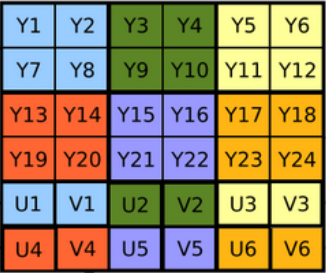
二、代码示例
1.初始化硬解码上下文
//硬件加速格式 DXVA2
auto hw_type = AV_HWDEVICE_TYPE_DXVA2;
//初始化硬件加速上下文
AVBufferRef* hw_ctx = nullptr;
av_hwdevice_ctx_create(&hw_ctx, hw_type, NULL, NULL, 0);
2.给AVCodecContext设置硬解码(GPU加速)
//设定硬件GPU加速
codecCtx->hw_device_ctx = av_buffer_ref(hw_ctx);
3.开始硬解码转换
if (codecCtx->hw_device_ctx)//如果支持硬解码
{
                //硬解码转换GPU =》CPU 显存=》内存
                //AV_PIX_FMT_NV12,      ///< planar YUV 4:2:0
                av_hwframe_transfer_data(hw_frame, frame, 0);
                pframe = hw_frame;
                qDebug() << "硬解码";
}
4.渲染,渲染的时候要考虑字节对齐问题。如果字节对齐了就进行平面复制。如果字节没有对齐就逐行复制。防止有花屏的情况发生
switch (frame->format)
{
case AV_PIX_FMT_YUV420P:
    return renderUtil->DrawFrame(frame->data[0], frame->data[1], frame->data[2], frame->linesize[0], frame->linesize[1], frame->linesize[2]);
case AV_PIX_FMT_NV12:
{
    if (!nv12_data_cache)
    {
        nv12_data_cache = new char[frame->width * frame->height * 1.5];
    }
    //将data的数据复制到缓存中
    if (frame->linesize[0] == frame->width)//字节对齐了
    {
        memcpy(nv12_data_cache, frame->data[0], frame->linesize[0] * frame->height);//y
        memcpy(nv12_data_cache + frame->linesize[0] * frame->height, frame->data[1], frame->linesize[1] * frame->height / 2);//uv
    }
    else {//字节未对齐需要逐行复制
        //先复制y
        for (int i = 0;i < frame->height;i++)
        {
            memcpy(nv12_data_cache + i * frame->linesize[0], frame->data[0] + frame->linesize[0] * i, frame->width);
        }

        //再复制uv
        for (int i = 0;i < frame->height / 2;i++)
        {
            auto p = nv12_data_cache + frame->height * frame->width;
            memcpy(p + i * frame->width, frame->data[1] + i * frame->linesize[1], frame->width);
        }
    }
    int data_size = frame->width * frame->height * 1.5;
    return renderUtil->DrawFrame((const unsigned char*)nv12_data_cache, data_size);
}
case AV_PIX_FMT_BGRA:
case AV_PIX_FMT_ARGB:
case AV_PIX_FMT_RGBA:
case AV_PIX_FMT_RGB24:
    return renderUtil->DrawFrame(frame->data[0], frame->linesize[0]);
}

 浙公网安备 33010602011771号