

HAProxy+Keepalive实现HA
keepalive原理可以参考:Ubuntu安装keepalived
1. 首先需要安装keepalived
sudo apt-get install keepalived
2. 编辑 /etc/keepalived/keepalived.conf 配置,参考:16.6 Configuring Simple Virtual IP Address Failover Using Keepalived
master配置
将master的一个网卡的ip绑定到一个虚拟ip上,其中 interface 是绑定的网卡,virtual_ipaddress 是绑定的虚拟ip的地址
global_defs {
   notification_email {
     root@mydomain.com
   }
   notification_email_from svr1@mydomain.com
   smtp_server localhost
   smtp_connect_timeout 30
}

vrrp_instance VRRP1 {
    state MASTER
#   Specify the network interface to which the virtual address is assigned
    interface enp3s0
#   The virtual router ID must be unique to each VRRP instance that you define
    virtual_router_id 41
#   Set the value of priority higher on the master server than on a backup server
    priority 200
    advert_int 1
    authentication {
        auth_type PASS
        auth_pass 1066
    }
    virtual_ipaddress {
        10.0.0.100/24
    }
}
启动
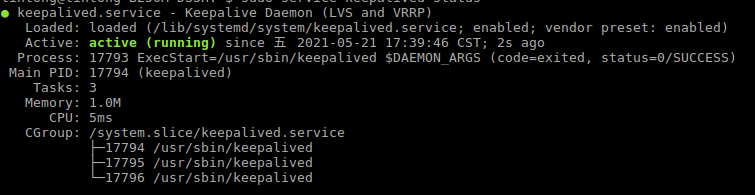
sudo service keepalived start
查看网卡信息
ip addr list
看到 enp3s0 网卡下面已经出现 10.0.0.100 的虚拟ip

可以ping通
ping 10.0.0.100
PING 10.0.0.100 (10.0.0.100) 56(84) bytes of data.
64 bytes from 10.0.0.100: icmp_seq=1 ttl=64 time=0.026 ms
64 bytes from 10.0.0.100: icmp_seq=2 ttl=64 time=0.023 ms
backup配置
将backup的一个网卡的ip也绑定到10.0.0.100这个虚拟ip上,来实现HA
global_defs {
   notification_email {
     root@mydomain.com
   }
   notification_email_from svr2@mydomain.com
   smtp_server localhost
   smtp_connect_timeout 30
}

vrrp_instance VRRP1 {
    state BACKUP
#   Specify the network interface to which the virtual address is assigned
    interface eth0
    virtual_router_id 41
#   Set the value of priority lower on the backup server than on the master server
    priority 100
    advert_int 1
    authentication {
        auth_type PASS
        auth_pass 1066
    }
    virtual_ipaddress {
        10.0.0.100/24
    }
}
这样,master和backup的ip就都绑定到 10.0.0.100 这个虚拟ip上了
2. 使用haproxy,将两个webserver 的ip 192.168.1.71和192.168.1.72绑定到Keepalive管理的虚拟ip 10.0.0.100上,从而来实现高可用
global
    daemon
    log 127.0.0.1 local0 debug
    maxconn 50000
    nbproc 1

defaults
    mode http
    timeout connect 5s
    timeout client 25s
    timeout server 25s
    timeout queue 10s

# Handle Incoming HTTP Connection Requests on the virtual IP address controlled by Keepalived
listen  http-incoming
    mode http
    bind 10.0.0.10:80
# Use each server in turn, according to its weight value
    balance roundrobin
# Verify that service is available
    option httpchk OPTIONS * HTTP/1.1\r\nHost:\ www
# Insert X-Forwarded-For header
    option forwardfor
# Define the back-end servers, which can handle up to 512 concurrent connections each
    server websvr1 192.168.1.71:80 weight 1 maxconn 512 check
    server websvr2 192.168.1.72:80 weight 1 maxconn 512 check
参考文档:16.10 Making HAProxy Highly Available Using Keepalived
keepalived有主主模式和主从模式,参考:HAProxy & Keepalived L4-L7 高可用负载均衡解决方案
本文只发表于博客园和tonglin0325的博客,作者:tonglin0325,转载请注明原文链接:https://www.cnblogs.com/tonglin0325/p/5242595.html

 浙公网安备 33010602011771号