
IDEA快速开发Hadoop入门程序WordCount
目录
1、开发环境配置
IDEA : 2019
hadoop: 2.6.5(根据个人情况而定)
maven: 3.5.4 (最好自己下载,需要在配置setting文件的添加阿里镜像)
测试数据: 自己输入
2、步骤
2.0 在C:/windows/System32/下添加 hadoop.dll
- 链接
- 提取码:
pwmg
2.1 打开Idea新建maven工程
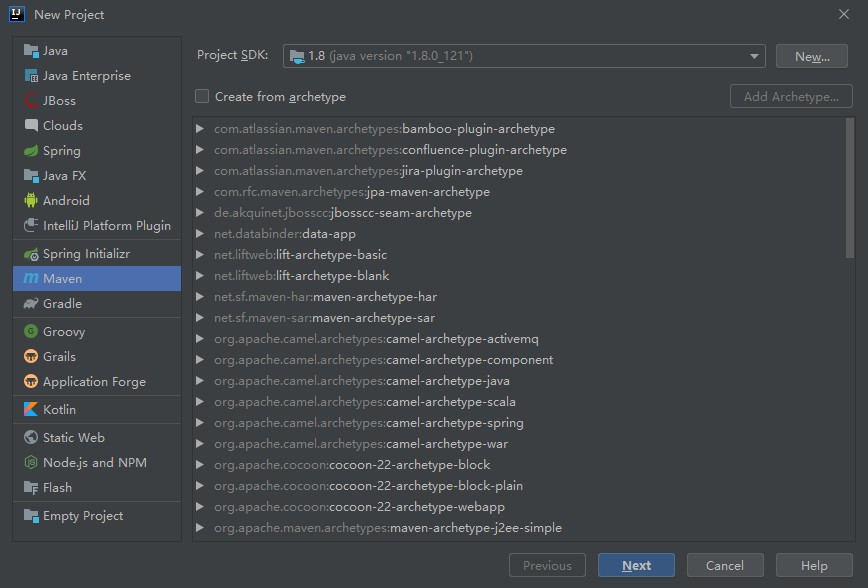
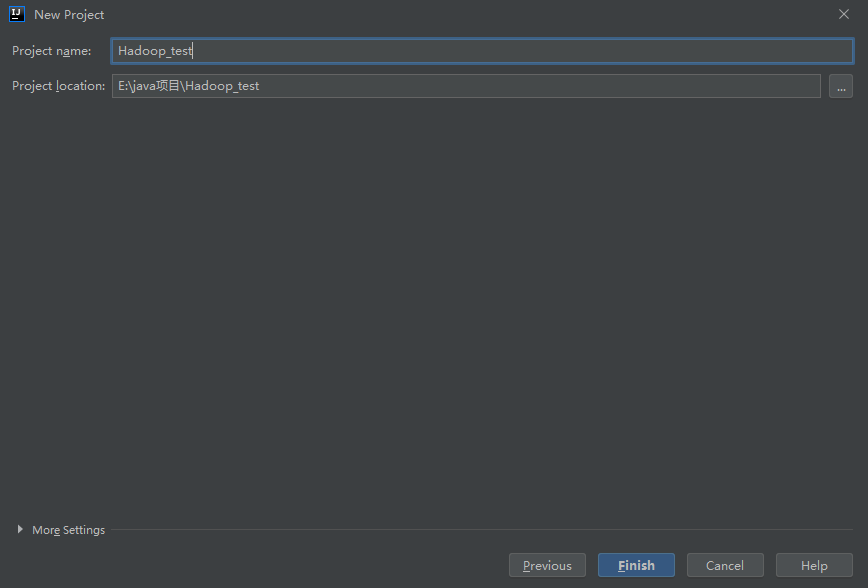
2.2 填写工程名字,选择磁盘目录
2.3 引入maven依赖(可以在maven官网上找到)
<?xml version="1.0" encoding="UTF-8"?>
<project xmlns="http://maven.apache.org/POM/4.0.0"
         xmlns:xsi="http://www.w3.org/2001/XMLSchema-instance"
         xsi:schemaLocation="http://maven.apache.org/POM/4.0.0 http://maven.apache.org/xsd/maven-4.0.0.xsd">
    <modelVersion>4.0.0</modelVersion>

    <groupId>com.zzuli.tumint</groupId>
    <artifactId>Hadoop_test</artifactId>
    <version>1.0-SNAPSHOT</version>
    <properties>
        <!-- 开发阶段配置文件-->
        <hadoop.version>2.6.5</hadoop.version>
    </properties>

    <dependencies>
        <!-- https://mvnrepository.com/artifact/org.apache.hadoop/hadoop-common -->
        <dependency>
            <groupId>org.apache.hadoop</groupId>
            <artifactId>hadoop-common</artifactId>
            <version>${hadoop.version}</version>
        </dependency>

        <!-- https://mvnrepository.com/artifact/org.apache.hadoop/hadoop-hdfs -->
        <dependency>
            <groupId>org.apache.hadoop</groupId>
            <artifactId>hadoop-hdfs</artifactId>
            <version>${hadoop.version}</version>
        </dependency>

        <!-- https://mvnrepository.com/artifact/org.apache.hadoop/hadoop-client -->
        <dependency>
            <groupId>org.apache.hadoop</groupId>
            <artifactId>hadoop-client</artifactId>
            <version>${hadoop.version}</version>
        </dependency>
    </dependencies>
</project>
2.4 引入官网的测试代码
- WorCount 主类
package test;
import org.apache.hadoop.conf.Configuration;
import org.apache.hadoop.fs.Path;
import org.apache.hadoop.io.IntWritable;
import org.apache.hadoop.io.Text;
import org.apache.hadoop.mapreduce.Job;
import org.apache.hadoop.mapreduce.lib.input.FileInputFormat;
import org.apache.hadoop.mapreduce.lib.output.FileOutputFormat;
import java.io.IOException;
/**
 * @Author: 张今天
 * @Date: 2020/2/24 11:23
 */
public class WordCount {
    public static void main(String[] args) throws IOException, ClassNotFoundException, InterruptedException {
        Configuration conf = new Configuration();
        Job job = Job.getInstance(conf, "word count");
        job.setJarByClass(WordCount.class);
        job.setMapperClass(WordCountMapper.class);
        job.setCombinerClass(WordCountReducer.class);
        job.setReducerClass(WordCountReducer.class);
        job.setOutputKeyClass(Text .class);
        job.setOutputValueClass(IntWritable .class);
        FileInputFormat.addInputPath(job, new Path(args[0]));
        FileOutputFormat.setOutputPath(job, new Path(args[1]));
        System.exit(job.waitForCompletion(true) ? 0 : 1);
    }
}
- WordCountMapper 类
package test;

import org.apache.hadoop.io.IntWritable;
import org.apache.hadoop.io.Text;
import org.apache.hadoop.mapreduce.Mapper;

import java.io.IOException;
import java.util.StringTokenizer;

/**
 * @Author: 张今天
 * @Date: 2020/2/24 11:24
 */
public class WordCountMapper extends Mapper<Object, Text, Text, IntWritable> {
    private final static IntWritable one = new IntWritable(1);
    private Text word = new Text();

    /**
     * Called once for each key/value pair in the input split. Most applications
     * should override this, but the default is the identity function.
     *
     * @param key
     * @param value
     * @param context
     */
    @Override
    protected void map(Object key, Text value, Context context) throws IOException, InterruptedException {
        StringTokenizer itr = new StringTokenizer(value.toString());
        while (itr.hasMoreTokens()) {
            word.set(itr.nextToken());
            context.write(word, one);
        }
    }
}
- WordCountReducer 类
package test;

import org.apache.hadoop.io.IntWritable;
import org.apache.hadoop.io.Text;
import org.apache.hadoop.mapreduce.Reducer;

import java.io.IOException;

/**
 * @Author: 张今天
 * @Date: 2020/2/24 11:24
 */
public class WordCountReducer extends Reducer <Text,IntWritable,Text,IntWritable>{
    private IntWritable result = new IntWritable(0);

    /**
     * This method is called once for each key. Most applications will define
     * their reduce class by overriding this method. The default implementation
     * is an identity function.
     *
     * @param key
     * @param values
     * @param context
     */
    @Override
    protected void reduce(Text key, Iterable<IntWritable> values, Context context) throws IOException, InterruptedException {
        int sum = 0;
        for (IntWritable val : values) {
            sum += val.get();
        }
        result.set(sum);
        context.write(key, result);
    }
}
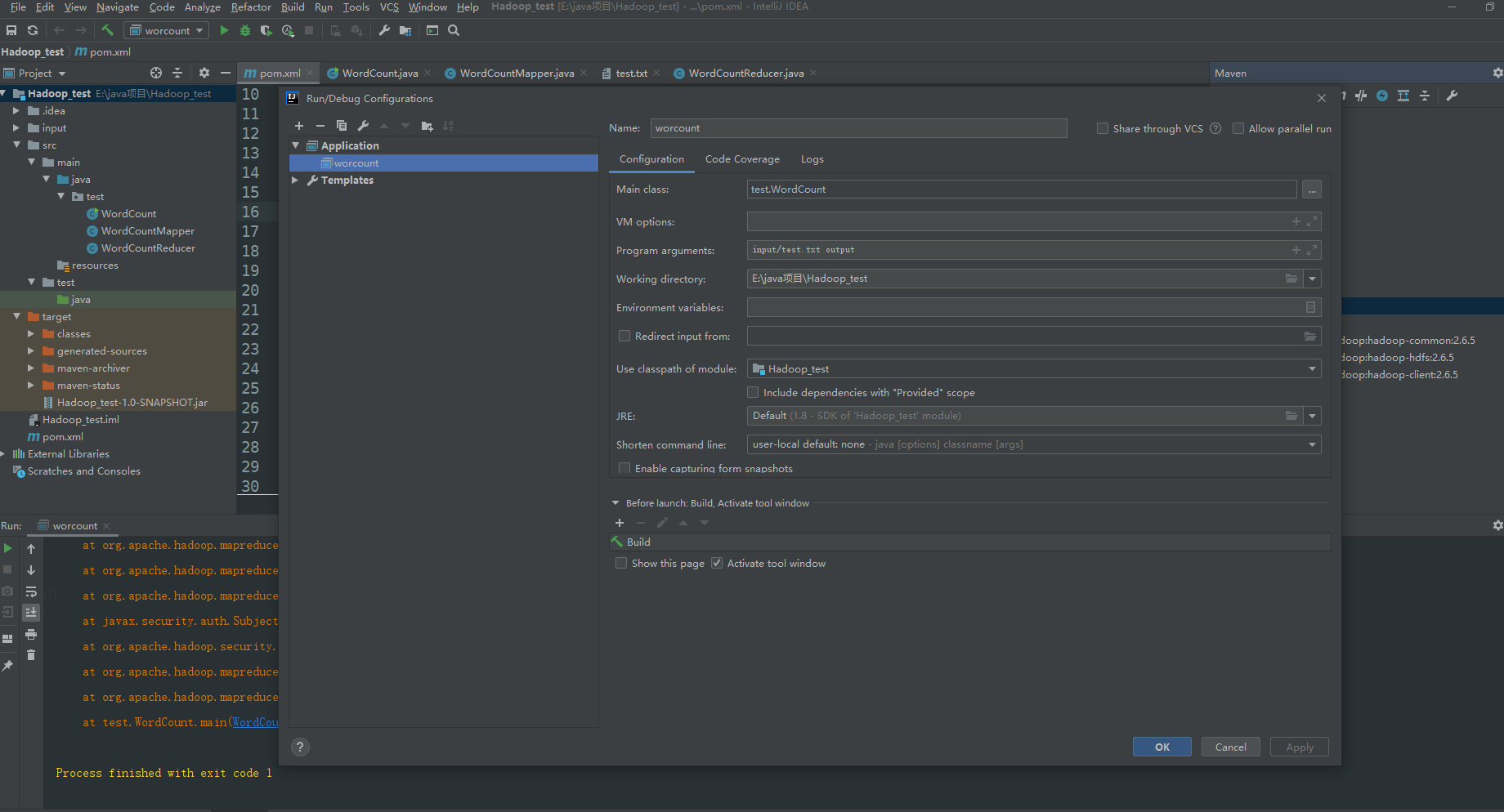
2.5 配置Idea的运行环境
3、单元测试
- 测试依赖
       <junit.version>4.12</junit.version>
       <mrunit.version>1.1.0</mrunit.version>
 <!-- junit -->
       <dependency>
           <groupId>junit</groupId>
           <artifactId>junit</artifactId>
           <version>${junit.version}</version>
           <scope>test</scope>
       </dependency>
       <!-- mrunit -->
       <dependency>
           <groupId>org.apache.mrunit</groupId>
           <artifactId>mrunit</artifactId>
           <version>${mrunit.version}</version>
           <classifier>hadoop2</classifier>
           <scope>test</scope>
       </dependency>
- mapDriver 测试
package test;

import org.apache.hadoop.io.IntWritable;
import org.apache.hadoop.io.Text;
import org.apache.hadoop.mrunit.mapreduce.MapDriver;
import org.junit.Test;

import java.io.IOException;

/**
* @Author: 张今天
* @Date: 2020/2/26 18:11
*/
public class WordCountMapperTest {
   @Test
   public void mapperTest() throws IOException {
       Text value = new Text("hello hadoop hello word");
       new MapDriver<Object , Text, Text, IntWritable>()
               .withMapper(new WordCountMapper())
               .withInput(new IntWritable(0), value)
               .withOutput(new Text("hello"), new IntWritable(1))
               .withOutput(new Text("hadoop"), new IntWritable(1))
               .withOutput(new Text("hello"), new IntWritable(1))
               .withOutput(new Text("word"), new IntWritable(1))
               .runTest();
   }
}
- ReduceDriver 测试
package test;

import org.apache.hadoop.io.IntWritable;
import org.apache.hadoop.io.Text;
import org.apache.hadoop.mrunit.mapreduce.ReduceDriver;
import org.junit.Test;

import java.io.IOException;
import java.util.Arrays;

/**
 * @Author: 张今天
 * @Date: 2020/2/26 18:28
 */
public class WordCountReducerTest {
    @Test
    public void reduceTest() throws IOException {
        new ReduceDriver<Text, IntWritable, Text, IntWritable>()
                .withReducer(new WordCountReducer())
                .withInput(new Text("hello"), Arrays.asList(
                        new IntWritable(1),
                        new IntWritable(1),
                        new IntWritable(1),
                        new IntWritable(2)
                )).withOutput(new Text("hello"), new IntWritable(5))
                .runTest();
    }
}
- mapReduce 测试
package test;

import org.apache.hadoop.io.IntWritable;
import org.apache.hadoop.io.Text;
import org.apache.hadoop.mrunit.mapreduce.MapReduceDriver;
import org.junit.Test;

import java.io.IOException;

/**
 * @Author: 张今天
 * @Date: 2020/2/26 18:37
 */
public class WordCountTest {
    @Test
    public void DriverTest() throws IOException {
        String test1 = "hello word hello mapreducer";

        new MapReduceDriver(new WordCountMapper(), new WordCountReducer())
                .withInput(new IntWritable(0), new Text(test1))
                .withOutput(new Text("hello"), new IntWritable(2))
                .withOutput(new Text("word"), new IntWritable(1))
                .withOutput(new Text("mapreducer"), new IntWritable(1))
                .runTest();

    }
}

 浙公网安备 33010602011771号