
Your CPU supports instructions that this TensorFlow binary was not compiled to use: AVX2
Posted on 2018-08-16 18:08 杯中酒赠行人 阅读(424) 评论(0) 收藏 举报pycharm运行TensorFlow警告:Your CPU supports instructions that this TensorFlow binary was not compiled to use: AVX2
我自己安装TensorFlow的时候是在terminal使用pip install tensorflow命令安装的,这样默认会下载X86_64的版本
解决方法:
方法一:忽视这种警告,
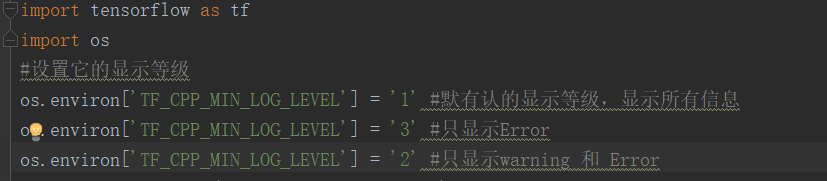
选择os.environ['TF_CPP_MIN_LOG_LEVEL'] = '2'即可
方法二:
首先卸载原来安装的tensorflow版本
然后去GitHub下载适合自己版本的tensorflow,
windows版本的GitHub地址:https://github.com/fo40225/tensorflow-windows-wheel
其他操作系统的GitHub地址:https://github.com/lakshayg/tensorflow-build
找到适合自己的tensorflow版本之后,复制下载地址,然后在terminal使用pip install +地址即可
(如果本地有多个Python版本,必须清楚pycharm使用的是哪个Python版本,然后安装到该版本的site-packages目录下)
如果想看更详细的解答,请移步:https://blog.csdn.net/Fourierrr_/article/details/79749899这位博主的文章

 浙公网安备 33010602011771号