
写一个简单的框架
一、问题:
能不能写一个通用的查询框架,也就是我只写sql语句,什么加载驱动,创建连接,查询,封装......之类的全都封装到一起,然后我们可以打个jar包,以后无论查什么都可以通用, 好,下面开始干~
二、框架结构
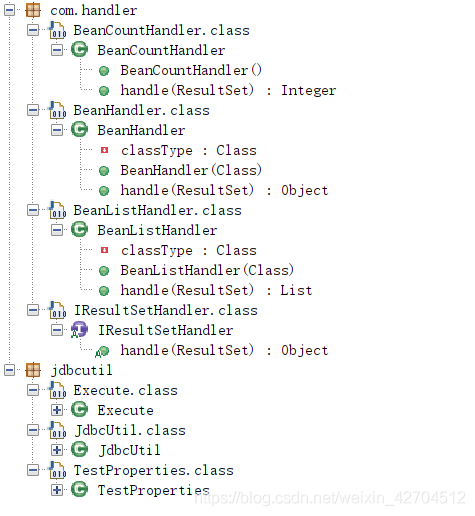
三、开始代码
1. 首先创建jdbcutil.JdbcUtil类,这个类主要是为了加载驱动,获取连接,返回连接,以及关闭连接。
package jdbcutil;

import com.alibaba.druid.pool.DruidDataSourceFactory;
import java.io.InputStream;
import java.sql.Connection;
import java.sql.PreparedStatement;
import java.sql.ResultSet;
import java.sql.SQLException;
import java.util.Properties;
import javax.sql.DataSource;

public class JdbcUtil {
  static DataSource ds = null;

  static {
    Properties p = new Properties();
    InputStream in = null;
    ds = null;
    try {
      in = JdbcUtil.class.getClassLoader().getResourceAsStream("db.properties");
      p.load(in);
      ds = DruidDataSourceFactory.createDataSource(p);
    } catch (Exception e1) {
      e1.printStackTrace();
    }
  }

  public static Connection getConn() {
    try {
      return ds.getConnection();
    } catch (SQLException e) {
      e.printStackTrace();
      return null;
    }
  }

  public static void close(ResultSet rset, PreparedStatement pstmt, Connection conn) {
    try {
      if (rset != null)
        rset.close();
      if (pstmt != null)
        pstmt.close();
      if (conn != null)
        conn.close();
    } catch (SQLException e) {
      e.printStackTrace();
    }
  }
}
2. 执行实际的sql语句类jdbcutil.Execute


package jdbcutil;

import com.handler.IResultSetHandler;
import java.sql.Connection;
import java.sql.PreparedStatement;
import java.sql.ResultSet;

public class Execute {
  public int executeUpdata(String sql, Object... params) {
    Connection conn = JdbcUtil.getConn();
    PreparedStatement pstmt = null;
    try {
      pstmt = conn.prepareStatement(sql);
      for (int i = 0; i < params.length; i++)
        pstmt.setObject(i + 1, params[i]);
      return pstmt.executeUpdate();
    } catch (Exception e) {
      e.printStackTrace();
    } finally {
      JdbcUtil.close(null, pstmt, conn);
    }
    return 0;
  }

  public <T> T executeQuery(String sql, IResultSetHandler<T> rh, Object... params) {
    Connection conn = JdbcUtil.getConn();
    PreparedStatement pstmt = null;
    ResultSet rs = null;
    try {
      pstmt = conn.prepareStatement(sql);
      for (int i = 0; i < params.length; i++)
        pstmt.setObject(i + 1, params[i]);
      rs = pstmt.executeQuery();
      return (T)rh.handle(rs);
    } catch (Exception e) {
      e.printStackTrace();
    } finally {
      JdbcUtil.close(rs, pstmt, conn);
    }
    return null;
  }
}
3. handler 主要是对数据的查询和封装 com.handler.BeanCountHandler
package com.handler;

import java.sql.ResultSet;

public class BeanCountHandler implements IResultSetHandler<Integer> {
  public Integer handle(ResultSet rs) throws Exception {
    if (rs.next())
      return Integer.valueOf(rs.getInt(1));
    return null;
  }
}
4.com.handler.BeanHandler
package com.handler;

import java.beans.BeanInfo;
import java.beans.Introspector;
import java.beans.PropertyDescriptor;
import java.sql.ResultSet;

public class BeanHandler<T> implements IResultSetHandler<T> {
  private Class<T> classType;

  public BeanHandler(Class<T> classType) {
    this.classType = classType;
  }

  public T handle(ResultSet rs) throws Exception {
    if (rs.next()) {
      T obj = this.classType.newInstance();
      BeanInfo beanInfo = Introspector.getBeanInfo(this.classType, Object.class);
      PropertyDescriptor[] pds = beanInfo.getPropertyDescriptors();
      byte b;
      int i;
      PropertyDescriptor[] arrayOfPropertyDescriptor1;
      for (i = (arrayOfPropertyDescriptor1 = pds).length, b = 0; b < i; ) {
        PropertyDescriptor pd = arrayOfPropertyDescriptor1[b];
        Object val = rs.getObject(pd.getName());
        pd.getWriteMethod().invoke(obj, new Object[] { val });
        b++;
      }
      return obj;
    }
    return null;
  }
}
5. com.handler.BeanListHandler
package com.handler;

import java.beans.BeanInfo;
import java.beans.Introspector;
import java.beans.PropertyDescriptor;
import java.sql.ResultSet;
import java.util.ArrayList;
import java.util.List;

public class BeanListHandler<T> implements IResultSetHandler<List<T>> {
  private Class<T> classType;

  public BeanListHandler(Class<T> classType) {
    this.classType = classType;
  }

  public List<T> handle(ResultSet rs) throws Exception {
    List<T> list = new ArrayList<T>();
    while (rs.next()) {
      T obj = this.classType.newInstance();
      BeanInfo beanInfo = Introspector.getBeanInfo(this.classType, Object.class);
      PropertyDescriptor[] pds = beanInfo.getPropertyDescriptors();
      byte b;
      int i;
      PropertyDescriptor[] arrayOfPropertyDescriptor1;
      for (i = (arrayOfPropertyDescriptor1 = pds).length, b = 0; b < i; ) {
        PropertyDescriptor pd = arrayOfPropertyDescriptor1[b];
        Object val = rs.getObject(pd.getName());
        pd.getWriteMethod().invoke(obj, new Object[] { val });
        b++;
      }
      list.add(obj);
    }
    return list;
  }
}
6.com.handler.IResultSetHandler
package com.handler;

import java.sql.ResultSet;

public interface IResultSetHandler<T> {
  T handle(ResultSet paramResultSet) throws Exception;
}
至此已经完成,打个jar包 和jdbc jar包一起导入就可以用了
四、 jdbcUtil使用
1. 导入jar包,不想敲代码的同学,这里放上连接。
链接:[https://share.weiyun.com/sWGwc44z]密码:999999
导入后需要在你的项目里创建resource 文件夹以及里面的 db.properties
driverClassName=com.mysql.jdbc.Driver
url=jdbc\:mysql\://localhost\:3306/test
username=root
password=root
1. 首先需要继承Execute类 或者创建Execute对象也行
2. 然后写自己的方法
/*
Execute类中有两个方法
1.executeQuery(); 执行查询操作
2.executeUpdata(); 执行修改操作
而里面的参数是可变的 具体根据自己的情况传参
3. 若执行查询操作 需要把接获及处理器传进去
结果集处理器有三种
- new BeanListHandler<泛型>(类的反射) 例如:new BeanListHandler(Address.class);
- new BeanBeanHandler 例如:new BeanHandler(Address.class)
- new BeanCountHandler() 这个是当执行统计总数时用的处理器 返回值为int类型
*/public 返回结果类型 方法名(参数类型) { String sql = "这里写要执行的sql语句"; return executeQuery(sql, 结果集处理器, 这里是sql语句里?对应的值); }

 浙公网安备 33010602011771号