
Spring AI 搭建 MCP 天气服务
引言
在当今的AI驱动世界中,如何有效地将AI模型与各种数据源和工具集成是一个关键问题。MCP(Model Context Protocol)协议应运而生,它提供了一种标准化的方式,使得AI应用能够无缝连接不同的数据源和工具。本文将介绍如何使用MCP协议构建一个基于Spring Boot的应用,并展示如何通过MCP协议获取天气信息。
MCP协议简介
MCP协议类似于USB-C接口,它为AI应用提供了一个标准化的连接方式。通过MCP协议,AI模型可以轻松地集成各种数据源和工具,从而构建复杂的代理和工作流。MCP协议的主要优势包括:
-
预构建的集成:MCP提供了一系列预构建的集成,使得AI模型可以直接接入这些数据源和工具。
-
灵活性:MCP允许在不同LLM提供商之间灵活切换。
-
安全性:MCP提供了最佳实践,确保数据在基础设施中的安全性。
项目架构
本项目采用Spring Boot框架,并使用MCP协议来获取天气信息。项目的核心架构如下:
-
MCP Server:负责与外部数据源(如天气API)进行交互,并将数据通过MCP协议暴露给客户端。
-
Spring Boot应用:作为MCP客户端,通过MCP协议与MCP Server进行通信,获取所需的数据。
项目实现
1.环境信息
-
SpringBoot 3.3.6
-
Spring AI 1.0.0-SNAPSHOT
-
Maven 3.9.9
-
JDK 17
2.项目依赖
首先,我们需要在pom.xml文件中添加必要的依赖项,包括Spring Boot、Spring AI和MCP Server的相关依赖。
<dependencies>
    <dependency>
        <groupId>org.springframework.ai</groupId>
        <artifactId>spring-ai-mcp-server-webflux-spring-boot-starter</artifactId>
    </dependency>
</dependencies>
注:若依赖无法下载,需要配置下快照仓库地址,详见文末代码仓库。
3. 主应用类
在McpServerUsefulToolsApplication.java中,我们定义了主应用类,并配置了MCP工具的回调。
@SpringBootApplication
public class McpServerUsefulToolsApplication {

    public static void main(String[] args) {
        SpringApplication.run(McpServerUsefulToolsApplication.class, args);
    }

    @Bean
    public ToolCallbackProvider weatherTools(WeatherService weatherService) {
        return MethodToolCallbackProvider.builder().toolObjects(weatherService).build();
    }

    @Bean
    public ToolCallbackProvider stockTools(StockService stockService) {
        return MethodToolCallbackProvider.builder().toolObjects(stockService).build();
    }
}
4. 天气服务
在WeatherService.java中,我们实现了通过MCP协议获取天气信息的功能。
@Service
public class WeatherService {

    private static final String BASE_URL = "https://wttr.in";

    private final RestClient restClient;

    public WeatherService() {
        this.restClient = RestClient.builder()
                .baseUrl(BASE_URL)
                .defaultHeader("Accept", "application/geo+json")
                .defaultHeader("User-Agent", "WeatherApiClient/1.0 (your@email.com)")
                .build();
    }

    @Tool(description = "Get current weather information for a China city. Input is city name (e.g. 杭州, 上海)")
    public String getWeather(String cityName) {
        WeatherResponse response = restClient.get()
                .uri("/{city_name}?format=j1", cityName)
                .retrieve()
                .body(WeatherResponse.class);
        if (response != null && response.getCurrent_condition() != null && !response.getCurrent_condition().isEmpty()) {
            CurrentCondition currentCondition = response.getCurrent_condition().get(0);
            String result = String.format("""
                    城市: %s
                    天气情况: %s
                    气压: %s(mb)
                    温度: %s°C (Feels like: %s°C)
                    湿度: %s%%
                    降水量:%s (mm)
                    风速: %s km/h (%s)
                    能见度: %s 公里
                    紫外线指数: %s
                    观测时间: %s
                    """,
                    cityName,
                    currentCondition.getWeatherDesc().get(0).getValue(),
                    currentCondition.getPressure(),
                    currentCondition.getTemp_C(),
                    currentCondition.getFeelsLikeC(),
                    currentCondition.getHumidity(),
                    currentCondition.getPrecipMM(),
                    currentCondition.getWindspeedKmph(),
                    currentCondition.getWinddir16Point(),
                    currentCondition.getVisibility(),
                    currentCondition.getUvIndex(),
                    currentCondition.getLocalObsDateTime()
            );
            return result;
        } else {
            return "无法获取天气信息,请检查城市名称是否正确或稍后重试。";
        }
    }
}
5. 数据模型
在CurrentCondition.java、WeatherDesc.java和WeatherResponse.java中,我们定义了天气数据的模型类。
public class CurrentCondition {
    private String feelsLikeC;
    private String humidity;
    private String localObsDateTime;
    private String precipMM;
    private String pressure;
    private String temp_C;
    private String uvIndex;
    private String visibility;
    private List<WeatherDesc> weatherDesc;
    private String winddir16Point;
    private String windspeedKmph;

    // Getters and Setters
}

public class WeatherDesc {
    private String value;

    // Getter and Setter
}

public class WeatherResponse {
    private List<CurrentCondition> current_condition;

    // Getter and Setter
}
6.使用
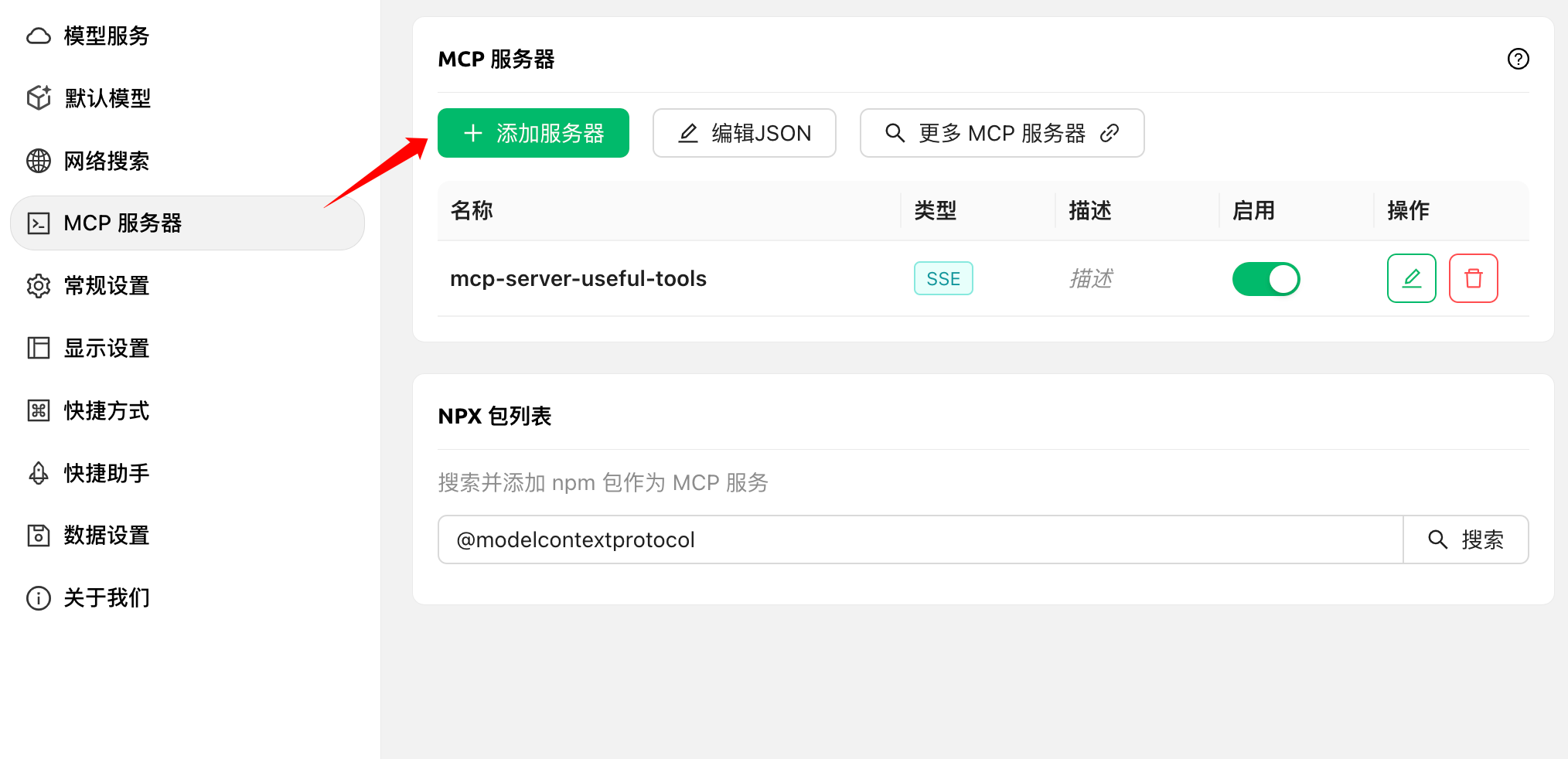
这里使用Cherry Studio进行天气查询MCP服务测试,具体配置可见文末文档地址。
添加服务器
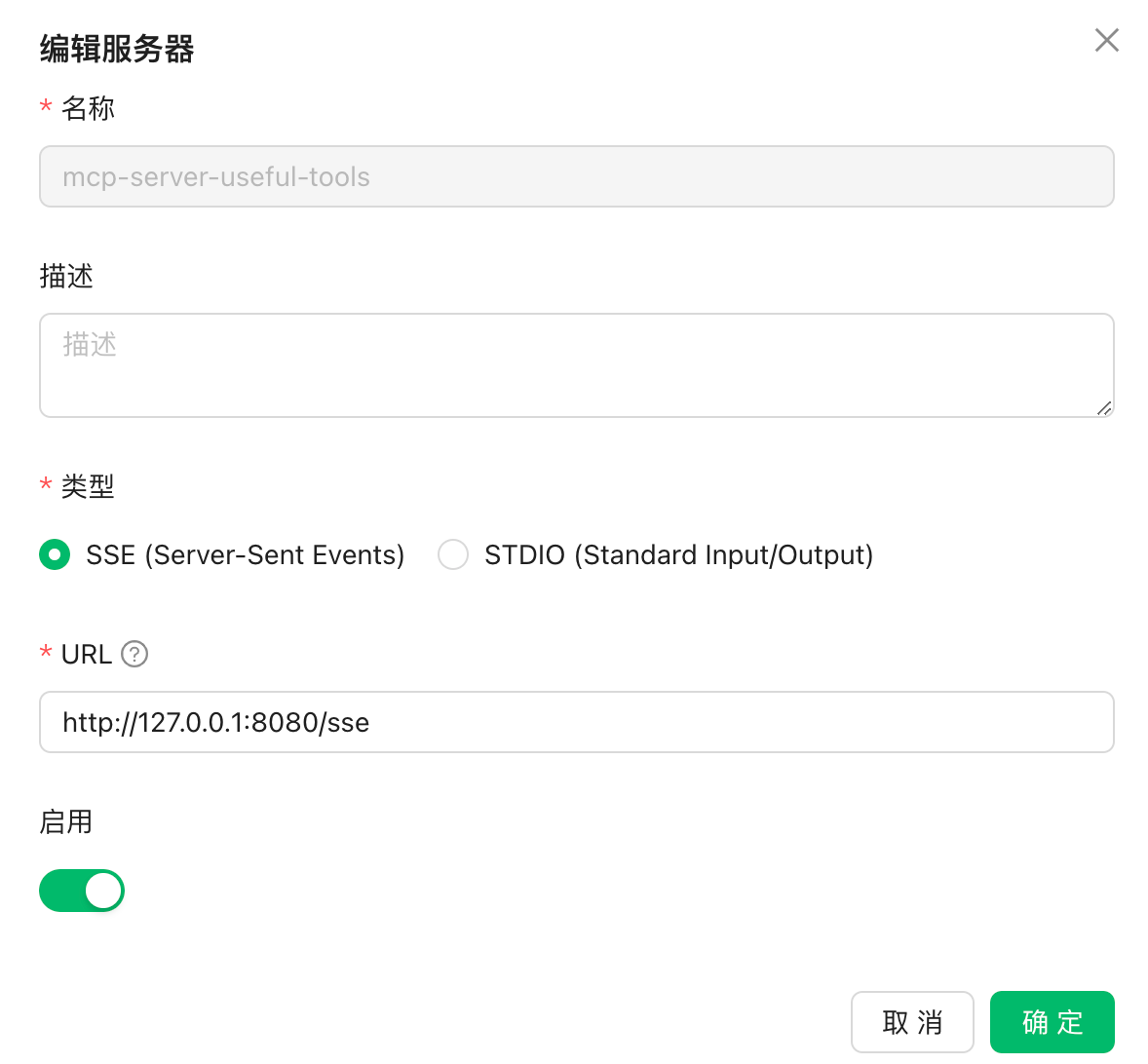
设置服务地址
选择SSE类型,填入服务地址
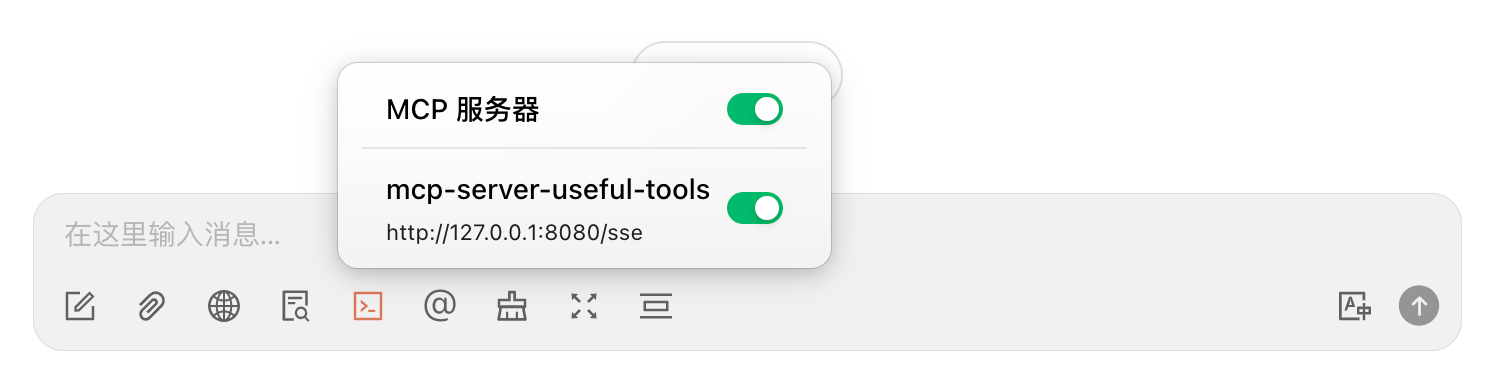
聊天框启用服务
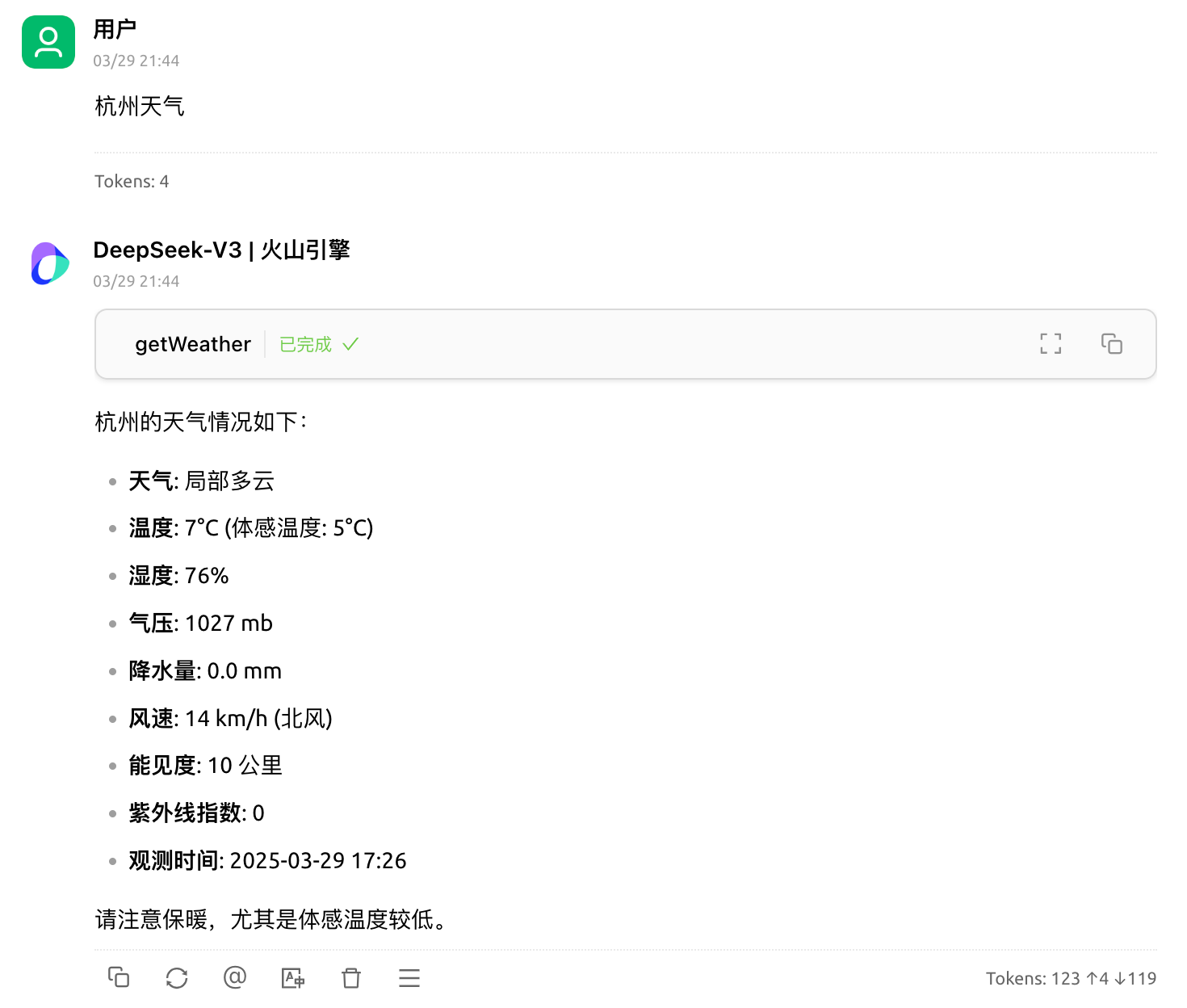
天气服务使用
MCP工具站
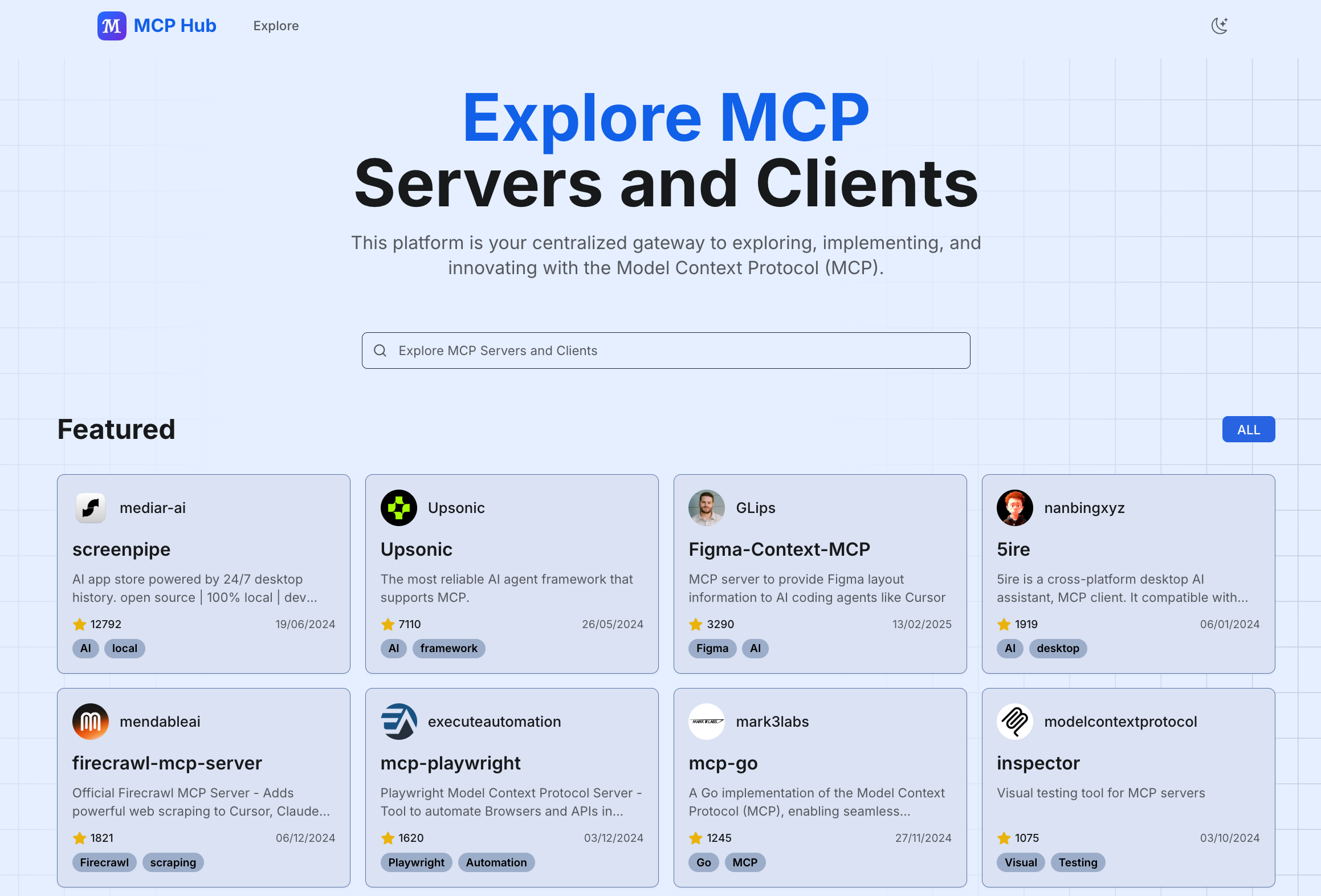
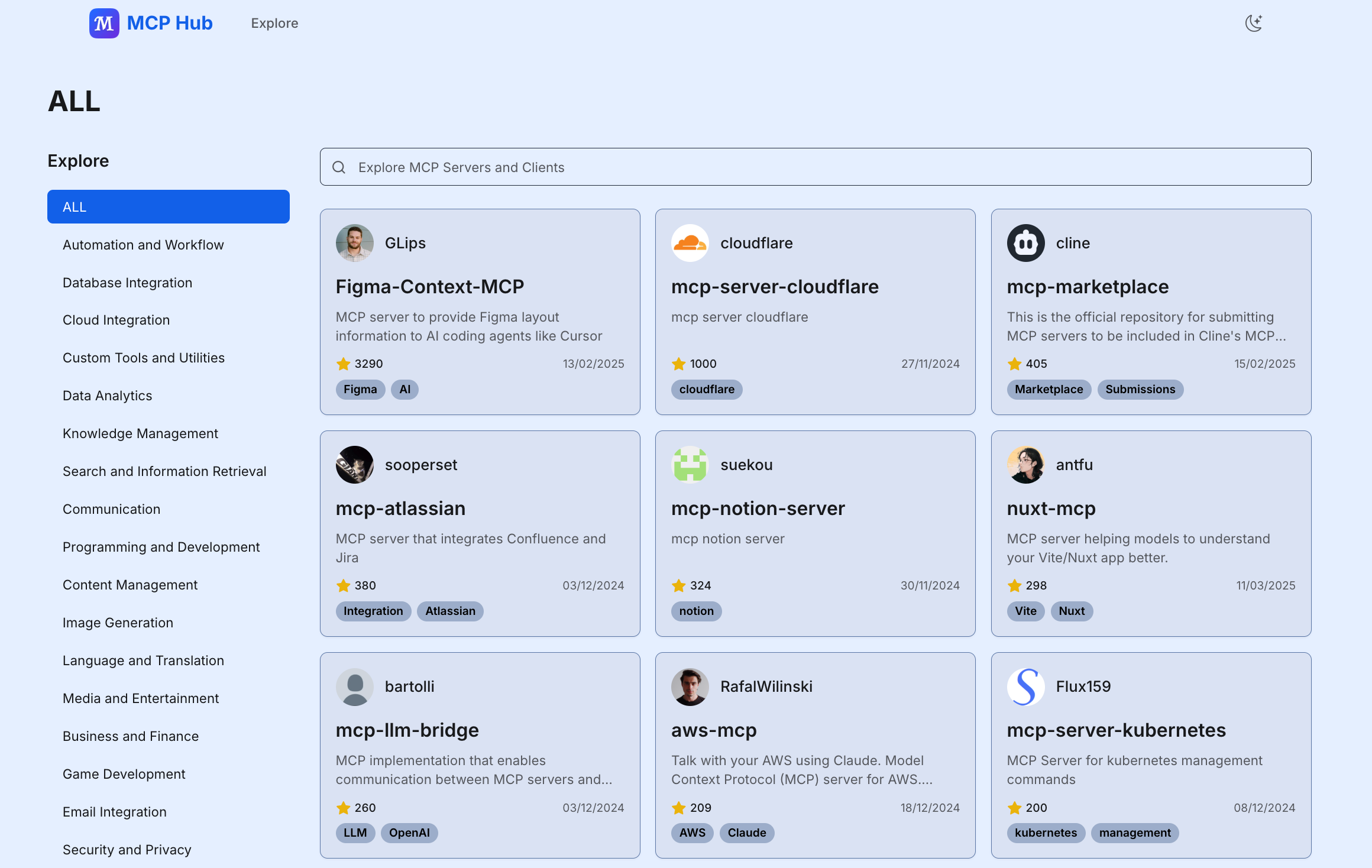
分享一个好用的MCP服务导航网站 https://mcphub.tools ,里边收集了1000+MCP服务,网站首页按照star数量精选了一批应用
首页
分类
按照不同类别进行了归纳
结论
通过MCP协议,我们可以轻松地将AI模型与各种数据源和工具集成,从而构建强大的AI应用。本文展示了如何使用MCP协议构建一个基于Spring Boot的应用,并通过MCP协议获取天气。希望本文能帮助你更好地理解MCP协议,并在实际项目中应用它。
参考资料:
Introduction - Model Context Protocol
代码仓库

 浙公网安备 33010602011771号