

[C++计划组件]Elasticsearch简单介绍
2025-09-30 22:10 tlnshuju 阅读(12) 评论(0) 收藏 举报Elasticsearch简单介绍
1.Elasticsearch介绍
Elasticsearch(简称ES)是开源的分布式搜索引擎,特点丰富:支持分布式部署,无需复杂配置就能自动发现节点,还能自动对索引分片、做副本;提供RESTful风格接口,可对接多数据源,自动平衡搜索负载。它能近乎实时地存储、检索数据,扩展性极强,可扩展到上百台服务器,处理PB级数据。
ES由Java开发,以Lucene为核心实现索引和搜索功能,但通过简单的RESTful API隐藏了Lucene的复杂性,让全文搜索更简便。
此外,ES是“面向文档”的,能存储整个对象或文档,还会为每个文档的内容建立索引以支持搜索;在ES中,可直接对文档(而非传统行列数据)进行索引、搜索、排序、过滤等操作。
项目中我们还要安装Kibana,来配合ES进行使用,在浏览器中访问Kibana
网址是:
2.ES核心概念
2.1 索引
在 Elasticsearch 里,“索引”可以理解为把具有相似特征的文档归到一起的集合。比如,能专门建一个存客户数据的索引,一个存产品目录的索引,还有一个存订单数据的索引。
每个索引得用全小写的名字来标识,之后要对这个索引里的文档进行索引(存储)、搜索、更新或者删除操作时,都得用这个名字。另外,在一个集群(多台服务器组成的整体)里,能创建非常多的索引。
2.2 类型
在 Elasticsearch 中,一个索引里可以定义一种或多种“类型”。类型是对索引里的文档进行的逻辑分类(分区),分类的含义由使用者自己确定。通常,会把具有一组共同字段的文档归为一个类型。比如运营博客平台时,若把所有数据存在一个索引里,在这个索引中,能给用户数据定义一个类型,给博客数据定义另一个类型,给评论数据也定义一个类型……
2.3 字段
字段相当于是数据表的字段,对文档数据根据不同属性进行的分类标识。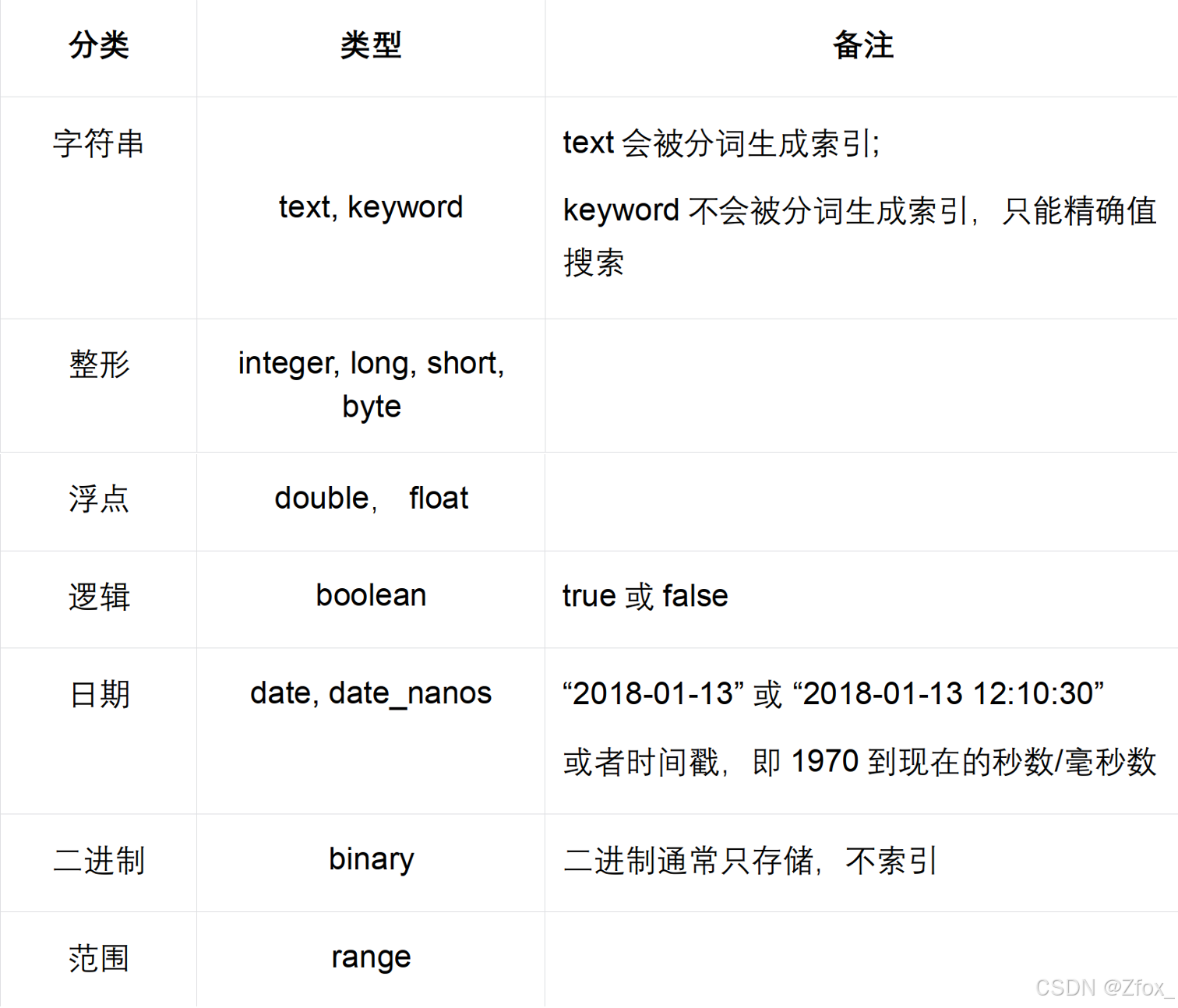
2.4 映射
映射是在处理数据的方式和规则方面做一些限制,如某个字段的数据类型、默认值、分析器、是否被索引等等,这些都是映射里面可以设置的,其它就是处理 es 里面数据的一些使用规则设置也叫做映射,按着最优规则处理数据对性能提高很大,因此才需要建立映射,并且需要思考如何建立映射才能对性能更好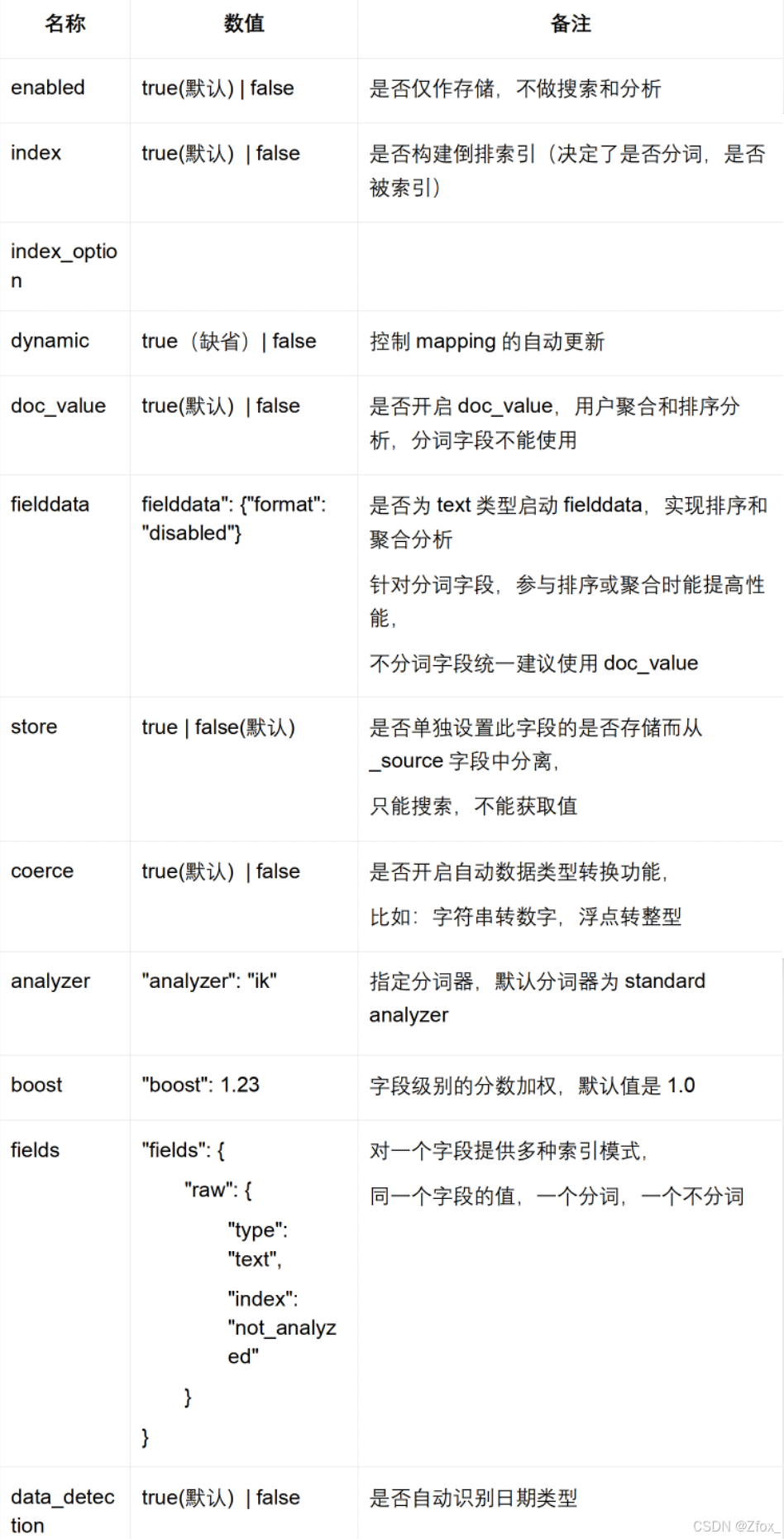
2.5 文档
一个文档是一个可被索引的基础信息单元。比如,你可以拥有某一个客户的文档,某一个产品的一个文档或者某个订单的一个文档。文档以 JSON(Javascript ObjectNotation)格式来表示,而 JSON 是一个到处存在的互联网数据交互格式。在一个 index/type 里面,你可以存储任意多的文档。一个文档必须被索引或者赋予一个索引的 type。
Elasticsearch 与传统关系型数据库相比如下:
3. Kibana访问es测试
通过网页访问 kibana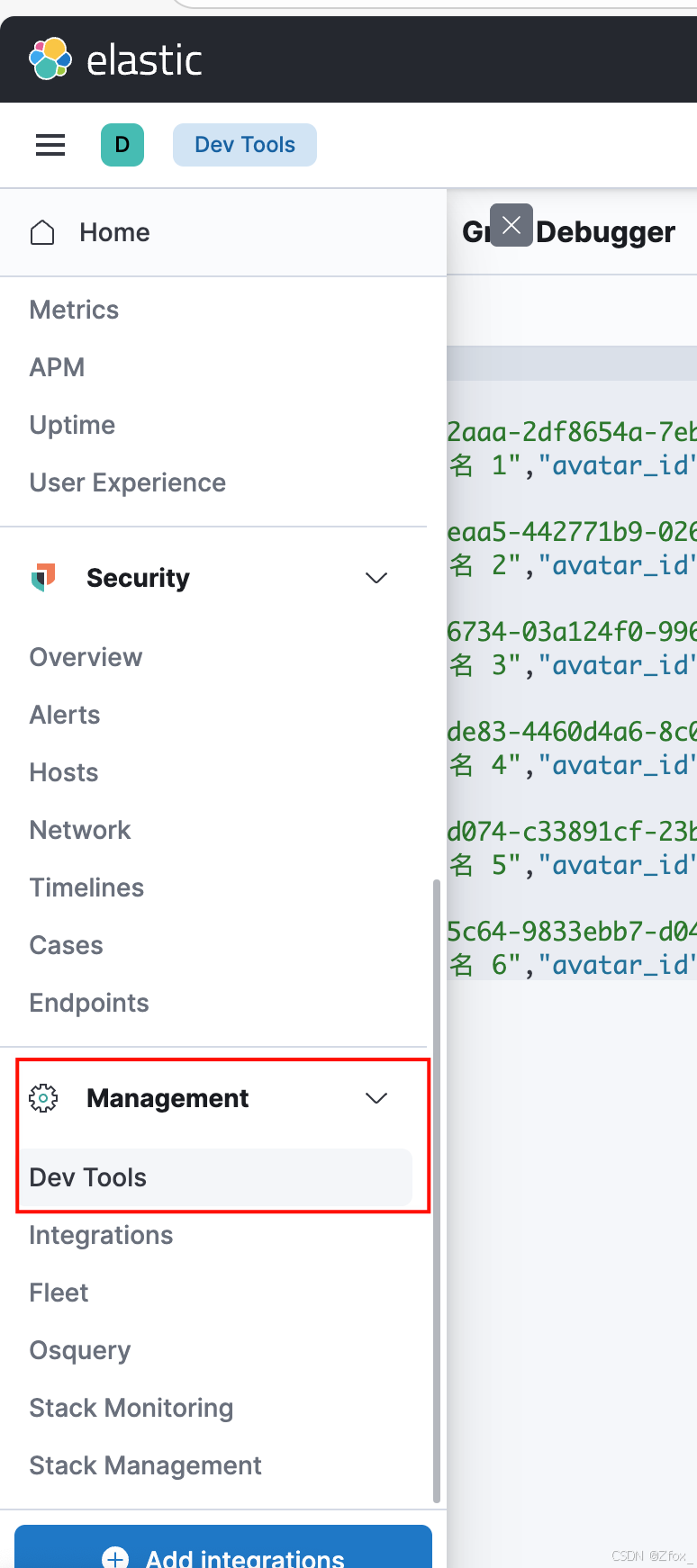
创建索引库
POST /user/_doc
{
"settings" : {
"analysis" : {
"analyzer" : {
"ik" : {
"tokenizer" : "ik_max_word"	// 最大粒度分词  - 你好 你 好 你好
}
}
}
},
"mappings" : {
"dynamic" : true,					// 自动更新
"properties" : {
"nickname" : {
"type" : "text",			// 字段是文本类型
"analyzer" : "ik_max_word"	// 使用中文分词器
},
"user_id" : {
"type" : "keyword",			// 是一个文本类型,但是是关键字,不进行分词
"analyzer" : "standard"		// 使用默认标准分词器
},
"phone" : {
"type" : "keyword",
"analyzer" : "standard"
},
"description" : {
"type" : "text",
"enabled" : false			// 仅做存储,不做搜索
},
"avatar_id" : {
"type" : "keyword",
"enabled" : false
}
}
}
}
新增数据:
POST /user/_doc/_bulk
{"index":{"_id":"1"}}
{"user_id" : "USER4b862aaa-2df8654a-7eb4bb65-e3507f66","nickname" : "昵称 1","phone" : "手机号 1","description" : "签名 1","avatar_id" : "头像 1"}
{"index":{"_id":"2"}}
{"user_id" : "USER14eeeaa5-442771b9-0262e455-e4663d1d","nickname" : "昵称 2","phone" : "手机号 2","description" : "签名 2","avatar_id" : "头像 2"}
{"index":{"_id":"3"}}
{"user_id" : "USER484a6734-03a124f0-996c169dd05c1869","nickname" : "昵称 3","phone" : "手机号 3","description" : "签名 3","avatar_id" : "头像 3"}
{"index":{"_id":"4"}}
{"user_id" : "USER186ade83-4460d4a6-8c08068f-83127b5d","nickname" : "昵称 4","phone" : "手机号 4","description" : "签名 4","avatar_id" : "头像 4"}
{"index":{"_id":"5"}}
{"user_id" : "USER6f19d074-c33891cf-23bf5a83-57189a19","nickname" : "昵称 5","phone" : "手机号 5","description" : "签名 5","avatar_id" : "头像 5"}
{"index":{"_id":"6"}}
{"user_id" : "USER97605c64-9833ebb7-d0455353-35a59195","nickname" : "昵称 6","phone" : "手机号 6","description" : "签名 6","avatar_id" : "头像 6"}
查看并搜索数据
GET /user/_doc/_search?pretty
{
"query" : {
"bool" : {
"must_not" : [		// 必须不遵循的条件
{
"terms" : {
"user_id.keyword" : [
"USER4b862aaa-2df8654a-7eb4bb65-e3507f66",
"USER14eeeaa5-442771b9-0262e455-e4663d1d",
"USER484a6734-03a124f0-996c169dd05c1869"
]
}
}
],
"should" : [		// 应该遵循的条件 有任意一个成功就ok
{
"match" : {
"user_id" : "昵称"
}
},
{
"match" : {
"nickname" : "昵称"
}
},
{
"match" : {
"phone" : "昵称"
}
}
]
}
}
}
terms: 完全匹配
match:分词匹配
过滤条件,是我的好友就过滤掉,在搜索好友进行添加的时候,就可以过滤掉
"user_id.keyword"  keyword 不进行分词
"USER4b862aaa-2df8654a-7eb4bb65-e3507f66",
"USER14eeeaa5-442771b9-0262e455-e4663d1d",
"USER484a6734-03a124f0-996c169dd05c1869"
删除索引
DELETE /userPOST /user/_doc/_search
{
"query": {
"match_all": {}
}
}4.ES客户端接口
/**
* Perform search on nodes until it is successful. Throws exception if all nodes
* has failed to respond.
* \param indexName specification of an Elasticsearch index.
* \param docType specification of an Elasticsearch document type.
* \param body Elasticsearch request body.
* \param routing Elasticsearch routing. If empty, no routing has been used.
*
* \return cpr::Response if any of node responds to request.
* \throws ConnectionException if all hosts in cluster failed to respond.
*/
cpr::Response search(const std::string &indexName,  索引名称 user
const std::string &docType,	索引类型 doc
const std::string &body,		请求正文,json字符串
const std::string &routing = std::string());
/**
* Get document with specified id from cluster. Throws exception if all nodes
* has failed to respond.
* \param indexName specification of an Elasticsearch index.
* \param docType specification of an Elasticsearch document type.
* \param id Id of document which should be retrieved.
* \param routing Elasticsearch routing. If empty, no routing has been used.
*
* \return cpr::Response if any of node responds to request.
* \throws ConnectionException if all hosts in cluster failed to respond.
*/
cpr::Response get(const std::string &indexName,
const std::string &docType,
const std::string &id = std::string(),
const std::string &routing = std::string());
/**
* Index new document to cluster. Throws exception if all nodes has failed to respond.
* \param indexName specification of an Elasticsearch index.
* \param docType specification of an Elasticsearch document type.
* \param body Elasticsearch request body.
* \param id Id of document which should be indexed. If empty, id will be generated
*           automatically by Elasticsearch cluster.
* \param routing Elasticsearch routing. If empty, no routing has been used.
*
* \return cpr::Response if any of node responds to request.
* \throws ConnectionException if all hosts in cluster failed to respond.
*/ 创建索引 新增数据
cpr::Response index(const std::string &indexName,		索引名称
const std::string &docType,			类型
const std::string &id,				自己制定或者es生成数据id
const std::string &body,			请求正文
const std::string &routing = std::string());
/**
* Delete document with specified id from cluster. Throws exception if all nodes
* has failed to respond.
* \param indexName specification of an Elasticsearch index.
* \param docType specification of an Elasticsearch document type.
* \param id Id of document which should be deleted.
* \param routing Elasticsearch routing. If empty, no routing has been used.
*
* \return cpr::Response if any of node responds to request.
* \throws ConnectionException if all hosts in cluster failed to respond.
*/
cpr::Response remove(const std::string &indexName,
const std::string &docType,
const std::string &id,
const std::string &routing = std::string());
/**
* Initialize the Client.
* \param hostUrlList  Vector of URLs of Elasticsearch nodes in one Elasticsearch cluster.
*  Each URL in vector should ends by "/".
* \param timeout      Elastic node connection timeout.
*/
explicit Client(const std::vector<std::string> &hostUrlList,
  std::int32_t timeout = 6000);
4.1 入门案例
针对上边通过 kibana 添加的数据通过客户端 api 进行一次数据获取。
#include <elasticlient/client.h>
  #include <cpr/cpr.h>
    #include <iostream>
      int main()
      {
      // 1. 构造 ES 客户端
      elasticlient::Client client({"http://127.0.0.1:9200/"});
      // 2. 发起搜索请求
      try {
      cpr::Response resp = client.search("user", "_doc", "{\"query\": { \"match_all\": {} }}");
      // 3. 打印响应状态码和响应正文
      std::cout << resp.status_code << std::endl;
      std::cout << resp.text << std::endl;
      } catch (std::exception &e) {
      std::cout << "请求失败: " << e.what() << std::endl;
      return -1;
      }
      return 0;
      }
5. ES二次封装
封装客户端 api 主要是因为,客户端只提供了基础的数据存储获取调用功能,无法根据我们的思想完成索引的构建,以及查询正文的构建,需要使用者自己组织好 json 进行序列化后才能作为正文进行接口的调用。
而封装的目的就是简化用户的操作,将索引的 json 正文构造,以及查询搜索的正文构造操作给封装起来,使用者调用接口添加字段就行,不用关心具体的 json 数据格式。
封装内容
- 索引构造过程的封装
- 索引正文构造过程,大部分正文都是固定的,唯一不同的地方是各个字段不同的名称以及是否只存储不索引这些选项,因此重点关注以下几个点即可:
- 字段类型:
type : text / keyword(目前只用到这两个类型) - 是否索引:
enable : true/false - 索引的话分词器类型:
analyzer : ik_max_word / standard - 新增文档构造过程的封装
- 新增文档其实在常规下都是单条新增,并非批量新增,因此直接添加字段和值就行
- 文档搜索构造过程的封装
- 搜索正文构造过程,我们默认使用条件搜索,我们主要关注的两个点:
- 应该遵循的条件是什么:
should中有什么 - 条件的匹配方式是什么:
match还是term/terms,还是wildcard - 过滤的条件字段是什么:
must_not中有什么 - 过滤的条件字段匹配方式是什么:
match还是wildcard,还是term/terms
#pragma once
#include <elasticlient/client.h>
#include <cpr/cpr.h>
#include <json/json.h>
#include <iostream>
#include <memory>
#include "logger.hpp"
namespace yjt_im{
bool Serialize(const Json::Value &val, std::string &dst)
{
//先定义Json::StreamWriter 工厂类 Json::StreamWriterBuilder
Json::StreamWriterBuilder swb;
swb.settings_["emitUTF8"] = true;
std::unique_ptr<Json::StreamWriter> sw(swb.newStreamWriter());
//通过Json::StreamWriter中的write接口进行序列化
std::stringstream ss;
int ret = sw->write(val, &ss);
if (ret != 0) {
std::cout << "Json反序列化失败!\n";
return false;
}
dst = ss.str();
return true;
}
bool UnSerialize(const std::string &src, Json::Value &val)
{
Json::CharReaderBuilder crb;
std::unique_ptr<Json::CharReader> cr(crb.newCharReader());
std::string err;
bool ret = cr->parse(src.c_str(), src.c_str() + src.size(), &val, &err);
if (ret == false) {
std::cout << "json反序列化失败: " << err << std::endl;
return false;
}
return true;
}
class ESIndex {
public:
ESIndex(std::shared_ptr<elasticlient::Client> &client,
const std::string &name,
const std::string &type = "_doc"):
_name(name), _type(type), _client(client) {
Json::Value analysis;
Json::Value analyzer;
Json::Value ik;
Json::Value tokenizer;
tokenizer["tokenizer"] = "ik_max_word";
ik["ik"] = tokenizer;
analyzer["analyzer"] = ik;
analysis["analysis"] = analyzer;
_index["settings"] = analysis;
}
ESIndex& append(const std::string &key,
const std::string &type = "text",
const std::string &analyzer = "ik_max_word",
bool enabled = true) {
Json::Value fields;
fields["type"] = type;
fields["analyzer"] = analyzer;
if (enabled == false ) fields["enabled"] = enabled;
_properties[key] = fields;
return *this;
}
bool create(const std::string &index_id = "default_index_id") {
Json::Value mappings;
mappings["dynamic"] = true;
mappings["properties"] = _properties;
_index["mappings"] = mappings;
std::string body;
bool ret = Serialize(_index, body);
if (ret == false) {
LOG_ERROR("索引序列化失败!");
return false;
}
LOG_DEBUG("{}", body);
//2. 发起搜索请求
try {
auto rsp = _client->index(_name, _type, index_id, body);
if (rsp.status_code < 200 || rsp.status_code >= 300) {
LOG_ERROR("创建ES索引 {} 失败,响应状态码异常: {}", _name, rsp.status_code);
return false;
}
} catch(std::exception &e) {
LOG_ERROR("创建ES索引 {} 失败: {}", _name, e.what());
return false;
}
return true;
}
private:
std::string _name;
std::string _type;
Json::Value _properties;
Json::Value _index;
std::shared_ptr<elasticlient::Client> _client;
};
class ESInsert {
public:
ESInsert(std::shared_ptr<elasticlient::Client> &client,
const std::string &name,
const std::string &type = "_doc"):
_name(name), _type(type), _client(client){}
template<typename T>
ESInsert &append(const std::string &key, const T &val){
_item[key] = val;
return *this;
}
bool insert(const std::string id = "") {
std::string body;
bool ret = Serialize(_item, body);
if (ret == false) {
LOG_ERROR("索引序列化失败!");
return false;
}
LOG_DEBUG("{}", body);
//2. 发起搜索请求
try {
auto rsp = _client->index(_name, _type, id, body);
if (rsp.status_code < 200 || rsp.status_code >= 300) {
LOG_ERROR("新增数据 {} 失败,响应状态码异常: {}", body, rsp.status_code);
return false;
}
} catch(std::exception &e) {
LOG_ERROR("新增数据 {} 失败: {}", body, e.what());
return false;
}
return true;
}
private:
std::string _name;
std::string _type;
Json::Value _item;
std::shared_ptr<elasticlient::Client> _client;
};
class ESRemove {
public:
ESRemove(std::shared_ptr<elasticlient::Client> &client,
const std::string &name,
const std::string &type = "_doc"):
_name(name), _type(type), _client(client){}
bool remove(const std::string &id) {
try {
auto rsp = _client->remove(_name, _type, id);
if (rsp.status_code < 200 || rsp.status_code >= 300) {
LOG_ERROR("删除数据 {} 失败,响应状态码异常: {}", id, rsp.status_code);
return false;
}
} catch(std::exception &e) {
LOG_ERROR("删除数据 {} 失败: {}", id, e.what());
return false;
}
return true;
}
private:
std::string _name;
std::string _type;
std::shared_ptr<elasticlient::Client> _client;
};
// 修改ESSearch类的构造函数
class ESSearch {
public:
// 移除type参数,使用默认构造
ESSearch(std::shared_ptr<elasticlient::Client> &client,
const std::string &name) :
_name(name), _client(client) {}
// 保留原有方法,但内部实现优化
ESSearch& append_must_not_terms(const std::string &key, const std::vector<std::string> &vals) {
Json::Value fields;
for (const auto& val : vals){
fields[key].append(val);
}
Json::Value terms;
terms["terms"] = fields;
_must_not.append(terms);
return *this;
}
// 其他append方法保持不变
ESSearch& append_should_match(const std::string &key, const std::string &val) {
Json::Value field;
field[key] = val;
Json::Value match;
match["match"] = field;
_should.append(match);
return *this;
}
ESSearch& append_must_term(const std::string &key, const std::string &val) {
Json::Value field;
field[key] = val;
Json::Value term;
term["term"] = field;
_must.append(term);
return *this;
}
ESSearch& append_must_match(const std::string &key, const std::string &val){
Json::Value field;
field[key] = val;
Json::Value match;
match["match"] = field;
_must.append(match);
return *this;
}
Json::Value search(){
Json::Value cond;
if (_must_not.empty() == false) cond["must_not"] = _must_not;
if (_should.empty() == false) cond["should"] = _should;
if (_must.empty() == false) cond["must"] = _must;
Json::Value query;
query["bool"] = cond;
Json::Value root;
root["query"] = query;
// 添加size参数,确保返回足够的结果
root["size"] = 100;
std::string body;
bool ret = Serialize(root, body);
if (ret == false) {
LOG_ERROR("索引序列化失败!");
return Json::Value();
}
LOG_DEBUG("搜索查询体: {}", body);
// 修改搜索调用,移除type参数
cpr::Response rsp;
try {
// 使用新的搜索API,不指定type
rsp = _client->search(_name, "", "", body);
if (rsp.status_code < 200 || rsp.status_code >= 300) {
LOG_ERROR("检索数据失败,响应状态码: {}, 错误信息: {}",
rsp.status_code, rsp.text);
return Json::Value();
}
} catch(std::exception &e) {
LOG_ERROR("检索数据异常: {}", e.what());
return Json::Value();
}
LOG_DEBUG("检索响应状态码: {}, 响应正文: [{}]",
rsp.status_code, rsp.text);
// 检查响应是否为空
if (rsp.text.empty() || rsp.text == "[]") {
LOG_DEBUG("ES返回空响应");
return Json::Value(Json::arrayValue);
}
Json::Value json_res;
ret = UnSerialize(rsp.text, json_res);
if (ret == false) {
LOG_ERROR("检索数据结果反序列化失败: {}", rsp.text);
return Json::Value();
}
// 打印完整的搜索结果,方便调试
LOG_DEBUG("搜索结果解析成功,共找到 {} 条数据",
json_res["hits"]["total"]["value"].asInt());
return json_res["hits"]["hits"];
}
private:
std::string _name;
// 移除_type成员变量
Json::Value _must_not;
Json::Value _should;
Json::Value _must;
std::shared_ptr<elasticlient::Client> _client;
};
}
 浙公网安备 33010602011771号