

使用原生HTML实现类iview table风格的可合并行表格
项目原因需要对表格的特定列的某几行进行合并,由于iview组件4.0.0以下版本不支持行列合并(注:4.0.0以上已支持,但仍需计算需要合并的单元格位置),故使用原生html实现了类似于iview table的可合并单元格的表格。该方法需要后台计算出合并单元格位置的数据,但也可以在前端计算并定义。首先以固定行数合并(合并两行)为例,表格效果如下:
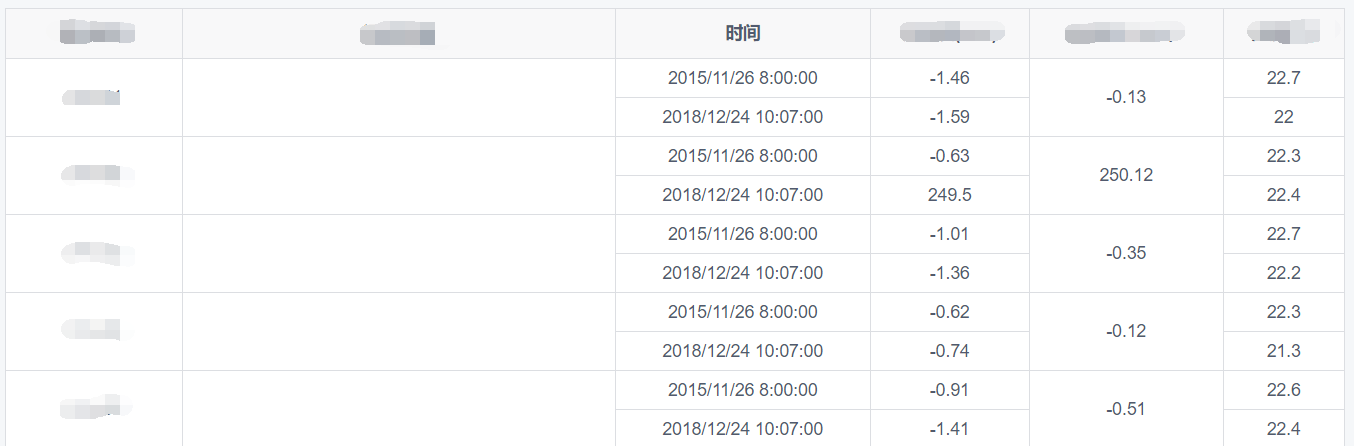
单元格合并数据mergeData结构如下:

主要的数据是StaRow,StaCol,EndRow,EndCol,分别代表被合并单元格的起始位置。首先计算合并单元格的列的位置,代码如下:
    mergeTableCellsMethod(mergeData) {
      let tempIndex = 0;
      this.mergeCellsIndexArray = {};
      this.mergeCellsRowSpan = {};
      mergeData.forEach((item, key) => {
        if (tempIndex != item.StaCol) {
          tempIndex = item.StaCol;
          this.mergeCellsIndexArray[item.StaCol - 1 + ""] = item.StaCol - 1;//计算出需要合并单元格的列{0: 0, 1: 1, 4: 4},使用对象存储是因为后续需要in进行遍历,js不像python可以用in遍历数组
        }
        this.mergeCellsRowSpan[item.StaRow-2]=item.EndRow-item.StaRow+1;//计算出需要合并的行数2
      });
    },
在原生html中一个目标单元格占两行可以设置rowspan为2实现,因此可用mergeCellsIndexArray定位目标单元格的列,偶数行定位目标单元格的行,但是如果不设置其他单元格的rowspan,则无法渲染,类似下图:

计算并设置的代码为:
              <template v-if="isTwice">//合并上下两行的情况
                <tr v-for="(items,keys) in limitedRowData" :key="keys"><!--遍历每一行的数据-->
                  <template v-for="(item,key) in items"><!--遍历每个单元格的数据-->
                    <template v-for="indexNum in mergeCellsIndexArray">
                      <!-- 根据表格规律将偶数行rowspan设置为2-->
                      <td
                        class="report-td"
                        v-if="(key == indexNum)&&(keys%2==0)"
                        rowspan="2"
                      >{{item}}</td>
                    </template>
                    <!-- 根据表格规律不渲染合并的单元格下方单元格,并将rowspan设置为1-->
                    <td class="report-td" v-if="!(key in mergeCellsIndexArray)">{{item}}</td>
                  </template>
这样就实现了特定列合并偶数行上下两个单元格的功能。但需求则是合并的单元格不一定是上下两行,行数可能不固定,如下图:
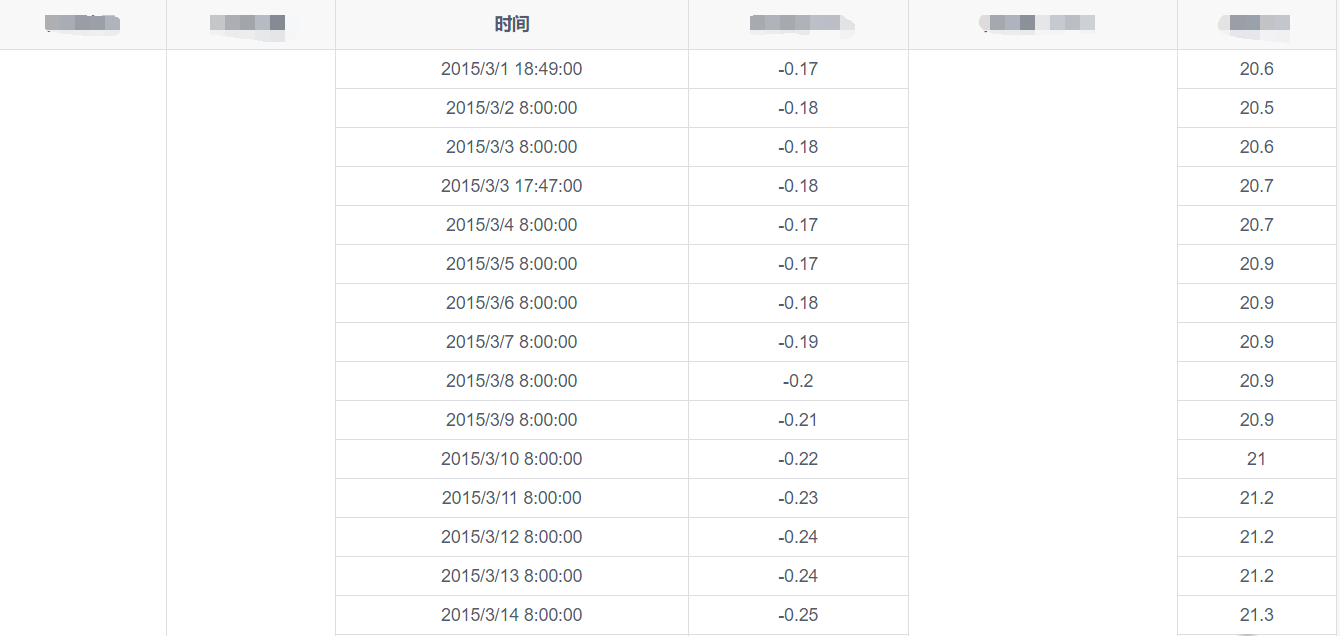
因此需要计算出目标单元格起始行及合并行数的集合mergeCellsRowSpan,结果如下:

为方便计算,将下标设为起始行。代码如下:
 <template v-else>
     <tr v-for="(items,keys) in limitedRowData" :key="keys">
        <template v-for="(item,key) in items">
            <template v-for="indexNum in mergeCellsIndexArray">
               <template v-for="(rowSpan,index) in mergeCellsRowSpan">
               <!-- 根据key == indexNum确定合并表格的列,根据(keys%index==0||keys==0)&&(index==keys)确定合并表格的行,根据rowSpan设置行数-->
                  <td class="report-td" v-if="(key == indexNum)&&(keys%index==0||keys==0)&&(index==keys)"<!--渲染目标行的单元格-->
                     :rowspan="rowSpan" >{{item}}</td>
               </template>
           </template>
     <td class="report-td" v-if="!(key in mergeCellsIndexArray)">{{item}}</td>
  </template>
至此,功能已完成。为使表格风格更接近于iview,css代码如下:
  .report-table {
    border: 1px solid #dcdee2;
    border-collapse: collapse;
    .report-th {
      height: 40px;
      text-align: center;
      padding: 5px;
      background: #f8f8f9;
    }
    .report-td {
      height: 30px;
      text-align: center;
      padding: 5px;
      background: #fff;
    }
  }
欢迎交流、建议和指正。

 浙公网安备 33010602011771号