
使用python管理esxi,定期进行碎片整理
前几天存储出问题了,导致大量虚拟机出现卡顿、延迟大等现象。后来发现是存储的空间满了且IO很大。然后就想写个脚本定期进行存储的碎片整理
代码如下:
# -*- coding: gbk -*-
# 制作人:Tim

import paramiko

hostname = "esxi-1"
ip = "192.168.1.1"
port = 22
user = "xxxxx"
password = "xxxx"

ssh = paramiko.SSHClient()
ssh.set_missing_host_key_policy(paramiko.AutoAddPolicy())

try:
    ssh.connect(ip,port,user,password,timeout= 10)
    print('connecting...%s' %hostname)
except:
    print("error connection")
else:
    stdin,stdout,stderr = ssh.exec_command("esxcli hardware cpu list ")
    stdin1,stdout1,stderr1 = ssh.exec_command("esxcli system version get")


result = stdout.read()
result1 = stdout1.read()
print("*"*50)
print(result.decode())
print("*"*50)
print(result1.decode())


ssh.close()
输出结果如下:
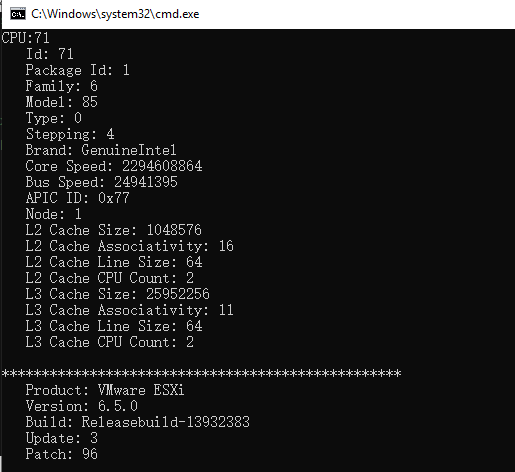
证明生效了,如果是碎片整理只需要把exec_command改成“esxcli storage vmfs unmap -l xxxx”
使用crontab进行定期执行脚本
使用crontab -e
添加 0 2 * * 6 /root/esxi.sh # 每周六凌晨2点执行脚本
这样就可以了
作者:tim54252
如果您看了本篇博客,觉得对您有所收获,请点击右下角的 [推荐]
如果您想转载本博客,请注明出处
如果您对本文有意见或者建议,欢迎留言
感谢您的阅读,请关注我的后续博客

 浙公网安备 33010602011771号