
java笔记十三——集合的遍历及泛型
一、Collections类
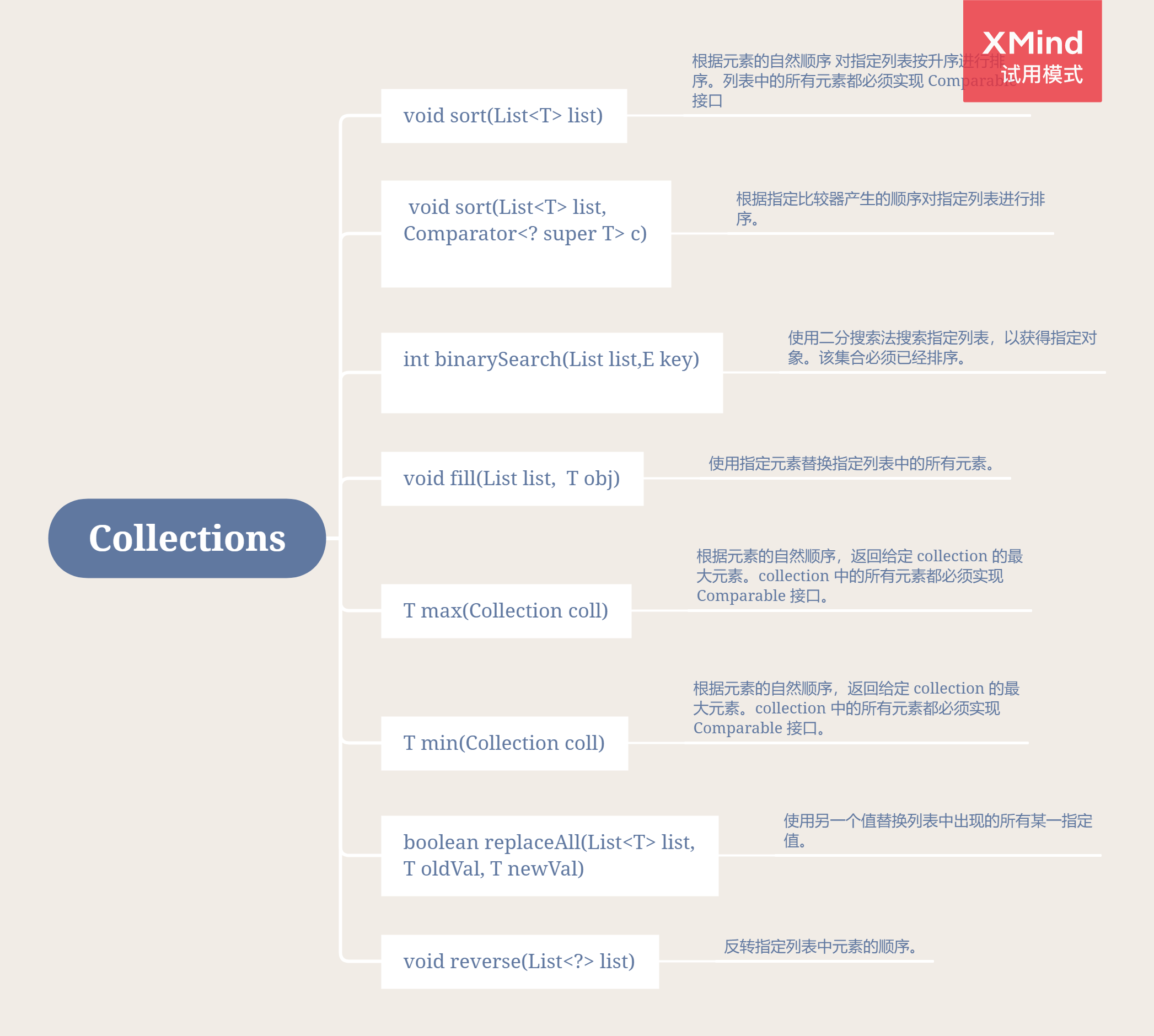
Collections类是单列集合Collection的工具类,Collections工具类为集合提供了许多静态方法,常用方法如下
二、迭代器Iterator
- 在对集合进行迭代的过程中,不要进行增删操作!!!
- 对ArrayList集合中的元素进行修改或删除时,先遍历找到对应元素的索引,遍历结束以后根据索引进行修改或删除
迭代器Iterator是用来遍历Collection集合的,Map集合不能直接使用Iterator迭代器遍历集合元素。
自定义对象并迭代
测试类:
public static void main(String[] args) {
        Person p1 = new Person("张三", 20);
        Person p2 = new Person("李四", 21);
        Person p3 = new Person("王五", 22);
        Person p4 = new Person("赵六", 23);

        ArrayList<Person> list = new ArrayList<>();
        list.add(p1);
        list.add(p2);
        list.add(p3);
        list.add(p4);

        Iterator<Person> iterator = list.iterator();
        while (iterator.hasNext()) {
            Person per = iterator.next();
            System.out.println(per);
        }
    }
Person.java
public class Person {
    private String name;
    private int age;

    public Person() {
    }

    public String getName() {
        return name;
    }

    public void setName(String name) {
        this.name = name;
    }

    public int getAge() {
        return age;
    }

    public void setAge(int age) {
        this.age = age;
    }

    public Person(String name, int age) {
        this.name = name;
        this.age = age;
    }

    @Override
    public String toString() {
        return "Person{" +
                "name='" + name + '\'' +
                ", age=" + age +
                '}';
    }
}
三、Map集合的遍历
3.1 keySet()遍历
实现思想:
1、Map接口定义了方法 keySet() ,可以利用这个方法获取Map集合中所有键的Set集合。
2、使用Iterator迭代器遍历Set集合。
3、利用步骤2中获取的key,调用Map集合的get()方法,获取键对应的值。
 /**
     * - Map接口定义了方法  keySet() 所有的键,存储到Set集合
     * - 遍历Set集合
     * - 取出Set集合元素 **Set集合的元素是Map集合的键**
     * - Map集合方法get()传递键获取值
     */
public static void mapKeySet(){
    Map<String,String> map = new HashMap<String, String>();
    map.put("a","java");
    map.put("b","c++");
    map.put("c","php");
    map.put("d","python");
    map.put("e","erlang");
    //Map接口定义了方法  keySet() 所有的键,存储到Set集合
    Set<String> set = map.keySet();
    //遍历Set集合
    Iterator<String> it = set.iterator();
    //取出Set集合元素 **Set集合的元素是Map集合的键**
    while (it.hasNext()){
        String key = it.next();
        //Map集合方法get()传递键获取值
        String value =  map.get(key);
        System.out.println(key+"==="+value);
    }
}
3.2 entrySet()遍历
实现思想:
1、调用Map接口的方法 Set< Map.Entry<Key,Value> > entrySet()
- 方法返回Set集合,集合中存储的元素,比较特别
- 存储的是Map集合中,键值对映射关系的对象 , 内部接口 Map.Entry
2、利用Iterator迭代器遍历Set集合
3、取出Set集合中的元素
- 是Map.Entry接口对象
- 接口的对象方法: getKey() ,getValue()
 public static void mapEntrySet(){
     Map<String,String> map = new HashMap<String, String>();
     map.put("a","java");
     map.put("b","c++");
     map.put("c","php");
     map.put("d","python");
     map.put("e","erlang");
     //Map接口的方法 Set< Map.Entry<Key,Value> > entrySet()
     Set<Map.Entry<String,String>>  set = map.entrySet();
     //- 遍历Set集合
     Iterator<Map.Entry<String,String>> it = set.iterator();
     while (it.hasNext()){
         //取出Set集合的元素
         Map.Entry<String,String> entry =  it.next();
         //- 接口的对象方法: getKey() ,getValue()
         String key = entry.getKey();
         String value = entry.getValue();
         System.out.println(key +"==="+ value);
     }
 }
四、增强for循环
JDK1.5出现的特性 : 循环的特性 (少些代码)
Collection是单列集合的顶级接口,但是到JDK1.5后,为Collection找了个爹
java.lang.Iterable接口 : 实现接口,就可以成为 "foreach"语句的目标
Collection,List,Set都实现了接口,包括数组。
map接口及其子类没有实现该接口。
4.1 for的格式
for(数据类型 变量名 : 集合或者数组){}
- 遍历数组
 /**
     * for循环遍历数组
     * for(数据类型 变量名 : 集合或者数组){}
     */
    public static void forArray(){
        int[] arr = {1,3,5,7,9};
        for(int i : arr){
            System.out.println(i+1);
        }
        System.out.println("arr=="+arr[0]);
    }
- 遍历集合
/** for循环遍历集合
     */
    public static void forList(){
        List<String> list = new ArrayList<>();
        list.add("aaa");
        list.add("bbb");
        list.add("ccc");

        for(String s : list){
            System.out.println(s);
        }
    }
五、泛型
5.1 泛型的概念
泛型,即“参数化类型”。一提到参数,最熟悉的就是定义方法时有形参,然后调用此方法时传递实参。那么参数化类型怎么理解呢?顾名思义,就是将类型由原来的具体的类型参数化,类似于方法中的变量参数,此时类型也定义成参数形式(可以称之为类型形参),然后在使用/调用时传入具体的类型(类型实参)。
这样说可能也比较抽象,用一句话总结泛型的作用:强制集合存储固定的数据类型
5.2 泛型的格式
集合类<存储的数据类型>  变量名 = new 集合类<存储的数据类型>();
                                       类型可以不写:钻石操作符
加入泛型后,程序的安全性提高了
public static void main(String[] args) {
        /**
         *  JDK没有泛型技术,就是这样写
         *  集合可以存储任何数据类型
         *  添加元素的数据类型是Object
         */
        List<String> list = new ArrayList<String>();
        list.add("a");
        list.add(1); //编译错误,数据类型不匹配

        Iterator<String> it = list.iterator();
        while (it.hasNext()){
            String obj =it.next(); //类型转换不需要
            System.out.println(obj);
        }
    }
5.3 泛型的好处
- 安全性提高了
- 程序的代码量减少
- 避免了类型的强制转换
- 程序的问题,由运行时期,提前到编译时期
5.4 自定义泛型类
/**
 *  定义类,类名叫工厂
 *  自定义泛型类
 *  Factory<什么都可以写> 只是变量名而已
 */
public class Factory<QQ> {
    private QQ q;

    public void setQ(QQ q){
        this.q = q;
    }

    public QQ getQ(){
        return q;
    }
}
public static void main(String[] args) {
    //创建对象Factory类对象
    // Factory factory = new Factory();//没有泛型,QQ就是Object

    Factory<String> factory = new Factory<String>();
    factory.setQ("abc");
    String s = factory.getQ();
    System.out.println(s);

    Factory<Double> factory2 = new Factory<Double>();
    factory2.setQ(1.5);
    Double q = factory2.getQ();
    System.out.println(q);
}
5.5 自定义泛型方法
/**
 * 泛型的方法,方法参数上
 */
public class Factory<Q> {

    /*
     * 静态方法
     * Q是非静态的, Q的数据类型,是new的时候指定的
     *
     * 静态方法参数中的泛型,不能和类一样
     * 静态方法的泛型,需要在方法上单独定义
     * 写在返回值类型的前面
     */
    public static <T> void staticMethod(T q){
        System.out.println(q);
    }

    public void print(Q q){
        System.out.println(q);
    }
}
5.6 泛型接口
1、实现类实现接口,不指定泛型的具体的类型
2、实现类实现接口,指定泛型的具体类型
//泛型接口
public interface Inter <T> {
    public abstract void inter(T t);
}
/**
 * 实现接口,不理会泛型
 * 对象创建的时候,指定类型
 */
public class InterImpl<T> implements Inter<T>{
    public void inter(T t){
        System.out.println(t);
    }
}
/**
 * 实现接口,同时指定泛型
 */
public class InterImpl2 implements Inter<String> {

    public void inter(String s) {
        System.out.println("s=="+s);
    }
}
public class GenericTest {
    public static void main(String[] args) {
        Inter<String> in = new InterImpl<String>();
        in.inter("ok");

        Inter in2 = new InterImpl2();
        in2.inter("kkk");
    }
}
5.7 泛型通配符
//泛型的通配符
public class GenericTest {
    public static void main(String[] args) {
        List<String> stringList = new ArrayList<String>();
        stringList.add("abc");
        stringList.add("bbc");

        List<Integer> integerList =  new ArrayList<Integer>();
        integerList.add(1);
        integerList.add(2);

        each(stringList);
        each(integerList);
    }
    /**
     * 定义方法,可以同时迭代器 遍历这两个集合
     * 方法的参数,是要遍历的集合,不确定是哪个集合
     * 定义参数,写接口类型,不要写实现类
     */
    public static void each(List<?> list){
        Iterator<?> it = list.iterator();
        while (it.hasNext()){
            Object obj = it.next();
            System.out.println(obj);
        }
    }
}
5.8 泛型限定
泛型限定 : 限制的是数据类型
- 传递E类型或者是E的子类,泛型上限限定 - 传递类型可以是Company或者是他的子类
- 传递E类型或者是E的父类,泛型下限限定
public static void main(String[] args) {
    //创建集合,存储员工对象

    //开发部的
    List<Development> devList = new ArrayList<Development>();
    //存储开发部员工对象
    Development d1 = new Development();
    d1.setName("张三");
    d1.setId("开发部001");

    Development d2 = new Development();
    d2.setName("张三2");
    d2.setId("开发部002");
    devList.add(d1);
    devList.add(d2);

    //财务部集合
    List<Financial> finList = new ArrayList<Financial>();
    Financial f1 = new Financial();
    f1.setName("李四");
    f1.setId("财务部001");

    Financial f2 = new Financial();
    f2.setName("李四2");
    f2.setId("财务部002");
    finList.add(f1);
    finList.add(f2);
    System.out.println(devList);
    System.out.println(finList);

    each(devList);
    each(finList);

    //        List<Integer> integerList = new ArrayList<>();
    //        integerList.add(1);
    //        each(integerList);
}
/**
     * 要求 : 定义方法
     * 同时遍历2个集合
     * 遍历的同时取出集合元素,调用方法work()
     * ? 接收任何一个类型
     * 只能接收 Company和子类对象
     * 明确父类,不能明确子类
     */
public static void each(List<? extends Company> list){
    Iterator<? extends Company> it = list.iterator();
    while (it.hasNext()){
        //取出元素
        Company obj =it.next();
        obj.work();
    }
}
六、Properties集合
6.2 Properties集合的特点
- 继承Hashtable,实现Map接口
- 底层是哈希表结构
- 线程是安全的,运行速度慢
- 集合没有泛型的写法,键和值的数据类型锁定为String类型
- 集合有自己的特有方法
- 此集合可以和IO流对象结合使用,实现数据的持久化存储
6.3 Properties集合的常用方法
6.3.1 添加获取
public Object setProperty(String key,String value):向集合内添加数据public String getProperty(String key):使用指定的键获取集合中的值
	private static void show01() {
        // setProperty() 通过该方法向Properties内添加一对字符串键值对
        Properties properties = new Properties();
        properties.setProperty("kelvin", "180");
        properties.setProperty("jack", "168");
        properties.setProperty("siri", "170");

        // stringPropertyNames() 通过该方法获取Properties集合内的所有键组成的set集合
        Set<String> strings = properties.stringPropertyNames();
        for (String key : strings) {
            String value = properties.getProperty(key);
            System.out.println(key + "--" + value);
        }
    }
6.3.2 store()方法持久化集合数据
public void store(OutputStream out,String comments):将此 Properties 表中的属性列表(键和元素对)写入输出流。
// store() 持久化数据
    private static void show02() throws IOException {
        /*
        持久化数据步骤:
         1 创建Properties对象,存储数据
         2 创建字节输出流/字符输出流对象,指定将数据持久化的位置(字节流不能持久化中文)
         3 调用Properties对象的store()方法,将集合中的临时数据持久化到指定位置
         4 释放资源
        */
        Properties properties = new Properties();
        properties.setProperty("kelvin", "180");
        properties.setProperty("jack", "168");
        properties.setProperty("siri", "170");

        FileWriter fw = new FileWriter("prop.txt");
        properties.store(fw, "store data");
        fw.close();
    }
6.3.3 load()方法加载文件数据到集合
public void load(InputStream inStream):从输入流中读取属性列表(键和元素对)。
/*
        加载数据步骤:
             1 创建Properties对象
             2 调用load方法加载指定文件
             3 遍历Properties集合
        注意事项:
            1 存储键值对的文件中,可以使用=,空格或其他符号进行连接
            2 存储键值对的文件中,可以使用#进行注释,注释内容不会加载
            3 读取内容默认是字符串格式
        */
    private static void show03() throws IOException {
        Properties properties = new Properties();
        properties.load(new FileReader("prop.txt"));
        Set<String> strings = properties.stringPropertyNames();
        for (String key : strings) {
            String value = properties.getProperty(key);
            System.out.println(key + "--" + value);
        }

    }

 浙公网安备 33010602011771号