

systemctl编译使用
https://github.com/systemd/systemd/issues/16325
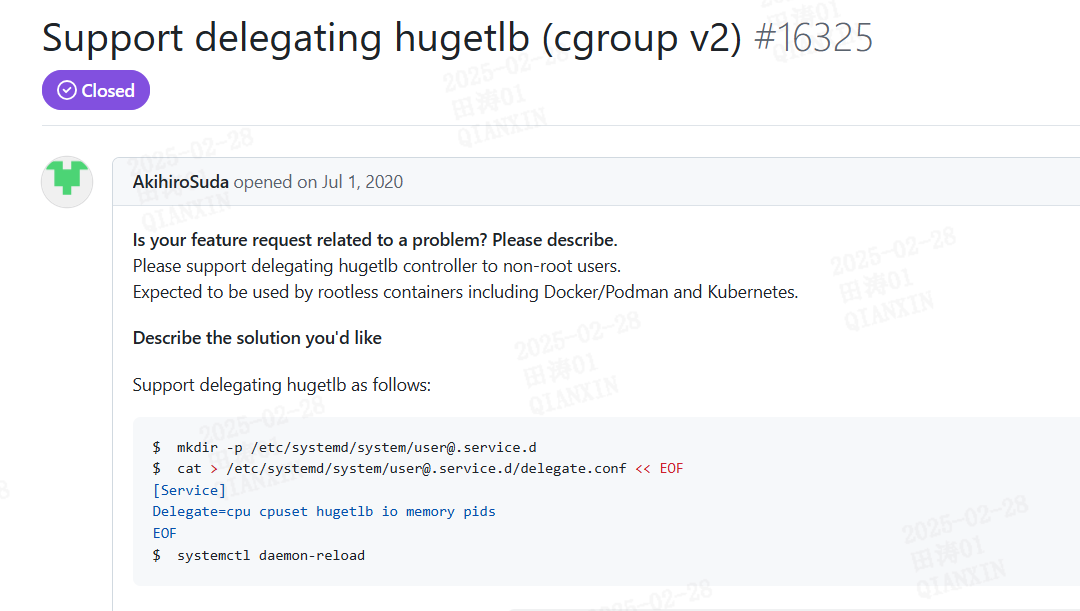
编译和升级
https://lctt.github.io/LFS-BOOK/lfs-systemd/chapter06/systemd.html
https://blog.csdn.net/wfyswcss/article/details/141495780
https://www.sobyte.net/post/2022-09/systemd-update/#google_vignette
https://cloud.tencent.com/developer/article/1827714
https://github.com/systemd/systemd/issues/24675
##############upgrade kernel###############################
]# rpm -Uvh python-perf-5.4.212-1.el7.elrepo.x86_64.rpm
]#rpm -Uvh perf-5.4.212-1.el7.elrepo.x86_64.rpm
]# rpm -ivh kernel-lt-5.4.212-1.el7.elrepo.x86_64.rpm kernel-lt-devel-5.4.212-1.el7.elrepo.x86_64.rpm
]# rpm -ivh kernel-lt-tools-libs-5.4.212-1.el7.elrepo.x86_64.rpm
]# rpm -ivh kernel-lt-tools-5.4.212-1.el7.elrepo.x86_64.rpm kernel-lt-tools-libs-devel-5.4.212-1.el7.elrepo.x86_64.rpm
]# rpm -ivh kernel-lt-headers-5.4.212-1.el7.elrepo.x86_64.rpm

]# rpm -qa|grep kernel
abrt-addon-kerneloops-2.1.11-52.el7.centos.x86_64
kernel-3.10.0-957.el7.x86_64
kernel-lt-devel-5.4.212-1.el7.elrepo.x86_64
kernel-lt-tools-libs-devel-5.4.212-1.el7.elrepo.x86_64
kernel-lt-5.4.212-1.el7.elrepo.x86_64
kernel-lt-tools-5.4.212-1.el7.elrepo.x86_64
kernel-lt-headers-5.4.212-1.el7.elrepo.x86_64
kernel-lt-tools-libs-5.4.212-1.el7.elrepo.x86_64

]# awk -F' '$1=="menuentry " {print i++ " : " $2}' /etc/grub2.cfg
0 : CentOS Linux (5.4.212-1.el7.elrepo.x86_64) 7 (Core)
1 : CentOS Linux (3.10.0-957.el7.x86_64) 7 (Core)
2 : CentOS Linux (0-rescue-35962adc690de940a02717d685a4160e) 7 (Core)
]# grub2-set-default 0

]# reboot
......
]# uname -r
5.4.212-1.el7.elrepo.x86_64

######################install Python3.8###############
]#cd /etc/yum.repos.d/
]# rm -rf *
]# mount /dev/sr0 /media ##注释:/dev/sr0 我的光盘所在路径
]# yum update -y
]# yum groupinstall -y 'Development Tools'
]# yum install -y gcc openssl-devel bzip2-devel libffi-devel

]# cd /ysys/
]# wget https://www.python.org/ftp/python/3.8.0/Python-3.8.0.tgz -O /tmp/Python-3.8.0.tgz
]# tar zxf Python-3.8.0.tgz
]# cd Python-3.8.0
]# ./configure prefix=/usr/local/python3
]# make
]# make install
]# export PATH=$PATH:/usr/local/python3/bin/

#############install Other##############

]# cd /ysys/
]# rpm -ivh epel-release-latest-7.noarch.rpm ### basic install
]# yum install http://repo.okay.com.mx/centos/7/x86_64/release/okay-release-1-1.noarch.rpm
]# yum groupinstall -y 'Development Tools'
]# pip3 install meson==0.49
]# yum install -y libcap-devel ninja-build
]# cd /ysys/
]# wget http://ftp.gnu.org/pub/gnu/gperf/gperf-3.1.tar.gz
]# tar zxf gperf-3.1.tar.gz && cd gperf-3.1 && ./configure && make && make install
]# cd /ysys/
]# wget https://github.com/Kitware/CMake/releases/download/v3.18.4/cmake-3.18.4-Linux-x86_64.tar.gz
]# tar zxf cmake-3.18.4-Linux-x86_64.tar.gz
]# export PATH=$PATH:pwd/cmake-3.18.4-Linux-x86_64/bin
]# cd /ysys/
]# wget https://mirrors.edge.kernel.org/pub/linux/utils/util-linux/v2.30/util-linux-2.30.2.tar.gz
]# tar zxf util-linux-2.30.2.tar.gz && cd util-linux-2.30.2
]# ./configure --disable-all-programs --enable-mount --enable-libmount --enable-libblkid --enable-libuuid
]# make && make install
]# cp mount /usr/bin/mount
]# cp umount /usr/bin/umount
]# ln /usr/lib/libmount.so /usr/lib64/libmount.so
]# cp ./libmount/mount.pc /usr/lib64/pkgconfig/mount.pc
]# cp ./libblkid/blkid.pc /usr/lib64/pkgconfig/blkid.pc
]# cp ./libuuid/uuid.pc /usr/lib64/pkgconfig/uuid.pc

######################systemd install#################

]# cd /ysys/
]# wget https://github.com/systemd/systemd/archive/v240.tar.gz
]# tar zxf systemd-240.tar.gz
]# cd systemd-240/
]#./configure && make && make install

]# systemctl --version
systemd 240
-PAM -AUDIT +SELINUX +IMA -APPARMOR +SMACK +SYSVINIT +UTMP -LIBCRYPTSETUP -GCRYPT -GNUTLS -ACL -XZ -LZ4 -SECCOMP +BLKID -ELFUTILS -KMOD -IDN2 -IDN -PCRE2 default-hierarchy=hybridz注意
编译核心
https://cloud.tencent.com/developer/article/1827714


meson build/ && ninja -C build
cd build/
ninja install
ninja: Entering directory `build'
[1319/1617] Generating binfmt.d.5 with a custom command.
FAILED: man/binfmt.d.5
/bin/xsltproc -o man/binfmt.d.5 --nonet --xinclude --maxdepth 9000 --stringparam man.output.quietly 1 --stringparam funcsynopsis.style ansi --stringparam man.authors.section.enabled 0 --stringparam man.copyright.section.enabled 0 --stringparam systemd.version 240 --path /home/tiantao01/systemd-240/build/man:/home/tiantao01/systemd-240/man ../man/custom-man.xsl ../man/binfmt.d.xml

sudo yum install docbook-style-xsl
systemd使用
https://docs.redhat.com/en/documentation/red_hat_enterprise_linux/7/html/system_administrators_guide/chap-managing_services_with_systemd#sect-Managing_Services_with_systemd-Unit_File_Modify
https://linuxconfig.org/start-stop-and-restart-services-on-systemd-rhel-7-linux-server
https://access.redhat.com/articles/754933


 浙公网安备 33010602011771号