


关于注册页面的建立以及SQlite数据库的增加操作的实现
创建SignUpActivity类用来实现注册功能
package com.example.myapplication;


import android.app.Activity;
import android.content.Intent;
import android.database.sqlite.SQLiteDatabase;
import android.os.Bundle;
import android.text.TextUtils;
import android.view.View;
import android.widget.Button;
import android.widget.EditText;
import android.widget.Toast;

import java.sql.DriverPropertyInfo;

public class SignUpActivity extends Activity {
    private SQlite mSQlite;
    private EditText UserName;
    private EditText passWord;
    // 调用Actvity

    @Override
    protected void onCreate(Bundle savedInstanceState) {
        super.onCreate(savedInstanceState);
        //关联activity_register.xml
        setContentView(R.layout.activity_sign_up);
        // 关联用户名、密码、确认密码、邮箱和注册、返回登录按钮
        EditText userName = (EditText) this.findViewById(R.id.UserNameEdit);
        EditText passWord = (EditText) this.findViewById(R.id.PassWordEdit);
        EditText passWordAgain = (EditText) this.findViewById(R.id.PassWordAgainEdit);
       EditText email = (EditText) this.findViewById(R.id.EmailEdit);
        Button signUpButton = (Button) this.findViewById(R.id.SignUpButton);
       Button backLoginButton = (Button) this.findViewById(R.id.BackLoginButton);

        // 立即注册按钮监听器
        signUpButton.setOnClickListener(
                new View.OnClickListener() {
                    @Override
                    public void onClick(View v) {
                       String strUserName = userName.getText().toString().trim();
                        String strPassWord = passWord.getText().toString().trim();
                        String strPassWordAgain = passWordAgain.getText().toString().trim();
                        String strPhoneNumber = email.getText().toString().trim();

                        if(!TextUtils.isEmpty(strUserName)&&!TextUtils.isEmpty(strPassWord)){
                            mSQlite.add(strUserName,strPassWord);//数据库的增加操作
                            Intent intent1 = new Intent(SignUpActivity.this,MainActivity.class);
                            startActivity(intent1);
                            finish();
                            Toast.makeText(SignUpActivity.this,"注册成功",Toast.LENGTH_SHORT).show();
                        }else {Toast.makeText(SignUpActivity.this,"信息不完备,注册失败",Toast.LENGTH_SHORT).show();}


                      /*  //注册格式粗检
                        if (strUserName.length() > 10) {
                            Toast.makeText(SignUpActivity.this, "用户名长度必须小于10!", Toast.LENGTH_SHORT).show();
                        } else if (strUserName.length() < 4) {
                            Toast.makeText(SignUpActivity.this, "用户名长度必须大于4!", Toast.LENGTH_SHORT).show();
                        } else if (strPassWord.length() > 16) {
                            Toast.makeText(SignUpActivity.this, "密码长度必须小于16!", Toast.LENGTH_SHORT).show();
                        } else if (strPassWord.length() < 6) {
                            Toast.makeText(SignUpActivity.this, "密码长度必须大于6!", Toast.LENGTH_SHORT).show();
                        } else if (!strPassWord.equals(strPassWordAgain)) {
                            Toast.makeText(SignUpActivity.this, "两次密码输入不一致!", Toast.LENGTH_SHORT).show();
                        } else if (!strPhoneNumber.contains("@")) {
                            Toast.makeText(SignUpActivity.this, "邮箱格式不正确!", Toast.LENGTH_SHORT).show();
                        } else {
                            Toast.makeText(SignUpActivity.this, "注册成功!", Toast.LENGTH_SHORT).show();
                            // 跳转到登录界面
                            Intent intent = new Intent(SignUpActivity.this, MainActivity.class);
                            startActivity(intent);
                        }*/
                    }
                }
        );
        mSQlite = new SQlite(SignUpActivity.this);
        // 返回登录按钮监听器
        backLoginButton.setOnClickListener(
                new View.OnClickListener() {
                    @Override
                    public void onClick(View v) {
                        // 跳转到登录界面
                        Intent intent = new Intent(SignUpActivity.this, MainActivity.class);
                        startActivity(intent);
                    }
                }
        );

    }
}
2.创建activity_sign_up
<?xml version="1.0" encoding="utf-8"?>
<androidx.constraintlayout.widget.ConstraintLayout xmlns:android="http://schemas.android.com/apk/res/android"
    xmlns:tools="http://schemas.android.com/tools"
    android:layout_width="match_parent"
    android:layout_height="match_parent"
    tools:context=".SignUpActivity">

    <!--使用线性布局-->
    <LinearLayout
        android:layout_width="match_parent"
        android:layout_height="match_parent"
        android:orientation="vertical"
        android:background="#F5F5F5">

        <!--Logo-->
        <ImageView
            android:id="@+id/LogoImage"
            android:layout_width="match_parent"
            android:layout_height="120dp"
            android:layout_marginTop="50dp"
            android:src="@drawable/logo"/>

        <!--标题-->
        <TextView
            android:id="@+id/TitleText"
            android:layout_width="match_parent"
            android:layout_height="wrap_content"
            android:layout_margin="20dp"
            android:text="注册"
            android:gravity="center"
            android:textStyle="italic"
            android:textColor="#808080"
            android:textSize="30dp" />

        <!--嵌套线性布局-->
        <LinearLayout
            android:layout_width="match_parent"
            android:layout_height="wrap_content"
            android:orientation="vertical">

            <!--嵌套线性布局-->
            <LinearLayout
                android:id="@+id/UserNameLayout"
                android:layout_width="match_parent"
                android:layout_height="match_parent"
                android:orientation="horizontal">

                <!--用户名输入-->
                <EditText
                    android:id="@+id/UserNameEdit"
                    android:layout_width="match_parent"
                    android:layout_height="wrap_content"
                    android:padding="15dp"
                    android:layout_marginLeft="20dp"
                    android:layout_marginRight="20dp"
                    android:layout_marginTop="10dp"
                    android:layout_marginBottom="10dp"
                    android:background="@drawable/translucent_edit"
                    android:hint="输入用户名"
                    android:textSize="24dp"
                    android:singleLine="true" />

            </LinearLayout>

            <!--嵌套线性布局-->
            <LinearLayout
                android:id="@+id/PassWordLayout"
                android:layout_width="match_parent"
                android:layout_height="wrap_content"
                android:orientation="horizontal">

                <!--密码输入-->
                <EditText
                    android:id="@+id/PassWordEdit"
                    android:layout_width="match_parent"
                    android:layout_height="wrap_content"
                    android:padding="15dp"
                    android:layout_marginLeft="20dp"
                    android:layout_marginRight="20dp"
                    android:layout_marginTop="10dp"
                    android:layout_marginBottom="10dp"
                    android:background="@drawable/translucent_edit"
                    android:hint="输入密码"
                    android:textSize="24dp"
                    android:maxLength="16"
                    android:singleLine="true"
                    android:inputType="textPassword" />

            </LinearLayout>

            <!--嵌套线性布局-->
            <LinearLayout
                android:id="@+id/PasswordAgainLayout"
                android:layout_width="match_parent"
                android:layout_height="wrap_content"
                android:orientation="horizontal">

                <!--二次密码输入-->
                <EditText
                    android:id="@+id/PassWordAgainEdit"
                    android:layout_width="match_parent"
                    android:layout_height="match_parent"
                    android:padding="15dp"
                    android:layout_marginLeft="20dp"
                    android:layout_marginRight="20dp"
                    android:layout_marginTop="10dp"
                    android:layout_marginBottom="10dp"
                    android:background="@drawable/translucent_edit"
                    android:hint="再次输入密码"
                    android:maxLength="16"
                    android:textSize="24dp"
                    android:singleLine="true"
                    android:inputType="textPassword" />

            </LinearLayout>

            <!--嵌套线性布局-->
            <LinearLayout
                android:id="@+id/EmailLayout"
                android:layout_width="match_parent"
                android:layout_height="wrap_content"
                android:orientation="horizontal">

                <!--邮箱输入-->
                <EditText
                    android:id="@+id/EmailEdit"
                    android:layout_width="match_parent"
                    android:layout_height="wrap_content"
                    android:padding="15dp"
                    android:layout_marginLeft="20dp"
                    android:layout_marginRight="20dp"
                    android:layout_marginTop="10dp"
                    android:layout_marginBottom="10dp"
                    android:background="@drawable/translucent_edit"
                    android:hint="输入邮箱地址"
                    android:textSize="24dp"
                    android:maxLength="16"
                    android:singleLine="true" />

            </LinearLayout>

            <!--嵌套线性布局-->
            <LinearLayout
                android:id="@+id/ButtonLayout"
                android:layout_width="match_parent"
                android:layout_height="wrap_content"
                android:orientation="horizontal">

                <!--立即注册按钮-->
                <Button
                    android:id="@+id/SignUpButton"
                    android:layout_width="wrap_content"
                    android:layout_height="wrap_content"
                    android:padding="15dp"
                    android:layout_margin="15dp"
                    android:layout_weight="1"
                    android:background="@drawable/translucent_button"
                    android:text="立即注册"
                    android:textColor="@color/white"
                    android:textSize="24dp" />

                <!--返回登录按钮-->
                <Button
                    android:id="@+id/BackLoginButton"
                    android:layout_width="wrap_content"
                    android:layout_height="wrap_content"
                    android:padding="15dp"
                    android:layout_margin="15dp"
                    android:layout_weight="1"
                    android:textColor="@color/white"
                    android:background="@drawable/translucent_button"
                    android:text="返回登录"
                    android:textSize="24dp" />

            </LinearLayout>

        </LinearLayout>

    </LinearLayout>
</androidx.constraintlayout.widget.ConstraintLayout>
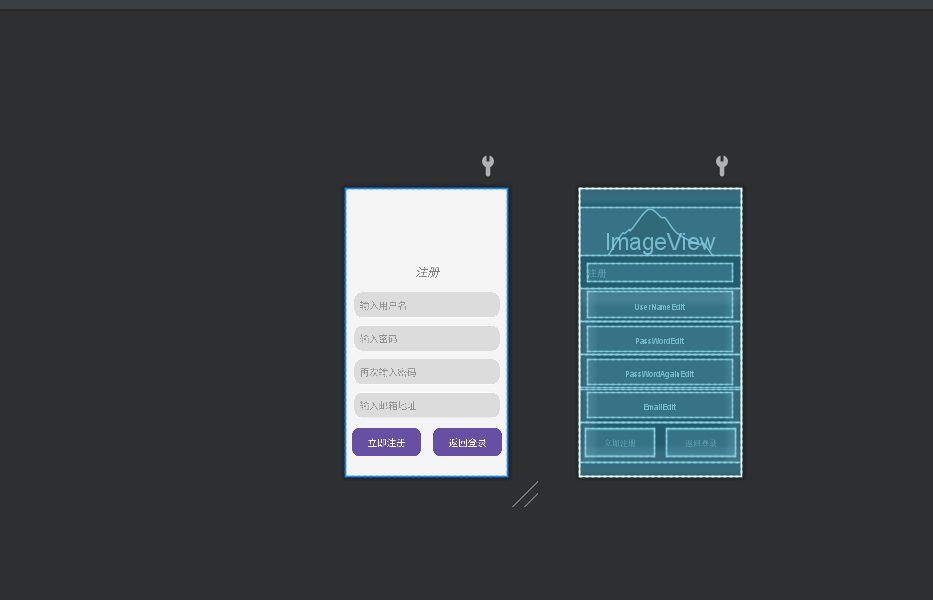
目前我只设置注册时将账号和密码存入数据库,其他输入项会自动流失


 浙公网安备 33010602011771号