


今天简单的完成了注册和登录界面的设计。
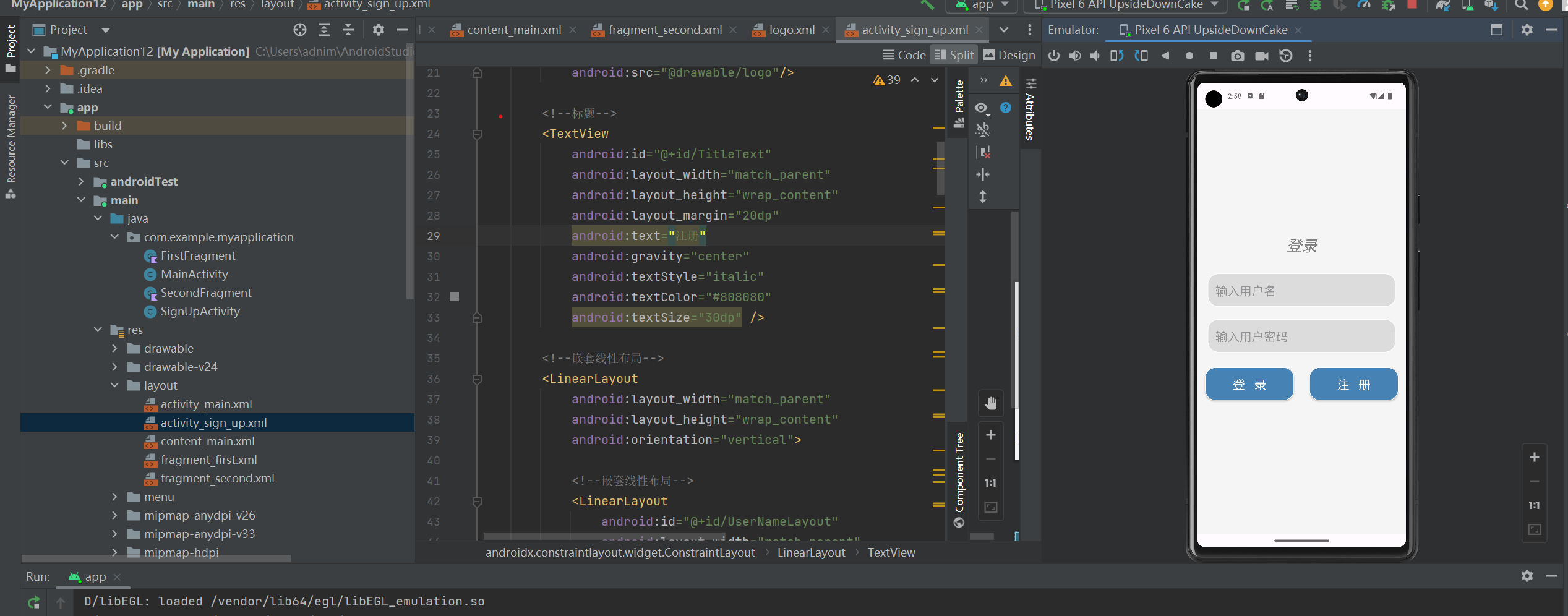
首先在res-layout中创建activity—main.xml文件,利用线性布局实现登录界面的设计
<?xml version="1.0" encoding="utf-8"?>
<androidx.constraintlayout.widget.ConstraintLayout xmlns:android="http://schemas.android.com/apk/res/android"
    xmlns:tools="http://schemas.android.com/tools"
    android:layout_width="match_parent"
    android:layout_height="match_parent"
    tools:context=".MainActivity">

    <!--使用线性布局-->
    <LinearLayout
        android:layout_width="match_parent"
        android:layout_height="match_parent"
        android:orientation="vertical"
        android:background="#F5F5F5">

        <!--Logo-->
        <ImageView
            android:id="@+id/LogoImage"
            android:layout_width="match_parent"
            android:layout_height="120dp"
            android:layout_marginTop="100dp"
            android:src="@drawable/logo"/>

        <!--标题-->
        <TextView
            android:id="@+id/TitleText"
            android:layout_width="match_parent"
            android:layout_height="wrap_content"
            android:layout_margin="25dp"
            android:text="登录"
            android:gravity="center"
            android:textStyle="italic"
            android:textColor="#808080"
            android:textSize="30dp" />

        <!--嵌套线性布局-->
        <LinearLayout
            android:layout_width="match_parent"
            android:layout_height="wrap_content"
            android:orientation="vertical">

            <!--嵌套线性布局-->
            <LinearLayout
                android:id="@+id/UserNameLayout"
                android:layout_width="match_parent"
                android:layout_height="match_parent">

                <!--用户名输入-->
                <EditText
                    android:id="@+id/UserNameEdit"
                    android:layout_width="match_parent"
                    android:layout_height="wrap_content"
                    android:padding="15dp"
                    android:layout_marginLeft="20dp"
                    android:layout_marginRight="20dp"
                    android:layout_marginTop="10dp"
                    android:layout_marginBottom="15dp"
                    android:background="@drawable/translucent_edit"
                    android:hint="输入用户名"
                    android:textSize="24dp"
                    android:singleLine="true" />

            </LinearLayout>

            <!--嵌套线性布局-->
            <LinearLayout
                android:id="@+id/PassWordLayout"
                android:layout_width="match_parent"
                android:layout_height="wrap_content">

                <!--密码输入-->
                <EditText
                    android:id="@+id/PassWordEdit"
                    android:layout_width="match_parent"
                    android:layout_height="wrap_content"
                    android:padding="15dp"
                    android:layout_marginLeft="20dp"
                    android:layout_marginRight="20dp"
                    android:layout_marginTop="10dp"
                    android:layout_marginBottom="15dp"
                    android:background="@drawable/translucent_edit"
                    android:hint="输入用户密码"
                    android:textSize="24dp"
                    android:maxLength="16"
                    android:singleLine="true"
                    android:inputType="textPassword" />

            </LinearLayout>

            <!--嵌套线性布局-->
            <LinearLayout
                android:id="@+id/LayoutButton"
                android:layout_width="match_parent"
                android:layout_height="wrap_content"
                android:orientation="horizontal">

                <!--登录按钮-->
                <Button
                    android:id="@+id/LoginButton"
                    android:layout_width="wrap_content"
                    android:layout_height="wrap_content"
                    android:padding="15dp"
                    android:layout_margin="15dp"
                    android:layout_weight="1"
                    android:textColor="@color/white"
                    android:background="@drawable/translucent_button"
                    android:text="登   录"
                    android:textSize="24dp" />

                <!--注册按钮-->
                <Button
                    android:id="@+id/SignUpButton"
                    android:layout_width="wrap_content"
                    android:layout_height="wrap_content"
                    android:padding="15dp"
                    android:layout_margin="15dp"
                    android:layout_weight="1"
                    android:textColor="@color/white"
                    android:background="@drawable/translucent_button"
                    android:text="注   册"
                    android:textSize="24dp" />

            </LinearLayout>

        </LinearLayout>

    </LinearLayout>
</androidx.constraintlayout.widget.ConstraintLayout>
在java中创建软件包并且创建一个ActivityMain类,实现对登录操作的后台操作步骤
package com.example.myapplication;

import android.app.Activity;
import android.content.Intent;
import android.os.Bundle;
import android.view.View;
import android.view.View.OnClickListener;
import android.widget.Button;
import android.widget.EditText;
import android.widget.Toast;


public class MainActivity extends Activity {
    // 调用Actvity
    @Override
    protected void onCreate(Bundle savedInstanceState) {
        super.onCreate(savedInstanceState);
        // 关联activity.xml
        setContentView(R.layout.activity_main);
        // 关联用户名、密码和登录、注册按钮
        EditText userName = (EditText) this.findViewById(R.id.UserNameEdit);
        EditText passWord = (EditText) this.findViewById(R.id.PassWordEdit);
        Button loginButton = (Button) this.findViewById(R.id.LoginButton);
        Button signUpButton = (Button) this.findViewById(R.id.SignUpButton);
        // 登录按钮监听器
        loginButton.setOnClickListener(
                new OnClickListener() {
                    @Override
                    public void onClick(View v) {
                        // 获取用户名和密码
                        String strUserName = userName.getText().toString().trim();
                        String strPassWord = passWord.getText().toString().trim();
                        // 判断如果用户名为"123456"密码为"123456"则登录成功
                        if (strUserName.equals("123456") && strPassWord.equals("123456")) {
                            Toast.makeText(MainActivity.this, "登录成功!", Toast.LENGTH_SHORT).show();
                        } else {
                            Toast.makeText(MainActivity.this, "请输入正确的用户名或密码!", Toast.LENGTH_SHORT).show();
                        }
                    }
                }
        );
        // 注册按钮监听器
        signUpButton.setOnClickListener(
                new OnClickListener() {
                    @Override
                    public void onClick(View v) {
                        // 跳转到注册界面
                        Intent intent = new Intent(MainActivity.this, SignUpActivity.class);
                        startActivity(intent);
                    }
                }
        );

    }
}

注:AndroidMainfest.xml文件是链接java类与xml文件的链接函数,要修改好里面的相应的路径设置,使软件能够正常的打开

 浙公网安备 33010602011771号