
WPF界面设计—撸大师

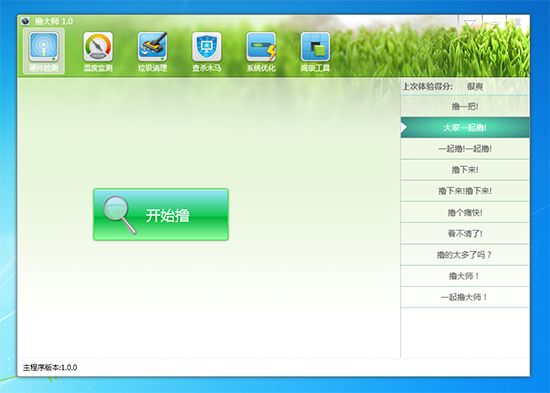
WPF界面设计,模仿了金山卫士,360,鲁大师的界面!


    <!--无边框窗体-->
    <Style x:Key="NoResize_window" TargetType="{x:Type Window}">
    <Setter Property="AllowsTransparency" Value="true"/>
    <Setter Property="Background" Value="Transparent"/>
    <Setter Property="FontFamily" Value="Consolas, Microsoft YaHei"/>
    <Setter Property="FontSize" Value="24"/>
    <Setter Property="ResizeMode" Value="NoResize"/>
    <Setter Property="WindowStyle" Value="None"/>
    <Setter Property="Template">
        <Setter.Value>
            <ControlTemplate TargetType="{x:Type Window}">
                <Grid Margin="10">
                    <Rectangle Fill="{DynamicResource {x:Static SystemColors.WindowBrushKey}}"
                        RadiusX="3" RadiusY="3">
                        <Rectangle.Effect>
                            <DropShadowEffect BlurRadius="10" ShadowDepth="0" Color="#FF898989"/>
                        </Rectangle.Effect>
                    </Rectangle>
                    <Border Background="{TemplateBinding Background}"
                        BorderBrush="{TemplateBinding BorderBrush}"
                        BorderThickness="{TemplateBinding BorderThickness}"
                        Padding="{TemplateBinding Margin}"
                        SnapsToDevicePixels="{TemplateBinding SnapsToDevicePixels}"
                        CornerRadius="3">
                        <ContentPresenter />
                    </Border>
                </Grid>
            </ControlTemplate>
        </Setter.Value>
    </Setter>
</Style>
    <!--TabControl样式资源-->
    <Style x:Key="TabControlStyle" TargetType="{x:Type TabControl}">
        <Setter Property="Foreground" Value="{DynamicResource {x:Static SystemColors.ControlTextBrushKey}}"/>
        <Setter Property="Padding" Value="4,4,4,4"/>
        <Setter Property="BorderThickness" Value="1"/>
        <Setter Property="BorderBrush" Value="#8C8E94"/>
        <Setter Property="Background" Value="#F9F9F9"/>
        <Setter Property="HorizontalContentAlignment" Value="Center"/>
        <Setter Property="VerticalContentAlignment" Value="Center"/>
        <Setter Property="Template">
            <Setter.Value>
                <ControlTemplate TargetType="{x:Type TabControl}">
                    <Grid ClipToBounds="true" SnapsToDevicePixels="true" KeyboardNavigation.TabNavigation="Local">
                        <Grid.RowDefinitions>
                            <RowDefinition x:Name="RowDefinition0" Height="Auto" MinHeight="102.5"/>
                            <RowDefinition x:Name="RowDefinition1"/>
                        </Grid.RowDefinitions>
                        <Border x:Name="ContentPanel" BorderThickness="{TemplateBinding BorderThickness}" Grid.Column="0" KeyboardNavigation.DirectionalNavigation="Contained" Grid.Row="1" KeyboardNavigation.TabIndex="2" KeyboardNavigation.TabNavigation="Local">
                            <ContentPresenter x:Name="PART_SelectedContentHost" ContentSource="SelectedContent" SnapsToDevicePixels="{TemplateBinding SnapsToDevicePixels}"/>
                        </Border>
                        <Canvas x:Name="HeaderPanel" HorizontalAlignment="Stretch" Height="Auto" VerticalAlignment="Stretch" Width="Auto" IsItemsHost="True"/>
                    </Grid>
                </ControlTemplate>
            </Setter.Value>
        </Setter>
    </Style>
转载:http://blog.csdn.net/cmis7645/article/details/7562833

 浙公网安备 33010602011771号