
.net8 下载文件+进度条
效果:
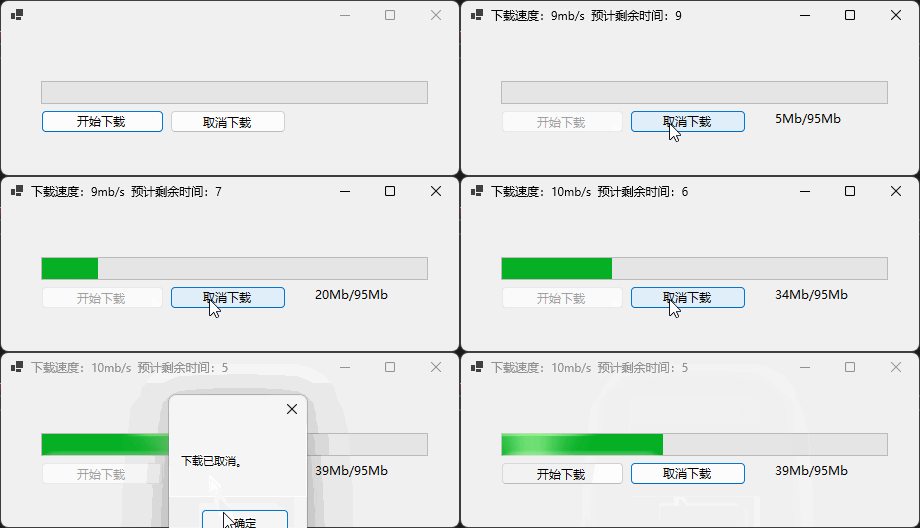
代码:
1、异步下载代码
展开或折叠代码
 public async Task DownloadFileAsync(string url, string savePath, IProgress<FileDownloadInfo> progress, CancellationToken cancelToken)
 {
     using HttpClient client = new();
     //指定HttpCompletionOption.ResponseHeadersRead来立即处理响应头而不是等待内容完全下载
     using HttpResponseMessage response = await client.GetAsync(url, HttpCompletionOption.ResponseHeadersRead, cancelToken);

     using Stream stream = await response.Content.ReadAsStreamAsync(cancelToken);
     using FileStream fileStream = new(savePath, FileMode.Create, FileAccess.Write, FileShare.None, 8192, true);

     //TCP/IP协议数据包通常也是8kb,所以buffer的长度与之匹配。
     byte[] buffer = new byte[8192];
     int bytesRead;
     long totalBytesRead = 0;
     long totalBytes = response.Content.Headers.ContentLength ?? -1;

     var stopwatch = new Stopwatch();
     stopwatch.Start();

     while (!cancelToken.IsCancellationRequested && (bytesRead = await stream.ReadAsync(buffer, cancelToken)) > 0)
     {
         await fileStream.WriteAsync(buffer.AsMemory(0, bytesRead), cancelToken);
         totalBytesRead += bytesRead;

         double speed = 0;
         if (stopwatch.Elapsed.TotalSeconds > 0)
         {
             speed = totalBytesRead / stopwatch.Elapsed.TotalSeconds;
         }

         var value = (int)(((double)totalBytesRead / totalBytes) * 100);
         progress.Report(new FileDownloadInfo
         {
             Size = totalBytes,
             Downloaded = totalBytesRead,
             Progress = value,
             Speed = speed,
             Remaining = (int)((totalBytes - totalBytesRead) / speed)
         });
     }
     cancelToken.ThrowIfCancellationRequested();
 }
2、创建一个文件下载信息类
展开或折叠代码
public class FileDownloadInfo : IDisposable
{
    /// <summary>
    /// 文件大小
    /// </summary>
    public long Size { get; set; }
    /// <summary>
    /// 已下载
    /// </summary>
    public long Downloaded { get; set; }
    /// <summary>
    /// 下载速度
    /// </summary>
    public double Speed { get; set; }
    /// <summary>
    /// 下载进度
    /// </summary>
    public int Progress { get; set; }
    /// <summary>
    /// 预计剩余时间
    /// </summary>
    public int Remaining { get; set; }

    public void Dispose()
    {
        GC.SuppressFinalize(this);
    }
}
3.1、定义一个Progress
展开或折叠代码
var progress = new Progress<FileDownloadInfo>(info =>
{
    //todo 处理异步方法中Report过来的数据,比如下载进度、下载速度等。
});
展开或折叠代码
await DownloadFileAsync(url, path, progress, _cancellationTokenSource.Token);
4.1、定义一个取消令牌
展开或折叠代码
private CancellationTokenSource? _cancellationTokenSource = new CancellationTokenSource();
4.2、调用异步下载方法时传入令牌。
4.3、在需要取消下载的时候调用令牌的Cancel()方法
展开或折叠代码
_cancellationTokenSource?.Cancel();

 浙公网安备 33010602011771号