
------------恢复内容开始------------
一、
Spring-MVC 全称应该是spring-webmvc,即springmvc是spring框架的一个主要支持Javaweb的一个模块。
springMVC对servlet进行封装,避免繁琐的获取表单参数,多余的serlvet服务类等代码
二、
相较于struct2来说:
使用简单、性能安全性更加优秀、拓展性强
三、
优点:
清晰地角色划分
灵活的配置功能
提供了大量的控制器接口和实现类
国际化支持
面向接口编程
Spring提供了Web应用开发的一整套流程,不仅仅是MVC,他们之间可以很方便的结合一起。(意思就是springmvc是spring原生的,用起来不会有什么兼容问题)
四、核心类及接口
核心类:DispatcherServlet前端控制器 其父类是Httpservlet
作用:接收请求,响应结果,相当于转发器,是SpringMVC的中央处理器。springMVC的入口
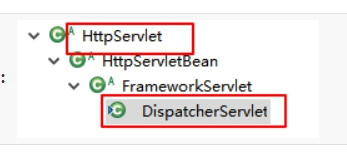
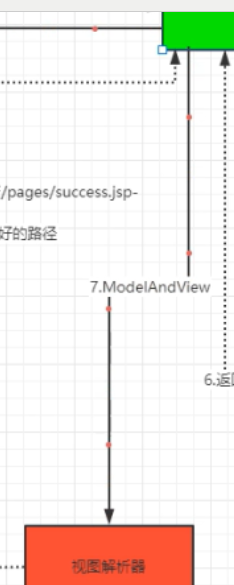
补图:
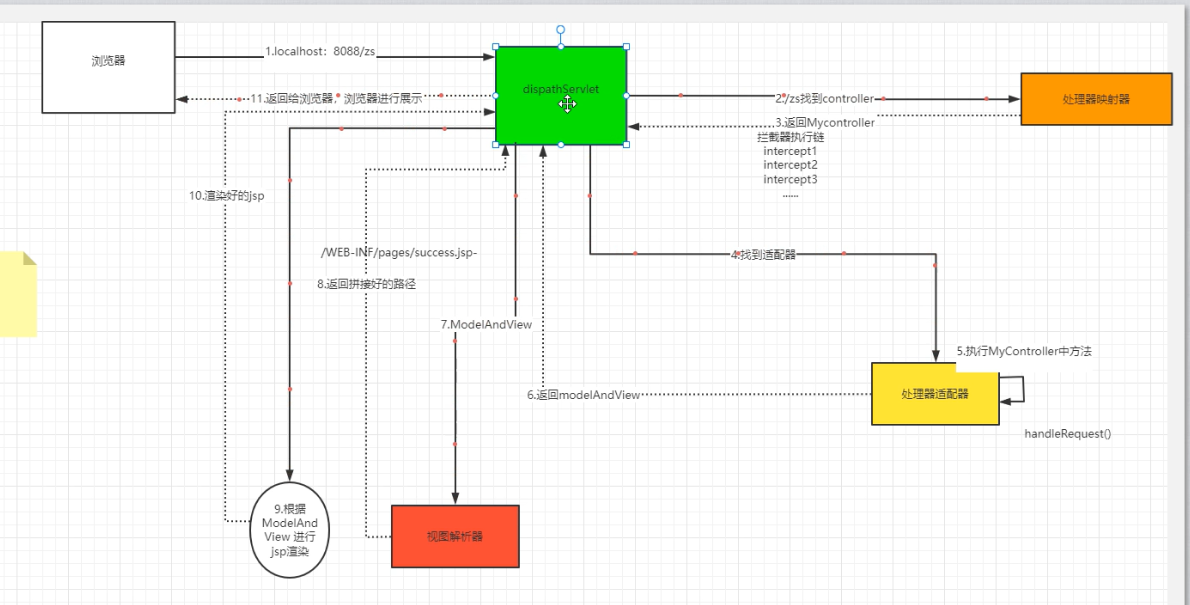
处理器():
作用:前端控制器接收到请求,解析uri,HandlerMapping负责查找Handler处理器对象.(前后端的桥梁)
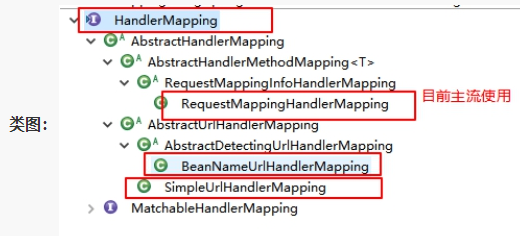
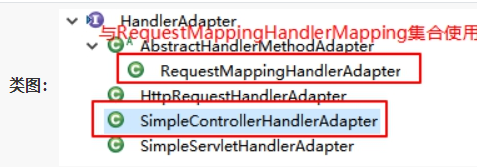
ModelAndView模型与视图对象
实战开始:
(这次写完发现了一个很白痴的错误,太久没写web项目不小心把lib放到项目下面导致一直报404浪费了快两小时排错,记得lib包要放到webinf下面)
1.搭建Web项目 略
2.lib包导入 略
3.controller层编写
package stu.adam.controller.impl;

import org.springframework.web.servlet.ModelAndView;
import org.springframework.web.servlet.mvc.Controller;

import javax.servlet.http.HttpServletRequest;
import javax.servlet.http.HttpServletResponse;

/**
 * @program: SpringMVC-1
 * @description:
 * @author: adam
 * @create: 2021-12-16 19:42
 **/


public class MsgControllerImpl implements Controller {


    @Override
    public ModelAndView handleRequest(HttpServletRequest httpServletRequest, HttpServletResponse httpServletResponse) throws Exception {

            ModelAndView mav=new ModelAndView();
            mav.setViewName("success");
            mav.addObject("msg","你好~我是控制层");
            return mav;


    }
}
springmvc.xml
<?xml version="1.0" encoding="UTF-8"?>
<beans xmlns="http://www.springframework.org/schema/beans"
       xmlns:xsi="http://www.w3.org/2001/XMLSchema-instance"
       xsi:schemaLocation="http://www.springframework.org/schema/beans http://www.springframework.org/schema/beans/spring-beans.xsd">
    <!--映射器-->
    <bean class="org.springframework.web.servlet.handler.BeanNameUrlHandlerMapping"/>
    <!--适配器-->
    <bean class="org.springframework.web.servlet.mvc.SimpleControllerHandlerAdapter"/>
    <!--视图解析器-->
    <bean class="org.springframework.web.servlet.view.InternalResourceViewResolver">
        <!--前缀-->
        <property name="prefix" value="/WEB-INF/pages/"/>
        <property name="suffix" value=".jsp"/>
    </bean>

    <!--spring 控制反转 bean给到容器中-->
    <bean name="/zs" class="stu.adam.controller.impl.MsgControllerImpl"/>


</beans>
web.xml
<?xml version="1.0" encoding="UTF-8"?>
<web-app xmlns="http://xmlns.jcp.org/xml/ns/javaee"
         xmlns:xsi="http://www.w3.org/2001/XMLSchema-instance"
         xsi:schemaLocation="http://xmlns.jcp.org/xml/ns/javaee http://xmlns.jcp.org/xml/ns/javaee/web-app_4_0.xsd"
         version="4.0">

    <servlet>
        <servlet-name>dispatcherServlet</servlet-name>
        <servlet-class>org.springframework.web.servlet.DispatcherServlet</servlet-class>

        <init-param>
            <param-name>contextConfigLocation</param-name>
            <param-value>classpath:springmvc.xml</param-value>
        </init-param>

        <load-on-startup>1</load-on-startup>

    </servlet>
    <servlet-mapping>
        <servlet-name>dispatcherServlet</servlet-name>
        <url-pattern>/</url-pattern>
    </servlet-mapping>

</web-app>
效果:
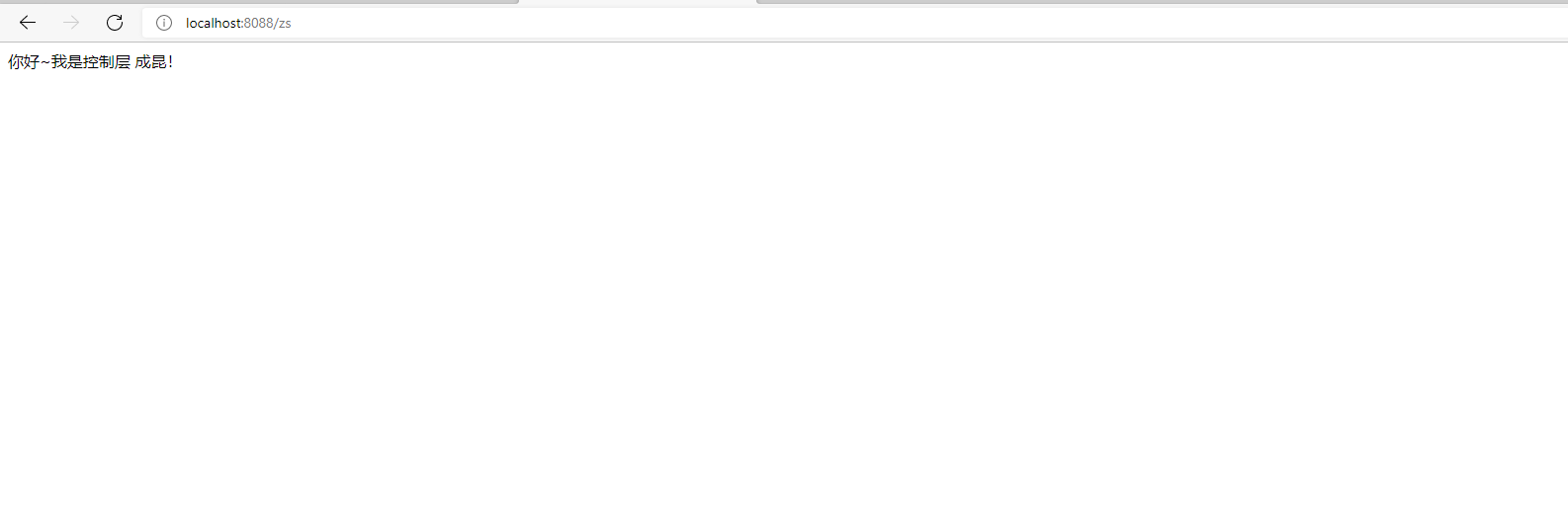
上面那个是基础版本,开始改进(指使用注解 以及springxml处理映射器和处理器适配器的导入包改改,然后就是换成包扫描)
impl2
package stu.adam.controller.impl;

import org.springframework.stereotype.Controller;
import org.springframework.web.bind.annotation.RequestMapping;
import org.springframework.web.servlet.ModelAndView;

/**
 * @program: SpringMVC-1
 * @description:
 * @author: adam
 * @create: 2021-12-16 21:21
 **/

@Controller
public class MsgControllerImpl2 {

    @RequestMapping("/find")
    public ModelAndView findList(){
            ModelAndView  modelAndView=new ModelAndView();
            modelAndView.setViewName("success");
            modelAndView.addObject("msg"," annotation select find!");
            return modelAndView;

        }

    @RequestMapping("/add")
    public ModelAndView addList(){
        ModelAndView  modelAndView=new ModelAndView();
        modelAndView.setViewName("success");
        modelAndView.addObject("msg"," annotation select add!");
        return modelAndView;
    }


}
springmvc.xml
<?xml version="1.0" encoding="UTF-8"?>
<beans xmlns="http://www.springframework.org/schema/beans"
       xmlns:xsi="http://www.w3.org/2001/XMLSchema-instance"
       xmlns:context="http://www.springframework.org/schema/context"
       xsi:schemaLocation="http://www.springframework.org/schema/beans http://www.springframework.org/schema/beans/spring-beans.xsd http://www.springframework.org/schema/context https://www.springframework.org/schema/context/spring-context.xsd">
   <!--包扫描-->
   <context:component-scan base-package="stu.adam.controller.impl"/>
    <!--映射器 变-->
    <bean class="org.springframework.web.servlet.mvc.method.annotation.RequestMappingHandlerMapping"/>
    <!--适配器 变-->
    <bean class="org.springframework.web.servlet.mvc.method.annotation.RequestMappingHandlerAdapter"/>
    <!--视图解析器-->
    <bean class="org.springframework.web.servlet.view.InternalResourceViewResolver">
        <!--前缀-->
        <property name="prefix" value="/WEB-INF/pages/"/>
        <property name="suffix" value=".jsp"/>
    </bean>

    <!--spring 控制反转 bean给到容器中-->
    <!--<bean name="/zs" class="stu.adam.controller.impl.MsgControllerImpl"/>-->


</beans>
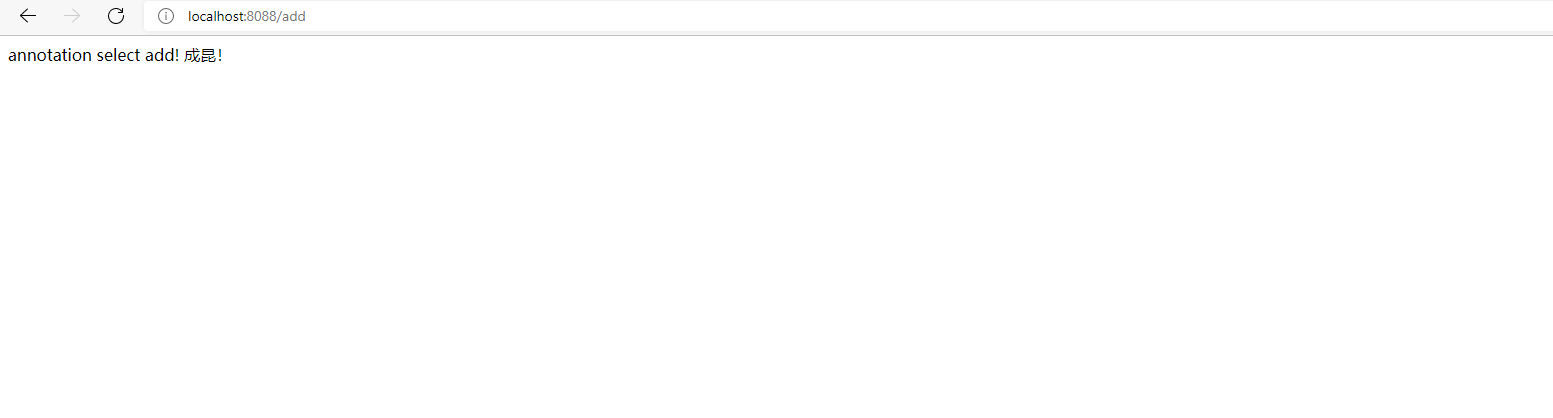
web.xml不变 ,说实话比上一种好用多了
效果:
mapping补充以及优化测试:
- @GetMapping :只支持Get请求
- @DeleteMapping:只支持delete请求
- @PutMapping:只支持put请求
- @PostMapping:只支持post请求
- @RequestMapping   : 支持   所有请求类型
接收请求类型(服务器类别,这些类别是汽车标签,TCP是汽车,服务器/客户端是运输公司)
HTTP只是个行为准则,而TCP才是GET和POST怎么实现的基本。
GET,
HEAD,
POST,
PUT,
PATCH,
DELETE,
OPTIONS,
TRACE;
//写到这看到了一篇好文,分享下,原博主(大概)链接:javaweb开发之get与post请求的区别 - 魔笛手 - 博客园 (cnblogs.com)
GET和POST是HTTP请求的两种基本方法,要说它们的区别,接触过WEB开发的人都能说出一二。

最直观的区别就是GET把参数包含在URL中,POST通过request body传递参数。

你可能自己写过无数个GET和POST请求,或者已经看过很多权威网站总结出的他们的区别,你非常清楚知道什么时候该用什么。

当你在面试中被问到这个问题,你的内心充满了自信和喜悦。


你轻轻松松的给出了一个“标准答案”:


GET在浏览器回退时是无害的,而POST会再次提交请求。
GET产生的URL地址可以被Bookmark,而POST不可以。
GET请求会被浏览器主动cache,而POST不会,除非手动设置。
GET请求只能进行url编码,而POST支持多种编码方式。
GET请求参数会被完整保留在浏览器历史记录里,而POST中的参数不会被保留。
GET请求在URL中传送的参数是有长度限制的,而POST么有。
对参数的数据类型,GET只接受ASCII字符,而POST没有限制。
GET比POST更不安全,因为参数直接暴露在URL上,所以不能用来传递敏感信息。
GET参数通过URL传递,POST放在Request body中。
(本标准答案参考自w3schools)

“很遗憾,这不是我们要的回答!”


请告诉我真相。。。

如果我告诉你GET和POST本质上没有区别你信吗?


让我们扒下GET和POST的外衣,坦诚相见吧!


GET和POST是什么?HTTP协议中的两种发送请求的方法。

HTTP是什么?HTTP是基于TCP/IP的关于数据如何在万维网中如何通信的协议。

HTTP的底层是TCP/IP。所以GET和POST的底层也是TCP/IP,也就是说,GET/POST都是TCP链接。GET和POST能做的事情是一样一样的。你要给GET加上request body,给POST带上url参数,技术上是完全行的通的。


那么,“标准答案”里的那些区别是怎么回事?

在我大万维网世界中,TCP就像汽车,我们用TCP来运输数据,它很可靠,从来不会发生丢件少件的现象。但是如果路上跑的全是看起来一模一样的汽车,那这个世界看起来是一团混乱,送急件的汽车可能被前面满载货物的汽车拦堵在路上,整个交通系统一定会瘫痪。为了避免这种情况发生,交通规则HTTP诞生了。HTTP给汽车运输设定了好几个服务类别,有GET, POST, PUT, DELETE等等,HTTP规定,当执行GET请求的时候,要给汽车贴上GET的标签(设置method为GET),而且要求把传送的数据放在车顶上(url中)以方便记录。如果是POST请求,就要在车上贴上POST的标签,并把货物放在车厢里。当然,你也可以在GET的时候往车厢内偷偷藏点货物,但是这是很不光彩;也可以在POST的时候在车顶上也放一些数据,让人觉得傻乎乎的。HTTP只是个行为准则,而TCP才是GET和POST怎么实现的基本。


但是,我们只看到HTTP对GET和POST参数的传送渠道(url还是requrest body)提出了要求。“标准答案”里关于参数大小的限制又是从哪来的呢?

在我大万维网世界中,还有另一个重要的角色:运输公司。不同的浏览器(发起http请求)和服务器(接受http请求)就是不同的运输公司。 虽然理论上,你可以在车顶上无限的堆货物(url中无限加参数)。但是运输公司可不傻,装货和卸货也是有很大成本的,他们会限制单次运输量来控制风险,数据量太大对浏览器和服务器都是很大负担。业界不成文的规定是,(大多数)浏览器通常都会限制url长度在2K个字节,而(大多数)服务器最多处理64K大小的url。超过的部分,恕不处理。如果你用GET服务,在request body偷偷藏了数据,不同服务器的处理方式也是不同的,有些服务器会帮你卸货,读出数据,有些服务器直接忽略,所以,虽然GET可以带request body,也不能保证一定能被接收到哦。

好了,现在你知道,GET和POST本质上就是TCP链接,并无差别。但是由于HTTP的规定和浏览器/服务器的限制,导致他们在应用过程中体现出一些不同。

你以为本文就这么结束了?


我们的大BOSS还等着出场呢。。。

这位BOSS有多神秘?当你试图在网上找“GET和POST的区别”的时候,那些你会看到的搜索结果里,从没有提到他。他究竟是什么呢。。。

GET和POST还有一个重大区别,简单的说:

GET产生一个TCP数据包;POST产生两个TCP数据包。

长的说:

对于GET方式的请求,浏览器会把http header和data一并发送出去,服务器响应200(返回数据);

而对于POST,浏览器先发送header,服务器响应100 continue,浏览器再发送data,服务器响应200 ok(返回数据)。

也就是说,GET只需要汽车跑一趟就把货送到了,而POST得跑两趟,第一趟,先去和服务器打个招呼“嗨,我等下要送一批货来,你们打开门迎接我”,然后再回头把货送过去。

因为POST需要两步,时间上消耗的要多一点,看起来GET比POST更有效。因此Yahoo团队有推荐用GET替换POST来优化网站性能。但这是一个坑!跳入需谨慎。为什么?

1. GET与POST都有自己的语义,不能随便混用。

2. 据研究,在网络环境好的情况下,发一次包的时间和发两次包的时间差别基本可以无视。而在网络环境差的情况下,两次包的TCP在验证数据包完整性上,有非常大的优点。

3. 并不是所有浏览器都会在POST中发送两次包,Firefox就只发送一次。
参数测试:
package stu.adam.controller.impl;

import org.springframework.stereotype.Controller;
import org.springframework.web.bind.annotation.*;
import org.springframework.web.servlet.ModelAndView;
import stu.adam.entity.MyUser;
import stu.adam.entity.MyUserList;
import stu.adam.entity.User;

import javax.xml.bind.SchemaOutputResolver;
import java.util.ArrayList;
import java.util.Arrays;
import java.util.List;
import java.util.Map;

import static com.sun.xml.internal.ws.api.model.wsdl.WSDLBoundOperation.ANONYMOUS.required;

/**
 * @program: SpringMVC-1
 * @description:
 * @author: adam
 * @create: 2021-12-16 21:21
 **/

@Controller
public class MsgControllerImpl2 {


    @RequestMapping("/find")
    public ModelAndView findList() {
        ModelAndView modelAndView = new ModelAndView();
        modelAndView.setViewName("success");
        modelAndView.addObject("msg", " annotation select find!");
        return modelAndView;

    }

    @GetMapping("/add")
    public ModelAndView addList() {
        ModelAndView modelAndView = new ModelAndView();
        modelAndView.setViewName("success");
        modelAndView.addObject("msg", " annotation select add!");
        return modelAndView;
    }


    /*
    * get和Post的区别
    * 最直观的区别就是GET把参数包含在URL中,POST通过request body传递参数。
    *
    *
GET在浏览器回退时是无害的,而POST会再次提交请求。
GET产生的URL地址可以被Bookmark,而POST不可以。
GET请求会被浏览器主动cache,而POST不会,除非手动设置。
GET请求只能进行url编码,而POST支持多种编码方式。
GET请求参数会被完整保留在浏览器历史记录里,而POST中的参数不会被保留。
GET请求在URL中传送的参数是有长度限制的,而POST么有。
对参数的数据类型,GET只接受ASCII字符,而POST没有限制。
GET比POST更不安全,因为参数直接暴露在URL上,所以不能用来传递敏感信息。
GET参数通过URL传递,POST放在Request body中。
(本标准答案参考自w3schools)
    * */

    //这么写会出bug
    @DeleteMapping("/delete")
    public ModelAndView deleteList() {
        ModelAndView modelAndView = new ModelAndView();
        modelAndView.setViewName("success");
        modelAndView.addObject("msg", " annotation select delete!");
        return modelAndView;
    }

    //这么写会出bug
    @PutMapping(value = "/update")
    public ModelAndView updateList() {
        ModelAndView modelAndView = new ModelAndView();
        modelAndView.setViewName("success");
        modelAndView.addObject("msg", "annotation select update!");
        return modelAndView;
    }

    //这么写会出bug 现在暂时不行
    //对于GET方式的请求,浏览器会把http header和data一并发送出去,服务器响应200(返回数据);
    //而对于POST,浏览器先发送header,服务器响应100 continue,浏览器再发送data,服务器响应200 ok(返回数据)。
    @RequestMapping(value = "/update2", method = RequestMethod.PUT)
    public ModelAndView updateList2() {
        ModelAndView modelAndView = new ModelAndView();
        modelAndView.setViewName("success");
        modelAndView.addObject("msg", "annotation select update!");
        return modelAndView;
    }

    //===========================================================================================================================
    /*
    * 参数类型接收
    * */

//    基本参数类型
    @GetMapping("/common")
    public ModelAndView CsTest(String username){
        ModelAndView modelAndView=new ModelAndView();
        modelAndView.addObject("msg",username);
        modelAndView.setViewName("success");
        return modelAndView;
    }


    //基本参数类型 别名注解使用
    @GetMapping("/common2")
    public ModelAndView CsTest2(@RequestParam("asd1") String username){
        ModelAndView modelAndView=new ModelAndView();
        modelAndView.addObject("msg",username);
        modelAndView.setViewName("success");
        return modelAndView;
    }


    //传数组
    @GetMapping("/array")
    public ModelAndView arraytest(String[] array1){
        ModelAndView modelAndView = new ModelAndView();
        modelAndView.addObject("msg", Arrays.toString(array1));
        modelAndView.setViewName("success");
        return modelAndView;
    }

    //传对象(自定义类型)
    @GetMapping("Object")
    public ModelAndView arraytest(User user){
        ModelAndView modelAndView = new ModelAndView();
        modelAndView.addObject("msg",user);
        modelAndView.setViewName("success");
        return modelAndView;
    }

    //传对象(包装自定义类型2 就是套娃 对象里面套对象)
    @GetMapping("Object2")
    public ModelAndView arraytest2(MyUser user){
        ModelAndView modelAndView = new ModelAndView();
        modelAndView.addObject("msg",user);
        modelAndView.setViewName("success");
        return modelAndView;
    }

    //传list集合
    @GetMapping("list")
    public ModelAndView list(MyUserList userlist){
        System.out.println(userlist);
        System.out.println(userlist.toString());

        ModelAndView modelAndView = new ModelAndView();
        modelAndView.addObject("msg",userlist);
        modelAndView.setViewName("success");

        return modelAndView;
    }


    //传map
    @GetMapping("map")
    public ModelAndView map(stu.adam.entity.Map map){
        ModelAndView modelAndView = new ModelAndView();
        modelAndView.addObject("msg",map);
        modelAndView.setViewName("success");
        return modelAndView;
    }


    /**/


    //传json
//    使用Postmapping会出错
//    @PostMapping("/json")
//    @GetMapping(value = "/json")
 @RequestMapping(value = "json",method = RequestMethod.GET)
    public ModelAndView json(@RequestBody User user){

        System.out.println("user====>" +user);
        ModelAndView modelAndView = new ModelAndView();
        modelAndView.setViewName("success");
        modelAndView.addObject("msg",user);
        return modelAndView;
    }

}
太多了 懒得写了:
<%--
  Created by IntelliJ IDEA.
  User: Administrator
  Date: 2021/12/16
  Time: 19:50
  To change this template use File | Settings | File Templates.
--%>
<%@ page contentType="text/html;charset=UTF-8" language="java" %>
<html>
<head>
    <title>Title</title>
</head>
<body>
<h1 style="background-color: #ffa2d9">我是success页面</h1>
${msg}

<form action="/common" method="get">
姓名:<input type="text" name="asd">
<input type="submit" value="commit">
</form>


<%--<form action="/common" method="get">--%>
<%--姓名:<input type="text" name="asd">--%>
    <%--<input type="submit" value="commit">--%>
<%--</form>--%>

<%--<form action="/common2" method="get">--%>
    <%--姓名:<input type="text" name="asd1">--%>
    <%--<input type="submit" value="commit">--%>
<%--</form>--%>

<%--<form action="/array" method="get">--%>
    <%--兴趣:--%>
    <%--<input type="text" name="array1" value="1 篮球">--%>
    <%--<input type="text" name="array1" value="2 足球">--%>
    <%--<input type="text" name="array1" value="3 乒乓球">--%>
    <%--<input type="submit" value="commit">--%>
<%--</form>--%>

<%--<form action="/Object" method="get">--%>
    <%--用户:--%>
    <%--<input type="text" name="id" >--%>
    <%--<input type="text" name="username" >--%>
    <%--<input type="text" name="pwd" >--%>
    <%--<input type="submit" value="commit">--%>
<%--</form>--%>


<%--<form action="/Object2" method="get">--%>
<%--用户:--%>
<%--<input type="text" name="User.id" >--%>
<%--<input type="text" name="User.username" >--%>
<%--<input type="text" name="User.pwd" >--%>
<%--<input type="submit" value="commit">--%>
<%--</form>--%>


<%--<form action="/list" method="get">--%>
<%--用户list:--%>
<%--<input type="text" name="userlist[0].id" >--%>
<%--<input type="text" name="userlist[0].username" >--%>
<%--<input type="text" name="userlist[0].pwd" >--%>

    <%--<input type="text" name="userlist[1].id" >--%>
    <%--<input type="text" name="userlist[1].username" >--%>
    <%--<input type="text" name="userlist[1].pwd" >--%>
<%--<input type="submit" value="commit">--%>
<%--</form>--%>

<%--<form action="/map" method="get">--%>
<%--用户:--%>
<%--<input type="text" name="map['id']" >--%>
<%--<input type="text" name="map['name']" >--%>
<%--<input type="text" name="map['qwe']" >--%>
<%--<input type="submit" value="commit">--%>
<%--</form>--%>

<%--<form action="/json" method="get">--%>
<%--123--%>

<%--</form>--%>


</body>
</html>
package com.javasm.springmvc.controller;

import com.javasm.springmvc.entity.*;
import org.springframework.stereotype.Controller;
import org.springframework.web.bind.annotation.*;
import org.springframework.web.servlet.ModelAndView;

import java.io.UnsupportedEncodingException;
import java.util.Arrays;
import java.util.Map;

/**
 * @Author:liulei
 * @Version:1.0
 * @Date:2021/12/16-11:38
 * @Since:jdk1.8
 * @Description:
 */
@Controller
public class SecondController {

    //   /zs

    @RequestMapping("/select")
    public ModelAndView findList(String username,@RequestParam("userage") Integer age) throws UnsupportedEncodingException {

//        String s = new String(username.getBytes("ISO-8859-1"), "utf-8");

        System.out.println("username==="+username);
        //age不能接收到,因为与 前端传过来的 userage 不一致,封装不上
        //springMVC帮我们自动封装了接收参数,但是要求 后台的接收参数名与前端传过来的变量名一致
        System.out.println("userage===="+age);
        ModelAndView modelAndView = new ModelAndView();
        modelAndView.setViewName("success");
        modelAndView.addObject("msg","springMVC 优化 select   "+username+"---------"+age);

        return modelAndView;
    }

    @GetMapping("/add")
    public ModelAndView add(){

        ModelAndView modelAndView = new ModelAndView();
        modelAndView.setViewName("success");
        modelAndView.addObject("msg","springMVC 优化 add");

        return modelAndView;
    }

    @PutMapping("/update")
    public ModelAndView update(){

        ModelAndView modelAndView = new ModelAndView();
        modelAndView.setViewName("success");
        modelAndView.addObject("msg","springMVC 优化 update");

        return modelAndView;
    }
    @DeleteMapping("/delete")
    public ModelAndView delete(){

        ModelAndView modelAndView = new ModelAndView();
        modelAndView.setViewName("success");
        modelAndView.addObject("msg","springMVC 优化 delete");

        return modelAndView;
    }
    //使用 @RequestMapping,只接收post请求
    @RequestMapping(value = "/addUser",method = RequestMethod.POST)
    public ModelAndView addUser(){

        ModelAndView modelAndView = new ModelAndView();
        modelAndView.setViewName("success");
        modelAndView.addObject("msg","springMVC 优化   addUser");

        return modelAndView;
    }


    //使用 @RequestMapping,只接收post请求
    @RequestMapping(value = "/updateUser",method = RequestMethod.PUT)
    public ModelAndView updateUser(){

        ModelAndView modelAndView = new ModelAndView();
        modelAndView.setViewName("success");
        modelAndView.addObject("msg","springMVC 优化   updateUser");

        return modelAndView;
    }


    @GetMapping("/array")
    public ModelAndView array(@RequestParam("hobby") String [] hobby1){
        System.out.println("hobby==="+Arrays.toString(hobby1));
        //age不能接收到,因为与 前端传过来的 userage 不一致,封装不上
        //springMVC帮我们自动封装了接收参数,但是要求 后台的接收参数名与前端传过来的变量名一致
        ModelAndView modelAndView = new ModelAndView();
        modelAndView.setViewName("success");
        modelAndView.addObject("msg","springMVC 优化 array===   "+Arrays.toString(hobby1));

        return modelAndView;
    }
    @GetMapping("/dilraba")
    public ModelAndView dilraba(Dilraba dilraba) throws UnsupportedEncodingException {
//        String name = dilraba.getName();
//        String name1 = new String(name.getBytes("ISO-8859-1"), "utf-8");

        System.out.println("dilraba==="+dilraba);
        //age不能接收到,因为与 前端传过来的 userage 不一致,封装不上
        //springMVC帮我们自动封装了接收参数,但是要求 后台的接收参数名与前端传过来的变量名一致
        ModelAndView modelAndView = new ModelAndView();
        modelAndView.setViewName("success");
        modelAndView.addObject("msg","springMVC 优化 dilraba===   "+dilraba);

        return modelAndView;
    }
   @GetMapping("/myDilraba")
    public ModelAndView myDilraba(MyDilraba myDilraba){

        System.out.println("myDilraba==="+myDilraba);
        //age不能接收到,因为与 前端传过来的 userage 不一致,封装不上
        //springMVC帮我们自动封装了接收参数,但是要求 后台的接收参数名与前端传过来的变量名一致
        ModelAndView modelAndView = new ModelAndView();
        modelAndView.setViewName("success");
        modelAndView.addObject("msg","springMVC 优化 myDilraba===   "+myDilraba);

        return modelAndView;
    }
    @GetMapping("/myCustomer")
    public ModelAndView myCustomer(MyCustomer myCustomer){

        System.out.println("myCustomer==="+myCustomer);
        //age不能接收到,因为与 前端传过来的 userage 不一致,封装不上
        //springMVC帮我们自动封装了接收参数,但是要求 后台的接收参数名与前端传过来的变量名一致
        ModelAndView modelAndView = new ModelAndView();
        modelAndView.setViewName("success");
        modelAndView.addObject("msg","springMVC 优化 myCustomer===   "+myCustomer);

        return modelAndView;
    }


    @GetMapping("/myMap")
    public ModelAndView myMap(MyMap myMap){

        System.out.println("myMap==="+myMap);
        //age不能接收到,因为与 前端传过来的 userage 不一致,封装不上
        //springMVC帮我们自动封装了接收参数,但是要求 后台的接收参数名与前端传过来的变量名一致
        ModelAndView modelAndView = new ModelAndView();
        modelAndView.setViewName("success");
        modelAndView.addObject("msg","springMVC 优化 myMap===   "+myMap);

        return modelAndView;
    }

    @PostMapping("/user")
    // User user 接收的是 key=value 的,不能接收json格式

    //接收json格式 :因为json格式的字符串在 请求体里,所以加@RequestBody 去接收
    public ModelAndView user(@RequestBody User user){

        System.out.println("user==="+user);
        //age不能接收到,因为与 前端传过来的 userage 不一致,封装不上
        //springMVC帮我们自动封装了接收参数,但是要求 后台的接收参数名与前端传过来的变量名一致
        ModelAndView modelAndView = new ModelAndView();
        modelAndView.setViewName("success");
        modelAndView.addObject("msg","springMVC 优化 user===   "+user);

        return modelAndView;
    }

    @PostMapping("/userMap")
    // User user 接收的是 key=value 的,不能接收json格式

    //接收json格式 :因为json格式的字符串在 请求体里,所以加@RequestBody 去接收
    public ModelAndView map(@RequestBody Map<String,Object> map){

        System.out.println("map==="+map);
        //age不能接收到,因为与 前端传过来的 userage 不一致,封装不上
        //springMVC帮我们自动封装了接收参数,但是要求 后台的接收参数名与前端传过来的变量名一致
        ModelAndView modelAndView = new ModelAndView();
        modelAndView.setViewName("success");
        modelAndView.addObject("msg","springMVC 优化 map===   "+map);

        return modelAndView;
    }

}
------------恢复内容结束------------

 浙公网安备 33010602011771号