
10_IO
1、基本概念和IO入门
对于任何程序设计语言而言,输入输出(Input/Output)系统都是非常核心的功能。程序运行需要数据,数据的获取往往需要跟外部系统进行通信,外部系统可能是文件、数据库、其他程序、网络、IO设备等等。外部系统比较复杂多变,那么我们有必要通过某种手段进行抽象、屏蔽外部的差异,从而实现更加便捷的编程。
- 输入(Input)指的是:可以让程序从外部系统获得数据(核心含义是“读”,读取外部数据)。常见的应用:
- 读取硬盘上的文件内容到程序。例如:播放器打开一个视频文件、word打开一个doc文件。
- 读取网络上某个位置内容到程序。例如:浏览器中输入网址后,打开该网址对应的网页内容;下载网络上某个网址的文件。
- 读取数据库系统的数据到程序。
- 读取某些硬件系统数据到程序。例如:车载电脑读取雷达扫描信息到程序;温控系统等。
- 输出(Output)指的是:程序输出数据给外部系统从而可以操作外部系统(核心含义是“写”,将数据写出到外部系统)。常见的应用有:
- 将数据写到硬盘中。例如:我们编辑完一个word文档后,将内容写到硬盘上进行保存。
- 将数据写到数据库系统中。例如:我们注册一个网站会员,实际就是后台程序向数据库中写入一条记录。
- 将数据写到某些硬件系统中。例如:导弹系统导航程序将新的路径输出到飞控子系统,飞控子系统根据数据修正飞行路径。
java.io包为我们提供了相关的API,实现了对所有外部系统的输入输出操作,这就是我们这章所要学习的技术。
1.1、数据源
-
数据源data source,提供数据的原始媒介。常见的数据源有:数据库、文件、其他程序、内存、网络连接、IO设备。
-
数据源分为:源设备、目标设备。
- 源设备:为程序提供数据,一般对应输入流。
- 目标设备:程序数据的目的地,一般对应输出流。
1.2、流的概念
-
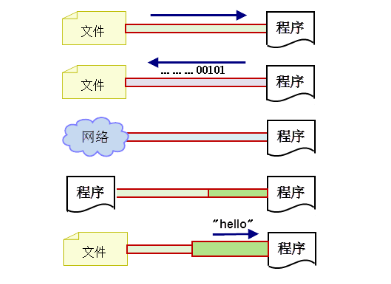
流是一个抽象、动态的概念,是一连串连续动态的数据集合。
-
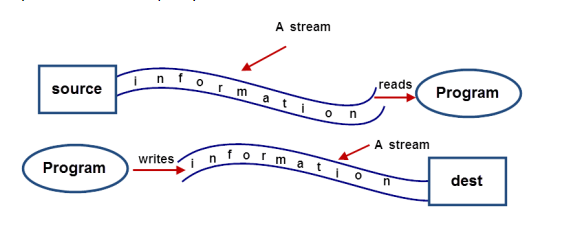
对于输入流而言,数据源就像水箱,流(stream)就像水管中流动着的水流,程序就是我们最终的用户。我们通过流(A Stream)将数据源(Source)中的数据(information)输送到程序(Program)中。
-
对于输出流而言,目标数据源就是目的地(dest),我们通过流(A Stream)将程序(Program)中的数据(information)输送到目的数据源(dest)中。
-
菜鸟雷区
输入/输出流的划分是相对程序而言的,并不是相对数据源。
1.3、第一个简单的IO流程序及深入理解
当程序需要读取数据源的数据时,就会通过IO流对象开启一个通向数据源的流,通过这个IO流对象的相关方法可以顺序读取数据源中的数据。
-
使用流读取文件内容(不规范的写法,仅用于测试)
public class Test1 {
    public static void main(String[] args) {
        try {
            //创建输入流
            FileInputStream fis = new FileInputStream("d:/a.txt"); // 文件内容是:abc
            //一个字节一个字节的读取数据
            int s1 = fis.read(); // 打印输入字符a对应的ascii码值97
            int s2 = fis.read(); // 打印输入字符b对应的ascii码值98
            int s3 = fis.read(); // 打印输入字符c 对应的ascii码值99
            int s4 = fis.read(); // 由于文件内容已经读取完毕,返回-1
            System.out.println(s1);
            System.out.println(s2);
            System.out.println(s3);
            System.out.println(s4);
            // 流对象使用完,必须关闭!不然,总占用系统资源,最终会造成系统崩溃!
            fis.close();
        } catch (Exception e) {
            e.printStackTrace();
        }
    }
}
输出结果:
97
98
99
-1
通过上面的示例,我们要注意以下几点:
- 在示例中我们读取的文件内容是已知的,因此可以使用固定次数的“int s= fis.read();”语句读取内容,但是在实际开发中通常我们根本不知道文件的内容,因此我们在读取的时候需要配合while循环使用。
- 为了保证出现异常后流的正常关闭,通常要将流的关闭语句要放到finally语句块中,并且要判断流是不是null。
-
使用流读取文件内容(经典代码,一定要掌握)
public class Test2 {
    public static void main(String[] args) {
        FileInputStream fis = null;
        try {
            fis = new FileInputStream("d:/a.txt"); // 内容是:abc
            StringBuilder sb = new StringBuilder();
            int temp;
            //当temp等于-1时,表示已经到了文件结尾,停止读取
            while ((temp = fis.read()) != -1) {
                sb.append((char) temp);
            }
            System.out.println(sb);
        } catch (Exception e) {
            e.printStackTrace();
        } finally {
            try {
                //这种写法,保证了即使遇到异常情况,也会关闭流对象。
                if (fis != null) {
                    fis.close();
                }
            } catch (IOException e) {
                e.printStackTrace();
            }
        }
    }
}
输出结果:
abc如上代码是一段非常典型的IO流代码,其他流对象的使用也基本是同样的模式!
1.4、Java中流的概念细分
-
按流的方向分类:
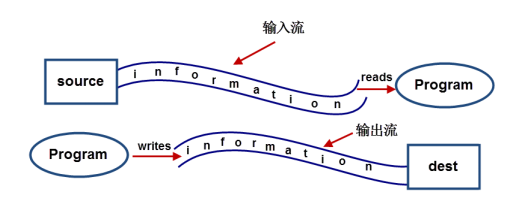
- 输入流:数据流向是数据源到程序(以InputStream、Reader结尾的流)。
- 输出流:数据流向是程序到目的地(以OutPutStream、Writer结尾的流)。
-
按处理的数据单元分类:
- 字节流:以字节为单位获取数据,命名上以Stream结尾的流一般是字节流,如FileInputStream、FileOutputStream。
- 字符流:以字符为单位获取数据,命名上以Reader/Writer结尾的流一般是字符流,如FileReader、FileWriter。
-
按处理对象不同分类:
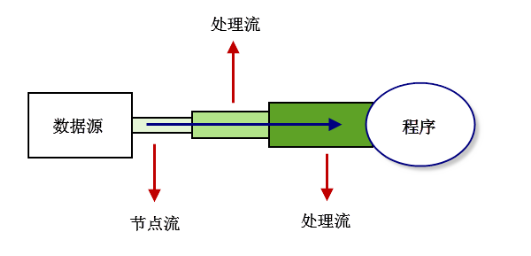
- 节点流:可以直接从数据源或目的地读写数据,如FileInputStream、FileReader、DataInputStream等。
- 处理流:不直接连接到数据源或目的地,是”处理流的流”。通过对其他流的处理提高程序的性能,如BufferedInputStream、BufferedReader等。处理流也叫包装流。
节点流处于IO操作的第一线,所有操作必须通过它们进行;处理流可以对节点流进行包装,提高性能或提高程序的灵活性。
1.5、Java中IO流类的体系
Java为我们提供了多种多样的IO流,我们可以根据不同的功能及性能要求挑选合适的IO流,如图所示,为Java中IO流类的体系。
注:这里只列出常用的类,详情可以参考JDK API文档。粗体标注为常用!
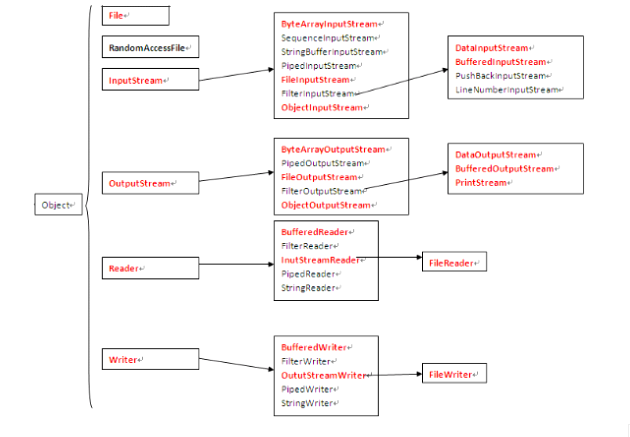
从上图发现,很多流都是成对出现的,比如:FileInputStream/FileOutputStream,显然是对文件做输入和输出操作的。我们下面简单做个总结:
-
InputStream/OutputStream
字节流的抽象类。
-
Reader/Writer
字符流的抽象类。
-
FileInputStream/FileOutputStream
节点流:以字节为单位直接操作“文件”。
-
ByteArrayInputStream/ByteArrayOutputStream
节点流:以字节为单位直接操作“字节数组对象”。
-
ObjectInputStream/ObjectOutputStream
处理流:以字节为单位直接操作“对象”。
-
DataInputStream/DataOutputStream
处理流:以字节为单位直接操作“基本数据类型与字符串类型”。
-
FileReader/FileWriter
节点流:以字符为单位直接操作“文本文件”(注意:只能读写文本文件)。
-
BufferedReader/BufferedWriter
处理流:将Reader/Writer对象进行包装,增加缓存功能,提高读写效率。
-
BufferedInputStream/BufferedOutputStream
处理流:将InputStream/OutputStream对象进行包装,增加缓存功能,提高 读写效率。
-
InputStreamReader/OutputStreamWriter
处理流:将字节流对象转化成字符流对象。
-
PrintStream
处理流:将OutputStream进行包装,可以方便地输出字符,更加灵活。
- 上面的解释,一句话就点中了流的核心作用。大家在后面学习的时候,用心体会。
1.6、四大IO抽象类
InputStream/OutputStream和Reader/writer类是所有IO流类的抽象父类,我们有必要简单了解一下这个四个抽象类的作用。然后,通过它们具体的子类熟悉相关的用法。
-
InputStream
此抽象类是表示字节输入流的所有类的父类。InputSteam是一个抽象类,它不可以实例化。 数据的读取需要由它的子类来实现。根据节点的不同,它派生了不同的节点流子类 。继承自InputSteam的流都是用于向程序中输入数据,且数据的单位为字节(8 bit)。
常用方法:
- int read():读取一个字节的数据,并将字节的值作为int类型返回(0-255之间的一个值)。如果未读出字节则返回-1(返回值为-1表示读取结束)。
- void close():关闭输入流对象,释放相关系统资源。
-
OutputStream
此抽象类是表示字节输出流的所有类的父类。输出流接收输出字节并将这些字节发送到某个目的地。
常用方法:
- void write(int n):向目的地中写入一个字节。
- void close():关闭输出流对象,释放相关系统资源。
-
Reader
Reader用于读取的字符流抽象类,数据单位为字符。
常用方法:
- int read(): 读取一个字符的数据,并将字符的值作为int类型返回(0-65535之间的一个值,即Unicode值)。如果未读出字符则返回-1(返回值为-1表示读取结束)。
- void close() : 关闭流对象,释放相关系统资源。
-
Writer
Writer用于写入的字符流抽象类,数据单位为字符。
常用方法:
- void write(int n): 向输出流中写入一个字符。
- void close() : 关闭输出流对象,释放相关系统资源。
2、各种流的详细介绍
2.1、文件字节流
-
FileInputStream通过字节的方式读取文件,适合读取所有类型的文件(图像、视频、文本文件等)。Java也提供了FileReader专门读取文本文件。
-
FileOutputStream 通过字节的方式写数据到文件中,适合所有类型的文件。Java也提供了FileWriter专门写入文本文件。
-
将文件内容读取到程序中
public class Test2 { public static void main(String[] args) { FileInputStream fis = null; try { fis = new FileInputStream("d:/a.txt"); // 内容是:abc StringBuilder sb = new StringBuilder(); int temp; //当temp等于-1时,表示已经到了文件结尾,停止读取 while ((temp = fis.read()) != -1) { sb.append((char) temp); } System.out.println(sb); } catch (Exception e) { e.printStackTrace(); } finally { try { //这种写法,保证了即使遇到异常情况,也会关闭流对象。 if (fis != null) { fis.close(); } } catch (IOException e) { e.printStackTrace(); } } } } -
将字符串/字节数组的内容写入到文件中
public class Test3 {
    public static void main(String[] args) {
        FileOutputStream fos = null;
        String string = "你好,世界!";
        try {
            // true表示内容会追加到文件末尾;false表示重写整个文件内容。
            fos = new FileOutputStream("d:/a.txt", true);
            //该方法是直接将一个字节数组写入文件中; 而write(int n)是写入一个字节
            fos.write(string.getBytes());
        } catch (Exception e) {
            e.printStackTrace();
        } finally {
            try {
                if (fos != null) {
                    fos.close();
                }
            } catch (IOException e) {
                e.printStackTrace();
            }
        }
    }
}
执行结果:
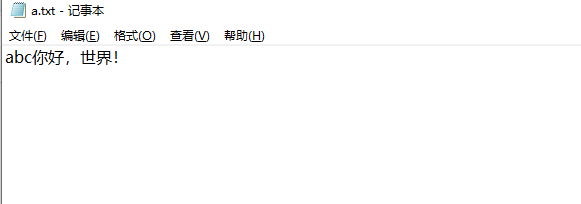
上面的示例中,用到一个write方法:void write(byte[ ] b),该方法不再一个字节一个字节地写入,而是直接写入一个字节数组;另外其还有一个重载的方法:void write(byte[ ] b, int off, int length),这个方法也是写入一个字节数组,但是我们程序员可以指定从字节数组的哪个位置开始写入,写入的长度是多少。
-
利用文件流实现文件的复制
public class Test2 {
    public static void main(String[] args) {
        FileInputStream fis = null;
        try {
            fis = new FileInputStream("d:/a.txt"); // 内容是:abc
            StringBuilder sb = new StringBuilder();
            int temp;
            //当temp等于-1时,表示已经到了文件结尾,停止读取
            while ((temp = fis.read()) != -1) {
                sb.append((char) temp);
            }
            System.out.println(sb);
        } catch (Exception e) {
            e.printStackTrace();
        } finally {
            try {
                //这种写法,保证了即使遇到异常情况,也会关闭流对象。
                if (fis != null) {
                    fis.close();
                }
            } catch (IOException e) {
                e.printStackTrace();
            }
        }
    }
}
执行结果:


-
注意
在使用文件字节流时,我们需要注意以下两点:
- 为了减少对硬盘的读写次数,提高效率,通常设置缓存数组。相应地,读取时使用的方法为:read(byte[] b);写入时的方法为:write(byte[ ] b, int off, int length)。
- 程序中如果遇到多个流,每个流都要单独关闭,防止其中一个流出现异常后导致其他流无法关闭的情况。
2.2、文件字符流
-
前面介绍的文件字节流可以处理所有的文件,但是字节流不能很好的处理Unicode字符,经常会出现“乱码”现象。所以,我们处理文本文件,一般可以使用文件字符流,它以字符为单位进行操作。
-
使用FileReader与FileWriter实现文本文件的复制
public class Test5 {
    public static void main(String[] args) {
        // 写法和使用Stream基本一样。只不过,读取时是读取的字符。
        FileReader fr = null;
        FileWriter fw = null;
        int len;
        try {
            fr = new FileReader("d:/a.txt");
            fw = new FileWriter("d:/c.txt");
            //为了提高效率,创建缓冲用的字符数组
            char[] buffer = new char[1024];
            //边读边写
            while ((len = fr.read(buffer)) != -1) {
                fw.write(buffer, 0, len);
            }
        } catch (IOException e) {
            e.printStackTrace();
        } finally {
            try {
                if (fw != null) {
                    fw.close();
                }
            } catch (IOException e) {
                e.printStackTrace();
            }
            try {
                if (fr != null) {
                    fr.close();
                }
            } catch (IOException e) {
                e.printStackTrace();
            }
        }
    }
}
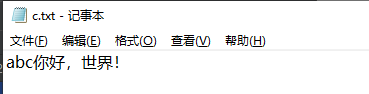
执行结果:

2.3、缓冲字节流
-
Java缓冲流本身并不具有IO流的读取与写入功能,只是在别的流(节点流或其他处理流)上加上缓冲功能提高效率,就像是把别的流包装起来一样,因此缓冲流是一种处理流(包装流)。
-
当对文件或者其他数据源进行频繁的读写操作时,效率比较低,这时如果使用缓冲流就能够更高效的读写信息。因为缓冲流是先将数据缓存起来,然后当缓存区存满后或者手动刷新时再一次性的读取到程序或写入目的地。
-
因此,缓冲流还是很重要的,我们在IO操作时记得加上缓冲流来提升性能。
-
BufferedInputStream和BufferedOutputStream这两个流是缓冲字节流,通过内部缓存数组来提高操作流的效率。
-
下面我们通过两种方式(普通文件字节流与缓冲文件字节流)实现一个视频文件的复制,来体会一下缓冲流的好处。
-
使用缓冲流实现文件的高效率复制
public class Test6 {
    public static void main(String[] args) {
        // 使用缓冲字节流实现复制
        long time1 = System.currentTimeMillis();
        copyFile1("D:/电影.mp4", "D:/电影1.mp4");
        long time2 = System.currentTimeMillis();
        System.out.println("缓冲字节流花费的时间为:" + (time2 - time1));

        // 使用普通字节流实现复制
        long time3 = System.currentTimeMillis();
        copyFile2("D:/电影.mp4", "D:/电影2.mp4");
        long time4 = System.currentTimeMillis();
        System.out.println("普通字节流花费的时间为:" + (time4 - time3));
    }

    /**缓冲字节流实现的文件复制的方法*/
    static void copyFile1(String src, String dec) {
        FileInputStream fis = null;
        BufferedInputStream bis = null;
        FileOutputStream fos = null;
        BufferedOutputStream bos = null;
        int temp;
        try {
            fis = new FileInputStream(src);
            fos = new FileOutputStream(dec);
            //使用缓冲字节流包装文件字节流,增加缓冲功能,提高效率
            //缓存区的大小(缓存数组的长度)默认是8192,也可以自己指定大小
            bis = new BufferedInputStream(fis);
            bos = new BufferedOutputStream(fos);
            while ((temp = bis.read()) != -1) {
                bos.write(temp);
            }
        } catch (Exception e) {
            e.printStackTrace();
        } finally {
            //注意:增加处理流后,注意流的关闭顺序!“后开的先关闭!”
            try {
                if (bos != null) {
                    bos.close();
                }
            } catch (IOException e) {
                e.printStackTrace();
            }
            try {
                if (bis != null) {
                    bis.close();
                }
            } catch (IOException e) {
                e.printStackTrace();
            }
            try {
                if (fos != null) {
                    fos.close();
                }
            } catch (IOException e) {
                e.printStackTrace();
            }
            try {
                if (fis != null) {
                    fis.close();
                }
            } catch (IOException e) {
                e.printStackTrace();
            }
        }
    }

    /**普通节流实现的文件复制的方法*/
    static void copyFile2(String src, String dec) {
        FileInputStream fis = null;
        FileOutputStream fos = null;
        int temp;
        try {
            fis = new FileInputStream(src);
            fos = new FileOutputStream(dec);
            while ((temp = fis.read()) != -1) {
                fos.write(temp);
            }
        } catch (Exception e) {
            e.printStackTrace();
        } finally {
            try {
                if (fos != null) {
                    fos.close();
                }
            } catch (IOException e) {
                e.printStackTrace();
            }
            try {
                if (fis != null) {
                    fis.close();
                }
            } catch (IOException e) {
                e.printStackTrace();
            }
        }
    }
}
输出结果:
缓冲字节流花费的时间为:29450 普通字节流花费的时间为:4585125 -
注意
- 在关闭流时,应该先关闭最外层的包装流,即“后开的先关闭”。
- 缓存区的大小默认是8192字节,也可以使用其它的构造方法自己指定大小。
-
2.4、缓冲字符流
-
BufferedReader/BufferedWriter增加了缓存机制,大大提高了读写文本文件的效率,同时,提供了更方便的按行读取的方法:readLine(); 处理文本时,我们一般可以使用缓冲字符流。
-
使用BufferedReader与BufferedWriter实现文本文件的复制
public class Test7 { public static void main(String[] args) { // 注:处理文本文件时,实际开发中可以用如下写法,简单高效!! FileReader fr = null; FileWriter fw = null; BufferedReader br = null; BufferedWriter bw = null; String tempString; try { fr = new FileReader("d:/a.txt"); fw = new FileWriter("d:/d.txt"); //使用缓冲字符流进行包装 br = new BufferedReader(fr); bw = new BufferedWriter(fw); //BufferedReader提供了更方便的readLine()方法,直接按行读取文本 //br.readLine()方法的返回值是一个字符串对象,即文本中的一行内容 while ((tempString = br.readLine()) != null) { //将读取的一行字符串写入文件中 bw.write(tempString); //下次写入之前先换行,否则会在上一行后边继续追加,而不是另起一行 bw.newLine(); } } catch (IOException e) { e.printStackTrace(); } finally { try { if (bw != null) { bw.close(); } } catch (IOException e1) { e1.printStackTrace(); } try { if (br != null) { br.close(); } } catch (IOException e1) { e1.printStackTrace(); } try { if (fw != null) { fw.close(); } } catch (IOException e) { e.printStackTrace(); } try { if (fr != null) { fr.close(); } } catch (IOException e) { e.printStackTrace(); } } } } -
注意
- readLine()方法是BufferedReader特有的方法,可以对文本文件进行更加方便的读取操作。
- 写入一行后要记得使用newLine()方法换行。
2.5、字节数组流
-
ByteArrayInputStream和ByteArrayOutputStream经常用在需要流和数组之间转化的情况!说白了,FileInputStream是把文件当做数据源。ByteArrayInputStream则是把内存中的”某个字节数组对象”当做数据源。
-
简单测试ByteArrayInputStream 的使用
public class Test8 {
    public static void main(String[] args) {
        //将字符串转变成字节数组
        byte[] b = "abcdefg".getBytes();
        test(b);
    }
    public static void test(byte[] b) {
        ByteArrayInputStream bais = null;
        StringBuilder sb = new StringBuilder();
        int temp ;
        //用于保存读取的字节数
        int num = 0;
        try {
            //该构造方法的参数是一个字节数组,这个字节数组就是数据源
            bais = new ByteArrayInputStream(b);
            while ((temp = bais.read()) != -1) {
                sb.append((char) temp);
                num++;
            }
            System.out.println(sb);
            System.out.println("读取的字节数:" + num);
        } finally {
            try {
                if (bais != null) {
                    bais.close();
                }
            } catch (IOException e) {
                e.printStackTrace();
            }
        }
    }
}
输出结果:
abcdefg
读取的字节数:7
2.6、数据流
-
数据流将“基本数据类型与字符串类型”作为数据源,从而允许程序以与机器无关的方式从底层输入输出流中操作Java基本数据类型与字符串类型。
-
DataInputStream和DataOutputStream提供了可以存取与机器无关的所有Java基础类型数据(如:int、double、String等)的方法。
-
DataInputStream和DataOutputStream是处理流,可以对其他节点流或处理流进行包装,增加一些更灵活、更高效的功能。
-
DataInputStream和DataOutputStream的使用
public class Test9 {
    public static void main(String[] args) {
        DataOutputStream dos = null;
        DataInputStream dis = null;
        FileOutputStream fos = null;
        FileInputStream fis = null;
        try {
            fos = new FileOutputStream("D:/data.txt");
            fis = new FileInputStream("D:/data.txt");
            //使用数据流对缓冲流进行包装,新增缓冲功能
            dos = new DataOutputStream(new BufferedOutputStream(fos));
            dis = new DataInputStream(new BufferedInputStream(fis));
            //将如下数据写入到文件中
            dos.writeChar('a');
            dos.writeInt(10);
            dos.writeDouble(Math.random());
            dos.writeBoolean(true);
            dos.writeUTF("你好,世界!");
            //手动刷新缓冲区:将流中数据写入到文件中
            dos.flush();
            //直接读取数据:读取的顺序要与写入的顺序一致,否则不能正确读取数据。
            System.out.println("char: " + dis.readChar());
            System.out.println("int: " + dis.readInt());
            System.out.println("double: " + dis.readDouble());
            System.out.println("boolean: " + dis.readBoolean());
            System.out.println("String: " + dis.readUTF());
        } catch (IOException e) {
            e.printStackTrace();
        } finally {
            try {
                if(dos!=null){
                    dos.close();
                }
            } catch (IOException e) {
                e.printStackTrace();
            }
            try {
                if(dis!=null){
                    dis.close();
                }
            } catch (IOException e) {
                e.printStackTrace();
            }
            try {
                if(fos!=null){
                    fos.close();
                }
            } catch (IOException e) {
                e.printStackTrace();
            }
            try {
                if(fis!=null){
                    fis.close();
                }
            } catch (IOException e) {
                e.printStackTrace();
            }
        }
    }
}
输出结果:
char: a int: 10 double: 0.2067302372543398 boolean: true String: 你好,世界! -
注意
使用数据流时,读取的顺序一定要与写入的顺序一致,否则不能正确读取数据。
2.7、对象流
-
我们前边学到的数据流只能实现对基本数据类型和字符串类型的读写,并不能读取对象(字符串除外),如果要对某个对象进行读写操作,我们需要学习一对新的处理流:ObjectInputStream/ObjectOutputStream。
-
ObjectInputStream/ObjectOutputStream是以“对象”为数据源,但是必须将传输的对象进行序列化与反序列化操作。
-
ObjectInputStream/ObjectOutputStream的使用
import java.io.*;
import java.util.Date;

public class Test10 {
    public static void main(String[] args) throws IOException, ClassNotFoundException {
        write();
        read();
    }

    /**
     * 使用对象输出流将数据写入文件
     */
    public static void write() {
        // 创建Object输出流,并包装缓冲流,增加缓冲功能
        OutputStream os = null;
        BufferedOutputStream bos = null;
        ObjectOutputStream oos = null;
        try {
            os = new FileOutputStream(new File("d:/test.txt"));
            bos = new BufferedOutputStream(os);
            oos = new ObjectOutputStream(bos);
            // 使用Object输出流
            //对象流也可以对基本数据类型进行读写操作
            oos.writeInt(12);
            oos.writeDouble(3.14);
            oos.writeChar('A');
            oos.writeBoolean(true);
            oos.writeUTF("你好,世界!");
            //对象流能够对对象数据类型进行读写操作
            //Date是系统提供的类,已经实现了序列化接口
            //如果是自定义类,则需要自己实现序列化接口
            oos.writeObject(new Date());
        } catch (IOException e) {
            e.printStackTrace();
        } finally {
            //关闭输出流
            if (oos != null) {
                try {
                    oos.close();
                } catch (IOException e) {
                    e.printStackTrace();
                }
            }
            if (bos != null) {
                try {
                    bos.close();
                } catch (IOException e) {
                    e.printStackTrace();
                }
            }
            if (os != null) {
                try {
                    os.close();
                } catch (IOException e) {
                    e.printStackTrace();
                }
            }
        }
    }

    /**
     * 使用对象输入流将数据读入程序
     */
    public static void read() {
        // 创建Object输入流
        InputStream is = null;
        BufferedInputStream bis = null;
        ObjectInputStream ois = null;
        try {
            is = new FileInputStream(new File("d:/test.txt"));
            bis = new BufferedInputStream(is);
            ois = new ObjectInputStream(bis);
            // 使用Object输入流按照写入顺序读取
            System.out.println(ois.readInt());
            System.out.println(ois.readDouble());
            System.out.println(ois.readChar());
            System.out.println(ois.readBoolean());
            System.out.println(ois.readUTF());
            System.out.println(ois.readObject().toString());
        } catch (ClassNotFoundException | IOException e) {
            e.printStackTrace();
        } finally {
            // 关闭Object输入流
            if (ois != null) {
                try {
                    ois.close();
                } catch (IOException e) {
                    e.printStackTrace();
                }
            }
            if (bis != null) {
                try {
                    bis.close();
                } catch (IOException e) {
                    e.printStackTrace();
                }
            }
            if (is != null) {
                try {
                    is.close();
                } catch (IOException e) {
                    e.printStackTrace();
                }
            }
        }
    }
}
输出结果:
12 3.14 A true 你好,世界! Wed Jan 20 23:55:36 CST 2021 -
注意
- 对象流不仅可以读写对象,还可以读写基本数据类型。
- 使用对象流读写对象时,该对象必须序列化与反序列化。
- 系统提供的类(如Date等)已经实现了序列化接口,自定义类必须手动实现序列化接口。
2.8、转换流
-
InputStreamReader/OutputStreamWriter用来实现将字节流转化成字符流。比如,如下场景:
-
System.in是字节流对象,代表键盘的输入,如果我们想按行接收用户的输入时,就必须用到缓冲字符流BufferedReader特有的方法readLine(),但是经过观察会发现在创建BufferedReader的构造方法的参数必须是一个Reader对象,这时候我们的转换流InputStreamReader就派上用场了。
-
而System.out也是字节流对象,代表输出到显示器,按行读取用户的输入后,并且要将读取的一行字符串直接显示到控制台,就需要用到字符流的write(String str)方法,所以我们要使用OutputStreamWriter将字节流转化为字符流。
-
-
使用InputStreamReader接收用户的输入,并输出到控制台
import java.io.*;

public class Test11 {
    public static void main(String[] args) {
        // 创建字符输入和输出流:使用转换流将字节流转换成字符流
        BufferedReader br = null;
        BufferedWriter bw = null;
        try {
            br = new BufferedReader(new InputStreamReader(System.in));
            bw = new BufferedWriter(new OutputStreamWriter(System.out));
            // 使用字符输入和输出流
            String str = br.readLine();
            // 一直读取,直到用户输入了exit为止
            while (!"exit".equals(str)) {
                // 写到控制台
                bw.write(str);
                bw.newLine();// 写一行后换行
                bw.flush();// 手动刷新
                // 再读一行
                str = br.readLine();
            }
        } catch (IOException e) {
            e.printStackTrace();
        } finally {
            // 关闭字符输入和输出流
            if (br != null) {
                try {
                    br.close();
                } catch (IOException e) {
                    e.printStackTrace();
                }
            }
            if (bw != null) {
                try {
                    bw.close();
                } catch (IOException e) {
                    e.printStackTrace();
                }
            }
        }
    }
}
执行过程:
hello, world!
hello, world!
你好,世界!
你好,世界!
再见
再见
exit
3、序列化和反序列化
3.1、序列化和反序列化的概念
- 当两个进程远程通信时,彼此可以发送各种类型的数据。 无论是何种类型的数据,都会以二进制序列的形式在网络上传送。比如,我们可以通过http协议发送字符串信息;我们也可以在网络上直接发送Java对象。发送方需要把这个Java对象转换为字节序列,才能在网络上传送;接收方则需要把字节序列再恢复为Java对象才能正常读取。
- 把Java对象转换为字节序列的过程称为对象的序列化。把字节序列恢复为Java对象的过程称为对象的反序列化。
- 对象序列化的作用有如下两种:
- 持久化: 把对象的字节序列永久地保存到硬盘上,通常存放在一个文件中,比如:休眠的实现。以后服务器session管理,hibernate将对象持久化实现。
- 网络通信:在网络上传送对象的字节序列。比如:服务器之间的数据通信、对象传递。
3.2、序列化涉及的类和接口
- ObjectOutputStream代表对象输出流,它的writeObject(Object obj)方法可对参数指定的obj对象进行序列化,把得到的字节序列写到一个目标输出流中。
- ObjectInputStream代表对象输入流,它的readObject()方法从一个源输入流中读取字节序列,再把它们反序列化为一个对象,并将其返回。
- 只有实现了Serializable接口的类的对象才能被序列化。 Serializable接口是一个空接口,只起到标记作用。
3.3、序列化/反序列化的步骤和实例
-
将Person类的实例进行序列化和反序列化
import java.io.*;

public class Test12 {
    public static void main(String[] args) {
        FileOutputStream fos = null;
        ObjectOutputStream oos = null;
        ObjectInputStream ois = null;
        FileInputStream fis = null;
        try {
            // 通过ObjectOutputStream将Person对象的数据写入到文件中,即序列化。
            Person person = new Person("张三", 20, true);
            // 序列化
            fos = new FileOutputStream("d:/c.txt");
            oos = new ObjectOutputStream(fos);
            oos.writeObject(person);
            oos.flush();
            // 反序列化
            fis = new FileInputStream("d:/c.txt");
            // 通过ObjectInputStream将文件中二进制数据反序列化成Person对象:
            ois = new ObjectInputStream(fis);
            Person p = (Person) ois.readObject();
            System.out.println(p);
        } catch (ClassNotFoundException | IOException e) {
            e.printStackTrace();
        } finally {
            if (oos != null) {
                try {
                    oos.close();
                } catch (IOException e) {
                    e.printStackTrace();
                }
            }
            if (fos != null) {
                try {
                    fos.close();
                } catch (IOException e) {
                    e.printStackTrace();
                }
            }
            if (ois != null) {
                try {
                    ois.close();
                } catch (IOException e) {
                    e.printStackTrace();
                }
            }
            if (fis != null) {
                try {
                    fis.close();
                } catch (IOException e) {
                    e.printStackTrace();
                }
            }
        }
    }
}

//Person类实现Serializable接口后,Person对象才能被序列化
class Person implements Serializable {
    // 添加序列化ID,它决定着是否能够成功反序列化!
    private static final long serialVersionUID = 1L;
    String name;
    int age;
    boolean isMan;

    public Person(String name, int age, boolean isMan) {
        this.name = name;
        this.age = age;
        this.isMan = isMan;
    }

    @Override
    public String toString() {
        return "Person [name=" + name + ", age=" + age + ", isMan=" + isMan + "]";
    }
}
输出结果:Person [name=张三, age=20, isMan=true]
-
注意
- static属性不参与序列化。
- 对象中的某些属性如果不想被序列化,不能使用static,而是使用transient修饰。
- 为了防止读和写的序列化ID不一致,一般指定一个固定的序列化ID。
4、IO流体系中装饰器模式
-
装饰器模式简介
- 装饰器模式是GOF23种设计模式中较为常用的一种模式。它可以实现对原有类的包装和装饰,使新的类具有更强的功能。
- 我这里有智能手机iphone, 我们可以通过加装投影组件,实现原有手机功能的扩展。这就是一种“装饰器模式”。 我们在未来给普通人加装“外骨骼”装饰,让普通人具有力扛千斤的能力,也是一种“装饰器模式”。
- 装饰器模式演示
public class Test13 {
    public static void main(String[] args) {
        Iphone phone = new Iphone("iphone30");
        phone.show();
        System.out.println("===============装饰后");
        TouyingPhone typhone = new TouyingPhone(phone);
        typhone.show();
    }
}

class Iphone {
    private String name;

    public Iphone(String name) {
        this.name = name;
    }
    public void show() {
        System.out.println("我是" + name + ",可以在屏幕上显示");
    }
}

class TouyingPhone {
    public Iphone phone;
    public TouyingPhone(Iphone p) {
        this.phone = p;
    }
    // 功能更强的方法
    public void show() {
        phone.show();
        System.out.println("还可以投影,在墙壁上显示");
    }
}
输出结果:
我是iphone30,可以在屏幕上显示 ===============装饰后 我是iphone30,可以在屏幕上显示 还可以投影,在墙壁上显示 -
IO流体系中大量使用了装饰器模式,让流具有更强的功能、更强的灵活性。比如:
FileInputStream fis = new FileInputStream(src);
BufferedInputStream bis = new BufferedInputStream(fis);
显然BufferedInputStream装饰了原有的FileInputStream,让普通的FileInputStream也具备了缓存功能,提高了效率。
5、Apache IOUtils和FileUtils的使用
- JDK中提供的文件操作相关的类,但是功能都非常基础,进行复杂操作时需要做大量编程工作。实际开发中,往往需要你自己动手编写相关的代码,尤其在遍历目录文件时,经常用到递归,非常繁琐。 Apache-commons工具包中提供了IOUtils/FileUtils,可以让我们非常方便的对文件和目录进行操作。 本文就是让大家对IOUtils/FileUtils类有一个全面的认识,便于大家以后开发与文件和目录相关的功能。
- Apache IOUtils和FileUtils类库为我们提供了更加简单、功能更加强大的文件操作和IO流操作功能。非常值得大家学习和使用。
5.1、Apache基金会介绍
- Apache软件基金会(也就是Apache Software Foundation,简称为ASF),是专门为支持开源软件项目而办的一个非盈利性组织。在它所支持的Apache项目与子项目中,所发行的软件产品都遵循Apache许可证(Apache License)。 官方网址为:www.apache.org 。
- 很多著名的Java开源项目都来源于这个组织。比如:commons、kafka、lucene、maven、shiro、struts等技术,以及大数据技术中的:hadoop(大数据第一技术)、hbase、spark、storm、mahout等。
5.2、FileUtils的妙用
-
jar包下载和介绍
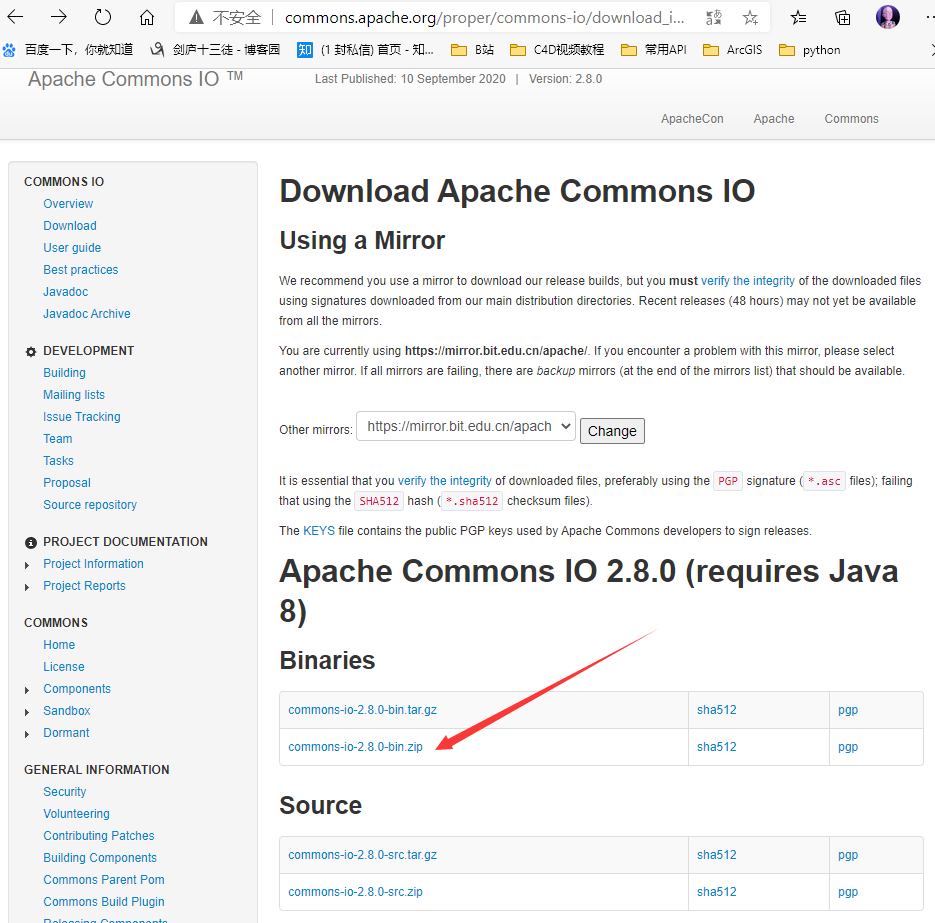
首先,我们要下载FileUtils相关的Apache-commons-io jar包以及api文档。FileUtils类库的下载页面在:
http://commons.apache.org/proper/commons-io/download_io.cgi
点击进入下载页面:
API文档的页面:
http://commons.apache.org/proper/commons-io/javadocs/ 各种版本的都有
我们本次示例,下载了最新的2.8版本,作为测试和示范。
-
FieUtils类中常用方法的介绍
打开FileUtils的api文档,我们抽出一些工作中比较常用的方法,进行总结和讲解。总结如下:
cleanDirectory:清空目录,但不删除目录。
contentEquals:比较两个文件的内容是否相同。
copyDirectory:将一个目录内容拷贝到另一个目录。可以通过FileFilter过滤需要拷贝的 文件。
copyFile:将一个文件拷贝到一个新的地址。
copyFileToDirectory:将一个文件拷贝到某个目录下。
copyInputStreamToFile:将一个输入流中的内容拷贝到某个文件。
deleteDirectory:删除目录。
deleteQuietly:删除文件。
listFiles:列出指定目录下的所有文件。
openInputSteam:打开指定文件的输入流。
readFileToString:将文件内容作为字符串返回。
readLines:将文件内容按行返回到一个字符串数组中。
size:返回文件或目录的大小。
write:将字符串内容直接写到文件中。
writeByteArrayToFile:将字节数组内容写到文件中。
writeLines:将容器中的元素的toString方法返回的内容依次写入文件中。
writeStringToFile:将字符串内容写到文件中。
-
代码演示
-
读取文件内容,并输出到控制台上(只需一行代码!)
import org.apache.commons.io.FileUtils;

import java.io.File;
import java.io.IOException;

public class Test14 {
    public static void main(String[] args) throws IOException {
        String content = FileUtils.readFileToString(new File("d:/test.txt"), "gbk");
        System.out.println(content);
    }
}
输出结果:你好,世界!
-
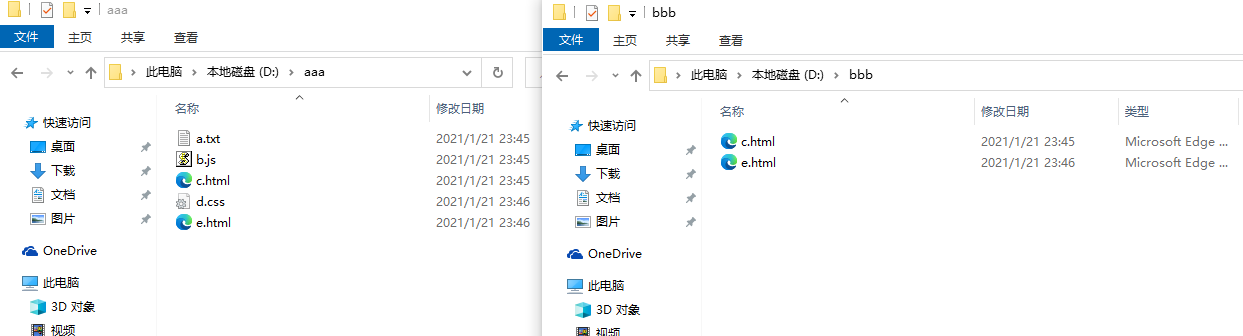
目录拷贝,并使用FileFilter过滤目录和以html结尾的文件
import org.apache.commons.io.FileUtils;

import java.io.File;
import java.io.FileFilter;
import java.io.IOException;

public class Test15 {
    public static void main(String[] args) throws IOException {
        FileUtils.copyDirectory(new File("d:/aaa"), new File("d:/bbb"), new FileFilter() {
            @Override
            public boolean accept(File pathname) {
                // 使用FileFilter过滤目录和以html结尾的文件
                if (pathname.isDirectory() || pathname.getName().endsWith("html")) {
                    return true;
                } else {
                    return false;
                }
            }
        });
    }
}
执行结果:
-
5.3、IOUtils的妙用
- 打开IOUtils的api文档,我们发现它的方法大部分都是重载的。所以,我们理解它的方法并不是难事。因此,对于方法的用法总结如下:
- buffer方法:将传入的流进行包装,变成缓冲流。并可以通过参数指定缓冲大小。
- closeQueitly方法:关闭流。
- contentEquals方法:比较两个流中的内容是否一致。
- copy方法:将输入流中的内容拷贝到输出流中,并可以指定字符编码。
- copyLarge方法:将输入流中的内容拷贝到输出流中,适合大于2G内容的拷贝。
- lineIterator方法:返回可以迭代每一行内容的迭代器。
- read方法:将输入流中的部分内容读入到字节数组中。
- readFully方法:将输入流中的所有内容读入到字节数组中。
- readLine方法:读入输入流内容中的一行。
- toBufferedInputStream,toBufferedReader:将输入转为带缓存的输入流。
- toByteArray,toCharArray:将输入流的内容转为字节数组、字符数组。
- toString:将输入流或数组中的内容转化为字符串。
- write方法:向流里面写入内容。
- writeLine方法:向流里面写入一行内容。
-
我们没有必要对每个方法做测试,只是演示一下读入d:/a.txt文件内容到程序中,并转成String对象,打印出来。
import org.apache.commons.io.IOUtils;

import java.io.FileInputStream;
import java.io.IOException;

public class Test16 {
    public static void main(String[] args) throws IOException {
        String content = IOUtils.toString(new FileInputStream("d:/test.txt"),"gbk");
        System.out.println(content);
    }
}
输出结果:你好,世界!
6、总结
-
按流的方向分类:
-
输入流:数据源到程序(InputStream、Reader读进来)。
-
输出流:程序到目的地(OutPutStream、Writer写出去)。
-
-
按流的处理数据单元分类:
- 字节流:按照字节读取数据(InputStream、OutputStream)。
- 字符流:按照字符读取数据(Reader、Writer)。
-
按流的功能分类:
- 节点流:可以直接从数据源或目的地读写数据。
- 处理流:不直接连接到数据源或目的地,是处理流的流。通过对其他流的处理提高程序的性能。
-
IO的四个基本抽象类:InputStream、OutputStream、Reader、Writer
-
InputStream的实现类:
- FileInputStream
- ByteArrayInputStream
- BufferedInputStream
- DataInputStream
- ObjectInputStream
-
OutputStream的实现类:
- FileOutputStream
- ByteArrayOutputStream
- BufferedOutputStream
- DataOutputStream
- ObjectOutputStream
- PrintStream
-
Reader的实现类
- FileReader
- BufferedReader
- InputStreamReader
-
Writer的实现类
- FileWriter
- BufferedWriter
- OutputStreamWriter
-
把Java对象转换为字节序列的过程称为对象的序列化。
-
把字节序列恢复为Java对象的过程称为对象的反序列化。

 浙公网安备 33010602011771号