
Conventor学习笔记1
SEMluator 3D启动
设置服务器地址与应用文件夹
1.工具介绍
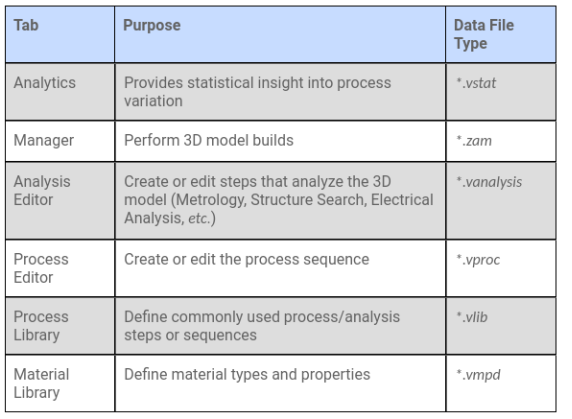
Manager: This tab allows the user to select layout files for creating the 3D model and set the model build parameters. It is from the Manager that the user builds the 3D model or creates a script.
Manager选择版图,设置结构参数
Analysis Editor: From this tab, the user can create a list of analysis steps (dimensional measurement and physical analysis steps) separate from the process flow. By separating analysis steps from the process steps that define the 3D model, the analysis steps can be run with the model build or separately from the model build. For a given process file, a user can have a different set of analysis steps for each type of desired analysis.
Process Editor: From this tab, the user can create a process flow identical to the foundry process used to fabricate the technology structures. The Process Editor's Process Library has numerous steps, including various material addition and removal steps, as well as steps for creating masks and cross-sections, meshing the model, virtual metrology and more. The created process can then be used in conjunction with a 2-D layout to create the 3D model.
Process Library: From this tab, the user can create a custom library of process steps tailored to a specific usage. With this module the user can duplicate and rename process steps and customize the default property values of each process step. The Process Library information is stored in a .vlib file, and the active .vlib file determines the content of the Process Editor\u2019s Process Library tab.
Material Library: From this tab, the user can create the materials associated with the fabrication process. The Material Library stores materials and their properties in a .vmpd file. In the Process Editor, the user associates the process with the material database file, and the material list stored in that file becomes available in the individual steps of the process.
Layout Editor: This tool can be used for creating and viewing 2-D masks. The user can draw masks using the Layout Editoror can import 2-D layouts in GDS, DXF, Oasis, or CIF format. For information on how the Layout Editor works, see the Layout Editor User Guide, accessed from the SEMulator3D Manager Help menu. The User Guide includes general information about available layout tools.
By default, SEMulator3D appears with three of the most fundamental tabs visible: Manager, Process Editor, and Material Library. However, when an existing file is opened in SEMulator3D, the appropriate tabs for that file are shown automatically. For example, in the case of a .zam file, the Manager, Analysis Editor (if a .vanalysis file is the dependency), Process Editor, and Material Library tabs will automatically open. As another example, if a .vproc file is opened, the Process Editor and Material Library tabs will automatically open. The Process Library tab is used infrequently and hidden by default.
Any combination of tabs can be shown or hidden at any time through the Window menu.
2.数据类型
主要文件类型.ZAM
ZAM文件是其余文件的集合,一个完整的ZAM文件必须包含版图(.cat,.gds,.gdsii,.oa,.oas,.oasis)、工艺(.vproc)、材料目录(.vmpd)
不必须包含工艺目录(.vlib)、解析文件(.vanalysis)、解析(.vstat)
3.操作步骤
①打开SEMulator3D,选择Manager页面。②创建.zam文件。
③在Process Editor页面创建.vproc 文件, 添加工艺步骤。
④用Layout Editor创建平面版图。
⑤确定模型精度。
⑥每一步操作后可选择保存模型。完成搭建后打开You 3D viewer。
⑦点击Build生成模型。
Tips
- Process Editor-Tools-options-Process Editor模型默认长度单位

 浙公网安备 33010602011771号