
vue-axios
基础的axios请求
methods:{
    //axios.get 发起get请求
    //参数一表示请求地址
    //参数二表示配置信息
    //具体可见: http://www.axios-js.com/zh-cn/docs/
    //params  表示传递到服务器端的数据,已url参数的形式拼接在请求地址后面
    //{page:1,per:3}
    // 比如:http://jsonplaceholder.typicode.com/
    //最终生成:http://jsonplaceholder.typicode.com/?page=1&per=3
    // 其中?表示可选参数
    //headers  表示请求头
    getHandle(){
      axios.get('http://jsonplaceholder.typicode.com/',{
         params:{
           page:3,
           per:2
         },
        headers:{}
      })
      .then(res=>console.log(res))
    },
    postHandle(){
      //post请求传递三个参数
      //请求地址
      //请求数据,请求配置,
      //axios默认发送的数据是json格式的
      //配置信息
      //headers
      //content-type:'application/json' 默认
       axios.post('http://open.qunar.com/',{
         userName:'xiaoming',
         password:'112132'
       },{})
      .then(res => console.log(res))
      .catch(err=>console.log(err))
    },
//下面是封装的
    getByMineHandle(){
      get('abc',{page:3,per:2}).
      then(res=>console.log(res))
    }
  }
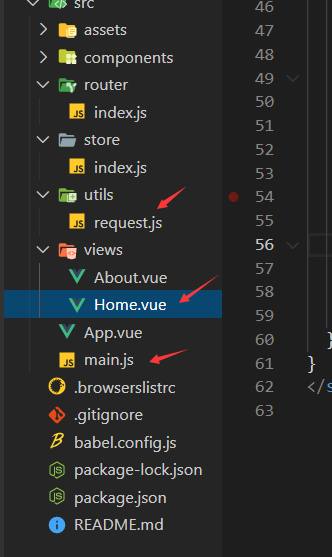
下面将请求封装 创建一个request.js 先封装请求头
import axiox from 'axios'

const instance =axiox.create({
    baseURL:'http://jsonplaceholder.typicode.com/',//baseURL会在发送请求的时候拼接在url参数的前面 http://localhost:8081/
timeout:5000 //超时终止请求
})

//下面是拦截器以及封装的请求
//http request 拦截器
axios.interceptors.request.use(
config => {
// const token = getCookie('名称');注意使用的时候需要引入cookie方法,推荐js-cookie
config.data = JSON.stringify(config.data);
config.headers = {
/*'Content-Type':'application/x-www-form-urlencoded'*/
'Content-Type':'application/json;charset=UTF-8'
}
// if(token){
// config.params = {'token':token}
// }
return config;
},
error => {
return Promise.reject(err);
}
);
//http response 拦截器
axios.interceptors.response.use(
response => {
if(response.data.errCode ==2){
router.push({
path:"/login",
querry:{redirect:router.currentRoute.fullPath}//从哪个页面跳转
})
}
return response;
},
error => {
Message({
Message:error.message,
type:'error',
duration:5*1000
});
return Promise.reject(error)
}
)
/**
* 封装get方法
* @param url
* @param data
* @returns {Promise}
*/
export function get(url,params={}){
return new Promise((resolve,reject) => {
axios.get(url,{
params:params
})
.then(response => {
console.log(response.data);
})
.catch(err => {
console.log(err)
})
})
}
/**
* 封装post请求
* @param url
* @param data
* @returns {Promise}
*/
export function post(url,data = {}){
return new Promise((resolve,reject) => {
axios.post(url,data)
.then(response => {
console.log(response.data);
},err => {
console.log(err)
})
})
}
/**
* 封装patch请求
* @param url
* @param data
* @returns {Promise}
*/
export function patch(url,data = {}){
return new Promise((resolve,reject) => {
axios.patch(url,data)
.then(response => {
console.log(response.data);
},err => {
console.log(err)
})
})
}
/**
* 封装put请求
* @param url
* @param data
* @returns {Promise}
*/
export function put(url,data = {}){
return new Promise((resolve,reject) => {
axios.put(url,data)
.then(response => {
console.log(response.data);
},err => {
console.log(err)
})
})
}
封装 的请求怎么用呢 就是要现在main.js引用为全局的先 也可以不引用为全局的(直接在要用的组件中引用即可 )
main.js加上这些
import axios from 'axios'

//其他vue组件中就可以this.$axios调用使用 其他同理
Vue.prototype.$axios=axios;
Vue.prototype.$post=post;
Vue.prototype.$fetch=fetch;
Vue.prototype.$get=get;
Vue.prototype.$put=put;
具体使用 注意要加上$ 因为为全局引用了
submitLogin1(){
                this.$get('/login/getUser',{ userid: 123})
            },

//正常的axios引用也要加上$
this.$axios.get('/login/getUser', {
params: {
userid: 123
},
headers: {}
// 请求成功后 then
}).then(function (response) {
console.log(response);
}).catch(function (error) {
console.log(error);
});
不引用为全局但是封装好怎么用 直接 要用的组件里

然后写方法名就行了 跟正常的使用没区别 只不过封装过了而已

下面是结构图

 浙公网安备 33010602011771号