
20242106 2024-2025-2 《Python 程序设计》实验三报告
20242106 2024-2025-2 《Python 程序设计》实验三报告
课程:《Python 程序设计》
班级: 2421
姓名: 于凯
学号: 20242106
实验教师:王志强
实验日期:2025 年 4 月 16 日
必修/选修: 公选课
一、实验内容
创建服务端和客户端,服务端在特定端口监听多个客户请求。客户端和服务端通过 Socket 套接字(TCP/UDP)进行通信。
- 创建服务端和客户端,选择一个通信端口,用 Python 语言编程实现通信演示程序。
- 要求包含文件的基本操作,例如打开和读写操作。
- 要求发送方从文件读取内容,加密后并传输;接收方收到密文并解密,保存在文件中。
- 程序代码托管到码云。
注:在华为 ECS 服务器 (OpenOuler 系统) 和物理机 (Windows/Linux 系统) 上使用 VIM、PDB、IDLE、Pycharm 等工具编程实现。
二、实验过程及结果
(一)客户端
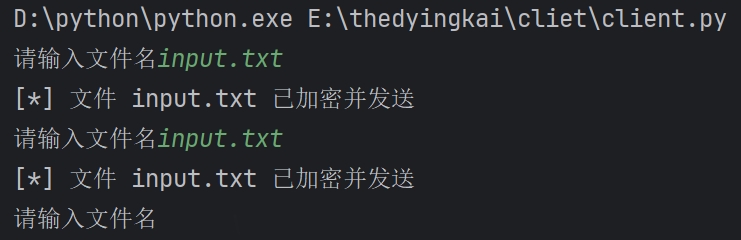
- 客户端会等待用户输入文件名,反复循环,因为我发现上传多份文件时,反复重启客户端会很麻烦,主要是懒,使用了简单的异或加密,然后传输,防止明文暴露信息。
- 客户端代码:
# -*- coding: utf-8 -*-
import socket
IP='127.0.0.1'
port=12712
while True:
    file=input("请输入文件名")
    try:
        with open(file,'rb')as f:data=bytes([b^0xAB for b in f.read()])
        clt=socket.socket(socket.AF_INET,socket.SOCK_STREAM)
        clt.connect((IP,port))
        # clt.send(bytes([b^0xAB for b in file.encode("UTF-8")]))
        clt.sendall(data)
        print(f"[*] 文件 {file} 已加密并发送")
    except Exception as e:
        print(f"[!] 发生错误: {e}")
    clt.close()
(二)服务端
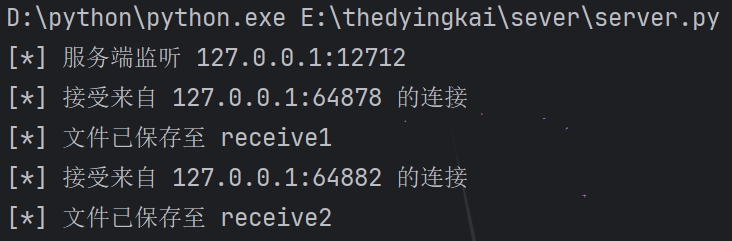
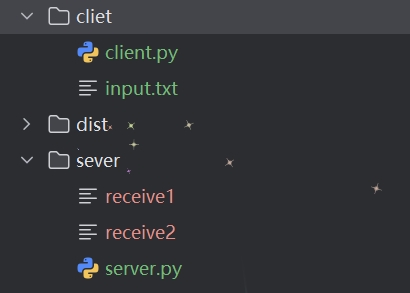
- 为了防止 recv() 传入的数据量过大,每次读取 1024 个字节,如果读取到空字节,则跳出循环。把每次的拼接,并异或解密,为了方便保存文件,设置 cnt 计数,使文件名不重复,防止混乱。
- 服务端代码:
# -*- coding: utf-8 -*-
import socket
IP='127.0.0.1'
port=12712
server=socket.socket(socket.AF_INET,socket.SOCK_STREAM)
server.bind((IP,port))
server.listen(5)
print(f"[*] 服务端监听 {IP}:{port}")
cnt=1
try:
    while True:
        cskt,addr=server.accept()
        print(f"[*] 接受来自 {addr[0]}:{addr[1]} 的连接")
        try:
            # file=bytes([b^0xAB for b in cskt.recv(1024)])
            data=b''
            while True:
                temp=cskt.recv(1024)
                if not temp:break
                data+=temp
            file='receive'+str(cnt)
            cnt+=1
            with open(file,'wb')as f:f.write(bytes([b^0xAB for b in data]))
            print(f"[*] 文件已保存至 {file}")
        except Exception as e:print(f"处理客户端时发生错误: {e}")
        cskt.close()
except KeyboardInterrupt:
    print("\n[*] 服务端关闭")
server.close()
(三)运行结果

(四)继续美化博客园
- 上次修改完之后,发现进去之后默认是深色模式,很不方便,想把他设为默认浅色模式,修改 js 文件,把 light 和 dark 全部互换,问题似乎解决了。
- 另一个早晨,我进来看,还是深色模式,非常奇怪,仔细检查 js 代码,没绷住:
var m = function() { $("body").append('<div class="esa-toolbar">\n <div class="material-symbols-outlined bars">more_horiz</div>\n <span class="material-symbols-outlined up" title="返回顶部">keyboard_arrow_up</span>\n <span class="material-symbols-outlined mode" title="切换模式">dark_mode</span>\n <span class="material-symbols-outlined skin" title="切换主题">palette</span>\n <div class="skin-popup">\n <div class="item">\n <div class="title">选择主题</div>\n <div class="themes">\n <button data-theme="a" style="background: #2D8CF0;"></button>\n <button data-theme="b" style="background: #FA7298;"></button>\n <button data-theme="c" style="background: #42B983;"></button>\n <button data-theme="d" style="background: #607D8B;"></button>\n <button data-theme="e" style="background: #5E72E4;"></button>\n <button data-theme="f" style="background: #FF9700;"></button>\n <button data-theme="g" style="background: #FF5722;"></button>\n <button data-theme="h" style="background: #009688;"></button>\n <button data-theme="i" style="background: #673BB7;"></button>\n <button data-theme="j" style="background: #906f61;"></button>\n </div>\n </div>\n </div>\n </div>\n </div>'); const t = s() && n.catalog.enable; t && $(".esa-toolbar").append('<span class="material-symbols-outlined contents" title="目录导航">menu</span>'); const e = "silence-mode-" + currentBlogApp, a = "silence-theme-" + currentBlogApp, o = (new Date).getHours(), i = sessionStorage.getItem(a) || n.defaultTheme, l = sessionStorage.getItem(e) || ("auto" == n.defaultMode ? o >= 6 && o < 18 ? "light" : "dark" : n.defaultMode); $("html").attr("mode", l), $("html").attr("theme", i); const r = $(".esa-toolbar"), c = $(".skin-popup"); r.find(".mode").html("light" == l ? "dark_mode" : "light_mode"); var d = document.getElementsByClassName("skin-popup")[0]; let h = !1; r.find(".bars").click((function() { h ? (r.find(".bars").removeClass("bars-show"), r.find(".up").removeClass("up-show"), r.find(".mode").removeClass("mode-show"), r.find(".skin").removeClass("skin-show"), t && r.find(".contents").removeClass("contents-show")) : (r.find(".bars").addClass("bars-show"), r.find(".up").addClass("up-show"), r.find(".mode").addClass("mode-show"), r.find(".skin").addClass("skin-show"), t && r.find(".contents").addClass("contents-show")), h = !h })), r.find(".up").click(() => { $("html, body").animate({ scrollTop: 0 }, 450) }), r.find(".mode").click((function() { let t = $("html").attr("mode"), a = "light" == t ? "dark" : "light"; sessionStorage.setItem(e, a), $(this).html(t + "_mode"), $("html").attr("mode", a) })), r.find(".skin").click(t => { t.stopPropagation(), c.slideToggle() }), d.addEventListener("click", (function(t) { if (t.stopPropagation(), "BUTTON" === t.target.nodeName) { console.log(t); var e = t.target.dataset.theme; sessionStorage.setItem(a, e), $("html").attr("theme", e) } })), document.addEventListener("click", (function(t) { d && "block" === d.style.display && (d.style.display = "none") })); let u = !1; r.find(".contents").click(() => { $(".esa-contents").toggleClass((function() { return $(this).hasClass("active") ? ($(this).removeClass("active"), "noactive") : ($(this).removeClass("noactive"), "active") })), u ? ($("#home").css({ width: "100%" }), u = !1) : ($("#home").css({ width: "calc(100% - 252px)" }), u = !0) }), s() && r.find(".bars").trigger("click") }; - 看这里:
const e = "silence-mode-" + currentBlogApp, a = "silence-theme-" + currentBlogApp, o = (new Date).getHours(), i = sessionStorage.getItem(a) || n.defaultTheme, l = sessionStorage.getItem(e) || ("auto" == n.defaultMode ? o >= 6 && o < 18 ? "light" : "dark" : n.defaultMode); - 他……白天浅色模式,黑天深色模式,我……
- 所以我之前改完就正好是反过来了,逆天。
三、实验过程中遇到的问题和解决过程
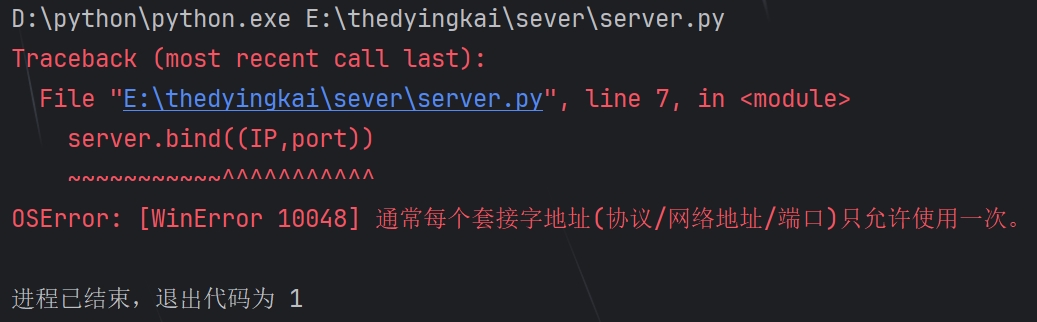
- 问题 1:端口占用,如下:
Traceback(most recent call last): File 'E:thedyingkailseverlserver.py", line 6, in <module>server.bind((IP,port)) vvvwvvNNNN~AAAAAAAAAAA 0SError:[WinError 10048]通常每个套接字地址(协议/网络地址/端口)只允许使用一次。 - 问题 1 解决方案:更换端口或电脑重启。
- 问题 2:字符解编码 UTF-8 报错
- 问题 2 解决方案:在行首添加
# -*- coding: utf-8 -*-。
四、其他(感悟、思考等)
- 半夜干活效率高

 浙公网安备 33010602011771号