


vue双向数据绑定原理分析--Mr.Ember
vue双向数据绑定原理分析
摘要
vue常用,但原理常常不理解,下面我们来具体分析下vue的双向数据绑定原理。
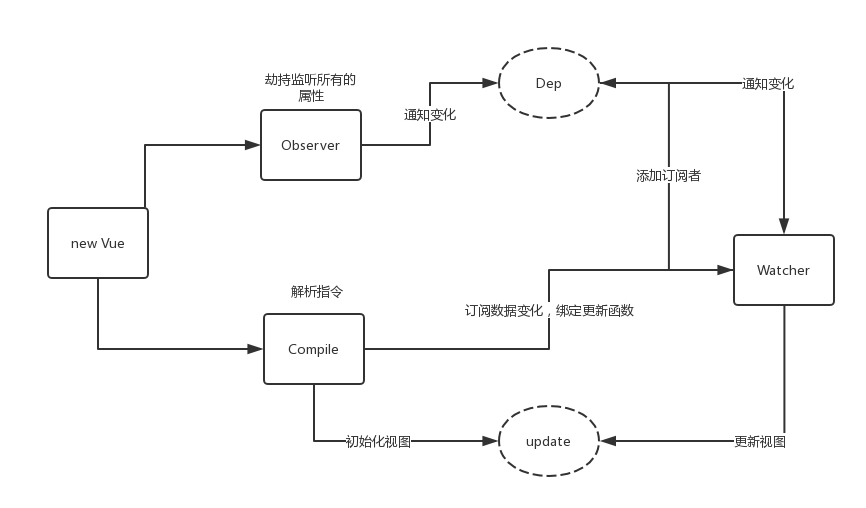
(1)创建一个vue对象,实现一个数据监听器observer,对所有数据对象属性进行监听, 数据发生变化时拿到最新值并通知订阅者
(2)实现一个解析器 compile,对没个元素节点进行扫描和解析,根据指令模板替换数据,以绑定更新函数
(3)实现一个Watcher, 作为连接observer 和 compile,订阅属性的变动通知,执行相应的回调函数,从而更新视图
一.简化版双向数据绑定
    <div id="app">
        <input type="text" t-model="text">
        <p>{{text}}</p>
    </div>
    <script>var obj = {};
            Object.defineProperty(obj, 'text', {
                get: function() {
                    return obj;
                },
                set: function(newValue) {
                    console.log(newValue)
                    showText = document.getElementById('show-text');
                    document.getElementById('txt').value = newValue;
                    showText.innerHTML = newValue;
                }

            })
            document.addEventListener('keyup', function(e) {
                console.log(e)
                obj.text = e.target.value;
            })
</script>
对input监听,把数据通过监听keyup事件实时写入p标签里
由于每次都渲染一次对于页面非常不友好,尽量避免对DOM的直接操作,下面的方法优雅的解决了这方面的问题。
二. 优雅版双向数据绑定
    <div id="app">
        <input type="text" id="txt">
        <p id="show-text"></p>
    </div>
    <script>
        function handleData() {
            var obj = {};
            Object.defineProperty(obj, 'text', {
                get: function() {
                    return obj;
                },
                set: function(newValue) {
                    console.log(newValue)
                    showText = document.getElementById('show-text');
                    document.getElementById('txt').value = newValue;
                    showText.innerHTML = newValue;
                }

            })
            document.addEventListener('keyup', function(e) {
                console.log(e)
                obj.text = e.target.value;
            })
        }

        function convertNode(node, vm) {
        //创建空白片段
            var fragment = document.createDocumentFragment(),child;
            console.log(vm)
            while(child = node.firstChild) {
                fragment.appendChild(child);
            }
            return fragment;
        }

        var dom = convertNode(document.getElementById('app'));
        handleData();
        document.getElementById('app').appendChild(dom);
    </script>
使用DocumentFragment代替直接操作DOM。
下一讲终极版双向数据绑定

 浙公网安备 33010602011771号