
Python_requests_最简单易用的HTTP库
requests是python最简单易用的HTTP库。
模块安装
默认是没有安装requests模块的,需要通过pip安装
pip install requests
常用请求方法
| 方法 | 解释 |
|---|---|
| requests.request(method, url, **kwargs) | 构造以下请求的一个基础方法 |
| requests.get(url, params=None, **kwargs) | 构造一个get请求 |
| requests.post(url, data=None, json=None, **kwargs) | 构造一个post请求 |
| requests.put(url, data=None, **kwargs) | 构造一个put请求 |
| requests.delete(url, data=None, **kwargs) | 构造一个delete请求 |
参数说明
- method:请求方式
- url:网站地址
- params:请求参数,多用于请求参数为表单的情况。
- data:请求数据,用于post请求传参,字符类型为字典,
request.body的内容为a=1&b=2这种形式 - json:请求数据,用于post请求参数,字符类型为json字符串或字典,
request.body的内容为'{"a": 1, "b": 2}'这种形式。Content-Type为application/json 一般使用该参数。 - **kwargs为缺省参数
- headers:请求的头部,数据类型为字典
- cookies:请求的cookie,数据类型为字典或CookieJar
- timeout:请求超时时间,单位为秒
- auth:http认证,数据类型为元组
- files:向服务器传输文件,数据类型为字典。key值为接口定义的字段,value值为元组:('filename', fileobj, 'content_type') ,使用了该参数不要加Content-Type
- proxies:设置访问代理服务器,数据类型为字典
- allow_redirects: 是否允许对url进行重定向, 默认为True。
- stream: 是否对获取内容进行立即下载, 默认为True。
- verify:是否认证SSL证书, 默认为True。
- cert: 设置保存本地SSL证书路径
获取响应内容
r.encoding              # 获取当前的编码
r.encoding = 'utf-8'    # 设置编码
r.text                  # 以encoding解析返回内容。字符串方式的响应体,会自动根据响应头部的字符编码进行解码。
r.content               # 以字节形式(二进制)返回。字节方式的响应体,会自动为你解码 gzip 和 deflate 压缩。

r.headers               # 以字典对象存储服务器响应头,但是这个字典比较特殊,字典键不区分大小写,若键不存在则返回None

r.status_code           # 响应状态码
r.raw                   # 返回原始响应体,也就是 urllib 的 response 对象,使用 r.raw.read()
r.ok                    # 查看r.ok的布尔值便可以知道是否登陆成功
 #*特殊方法*#
r.json()                # Requests中内置的JSON解码器,以json形式返回,前提返回的内容确保是json格式的,不然解析出错会抛异常
r.raise_for_status()    # 失败请求(非200响应)抛出异常
代码演示
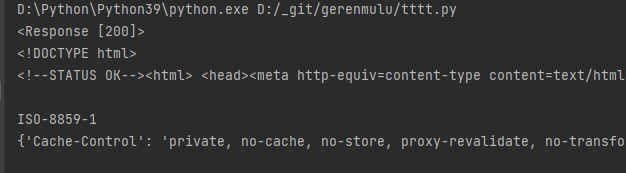
get请求
import requests


rsp = requests.get("http://www.baidu.com")
print(rsp)
print(rsp.text)
print(rsp.encoding)
print(rsp.headers)
上传文件或图片
以下图接口为例,接口传入了id和file字段

响应如下

使用request模块,从接口完成图片上传。代码如下:
import requests


url = "https://xxxxxx/uploadIdCard"
params = {"id": "ipJO6Yys3Zql0YXXXXXXXXXXXXXXXXXXXX"}

# 文件或图片传入格式说明:file为接口定义的字段,字段值传入元组格式
files = {
    "file": ("123.pdf", open("./123.pdf", "rb")),
}
# 非图片(或文件)字段正常入参, 图片(或文件)以files传入
rsp = requests.post(url, params=params, files=files)
print(rsp.json())
注意:请求时不要加{"Content-Type": "multipart/form-data"}的header,否则请求会报错
执行结果:

常见问题
1、响应header中的中文乱码
现象:接口响应的文件名称的中文部分乱码
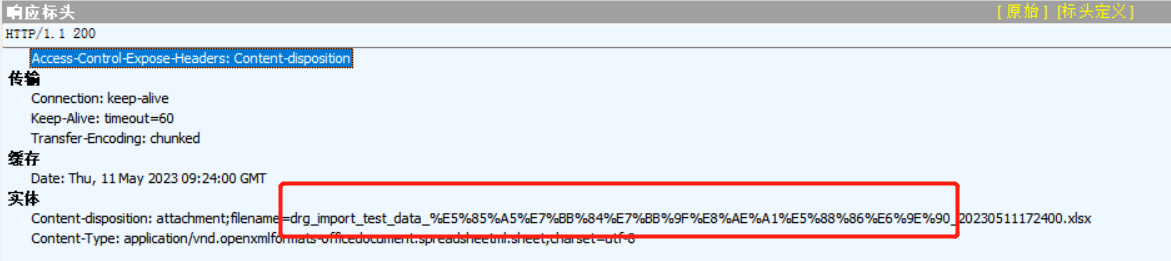
解决方法:使用了Python中的urllib库来进行URL解码
代码如下:
from urllib import parse

filename = parse.unquote("test_data_%E5%85%A5%E7%BB%84%E6%98%8E%E7%BB%86_20230511194810.xlsx")
print(filename)

2、向https地址发起请求报错ssl.SSLCertVerificationError: [SSL: CERTIFICATE_VERIFY_FAILED]

报错原因是证书验证失败,从Python 2.7.9版本开始,服务器证书验证功能默认启动。如果证书验证失败,将拒绝后续操作。这种做法能够防止中间人攻击,并能确保客户端认定的服务器身份是真实的。然而,对于自签名证书,由于系统的CA证书中通常不包含自签名CA证书的内容,因此证书验证可能会失败。
解决方法:
将参数verify设置为False

设置为False后,能正常请求接口,但是会有告警。
忽略告警:
# 导入模块
from requests.packages import urllib3

# 在发起请求添加忽略告警代码
urllib3.disable_warnings()

再次执行就没有告警提示了~
简单封装
# -*- coding:utf-8 -*-
"""model 基类, 无需变动
"""
import json
import os

import requests
from requests.packages import urllib3

# from utils import log


class Model(object):
    """请求模型基类
    """
    url = None  # protocol://hostname[:port]

    def __init__(self):
        self.public_headers = {}   # 请求头
        self.setup()

    # @property
    # def _log(self):
    #     """记录请求中的日志
    #     """
    #     return log.create_logger("API_LOG")

    def setup(self):
        """发送请求的前预置操作
        比如设置公共headers:在该方法中使用 add_public_headers 方法添加
        """
        pass

    def add_public_headers(self, headers):
        """添加公共headers
        :param headers: 添加的请求头
        :type headers: dict
        """
        self.public_headers.update(headers)

    def del_public_headers(self, key):
        """删除公共headers"""
        try:
            self.public_headers.pop(key)
        except KeyError:
            pass

    def handle_request_headers(self, headers):
        """ 处理请求传入的headers """
        headers = headers or {}
        for k in self.public_headers.keys():
            if k in headers:
                continue
            headers.update({k: self.public_headers[k]})
        return headers

    def _request(self, method, interface, body=None, params=None, timeout=60, encode=None, headers=None, files=None):
        """api请求基础方法
        :param method: 请求方式
        :param interface: uri
        :param body: body请求参数。 Content-Type为application/json 一般使用该参数
        :param params: 链接请求参数
        :param timeout: 超时时间
        :param encode: 请求转码
        :param headers: 添加header。这里添加的header为请求当前请求添加或修改的header。下次请求默认使用公共 public_headers
        :param files: 上传文件使用
        :return: response
        """
        # 如果发起http请求,则必须配置类属性url
        if self.url is None:
            raise NotImplementedError("需要在%s定义url类属性才能发起http请求" % self.__class__)
        url = self.url + interface
        # req_log = body or params
        headers = self.handle_request_headers(headers)
        # self._log.info("=============[%s %s]=============" % (method.upper(), interface))
        # self._log.info(">>> [header] %s" % headers)
        # self._log.info(">>> [Request] %s" % req_log)
        urllib3.disable_warnings()
        self._response = requests.request(
            method, url, json=body, params=params, timeout=timeout, headers=headers, files=files, verify=False
        )
        if encode:
            self._response.encoding = encode
        rsp = self._response.content
        try:
            rsp = json.loads(rsp)
        except Exception:
            pass
        # if isinstance(rsp, bytes):
        #     self._log.info("<<< [Response] 二进制内容不记录日志\n\n")
        # else:
        #     self._log.info("<<< [Response] %s\n\n" % rsp)
        return rsp

    def request_post(self, interface, body=None, params=None, timeout=60, encode=None, headers=None):
        return self._request("POST", interface, body, params, timeout, encode, headers)

    def request_get(self, interface, body=None, params=None, timeout=60, encode=None, headers=None):
        return self._request("GET", interface, body, params, timeout, encode, headers)

    def request_put(self, interface, body=None, params=None, timeout=60, encode=None, headers=None):
        return self._request("PUT", interface, body, params, timeout, encode, headers)

    def upload_file(self, interface, file_path, upload_file_name=None, params=None, file_field="file"):
        """上传文件
        file_path:导入文件路径
        upload_file_name:上传文件的名称。注意:修改后的名称文件格式需要一致
        params:除了file字段外的其它字段入参
        file_field:上传文件二进制的字段名称,默认为file
        """
        upload_file_name = upload_file_name or os.path.basename(file_path)
        # 文件或图片传入格式说明:file为接口定义的字段,字段值传入元组格式
        files = {file_field: (upload_file_name, open(file_path, "rb"))}
        headers = {"Content-Type": None}
        return self._request("POST", interface, params=params, headers=headers, files=files)

    def download_file(self, interface, save_dir, filename, body=None, params=None, timeout=60, headers=None):
        """下载文件
        download_dir:下载的目录
        filename:保存的文件名称
        """
        # 获取响应的二进制文件
        rsp = self.request_post(interface, body=body, params=params, timeout=timeout, headers=headers)
        if not isinstance(rsp, bytes):
            return rsp

        # 指定下载路径
        file_path = os.path.join(save_dir, filename)
        if not os.path.exists(save_dir):
            os.makedirs(save_dir)

        # 保存文件
        with open(file_path, 'wb') as f:
            f.write(rsp)
        print("文件保存成功:" + file_path)
        return file_path

    @property
    def response(self):
        """ 最后一次请求的实例对象
        """
        return self._response

    @property
    def response_header(self):
        """ 记录最后一次请求的响应头
        """
        return self._response.headers

    @property
    def response_status_code(self):
        """ 记录最后一次请求的响应码
        """
        return self._response.status_code

 浙公网安备 33010602011771号