学习资料:笨方法学Python
准备:
- 安装环境----请自行网络搜索(Windows安装很简单,和其他安装程序一样)
- 找一个自己习惯的编辑器(比如:sublime text 3)
- 创建一个专门的目录,按着资料把所有的代码敲一遍 -- 可了解下DOS基本命令
1、第一个程序
文件命名方式: 文件.py
执行方式:python 文件.py (在该文件路径下执行)
若执行错误,会有报错提示,看不懂可以从搜索引擎中查询
字符串的表示有几种方式,你注意到了吗~,还可以继续搜索是否有其他表示方式
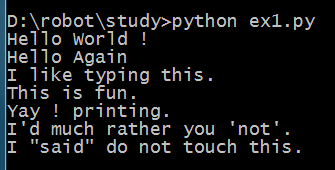
正确代码及结果:

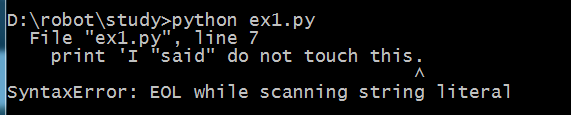
错误代码及结果:可以根据提示进行搜索错误原因,并可通过提示查找对应的错误代码行进行检查

习题2:注释与井号----程序里的注释是很重要的
代码:
# A comment,this is so you can read your program later.
# Anything after the # is ingnored by python.
print "I could have code like this." # and the comment after is ignored
# You can also use a comment to "disable" or comment out a piece of code:
# print "This won't run."
print "This will run"
运行:

习题3:数字和数学计算
• + plus 加法计算
• - minus 减法计算
• / slash 除法计算(保留商,舍弃余数)
• * asterisk 乘法计算
• % percent 模计算(取余数)
• < less-than 比较运算 小于号
• > greater-than 比较运算 大于号
• <= less-than-equal 比较运算 小于等于号
• >= greater-than-equal 比较运算 大于等于号
代码:建议养成良好的代码习惯,加空格
print "I will count my chickens:"
print "Hens", 25 + 30 / 6
print "Roosters", 100 - 25 * 3 % 4
print "Now I will count the eggs:"
print 3 + 2 + 1 - 5 + 4 % 2 - 1 /4 + 6
print "Is it true that 3 + 2 < 5 - 7?"
print 3 + 2 < 5 - 7
print "What is 3 + 2?", 3 + 2
print "What is 5 - 7?", 5 - 7
print "Oh, that's why it's False."
print "How about some more."
print "Is it greater?", 5 > -2
print "Is it greater or egual?", 5 >= -2
print "Is it less or egual?", 5 <= -2
结果:

习题4:变量和命名 -- 某东西的名字,在程序中建议以变量代表的真实含义用英语命名,亦可多个单词以“_”拼接
命名规范:适用字母、数字、下划线,数字不能开头
备注:字符串与变量的区别? 变量不用引号,直接调用变量名
代码:
cars = 100
space_in_a_car = 4.0
drivers = 30
passengers = 90
cars_not_driven = cars - drivers
cars_driven = drivers
carpool_capacity = cars_driven * space_in_a_car
average_passengers_per_car = passengers / cars_driven
print "There are", cars, "cars available."
print "There are only", drivers, "drivers available."
print "There will be", cars_not_driven, "empty cars today."
print "We van transport", carpool_capacity, "people today."
print "We have", passengers, "to carpool today."
print "We need to put about", average_passengers_per_car, "in each car."
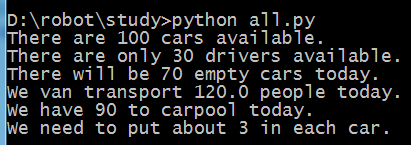
结果:
习题5:更多的变量及打印
字符串是程序将信息展示给人的方式。可以打印它们,可以将它们写入文件,还可以将它们发送给网站服务器,很多事情都是通过字符串交流实现。本习题引入格式化字符串。
常用:%s 字符串 ; %d 整数 ; %f 浮点数 ; %r 自然字符串 ,其余可搜索看看,另可查查%s和%r有什么不同~( 和 print "%r" % "\n")
格式:"%s" % 对应的变量(变量多个时,用圆括号括起来,与前面一一对应,中间用逗号隔开)
注意:大小写敏感,my_age和My_age代表不同的变量
如果使用了非ASCII字符碰到了编码错误,记得在最顶端加一行 # coding: utf-8
代码:
my_name = 'Zed A. Shaw'
my_age = 35
my_height = 74
my_weight = 180
my_eyes = 'Brown'
my_teeth = 'White'
my_hair = 'Black'
print "Let's talk about %s." % my_name
print "He's %d inches tail." % my_height
print "He's %d pounds heavy." % my_weight
print "Actually that's not too heavy."
print "He's got %s eyes and %s hair." % (my_eyes, my_hair)
print "His teeth are usually %s depending on the coffee." % my_teeth
# this line is trick, try to get it exactly right
print "If I add %d, %d, and %d I get %d." % (my_age, my_height, my_weight, my_age + my_height + my_weight)
结果:
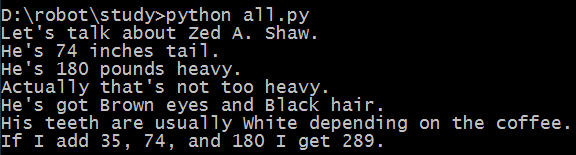
习题6:字符串和文本
备注:字符串拼接可以使用“+”
-- “+” 表示拼接 “,”主要是分割参数的一种方式
代码:
X = "There are %d types of people." % 10
binary = "binary"
do_not = "don't"
Y = "those who know %s and those who %s." % (binary, do_not)
print X
print Y
print "I siad: %r." % X
print "I also said: '%s'." % Y
hilarious = False
joke_evaluation = "Isn't that joke so funny?! %r"
print joke_evaluation % hilarious
w = "This is the left side of..."
e = "a string with a right side."
print w + e
结果:
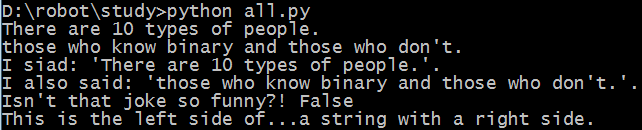
习题7:更多打印
备注:代码倒数第二行的打印,最后的逗号注意到了吗?不加的话会有怎样的效果呢?
代码:
print "Mary had a little lamb."
print "Its fleece was white as %s." % 'snow'
print "And everywhere that Mary went."
print "." * 10 # what'd that do?
end1 = "C"
end2 = "h"
end3 = "e"
end4 = "e"
end5 = "s"
end6 = "e"
end7 = "B"
end8 = "u"
end9 = "r"
end10 = "g"
end11 = "e"
end12 = "r"
# watch that comma at the end. try removing it to see what happens
print end1 + end2 + end3 + end4 + end5 +end6,
print end7 + end8 + end9 + end10 + end11 + end12
结果:
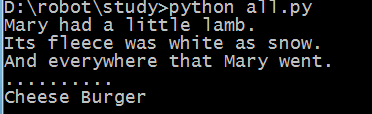
习题8:打印,打印
代码:
formmatter = "%r %r %r %r"
print formmatter % (1, 2, 3, 4)
print formmatter % ("one", "two", "three", "four")
print formmatter % (True, False, False, True)
print formmatter % (formmatter, formmatter, formmatter, formmatter)
print formmatter % (
"I had this thind.",
"That you could type up right.",
"But it didn't sing.",
"So I said goodnight."
)
结果:

习题9:打印,打印,打印
备注:代码中三个连着的双引号有什么作用?使用三个连着的单引号可以吗?\n 的作用?
-- """ 多行
文本
"""
-- \n 转义字符,表示新起一行 是否还有其他类似的转义字符?
代码:
# Here's some new strange stuff, remember type it exactly.
days = "Mon Tue Wed Thu Fri Sat Sun"
months = "Jan\nFeb\nMar\nApr\nMay\nJun\nJuly\nAug"
print "Here are the days: ", days
print "Here are the months: ", months
print """
There's something going on here.
With the three double-guotes.
We'll be able to type as much as we like.
Even 4 lines if we want, or 5, or 6.
"""
结果:
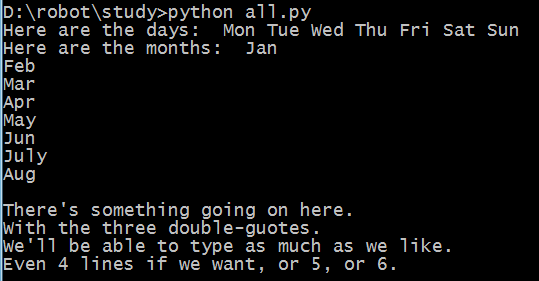
习题10:那是什么?
备注:更多的转义字符 -- \t \\ \' \" \r ...
"I "understand" joe." -- 这样表达会有什么问题?怎样解决呢?
-- 会认为understand左侧的引号为结束引号,将报错,可通过转义字符解决 "I \"understand\" joe."
代码:
tabby_cat = "\tI'm tabbed in."
persian_cat = "I'm split\non a line."
backslash_cat = "I'm \\ a \\ cat."
fat_cat = """
I'll do a list:
\t* Cat food
\t* Fishies
\t* Catnip\n\t* Grass
"""
print tabby_cat
print persian_cat
print backslash_cat
print fat_cat
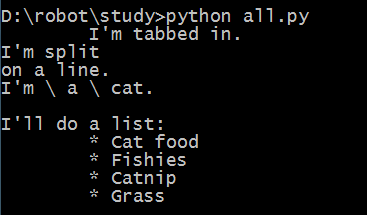
结果: