
jquery实现的时间轴
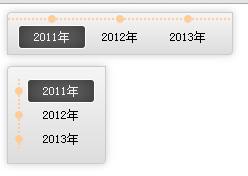
代码
样式文件style.css
|
1
2
3
4
5
6
7
8
9
10
11
12
13
14
15
16
17
18
19
20
21
22
23
24
25
26
27
28
29
30
31
32
33
34
35
36
37
38
39
40
41
42
43
44
45
46
47
48
49
50
|
.timeline{ position: absolute; z-index: 5000; font-size: 12px; border: 1px solid #ccc; background: whitesmoke; background: -webkit-linear-gradient(top, whitesmoke, #ddd); background: -ms-linear-gradient(top, whitesmoke, #ddd); background: -moz-linear-gradient(top, whitesmoke, #ddd); border-radius: 4px 0 4px 0; box-shadow: 0px 0px 10px rgba(150,150,150,0.5); } .timeline ul.ulvec{ margin-left: 10px; list-style: none; background: url("dot.gif") 0px 0px repeat-y; padding-right: 10px; } .timeline ul li.livec{ margin-left: -43px; padding: 0px 0px 0px 12px; background: url("biggerdot.png") 0px 50% no-repeat; cursor: pointer; } .timeline ul.ulhor{ margin: 0px; padding: 5px 10px; list-style: none; background: url("dot.gif") 0px 5px repeat-x; } .timeline ul li.lihor{ display: inline-block; margin: 0px; padding: 10px 0px 0px 0px; margin-top: -3px; background: url("biggerdot.png") 50% 0px no-repeat; cursor: pointer; } .timeline ul li span{ display: block; padding: 4px 15px; border: 1px solid transparent; } .timeline ul li.active span{ color: #f2f2f2; box-shadow: inset 0px 0px 30px #333333; border-radius: 4px; border: 1px solid #ffffff; background: #666; } |
控件代码 jquery.custom.timeline.js
|
1
2
3
4
5
6
7
8
9
10
11
12
13
14
15
16
17
18
19
20
21
22
23
24
25
26
27
28
29
30
31
32
33
34
35
36
37
38
39
40
41
42
43
44
45
46
47
|
(function($){ $.fn.TimeLine = function(options){ var defaults = { data:null, vertical:false }; var options = $.extend(defaults,options); var _data = options.data; var _vertical = options.vertical; var _showDiv = $(this).addClass("timeline"); var _ul = $("<ul />").appendTo(_showDiv); if(_vertical){ _ul.addClass("ulvec"); } else{ _ul.addClass("ulhor"); } for(var i= 0,dl=_data.length;i<dl;i++){ var _li = $("<li />").appendTo(_ul); if(_vertical){ _li.addClass("livec"); } else{ _li.addClass("lihor"); } var _span = $("<span />").attr("value",_data[i].value).html(_data[i].label).appendTo(_li); _span.on("click",function(){ var _value = this.getAttribute("value"); active(_value); }); } function active(value){ $("li").removeClass("active"); var _spans = $("ul").find("span"); for(var i= 0,dl=_spans.length;i<dl;i++){ var _span = _spans[i]; if(_span.getAttribute("value")===value){ var _li = $(_span.parentNode); _li.addClass("active"); } } } this.active = active; return this; } })(jQuery); |
调用实现
|
1
2
3
4
5
6
7
8
9
10
11
12
13
14
15
16
17
18
19
20
21
22
23
24
25
26
27
28
29
30
31
32
|
<!DOCTYPE html> <html> <head lang="en"> <meta charset="UTF-8"> <title></title> <link rel="stylesheet" href="style.css" type="text/css"> <script src="http://localhost/jquery/jquery-1.8.3.js"></script> <script src="jquery.custom.timeline.js"></script> <script> var data = [{"label":"2011年","value":"2011"}, {"label":"2012年","value":"2012"}, {"label":"2013年","value":"2013"} ]; $(function(){ var timelinehor = $("#timelinehor").TimeLine({ data:data, vertical:false }); timelinehor.active(data[0].value); var timelinevec = $("#timelinevec").TimeLine({ data:data, vertical:true }); timelinevec.active(data[0].value); }); </script> </head> <body> <div id="timelinehor"></div><br><br><br> <div id="timelinevec"></div> </body> </html> |
看官赏点饭钱可好?

 浙公网安备 33010602011771号