
webapi第三天
一、事件流
- 定义:当触发事件时,会经历两个阶段,分别是
捕获阶段、冒泡阶段 - 捕获
<body>
  <div class="father">
    父盒子
    <div class="son">子盒子</div>
  </div>
  <script>
    // 事件流
    const father = document.querySelector('.father')
    const son = document.querySelector('.son')
    // 1. 事件捕获
    // // 点击父盒子
     father.addEventListener('click', function () {
       alert('我是爸爸')
     }, true)  // 事件捕获
     // 点击子盒子
     son.addEventListener('click', function () {
       alert('我是儿子')
     }, true) // 事件捕获
  </script>
</body>
- 冒泡
<body>
  <div class="father">
    父盒子
    <div class="son">子盒子</div>
  </div>
  <script>
    // 事件流
    const father = document.querySelector('.father')
    const son = document.querySelector('.son')
    // 2. 事件冒泡
    // 点击父盒子
    father.addEventListener('click', function () {
      alert('我是爸爸')
    })
    // 点击子盒子
    son.addEventListener('click', function () {
      alert('我是儿子')
    }, false)
  </script>
</body>
- 阻止冒泡
<body>
  <div class="father">
    父盒子
    <div class="son">子盒子</div>
  </div>
  <script>
    // 事件流
    const father = document.querySelector('.father')
    const son = document.querySelector('.son')
    // 1. 事件冒泡
    // 点击父盒子
    father.addEventListener('click', function () {
      alert('我是爸爸')
    })
    // 点击子盒子
    son.addEventListener('click', function (e) {
      alert('我是儿子')
      // 1.1 先获取事件对象
      // 1.2 事件对象.stopPropagation()  注意是个方法
      e.stopPropagation()
    })
  </script>
</body>
- 事件委托
<script>
  // 假设页面中有 10000 个 button 元素
  const buttons = document.querySelectorAll('table button');

  for(let i = 0; i <= buttons.length; i++) {
    // 为 10000 个 button 元素添加了事件
    buttons.addEventListener('click', function () {
      // 省略具体执行逻辑...
    })
  }
</script>

6. 利用事件委托方式如何得到当前点击的元素,事件对象.target. tagName 可以获得真正触发事件的元素
```js
<body>
  <ul>
    <li>第1个孩子</li>
    <li>第2个孩子</li>
    <li>第3个孩子</li>
    <li>第4个孩子</li>
    <li>第5个孩子</li>
  </ul>
  <script>
    // 需求: 点击每个小li都会有弹窗效果
    // 1. 获取父元素ul
    const ul = document.querySelector('ul')

    // 2. 给ul注册点击事件
    ul.addEventListener('click', function (e) {
      // alert('我会弹窗')
      // 3. 利用事件对象.target 得到目标元素
      // console.log(e.target)
      // e.target.style.color = 'pink'

      // 需求2:点击哪个小li,对应的li变色
      // console.dir(e.target.tagName) 可以得到目标元素的标签名
      if (e.target.tagName === 'LI') {
        e.target.style.color = 'pink'
      }
    })
  </script>
- 阻止默认行为
<body>
  <form action="">
    姓名: <input type="text" name="username">
    <button>提交</button>
  </form>
  <a href="http://www.baidu.com">点击跳转</a>
  <script>
    // 阻止默认行为
    const form = document.querySelector('form')
    const input = document.querySelector('[name=username]')
    form.addEventListener('submit', function (e) {
      // 如果input表单的值为空则不允许提交
      if (input.value === '') {
        // return 无法阻止提交事件
        e.preventDefault()  // 阻止提交事件
      }
    })

    document.querySelector('a').addEventListener('click', function (e) {
      e.preventDefault()
    })
  </script>
</body>
- 事件解绑(了解)
<body>
  <button class="l2">移除L2事件监听</button>
  <button class="l0">移除L0事件监听</button>
  <script>
    // 需求:按钮就点击一次,然后移除点击事件

    // 1. l2事件监听
    const l2 = document.querySelector('.l2')

    l2.addEventListener('click', fn)
    function fn() {
      alert('我点击了')
      // 移除事件监听
      l2.removeEventListener('click', fn)
    }

    // 2. l0事件监听
    const l0 = document.querySelector('.l0')
    l0.onclick = function () {
      alert('我点击了')
      // 移除事件监听
      l0.onclick = null
    }
  </script>
</body>
- 其他事件
//页面加载事件
//事件名:load
window.addEventListener('load', function() {
    // xxxxx
})

//事件名:DOMContentLoaded
document.addEventListener('DOMContentLoaded', function() {
    // xxxxx
})

//元素滚动事件
window.addEventListener('scroll', function() {
    // xxxxx
})

//页面尺寸事件
window.addEventListener('resize', function() {
    // xxxxx
})
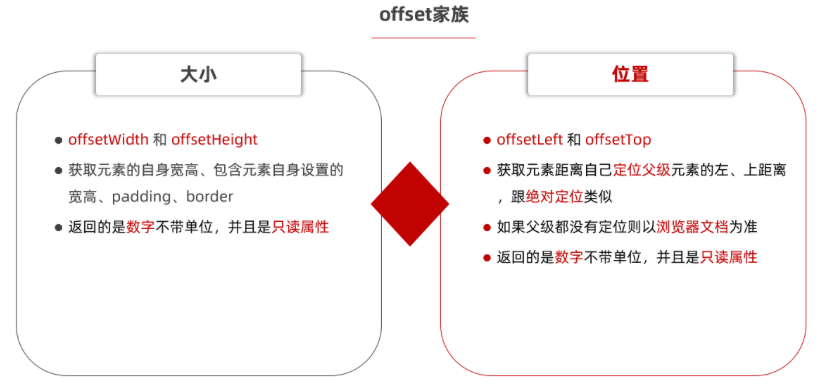
- 元素尺寸与位置
![image]()

 浙公网安备 33010602011771号