
vuex
一、准备代码
- 创建项目,
vue create vuex-demo - 建三个组件, 目录如下
|-components
|--Son1.vue
|--Son2.vue
|-App.vue
- 源代码
<!-- App.vue -->
<template>
  <div id="app">
    <h1>根组件</h1>
    <input type="text">
    <Son1></Son1>
    <hr>
    <Son2></Son2>
  </div>
</template>

<script>
import Son1 from './components/Son1.vue'
import Son2 from './components/Son2.vue'

export default {
  name: 'app',
  data: function () {
    return {

    }
  },
  components: {
    Son1,
    Son2
  }
}
</script>

<style>
#app {
  width: 600px;
  margin: 20px auto;
  border: 3px solid #ccc;
  border-radius: 3px;
  padding: 10px;
}
</style>

// main.js
import Vue from 'vue'
import App from './App.vue'

Vue.config.productionTip = false

new Vue({
  render: h => h(App)
}).$mount('#app')

// Son1.vue
<template>
  <div class="box">
    <h2>Son1 子组件</h2>
    从vuex中获取的值: <label></label>
    <br>
    <button>值 + 1</button>
  </div>
</template>

<script>
export default {
  name: 'Son1Com'
}
</script>

<style lang="css" scoped>
.box{
  border: 3px solid #ccc;
  width: 400px;
  padding: 10px;
  margin: 20px;
}
h2 {
  margin-top: 10px;
}
</style>

//Son2.vue
<template>
  <div class="box">
    <h2>Son2 子组件</h2>
    从vuex中获取的值:<label></label>
    <br />
    <button>值 - 1</button>
  </div>
</template>

<script>
export default {
  name: 'Son2Com'
}
</script>

<style lang="css" scoped>
.box {
  border: 3px solid #ccc;
  width: 400px;
  padding: 10px;
  margin: 20px;
}
h2 {
  margin-top: 10px;
}
</style>
二、创建仓库
- 安装
npm i vuex@3
-
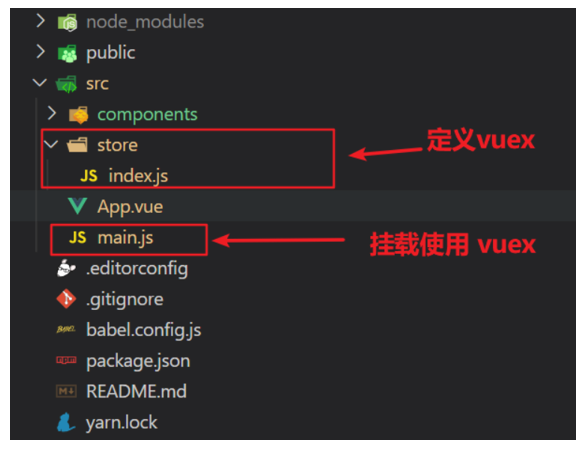
新建store/index.js专门存放 vuex。在src目录下新建一个store目录其下放置一个index.js文件。 (和
router/index.js类似)
![]()
-
创建仓库 store/index.js
// 导入 vue
import Vue from 'vue'
// 导入 vuex
import Vuex from 'vuex'
// vuex也是vue的插件, 需要use一下, 进行插件的安装初始化
Vue.use(Vuex)

// 创建仓库 store
const store = new Vuex.Store()

// 导出仓库
export default store
- 在 main.js 中导入挂载到 Vue 实例上
import Vue from 'vue'
import App from './App.vue'
import store from './store'

Vue.config.productionTip = false

new Vue({
  render: h => h(App),
  store
}).$mount('#app')
- 测试打印Vuex
created(){
  console.log(this.$store)
}
三、核心概念 —— state状态
- 提供数据, State提供唯一的公共数据源,所有共享的数据都要统一放到Store中的State中存储。打开项目中的store.js文件,在state对象中可以添加我们要共享的数据。
- 访问Vuex中的数据
- 通过$store直接访问 —> {{ $store.state.count }}
- 通过辅助函数mapState 映射计算属性 —> {{ count }}
- 通过$store访问的语法
获取 store:
 1.Vue模板中获取 this.$store
 2.js文件中获取 import 导入 store


模板中:     {{ $store.state.xxx }}
组件逻辑中:  this.$store.state.xxx
JS模块中:   store.state.xxx
- 代码实现
// 模板中使用
<h1>state的数据 - {{ $store.state.count }}</h1>

//组件逻辑中使用
<h1>state的数据 - {{ count }}</h1>
// 把state中数据,定义在组件内的计算属性中
  computed: {
    count () {
      return this.$store.state.count
    }
  }

//js文件中使用
//main.js
import store from "@/store"
console.log(store.state.count)
四、通过辅助函数 —— mapState获取 state中的数据
1.第一步:导入mapState (mapState是vuex中的一个函数)
import { mapState } from 'vuex'
2.第二步:采用数组形式引入state属性
mapState(['count'])
//上面代码的最终得到的是 **类似于**
count () {
    return this.$store.state.count
}
3.第三步:利用展开运算符将导出的状态映射给计算属性
  computed: {
    ...mapState(['count'])
  }

 <div> state的数据:{{ count }}</div>
五、开启严格模式及Vuex的单项数据流
- 明确 vuex 同样遵循单向数据流,组件中不能直接修改仓库的数据。错误代码
button @click="handleAdd">值 + 1</button>


methods:{
	 handleAdd (n) {
      // 错误代码(vue默认不会监测,监测需要成本)
       this.$store.state.count++
      // console.log(this.$store.state.count)
    },
}
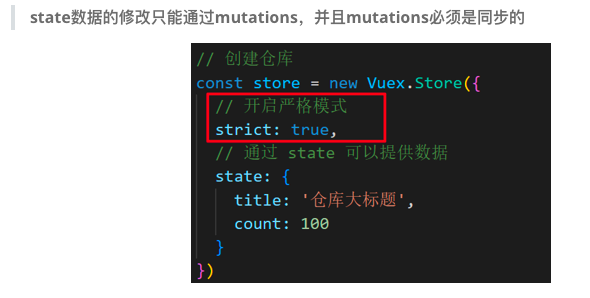
- 通过
strict: true可以开启严格模式,开启严格模式后,直接修改state中的值会报错
![]()
六、核心概念-mutations
- 定义
mutations: {
    // 方法里参数 第一个参数是当前store的state属性
    // payload 载荷 运输参数 调用mutaiions的时候 可以传递参数 传递载荷
    addCount (state) {
      state.count += 1
    }
  },
- 组件提交mutations
this.$store.commit('addCount')
七、带参数的 mutations
- 定义
mutations: {
  ...
  addCount (state, count) {
    state.count = count
  }
},
- 提交
handle ( ) {
  this.$store.commit('addCount', 10)
}
- 提交对象
this.$store.commit('addCount', {
  count: 10
})
八、练习mutations的减法功能
九、练习Vuex中的值和组件中的input双向绑定
//App.vue
<input :value="count" @input="handleInput" type="text">

export default {
  methods: {
    handleInput (e) {
      // 1. 实时获取输入框的值
      const num = +e.target.value
      // 2. 提交mutation,调用mutation函数
      this.$store.commit('changeCount', num)
    }
  }
}

//store/index.js
mutations: {
   changeCount (state, newCount) {
      state.count = newCount
   }
},
十、辅助函数- mapMutations
//mapMutations和mapState很像,它把位于mutations中的方法提取了出来,我们可以将它导入
import  { mapMutations } from 'vuex'
methods: {
    ...mapMutations(['addCount'])
}

//上面代码的含义是将mutations的方法导入了methods中,等价于
methods: {
      // commit(方法名, 载荷参数)
      addCount () {
          this.$store.commit('addCount')
      }
 }

//此时,就可以直接通过this.addCount调用了
<button @click="addCount">值+1</button>

//但是请注意: Vuex中mutations中要求不能写异步代码,如果有异步的ajax请求,应该放置在actions中
十一、核心概念actions
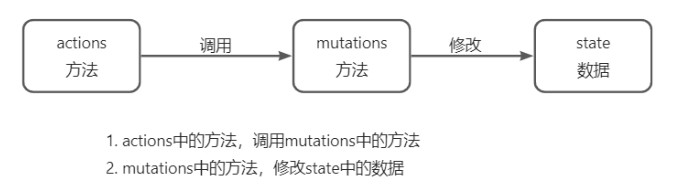
- 概念:state是存放数据的,mutations是同步更新数据 (便于监测数据的变化, 更新视图等, 方便于调试工具查看变化),actions则负责进行异步操作。mutations必须是同步的。
- 定义
mutations: {
  changeCount (state, newCount) {
    state.count = newCount
  }
}


actions: {
  setAsyncCount (context, num) {
    // 一秒后, 给一个数, 去修改 num
    setTimeout(() => {
      context.commit('changeCount', num)
    }, 1000)
  }
},

//调用
setAsyncCount () {
  this.$store.dispatch('setAsyncCount', 666)
}
- 流程图
![]()
十二、辅助函数mapActions
//mapActions 是把位于 actions中的方法提取了出来,映射到组件methods中
import { mapActions } from 'vuex'
methods: {
   ...mapActions(['changeCountAction'])
}

//mapActions映射的代码 本质上是以下代码的写法
//methods: {
//  changeCountAction (n) {
//    this.$store.dispatch('changeCountAction', n)
//  },
//}

//直接通过 this.方法 就可以调用
<button @click="changeCountAction(200)">+异步</button>
十三、核心概念getters
- 作用: 除了state之外,有时我们还需要从state中筛选出符合条件的一些数据,这些数据是依赖state的,此时会用到getters
- 定义
getters: {
    // getters函数的第一个参数是 state
    // 必须要有返回值
     filterList:  state =>  state.list.filter(item => item > 5)
  }
- 使用
//原始方式-$store
<div>{{ $store.getters.filterList }}</div>

//辅助函数 - mapGetters
computed: {
    ...mapGetters(['filterList'])
}
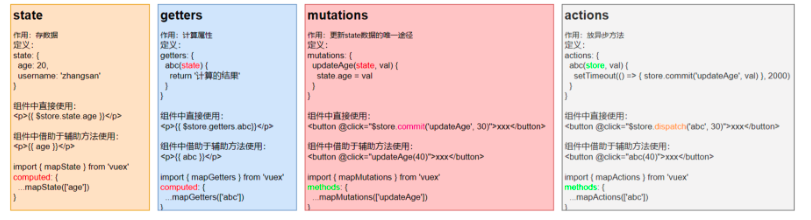
十四、小结
十五、核心概念module
- 模块定义——准备state
//  user中管理用户的信息状态  userInfo  `modules/user.js`
const state = {
  userInfo: {
    name: 'zs',
    age: 18
  }
}

const mutations = {}

const actions = {}

const getters = {}

export default {
  state,
  mutations,
  actions,
  getters
}

//  setting中管理项目应用的  主题色 theme,描述 desc, `modules/setting.js`
const state = {
  theme: 'dark'
  desc: '描述真呀真不错'
}

const mutations = {}

const actions = {}

const getters = {}

export default {
  state,
  mutations,
  actions,
  getters
}


// 在`store/index.js`文件中的modules配置项中,注册这两个模块
import user from './modules/user'
import setting from './modules/setting'

const store = new Vuex.Store({
    modules:{
        user,
        setting
    }
})
十六、获取模块内的state数据
- 使用模块中的数据
// 默认根级别的映射  mapState([ 'xxx' ])
$store.state.user.userInfo.name

//子模块的映射 :mapState('模块名', ['xxx'])
...mapState('user', ['userInfo']),
...mapState('setting', ['theme', 'desc']),

//需要开启命名空间 namespaced:true
const state = {
  userInfo: {
    name: 'zs',
    age: 18
  },
  myMsg: '我的数据'
}

const mutations = {
  updateMsg (state, msg) {
    state.myMsg = msg
  }
}

const actions = {}

const getters = {}

export default {
  namespaced: true,
  state,
  mutations,
  actions,
  getters
}
十七、获取模块内的getters数据
const getters = {
  // 分模块后,state指代子模块的state
  UpperCaseName (state) {
    return state.userInfo.name.toUpperCase()
  }
}

//直接通过模块名访问` $store.getters['模块名/xxx ']`
<!-- 测试访问模块中的getters - 原生 -->
<div>{{ $store.getters['user/UpperCaseName'] }}</div>

//默认根级别的映射  `mapGetters([ 'xxx' ]) ` , 子模块的映射  `mapGetters('模块名', ['xxx'])` -  需要开启命名空间
computed:{
  ...mapGetters('user', ['UpperCaseName'])
}
十八、获取模块内的mutations方法
- 默认模块中的 mutation 和 actions 会被挂载到全局,需要开启命名空间,才会挂载到子模块。
- 调用方式
//modules/user.js
const mutations = {
  setUser (state, newUserInfo) {
    state.userInfo = newUserInfo
  }
}

//modules/setting.js
const mutations = {
  setTheme (state, newTheme) {
    state.theme = newTheme
  }
}

//Son1.vue
<button @click="updateUser">更新个人信息</button>
<button @click="updateTheme">更新主题色</button>


export default {
  methods: {
    updateUser () {
      // $store.commit('模块名/mutation名', 额外传参)
      this.$store.commit('user/setUser', {
        name: 'xiaowang',
        age: 25
      })
    },
    updateTheme () {
      this.$store.commit('setting/setTheme', 'pink')
    }
  }
}


//Son2.vue
<button @click="setUser({ name: 'xiaoli', age: 80 })">更新个人信息</button>
<button @click="setTheme('skyblue')">更新主题</button>

methods:{
// 分模块的映射
...mapMutations('setting', ['setTheme']),
...mapMutations('user', ['setUser']),
}
十九、获取模块内的actions方法
- 代码实现
//modules/user.js
const actions = {
  setUserSecond (context, newUserInfo) {
    // 将异步在action中进行封装
    setTimeout(() => {
      // 调用mutation   context上下文,默认提交的就是自己模块的action和mutation
      context.commit('setUser', newUserInfo)
    }, 1000)
  }
}

//Son1.vue  直接通过store调用
<button @click="updateUser2">一秒后更新信息</button>

methods:{
    updateUser2 () {
      // 调用action dispatch
      this.$store.dispatch('user/setUserSecond', {
        name: 'xiaohong',
        age: 28
      })
    },
}

//Son2.vue mapActions映射
<button @click="setUserSecond({ name: 'xiaoli', age: 80 })">一秒后更新信息</button>

methods:{
  ...mapActions('user', ['setUserSecond'])
}
二十、Vuex模块化的使用小结
- 直接使用
1. state --> $store.state.模块名.数据项名
2. getters --> $store.getters['模块名/属性名']
3. mutations --> $store.commit('模块名/方法名', 其他参数)
4. actions --> $store.dispatch('模块名/方法名', 其他参数)
- 借助辅助方法使用
1.import { mapXxxx, mapXxx } from 'vuex'
computed、methods: {
// ...mapState、...mapGetters放computed中;
// ...mapMutations、...mapActions放methods中;
...mapXxxx('模块名', ['数据项|方法']),
...mapXxxx('模块名', { 新的名字: 原来的名字 }),
}
2.组件中直接使用 属性 {{ age }} 或 方法 @click="updateAge(2)"
二十一、综合案例

 浙公网安备 33010602011771号