

HTML5 App with MVVM and Knockout Study(1)
Study (1) Bindings and Observables
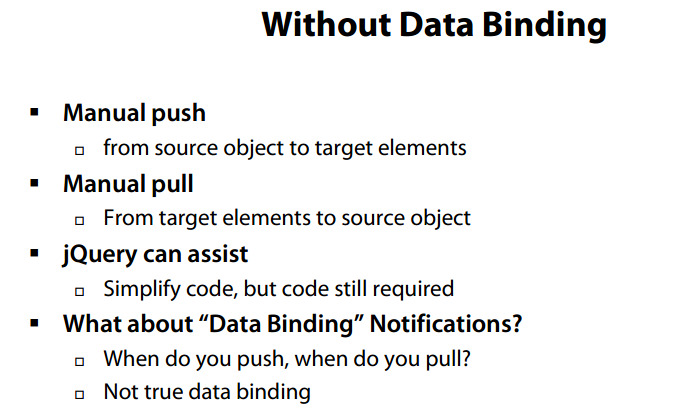
- Use jQuery to push data to DOM elements, without data binding

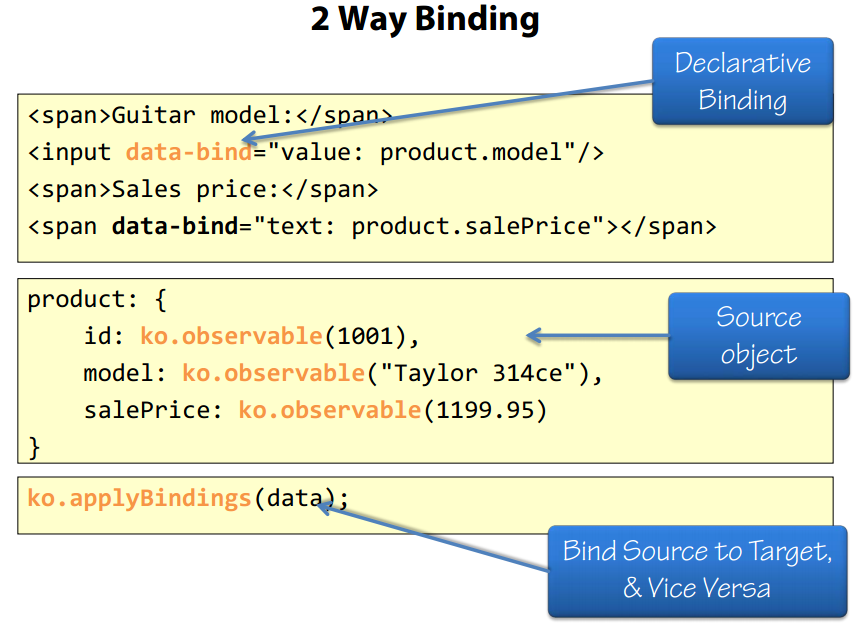
- Use Knockout’s Observables to bind data
data.js
 View Code

var my = { }; //my namespace
my.sampleData = (function (my) {
    "use strict";
    var data = { Products: [
                        { "ModelId": 1, "SalePrice": 1649.01, "ListPrice": 2199.00, "Rating": 5, "Photo": "Taylor 314-CE Left-Handed Grand Auditorium Acoustic-Electric Guitar.png", "CategoryId": 1, "ItemNumber": "T314CE", "Description": "Taylor 314-CE Left-Handed Grand Auditorium Acoustic-Electric Guitar", "Reviews": [{ "ProductId": 4, "ReviewerName": "guitarhero", "Description": "This guitar has never let me down. I gig 3-6 nights a week and the 314CE just keeps on ticking. Change the battery and the strings regularly and she sounds like a dream everytime. If you want great sound, playability, dependability and just great playing fun get this guitar. You won\u0027t be sorry.", "ReviewDate": "\/Date(1302181440000)\/", "Id": 3 }, { "ProductId": 4, "ReviewerName": "billyjack", "Description": "Best guitar ever!", "ReviewDate": "\/Date(1302218040000)\/", "Id": 4}], "Model": { "Name": "Taylor 314ce", "Id": 1 }, "Category": { "Name": "Acoustic Guitars", "Id": 1 }, "Id": 4 },
                        { "ModelId": 8, "SalePrice": 4199.00, "ListPrice": 5199.00, "Rating": 5, "Photo": "Taylor Koa Series K66ce Grand Symphony 12-String Cutaway Acoustic Electric Guitar.png", "CategoryId": 1, "ItemNumber": "TK66CE", "Description": "Taylor Koa Series K66ce Grand Symphony 12-String Cutaway Acoustic Electric Guitar", "Reviews": [], "Model": { "Name": "Taylor K66e", "Id": 8 }, "Category": { "Name": "Acoustic Guitars", "Id": 1 }, "Id": 11 },
                        { "ModelId": 9, "SalePrice": 299.00, "ListPrice": 399.00, "Rating": 3, "Photo": "Taylor Baby Taylor Left-Handed Acoustic Guitar.png", "CategoryId": 1, "ItemNumber": "TBTL", "Description": "Taylor Baby Taylor Left-Handed Acoustic Guitar", "Reviews": [], "Model": { "Name": "Taylor Baby", "Id": 9 }, "Category": { "Name": "Acoustic Guitars", "Id": 1 }, "Id": 12 },
                        { "ModelId": 10, "SalePrice": 1999.00, "ListPrice": 2399.00, "Rating": 4, "Photo": "Taylor T5 Standard Acoustic-Electric Guitar with Spruce Top.png", "CategoryId": 1, "ItemNumber": "TT5E", "Description": "Taylor T5 Standard Acoustic-Electric Guitar with Spruce Top", "Reviews": [], "Model": { "Name": "Taylor T5", "Id": 10 }, "Category": { "Name": "Acoustic Guitars", "Id": 1 }, "Id": 13 },
                        { "ModelId": 11, "SalePrice": 149.99, "ListPrice": 169.99, "Rating": 4, "Photo": "El Dorado Vintage Hand-Tooled Leather Guitar Strap.png", "CategoryId": 4, "ItemNumber": "87123", "Description": "El Dorado Vintage Hand-Tooled Leather Guitar Strap", "Reviews": [], "Model": { "Name": "El Dorado Vintage", "Id": 11 }, "Category": { "Name": "Straps", "Id": 4 }, "Id": 14 },
                        { "ModelId": 12, "SalePrice": 16.99, "ListPrice": 19.99, "Rating": 3, "Photo": "Moody 2 half Inch Luxury Black Leather Guitar Strap with Tobacco Leather Back.png", "CategoryId": 4, "ItemNumber": "89120", "Description": "Moody 2 half Inch Luxury Black Leather Guitar Strap with Tobacco Leather Back", "Reviews": [], "Model": { "Name": "Moody Luxury", "Id": 12 }, "Category": { "Name": "Straps", "Id": 4 }, "Id": 15 },
                        { "ModelId": 13, "SalePrice": 150.00, "ListPrice": 180.00, "Rating": 2, "Photo": "LM Products Iron Cross Stud 2 Inch Guitar Strap.png", "CategoryId": 4, "ItemNumber": "12972", "Description": "LM Products Iron Cross Stud 2 Inch Guitar Strap", "Reviews": [], "Model": { "Name": "LM Iron Cross", "Id": 13 }, "Category": { "Name": "Straps", "Id": 4 }, "Id": 17 },
                        { "ModelId": 14, "SalePrice": 64.99, "ListPrice": 64.99, "Rating": 4, "Photo": "Jodi Head 3 Inch Denny Wide Art Deco Guitar Strap - Brown and Tan Sequin Sparkle.png", "CategoryId": 4, "ItemNumber": "98612", "Description": "Jodi Head 3\" Denny Wide Art Deco Guitar Strap - Brown and Tan Sequin Sparkle", "Reviews": [], "Model": { "Name": "Jodi Deco", "Id": 14 }, "Category": { "Name": "Straps", "Id": 4 }, "Id": 18 },
                        { "ModelId": 15, "SalePrice": 59.99, "ListPrice": 64.99, "Rating": 3, "Photo": "Levy\u0027s Leather Guitar Strap with Dog Tags.png", "CategoryId": 4, "ItemNumber": "71203", "Description": "Levy\u0027s Leather Guitar Strap with Dog Tags", "Reviews": [], "Model": { "Name": "Levy\u0027s Dog Tags", "Id": 15 }, "Category": { "Name": "Straps", "Id": 4 }, "Id": 19 },
                        { "ModelId": 16, "SalePrice": 14.99, "ListPrice": 19.99, "Rating": 5, "Photo": "Dunlop Trigger Classical Guitar Capo.png", "CategoryId": 3, "ItemNumber": "76123", "Description": "Dunlop Trigger Classical Guitar Capo", "Reviews": [], "Model": { "Name": "Dunlop Trigger", "Id": 16 }, "Category": { "Name": "Capos", "Id": 3 }, "Id": 20 },
                        { "ModelId": 17, "SalePrice": 16.99, "ListPrice": 17.99, "Rating": 4, "Photo": "Paige 6-String Guitar Capo.png", "CategoryId": 3, "ItemNumber": "36581", "Description": "Paige 6-String Guitar Capo", "Reviews": [], "Model": { "Name": "Paige", "Id": 17 }, "Category": { "Name": "Capos", "Id": 3 }, "Id": 21 },
                        { "ModelId": 18, "SalePrice": 24.99, "ListPrice": 25.99, "Rating": 4, "Photo": "Glider GL-1 Guitar Capo.png", "CategoryId": 3, "ItemNumber": "23421", "Description": "Glider GL-1 Guitar Capo", "Reviews": [], "Model": { "Name": "Glider GL-1", "Id": 18 }, "Category": { "Name": "Capos", "Id": 3 }, "Id": 22 },
                        { "ModelId": 19, "SalePrice": 14.99, "ListPrice": 18.99, "Rating": 1, "Photo": "Planet Waves NS Classical Guitar Capo.png", "CategoryId": 3, "ItemNumber": "25232", "Description": "Planet Waves NS Classical Guitar Capo", "Reviews": [], "Model": { "Name": "Planet Waves NS", "Id": 19 }, "Category": { "Name": "Capos", "Id": 3 }, "Id": 23 },
                        { "ModelId": 2, "SalePrice": 649.00, "ListPrice": 899.00, "Rating": 4, "Photo": "Taylor 314-CE Left-Handed Grand Auditorium Acoustic-Electric Guitar.png", "CategoryId": 1, "ItemNumber": "T110CE", "Description": "Taylor 114-CE Left-Handed Grand Auditorium Acoustic-Electric Guitar", "Reviews": [], "Model": { "Name": "Taylor 110ce", "Id": 2 }, "Category": { "Name": "Acoustic Guitars", "Id": 1 }, "Id": 25 }
    ]
    };
    return {
        data: data
    };
})(my);
2-02-observable.html
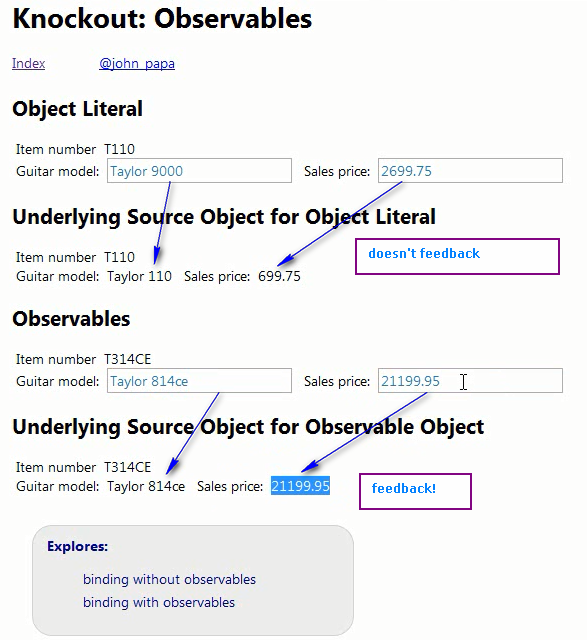
Note that product1 doesn’t use observables, therefore, the object value can be bound to the DOM element, but the value changes in DOM element doesn’t update the object value.
View Code
    <script type="text/javascript">
        $(function () {
            // Note:
            // it is likely that you would get your object from some
            // web service, but we'll mock it for simplicity.

            my.data = {
                metadata: {
                    pageTitle: "Knockout: Observables",
                    personal: {
                        link: "http://twitter.com/john_papa",
                        text: "@john_papa"
                    }
                },
                product1: {
                    id: 1002,
                    itemNumber: "T110",
                    model: "Taylor 110",
                    salePrice: 699.75
                },
                product2: {
                    id: ko.observable(1001),
                    itemNumber: ko.observable("T314CE"),
                    model: ko.observable("Taylor 314ce"),
                    salePrice: ko.observable(1199.95)
                }
            };

            //Note: Data bind the values between the source and the targets using Knockout
            ko.applyBindings(my.data);
        });
    </script>
View Code
    <div class="page">
        <div class="header" data-bind="with: metadata">
            <h1 data-bind="text: pageTitle"></h1>
            <div data-bind="with:personal">
                <a href="00-index.html">Index</a>
                <a data-bind="attr: {href: link, title: text}, text: text" class="personalCss"></a>
            </div>
        </div>
        <div>
            <h2>Object Literal</h2>
            <span>Item number</span><span data-bind="text: product1.itemNumber"></span>
            <br />
            <span>Guitar model:</span><input data-bind="value: product1.model" />
            <span>Sales price:</span><input data-bind="value: product1.salePrice" />
        </div>
        <div>
            <h2>Underlying Source Object for Object Literal</h2>
            <span>Item number</span><span data-bind="text: product1.itemNumber"></span>
            <br />
            <span>Guitar model:</span><span data-bind="text: product1.model"></span> <span>Sales
                price:</span><span data-bind="text: product1.salePrice"></span>
        </div>
        <div>
            <h2>Observables</h2>
            <span>Item number</span><span data-bind="text: product2.itemNumber" ></span>
            <br />
            <span>Guitar model:</span><input data-bind="value: product2.model" />
            <span>Sales price:</span><input data-bind="value: product2.salePrice" />
        </div>
        <div>
            <h2>Underlying Source Object for Observable Object</h2>
            <span>Item number</span><span data-bind="text: product2.itemNumber"></span>
            <br />
            <span>Guitar model:</span><span data-bind="text: product2.model"></span> <span>Sales price:</span><span data-bind="text: product2.salePrice"></span>
        </div>
        <div class="topics">
            <span>Explores:</span>
            <ul>
                <li>binding without observables</li>
                <li>binding with observables</li>
            </ul>
        </div>
    </div>
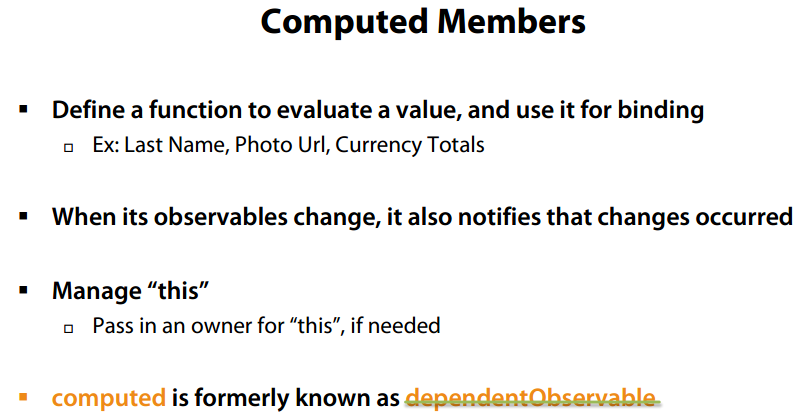
- Computed Members in Knockout
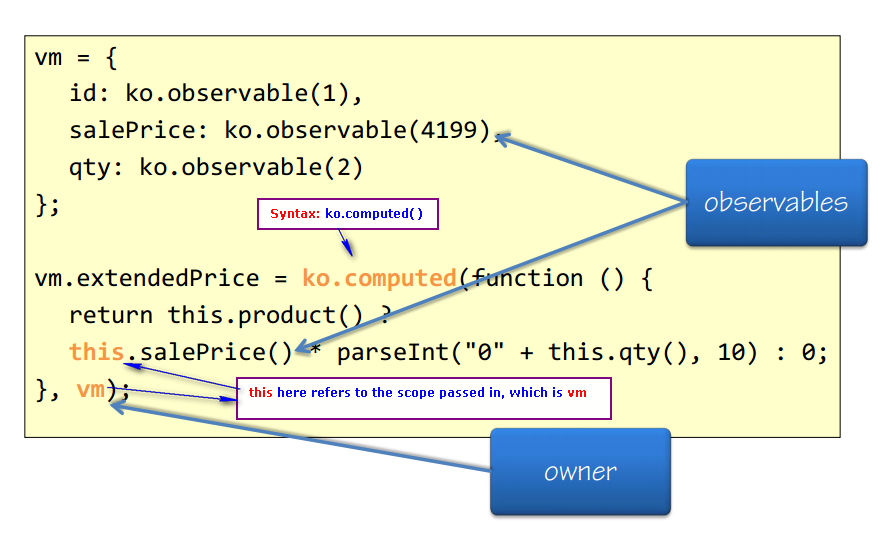
demo: 2-04-computed.html
Note that, two computed observables use different owners because of different definition scopes
View Code
    <script type="text/javascript">
        $(function () {
            var photoPath = "/images/";

            // function helper
            my.formatCurrency = function (value) {
                return "$" + value.toFixed(2);
            };

            // for creating Product Models
            my.Product = function () {
                this.id = ko.observable();
                this.salePrice = ko.observable();
                this.photo = ko.observable();
                this.shortDescription = ko.observable();
                // photo url
                // the computed field is defined inside the object, so pass "this" as owner
                this.photoUrl = ko.computed(function () {
                    return photoPath + this.photo();
                }, this);

            };

            // NOTE: I am showing 2 ways to handle "this" with a computed observable.
            // 1st way is to pass in what "this should" represent.
            // 2nd way is to skip it, and use a variable that is scoped
            // outside of the computed function.

            // The ViewModel
            my.vm = {
                metadata: {
                    pageTitle: "Knockout: Computed",
                    personal: {
                        link: "http://twitter.com/john_papa",
                        text: "@john_papa"
                    }
                },
                product: ko.observable(
                    new my.Product()
                        .shortDescription("Taylor Koa Series K66ce")
                        .salePrice(4199)
                        .photo("Taylor Koa Series K66ce Grand Symphony 12-String Cutaway Acoustic Electric Guitar.png")
                    ),
                quantity: ko.observable(2)
            };

            //extended price
            // this computed field is defined outside the object scope, so pass the object "my.vm" as owner
            my.vm.extendedPrice = ko.computed(function () {
                return this.product() ?
                    this.product().salePrice() * parseInt("0" + this.quantity(), 10) : 0;
            }, my.vm);

            ko.applyBindings(my.vm);
        });
    </script>
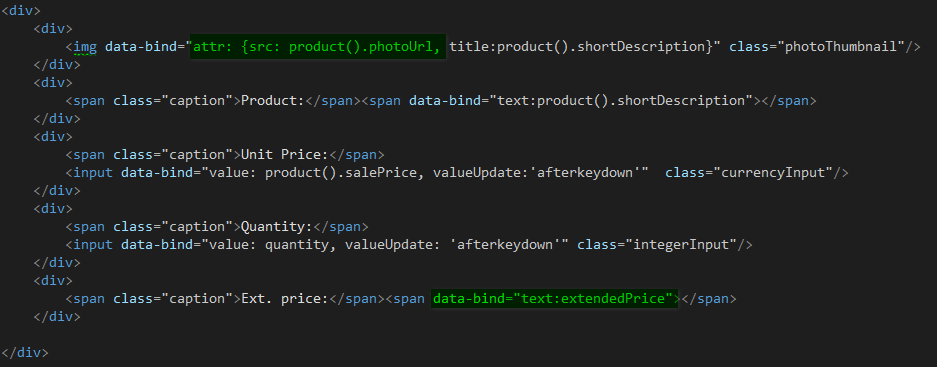
Data binding in DOM elements. Not that binding to an observable within another observable, the upper level one needs the parentheses, like product().photoUrl
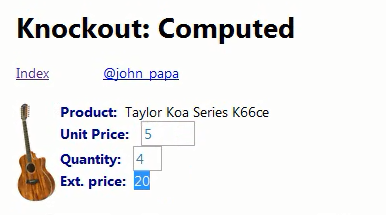
result:
- More complicated example of computed observable
Computed with grand totals:
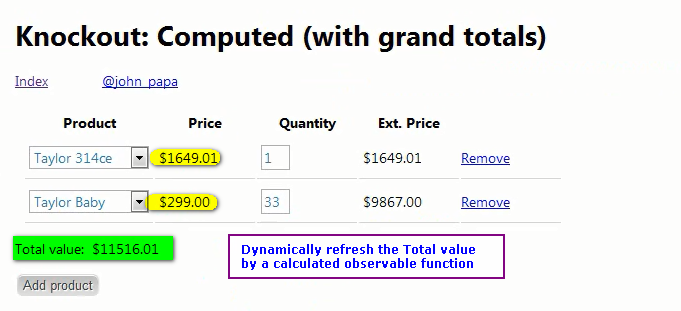
Code:2-05-computed-with-grand-totals.html
View Code
            // Computed observable function.
            // We append it to the ViewModel here.
            my.vm.grandTotal = ko.computed(function () {
                var total = 0;
                $.each(this.lines(), function () {
                    // "this" is part of the inner function
                    total += this.extendedPrice();
                });
                return total;
            }, my.vm);
- Two-way binding of computed observable
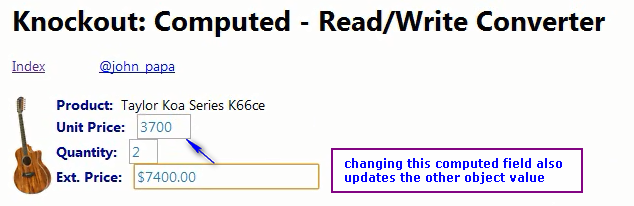
View Code
            ///////////////////////////////////////////////////
            // read/write computed
            ///////////////////////////////////////////////////
            my.vm.extendedPrice = ko.computed({
                read: function () {
                    var extPrice = this.product() ?
                       this.product().salePrice() * parseInt("0" + this.quantity(), 10) : 0;
                    return '$' + extPrice.toFixed(2);
                },
                write: function (value) {
                    value = parseFloat(value.replace(/[^\.\d]/g, ""));
                    value = isNaN(value) ? 0 : value;
                    var unitPrice = value / this.quantity();
                    this.product().salePrice(unitPrice);
                },
                owner: my.vm
            });

- ObservableArray
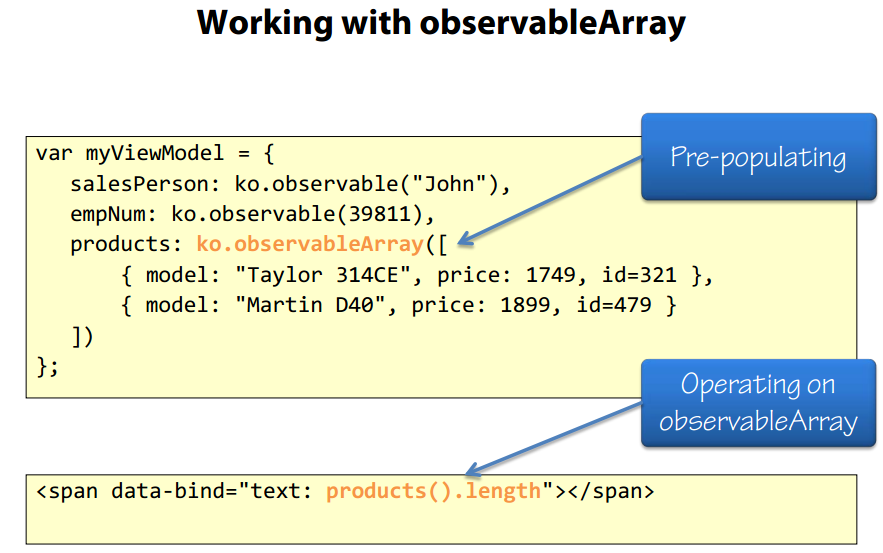
View Code
 1         $(function () {
 2             var photoPath = "/images/";
 3
 4             // Product construction
 5             var Product = function () {
 6                 this.id = ko.observable();
 7                 this.salePrice = ko.observable();
 8                 this.photo = ko.observable();
 9                 this.itemNumber = ko.observable();
10                 this.description = ko.observable();
11                 this.photoUrl = ko.computed(function () {
12                     return photoPath + this.photo();
13                 }, this);
14             };
15
16             my.vm = {
17                 metadata: {
18                     pageTitle: "Knockout: Observable Arrays",
19                     personal: {
20                         link: "http://twitter.com/john_papa",
21                         text: "@john_papa"
22                     }
23                 },
24
25                 // observable array of products
26                 products: ko.observableArray([]),
27                 selectedProducts: ko.observableArray([]),
28                 itemToAdd: ko.observable(""),
29
30                 // loading the observable array with sample data
31                 load: function () {
32                     $.each(my.sampleData.data.Products, function (i, p) {
33                         my.vm.products.push(new Product()
34                                 .id(p.Id)
35                                 .salePrice(p.SalePrice)
36                                 .photo(p.Photo)
37                                 .itemNumber(p.ItemNumber)
38                                 .description(p.Description)
39                         );
40                     });
41                 }
42             };
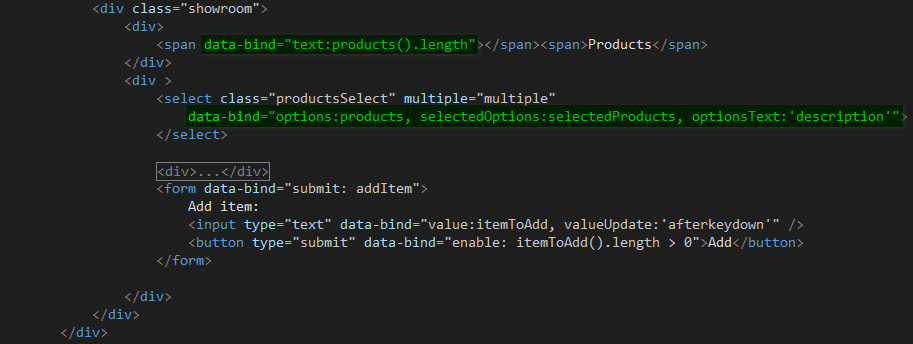
result:
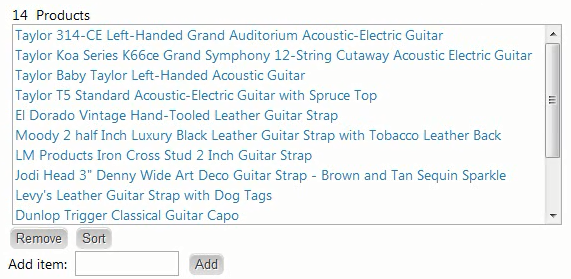
- Observable Array Functions
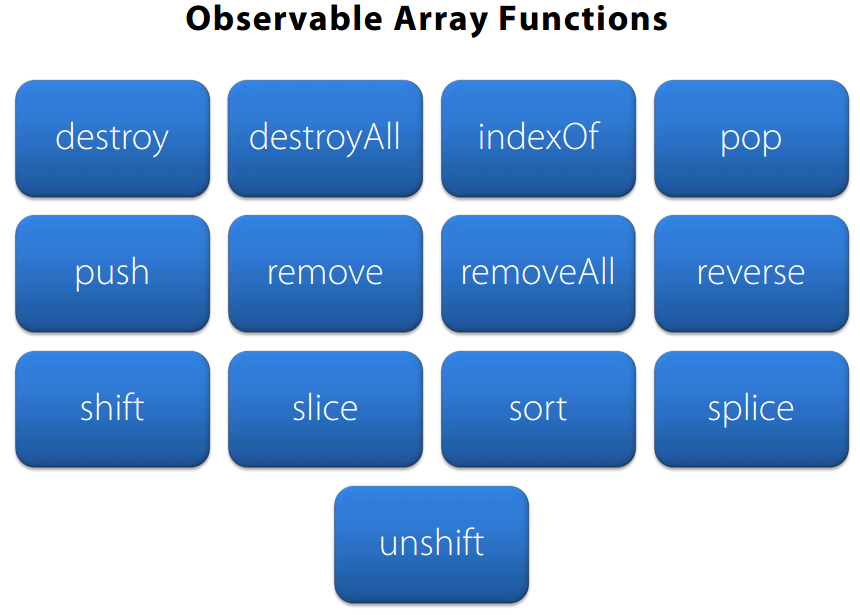
View Code
            my.vm.canAddViaSplice = ko.computed(function () {
                return this.productsAreSelected() && this.itemToAddViaSplice();
            }, my.vm);

            my.vm.canReplace = ko.computed(function () {
                return this.productsAreSelected() && this.replacementItem();
            }, my.vm);

            my.vm.canAddViaUnshift = ko.computed(function () {
                //return this.itemToAddViaUnshift();
                return this.itemToAddViaUnshift().length > 0;
            }, my.vm);

            my.vm.sortProducts = function () {
                my.vm.products.sort(
                    function (left, right) {
                        return left.toLowerCase() === right.toLowerCase()
                            ? 0 : (left.toLowerCase() < right.toLowerCase() ? -1 : 1);
                    }
                    );
            };

            my.vm.reverseProducts = function () {
                my.vm.products.reverse();
            };

            my.vm.spliceProduct = function () {
                if (!my.vm.productsAreSelected()) { return; }
                var start = my.vm.products().indexOf(my.vm.selectedProducts()[0]);
                my.vm.products.splice(start, 0, my.vm.itemToAddViaSplice());
                my.vm.itemToAddViaSplice("");
            };

            my.vm.replaceProduct = function () {
                if (!my.vm.productsAreSelected()) { return; }
                my.vm.products.replace(my.vm.selectedProducts()[0], my.vm.replacementItem());
                my.vm.selectedProducts.push(my.vm.replacementItem());
                my.vm.replacementItem("");
            };

            my.vm.unshiftProduct = function () {
                my.vm.products.unshift(my.vm.itemToAddViaUnshift());
                my.vm.itemToAddViaUnshift("");
            };

            my.vm.shiftProduct = function () {
                var item = my.vm.products.shift();
            };

            my.vm.popProduct = function () {
                var item = my.vm.products.pop();
            };

            my.vm.removeSelected = function () {
                // NOTE: Could use remove function if we had only 1 to remove
                // my.vm.products.remove(my.vm.selectedProducts()[0]);
                my.vm.products.removeAll(my.vm.selectedProducts());
                my.vm.selectedProducts([]);
            };
- Subscribing to changes
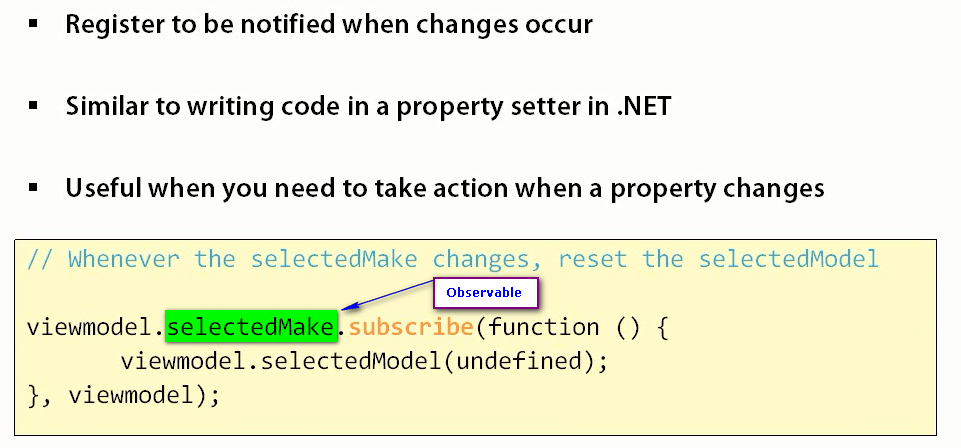
the code to subscribe:
View Code
            // Whenever the selectedMake changes, reset the selectedModel
            my.viewmodel.selectedMake.subscribe(function () {
                my.viewmodel.selectedModel(undefined);
            }, my.viewmodel);

            // Whenever the selectedModel changes, reset the selectedCar
            var mysub = my.viewmodel.selectedModel.subscribe(function () {
                my.viewmodel.selectedCar(undefined);
            }, my.viewmodel);
            //mysub.dispose();
View Code
            <ul>
                <li><span class="alignedCaption">Make: </span>
                    <select data-bind="options: makes, value: selectedMake, optionsText: 'name', optionsCaption: 'Choose a make'">
                    </select>
                    <!-- ko with: makes() -->
                    <span data-bind="text:length" class="textValues"></span>
                    <!-- /ko -->
                </li>
                <li><span class="alignedCaption">Model: </span>
                    <select data-bind="options: models, value: selectedModel, optionsText: 'name', optionsCaption: 'Choose a model'">
                    </select>
                    <!-- ko with: models() -->
                    <span data-bind="text:length" class="textValues"></span>
                    <!-- /ko -->
                </li>
                <li><span class="alignedCaption">Car: </span>
                    <select data-bind="options: cars, value: selectedCar, optionsText: 'desc', optionsCaption: 'Choose a car'">
                    </select>
                    <!-- ko with: cars() -->
                    <span data-bind="text:length" class="textValues"></span>
                    <!-- /ko -->
                </li>
            </ul>
Run the demo in jsFiddle

 浙公网安备 33010602011771号