02 - Razor Views in ASP.NET MVC 3
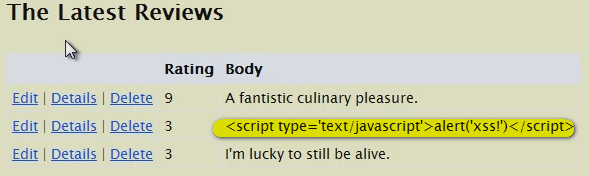
- Razor expression always returns HTML Encoded text. For example, the controller returns a javascript text to the view, razor expression in the view will only display the plain text of it, rather than running the javascript code:
the source code of the page is:
But if we use @Html.Raw(), itwill render the NON-Encoded text, in this example, it will run the javascript and show a alert popup window.
@Html.Raw() can also be used to render HTML content retruned by controller.
|
Razor code in View
|
Render in page
|
| @item.Rating / 10.0 |
9 / 10.0 |
| @(item.Rating / 10.0) |
0.9 |
| k@item.Rating |
k@item.Rating |
| k(@item.Rating ) |
k9 |
| @@somthing |
@something |
| {@: somthing} |
something |
- In MVC3, the “Master Page” is \Shared\_layout.cshtml
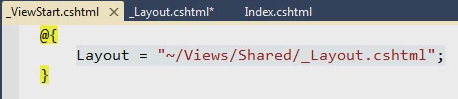
and the _ViewStart.cshtml defines variable Layout to indicate which file is “Master Page”. This Layout variable can be overridden in a paritcular View so that this View can indicate another View as its Master Page .
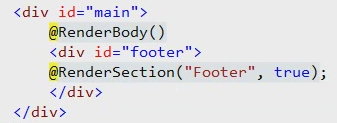
- The RenderBody method resides in the master page, or in Razor this is commonly referred to as the Layout page. There can only be ONE RenderBody method per Layout page. If you’re from Web Forms world, the easiest way to think of RenderBody is it’s like the ContentPlaceHolder server control.
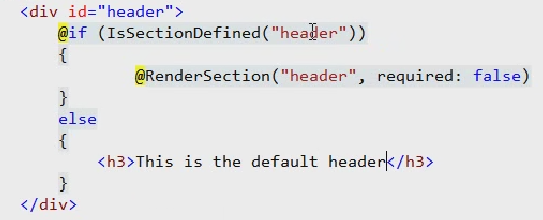
- RenderSection runs code blocks you define in your content pages.A layout page can only contain one RenderBody method, but can have multiple sections.
in content page we can define a paticualar section like this:
@section Footer
{
    <p> this is a footer </p>
}
|
in _Layout.cshtml :
- RenderPage() method renders the content of a file
| @RenderPage("~/Views/Shared/_header.cshtml") |
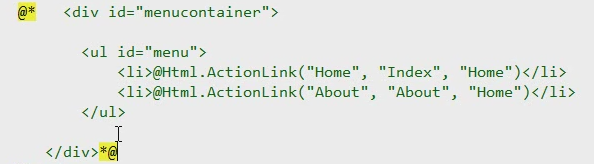
- In Razor, the way to comment out a piece of code is to use @* *@
- Html.Partial(“ViewName”, Model)
@Html.Partial("ViewName")
<% Html.RenderPartial("ViewName"); %>
|
Comparing to Html.RenderPartial, Html.Partial returns string insdead of wrting directly to Response object.
- Html.Action(“ViewName”,”ControllerName”)
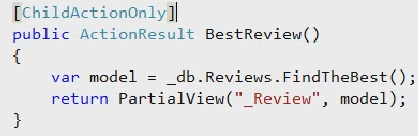
This is another way to render partial view, but we need to add an action that returns ParialView ActionResult:
- For actions returning PartialView, to avoid being invoked directly, we should put [ChildActionOnly] attribute to them.
- Custom HtmlHelper is an Extended method of "HtmlHelper" class
public static class MyHelpers
{
    public static string Image(this HtmlHelper helper, string src, string altText)
    {
        var builder = new TagBuilder("img");    // create a html tag
        builder.MergeAttribute("src",src);      // set attributes
        builder.MergeAttribute("alt",altText);
        return builder.ToString(TagRenderMode.SelfClosing); // close the tag and return the element string
    }
}
|
If we use @Html.Image(item.ImageUrl,item.Alt) to render the view, it will show the Encoded string instead of the img element itself:
In order to prevent razor from rendering the ECODED string to View, it should return MvcHtmlString instead of string
namespace MyMVC3App.Infrastructure
{
    public static class MyHelpers
    {
        public static MvcHtmlString Image(this HtmlHelper helper, string src, string altText)
        {
            var builder = new TagBuilder("img");    // create a html tag
            builder.MergeAttribute("src",src);      // set attributes
            builder.MergeAttribute("alt",altText);
            // close the tag and
            // in order to prevent razor from rendering the ECODED string to View
            // it should return MvcHtmlString instead of string
            return MvcHtmlString.Create(builder.ToString(TagRenderMode.SelfClosing));
        }
    }
}
|
Also, we should put the namespace of the Helper class to \Views\web.config file
  <system.web.webPages.razor>
    <host factoryType="System.Web.Mvc.MvcWebRazorHostFactory, System.Web.Mvc, Version=3.0.0.0,
          Culture=neutral, PublicKeyToken=31BF3856AD364E35" />
    <pages pageBaseType="System.Web.Mvc.WebViewPage">
      <namespaces>
        <add namespace="System.Web.Mvc" />
        <add namespace="System.Web.Mvc.Ajax" />
        <add namespace="System.Web.Mvc.Html" />
        <add namespace="System.Web.Routing" />
        <add namespace="MyMVC3App.Infrastructure"/>
      </namespaces>
    </pages>
  </system.web.webPages.razor>
|







 浙公网安备 33010602011771号