

CentOS8.4(Anolis 8.6) Apache 2.4 Web 服务器配置记录(2022.11)
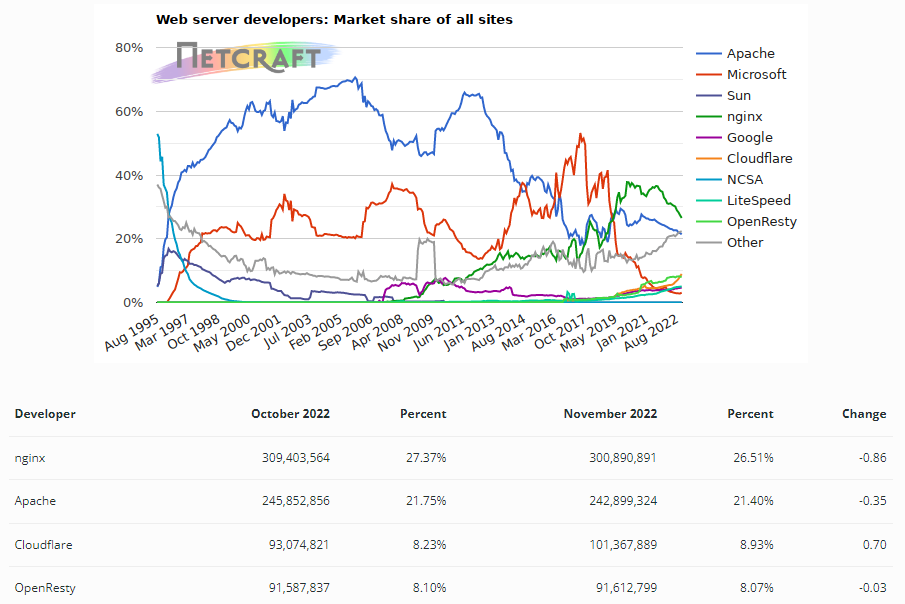
1. 首先安装nginx, 因为目前nginx在Web服务市场的占比(26.51%)已经超过Apache(21.40%)。
2. 安装nginx 步骤(在阿里云虚拟主机 CentOS8.4 123.56.43.47中安装)
#yum install nginx
#systemctl start nginx
#systemctl status nginx
nginx 配置文件为:/etc/nginx/nginx.conf
nginx web 服务器默认web root目录为: /usr/share/nginx/html
从windows web 浏览器 chrome中访问 htttp://123.56.43.47, 发现无法访问成功。
咨询阿里云公司后,被告知需要在aliyun主机的 WEB界面控制台中,添加安全组,允许80端口的协议进入云主机。
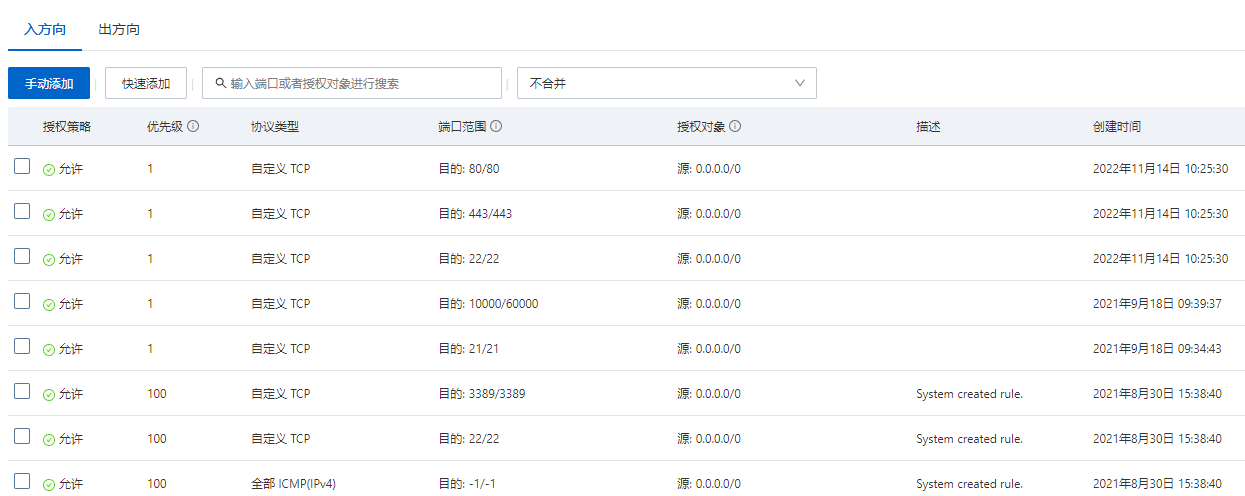
按上图内容添加80端口的进入规则后,http://123.56.43.47 即可访问成功。
3. 安装Apache 2.4
因为希望能够让每个Linux的登录用户可以访问到 http://123.56.43.47/~cjl 这样的自己的web主页。而在网络上一直未查询到如何配置nginx来实现此功能。
因此停止 nginx 服务,开始安装apache 2.4 web 服务。
#systemctl stop nginx
#yum install httpd* -y
#systemctl start httpd.service
#systemclt status httpd
#ps -ef | grep httpd
apche 2.4 版本的配置文件和以前的版本有很大的不同,而网上更多的是关于apache 2.4 以前的配置资料。
httpd的配置文件 /etc/httpd/conf/httpd.conf
#httpd -v //查看 apache 版本
我的版本是:
Server version: Apache/2.4.37 (centos)
Server built:   Nov 12 2021 04:57:27
个人主页相关的配置文件在
/etc/httpd/conf.modules.d/00-base.conf
和 etc/httpd/conf.d/userdir.conf
- 查看/etc/httpd/conf.modules.d/00-base.conf,必须有userdir_module模块,如:
$ cat /etc/httpd/conf.modules.d/00-base.conf | grep userdir
LoadModule userdir_module modules/mod_userdir.so
- 修改apache 配置文件
进入/etc/httpd/conf.d/userdir.conf设置,将第17行的UserDir disabled加上注释并取消24行UserDir public_html的注释(可以更改UserDir后面文件夹的名字,比如UserDir www)
添加下面的代码到/etc/httpd/conf/httpd.conf文件中
#
<Directory "/home/*/public_html">
AllowOverride None
Options Indexes FollowSymLinks
Require all granted
</Directory>
这里要注意的是,apache2.4版本已经取消了
Order Deny,Allow
Allow from All
的使用,而采用
Require all granted
来设置对目录的访问。
设置别名
- 创建文件根目录
进入个人home目录,创建一个文件目录 public_html和测试页面
mkdir ~/public_html
cd ~/public_html
echo "Test home dir" >> index.html
将selinux关闭,查看是否可以访问。
- 修改权限和selinux设置
开启selinux服务
个人home目录要允许apache软件访问,必须设置home目录和public_html目录可读可执行权限,比如
$ chmod 755 /home/username
$ chmod 755 ~/public_html -R
另外,需要修改selinux设置,否则会显示Permission denied。
$ ll -Z ~/ #查看home目录下各目录上下文
其中public_html目录必须有user_home_t内容,若没有,则执行
# chcon -t user_home_t /home/username/public_html -R
然后,开启服务器个人主页权限# setsebool httpd_enable_homedirs on
到此个人目录可以使用,将代码放到~/public_html 目录下吧^_^。
————————————————
4. 为 Apache 2.4 安装配置 PHP 支持。
#yum install php
#systemctl restart httpd.service // 重启apache 2.4 服务
- web browser (windows + chrome)访问 http://123.56.43.47/index-x.php(使用的 x php 探针程序) 时,出现
该网页无法正常运作
123.56.43.47 目前无法处理此请求。
HTTP ERROR 500
解决问题首先要知道问题所在,所以必须知道更详细的问题描述才行。其实只需要配置php.ini即可。在php的安装目录中找到php.ini文件并打开(/etc/php.ini, CentOS 8.4),找到display_errors,默认情况下是display_errors = Off,把Off修改为On,保存关闭文件,然后重启apache。
这样如果编写的脚本再有错误浏览器就会显示出来这些错误了,知道错误所在那就看你的了:)
- 自己编写一个php 程序 index.php 内容如下:
<html>
<body>

<?php
phpinfo();
?>

</body>
</html>
windows + chrome 访问 http://123.56.43.47时, 此php可以正常工作。
本文写作时,其中部分内容参考了CSDN博主「郭润民」的原创文章,遵循CC 4.0 BY-SA版权协议,转载请附上原文出处链接及本声明。
原文链接:https://blog.csdn.net/grunmin/article/details/17759665

 浙公网安备 33010602011771号