
Archlinux完全安装教程笔记(换源处之后同样适用Manjaro)——基本配置篇(含kde桌面环境、中文输入法)
网络配置
找到自己的无线网卡名,我的是wlp4s0
ip link
进入NetworkManagerTUI
nmtui
进入Edit->Add->wifi,对应填入
Device		网卡名
SSID		wifi名
Securtity	WAP &WAP2 Personal
Password	密码
设置完成后,检查一下能不能ping通,不通重新配置
ping baidu.com
进去后起个主机名,以archlinux举例
echo archlinux > /etc/hostname
映射ip地址
vim /etc/hosts
127.0.0.1			localhost
::1					localhost
127.0.0.1			archlinux.localdomain		archlinux
时间设置
设置时区
timedatectl set-timezone Asia/Shanghai
设置时间与网络同步
timedatectl set-ntp true
查看时间状态
tiemdatectl status
设置bash环境变量
cd /etc/skel
vim .bashrc
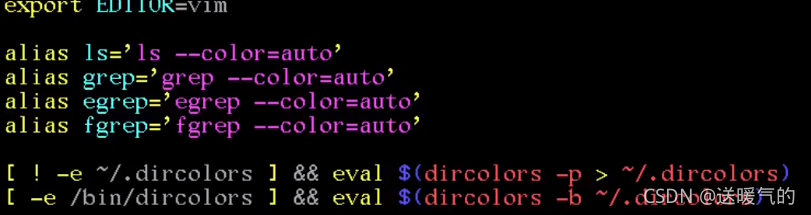
写入
#设置默认编辑器
export EDITOR=vim

alias grep=‘grep --colors=auto’

# grep -e
alias egrep=‘egrep --colors=auto’
# grep -F
alias fgrep=‘fgrep --colors=auto’

# 如果home下没有dircolors,就将dircolors写入新文件
[	! -e ~/.dircolors ] && eval $(dircolors -p > ~/.dircolors)

# 如果/bin下有dircolors,就把dircolors应用到当前文件
[ -e /bin/dircolors ]	&& eval $(dircolors -b ~/.dircolors)
复制所有文件到home下
cp -a . ~
如果下面两条命令都有颜色,说明配置成功
ls -al /
grep root /etc/passwd
用户创建及赋予sudo权限
以arch用户举例
创建arch用户
useradd --create-home arch
设置密码
passwd arch
添加arch到必要组里
usermod -Ga wheel,users,storage,power,lp,adm,optical
查看arch在哪些组里
id arch
配置sudo权限
visudo
找到下面这一行,并放开注释
# %wheel ALL=(ALL) ALL
arch用户就能进行sudo操作了
语言设置
vim /etc/locale.gen
找到并放开注释
# en_US UTF-8
# zh_CN UTF-8
生成locale
locale-gen
设置语言
echo LANG=en_US.UTF-8 > /etc/locale.conf (zh_CN)
重启
reboot
桌面环境
通用显卡驱动
pacman -S xf86-video-vesa
安装xorg
pacman -S xorg
安装字体
pacman -S ttf-dejavu wqy-microhei
安装kde及应用
pacman -S plasma kde-applications
启用sddm(简单桌面显示管理)
systemctl enable sddm
reboot
换源
此处开始同样适用Manjaro
最近时间的中国镜像源
sudo pacman-mirrors -i -c China -m rank
配置archlinuxcn源
sudo vim /etc/pacman .conf
[archlinuxcn]
SigLevel = Optional TrustedOnly
Server = https://mirrors.tuna.tsinghua.edu.cn/archlinuxcn/$arch
更新源列表
sudo pacman-mirrors -g
更新pacman的数据库和arch系统
sudo pacman -Syyu
添加密钥
sudo pacman -S archlinuxcn-keyring
安装输入法
安装fcitx组件和google拼音
pacman -S fcitx fcitx-configtool fcitx-googlepinyu
在当前home下新增配置文件
sudo vim ~/.xprofile
export GTK_IM_MODULE=fcitx
export QT_IM_MODULE=fcitx
export XMODIFIERS="@im=fcitx"
reboot
安装AUR包管理工具
安装yay
sudo pacman -S yay
安装其他常用软件或者工具
git
yay -S git
chrome
yay -S google-chrome
zsh
sudo pacman -S zsh
深度截图,好用
yay -S deepin-screenshot
开发工具一般去官网下
比如jetbrain全家桶,vscode等

 浙公网安备 33010602011771号