


3.4 MongoDB数据库查询
基于3.3节的结果,查询北京的天气数据,代码如下。
import pymongo
client = pymongo.MongoClient('localhost',27017)
book_weather = client['weather']
sheet_weather = book_weather['sheet_weather_3']
#查找键HeWeather6.basic.location值为北京的数据
for item in sheet_weather.find({'HeWeather6.basic.location':'北京'}):
    print(item)
代码运行结果如图所示。
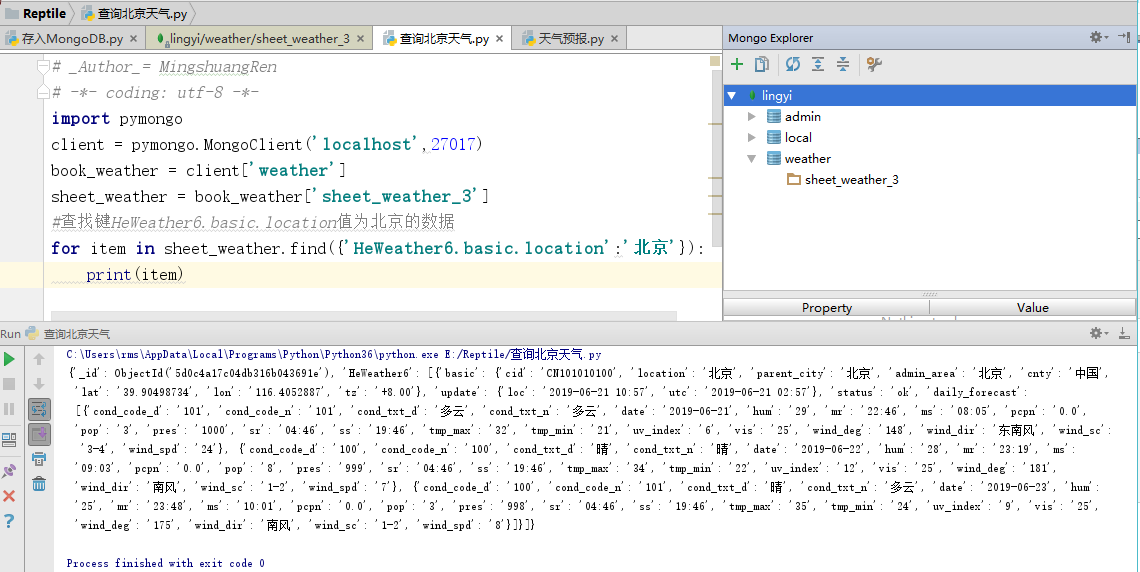
查询的语法是sheet_weather.find(),其中sheet_weather代表weather,数据库中的表格sheet_weather_3。
接下来查询天气最低气温大于5摄氏度的城市名,代码如下:
import pymongo
client = pymongo.MongoClient('localhost',27017)
book_weather = client['weather']
sheet_weather = book_weather['sheet_weather_3']
for item in sheet_weather.find():
    #因为数据需要3天的天气预报,因此循环3次
    for i in range(3):
        tmp = item['HeWeather6'][0]['daily_forecast'][i]['tmp_min']
        #使用update方法,将表中最低气温数据修改为数值型
        sheet_weather.update_one({'_id':item['_id']},{'$set':{'HeWeather6.0.daily_forecast.{}.tmp_min'.format(i):int(tmp)}})
        #提取出最低气温低于5摄氏度的城市
        for item in sheet_weather.find({'HeWeather6.0.daily_forecast.tmp_min':{'$gt':5}}):
            print(item['HeWeather6'][0]['basic']['location'])
代码运行结果如图所示。

由于这里目标是提取最低温度大于5摄氏度的城市名,因此先将最低温度设置成整型数据。更新数据用sheet_weather,其中update_one,update_one方法用于指定更新一条数据,代码如下。
sheet_weather.update_one({'_id':item['_id']},{'$set':{'HeWeather6.0.daily_forecast.{}.tmp_min'.format(i):int(tmp)}})
这里第一个参数是{'_id':item['_id']},表示要更新的查询条件,对应_id字段。第二个参数表示要更新的信息,$set是MongoDB中的一个修改器,用于指定一个键并更新键值,若键不存在则创建一个键。
除此之外,常用修改器还有$inc、$unset、$push等。
- 修改器$inc:可以对文档的某个值为数字型(只能为满足要求的数字)的键进行增减操作。
- 修改器$unset:用于删除键。
- 修改器$push:想文档的某个数组类型的键添加一个数组元素,不过滤重复的数据。添加时,若键存在,要求键值类型必须是数组;若键不存在,则创建数组类型的键。
{'$set':{'HeWeather6.0.daily_forecast.{}.tmp_min'.format(i):int(tmp)}}是将HeWeather6.0.daily_forecast.{}.tmp_min路径下的数据设置为int(整型),路径中间的{}的数据由路径后的.format(i)指定,其内容就是format中的i变量。

下面是一些延伸内容。
可以将3.2节中的URL部分。
url = 'https://free-api.heweather.net/s6/weather/forecast?location='+item[2:13]+'&key=871a107479f049cca8f7d22b031a1c2d'
写成:
url = 'https://free-api.heweather.net/s6/weather/forecast?location={}&key=871a107479f049cca8f7d22b031a1c2d'.format(item[0:11])
数据更新完毕后,再用find方法查找数据,其中$gt表示符号>。
        for item in sheet_weather.find({'HeWeather6.daily_forecast.tmp_min':{'$gt':5}}):
            print(item['HeWeather6'][0]['basic']['location'])
这里的$lt、$lte、$gt和$gte,分别表示符号<、 ≤ 、> 和 ≥。

 浙公网安备 33010602011771号