
C++中的文件操作
C++中的文件流类
在C++标准库中有三类可用于文件操作,称为文件流类:
ifstream:用于从文件中读取数据
ofstream:用于向文件中写入数据
fstream:既可用于从文件中读取数据,又可向文件中写入数据
使用这三个类时,程序中需要包含fstream头文件,C++中各流类的关系如下图所示: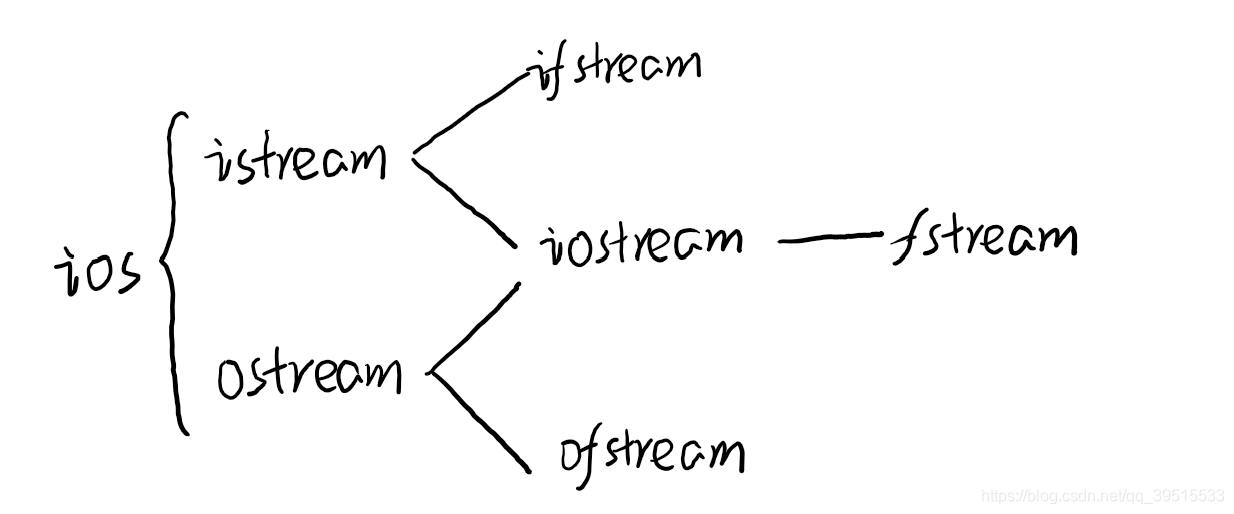
open打开文件
在对文件进行读写操作之前,先要打开文件。通过打开文件,可以建立起文件与文件流之间的关联,以后要对文件进行操作时,就可以通过与之关联的流对象来进行。另一方面,通过打开文件可以指明文件的使用方式(使用方式:只读、只写、既读又写、在文件末尾添加数据、以文本的方式使用、以二进制的方式使用…)
打开文件可以通过以下两种方式进行:
调用流对象的open成员函数打开文件
定义文件流对象时,通过构造函数打开文件
使用open函数打开文件
(以上列举的三类文件流类均有open成员函数)
函数原型如下:
void open(const char* szFileName, int mode);
第一个参数是指向文件名的指针,第二个参数是文件的打开模式标记。示例如下:
#include<iostream>
#include<fstream>
using namespace std;

int main(){
	ifstream inFile;
	inFile.open("test.txt",ios::in);//打开文件用于读取数据,如歌文件不存在则打开出错
	if(inFile)
		inFile.close();
	else
		cout<<"打开失败!"<<endl;

	ofstream outFile;
	outFile.open("test.txt",ios::out);//打开文件用于写入数据,如果文件不存在,则新建该文件,若文件本来就存在,则打开时清楚里面的内容
	if(!outFile)
		cout<<"error!"<<endl;
	else
		outFile.close();
	//打开已经存在的文件,既可读取内容,也可向其写入数据。文件刚打开时,原有内容保持不变,如果文件不存在,则打开出错
	outFile.open("test.txt",ios::out|ios::in);
	if(outFile)
		outFile.close();
	else
		cout<<"error-2!"<<endl;
	fstream ioFile;
	ioFile.open("test.txt",ios::out|ios::in|ios::trunc);//打开文件既可读也可写,如果文件本来就存在,则打开时清除其内容,如果文件不存在则新建该文件
	if(!ioFile)
		cout<<"error-3"<<endl;
	else
		ioFile.close();
	return 0;
}
使用流类的构造函数打开文件
在定义流对象时,在构造函数中给出文件名和打开模式也可以打开文件,例如在ifstream中,有如下构造函数:
ifstream::ifstream(const char* szFileName,int mode=ios::in, int);
第一个参数是指向文件名的指针,第二个参数是打开文件的模式标记,默认值为ios::in ,第三个参数是整型,一般很少用。示例如下:
#include<iostream>
#include<fstream>
using namespace std;
int main()
{
	ifstream inFile("test.txt",ios::in);
	if(inFile)
		inFile.close();
	else
		cout<<"error! doesn't exist!"<<endl;

	ofstream outFile("text.txt",ios::out|ios::in);
	if(!outFile)
		cout<<"error!";
	else
		outFile.close();
	return 0;
}
文本文件的读取和写入
使用文件流对象打开文件后,文件就成了一个输入或输出流,对于文本文件可以使用cin、cout方法读写。例如将in.txt中的内容输出到out.txt中,代码如下:
    #include<iostream>
#include<fstream>
using namespace std;

const int SIZE=1000;
int a[SIZE];    //用于存放文件中读入的整数
int main()
{
	int i=0;
	ifstream srcFile("in.txt",ios::in);  //以文本模式打开in.txt备读
	if(!srcFile){
		cout<<"error! sourse file"<<endl;
		return 0;
	}
	ofstream desFile("out.txt",ios::out);
	if(!desFile){
		cout<<"error! desfile"<<endl;
		srcFile.close();
		return 0;
	}
	int x;
	while (srcFile>>x)
	{
		a[i++]=x;
	}


	for(int j=0;j<9;++j)
		desFile<<a[j]<<" ";
	desFile.close();
	srcFile.close();
	return 0;
}
二进制文件的读取和写入
用文本的方式存储信息有一个问题就是浪费空间且不利于检索,这时我们可以使用二进制的方式。读写二进制文件不能使用类似cin、cout从流中读写数据的方法,我们可以调用ifstream类和fstream类的read成员函数从文件中读取数据,调用ofstream和fstream的write成员函数向文件中写入数据。
用ostream::write成员函数写文件
ofstream和fstream的write成员函数实际继承自ostream类,函数原型如下:
ostream & write(char* buffer,int count);
该成员函数将内存中buffer所指向的count个字节的内容写入文件,返回值是对函数所作用的对象的引用。这里又有一个问题,调用write函数时并没有指定这若干个字节要写入文件的什么位置,答案是从文件写指针指向的位置开始写入,例如:
ofstream outFile(“first.dat”,ios::in | ios::binary);
while(cin>>s.name>>s.age)
outFile.write((char*)&s,sizeof(s));
用istream::read成员函数读取文件
ifstream和fstream的read成员函数实际上继承自istream类,原型如下:
istream & read(char* buffer, int count);
该成员函数从文件中读取count个字节的内容,存放到buffer所指向的内存的缓冲区中,返回值是对函数所作用的对象的引用。有时候读取到文件末尾时并没有读取到count个字节,此时若想知道读取了多少字节,可以调用文件流对象的gcount()成员函数。示例如下:
#include<iostream>
#include<fstream>
using namespace std;
class Student{
public:
	char Name[20];
	int age;
};
int main(){
	Student s;
	ifstream inFile("student.dat",ios::in|ios::binary);
	if(!inFile){
		cout<<"error!"<<endl;
	    return 0;
	}
	while (inFile.read((char*)&s,sizeof(s)))//一直读取到文件结束
	{
		int readedbytesnumber=inFile.gcount();//查看刚才读取了多少字节
	}
	inFile.close();
	return 0;
}
用文件流的put和get成员函数读取文件
可以使用ifstream和fstream类的get成员函数(继承自istream类)从文件中一次读取一个字节,也可以用ofstream和fstream类的put成员函数(继承自ostream类)向文件中一次写入一个字节。给出如下实例,实现将in.dat文件中的内容复制到out.dat中:
#include<iostream>
#include<fstream>
using namespace std;

int main(){
	ifstream inFile("in.dat",ios::binary|ios::in);
	if(!inFile){
		cout<<"open error!"<<endl;
		return 0;
	}
	ofstream outFile("out.dat",ios::binary|ios::out);
	if(!outFile){
		cout<<"new file open error!"<<endl;
		inFile.close();
		return 0;
	}
	char c;
	while (inFile.get(c))
	{
		outFile.put(c);
	}
	outFile.close();
	inFile.close();
	return 0;
}
C++移动和获取文件读写指针
在实际情况下,我们有时希望直接跳到文件中的某处开始读写,此时就需要先将文件的读写指针指向该处,然后再进行读写。
- ifstream类和fstream类有seekg成员函数,用于设置文件读指针的位置
- istream类和fstream类有seekg成员函数,用于设置文件写指针的位置
**这里的位置指的是距离文件开头有多少字节(文件开头位置是0)
函数原型如下:
ostream & seekg (int offset,int mode);
istream & seekg(int offset,int mode);
mode代表文件读写指针的设置模式,有以下三种:
- ios::beg:让读(写)指针指向从文件开始向后的offset字节处。offset等于0代表文件开头。此时offset只能是负值。
- ios::cur:在此情况下,offset为负数表示将读(写)指针从当前位置朝开头方向移动offset字节。offset为正数则表示将读(写)指针从当前位置朝文件尾部移动offset个字节。offset为0则不移动。
- ios:: end:让文件读(写)指针指向从文件尾部往前的|offset|字节处,
另外以下函数可以得到当前读写指针的具体位置: - ifstream类和fstream类的tellg成员函数,返回读指针的具体位置。
- ofstream类和fstream类的tellp成员函数,返回写指针的具体位置。

 浙公网安备 33010602011771号