

element-ui 为<el-table>内数据 添加数字千位分割符
业务需求需要给表格中的金额数量等加入千分符,在此记录一种较为简单的方法。
先上效果图:
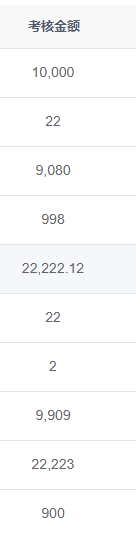
因用若依做后台管理脚手架,所以首先把以下方法写在Utils文件夹下的 ruoyi.js 里
1 export function  stateFormat(row, column, cellValue) {
2     cellValue += '';
3     if (!cellValue.includes('.')) cellValue += '.';
4     return cellValue.replace(/(\d)(?=(\d{3})+\.)/g, function ($0, $1) {
5         return $1 + ',';
6     }).replace(/\.$/, '');
7 }
这个会在整数数字后添加 .00
//金额千分符 会在整数后添加两个0
export function  stateFormat(row, column, cellValue) {
	if (cellValue) {
        return Number(cellValue)
          .toFixed(2)
          .replace(/(\d)(?=(\d{3})+\.)/g, ($0, $1) => {
            return $1 + ",";
          })
          .replace(/\.$/, "");
      }
}
第二步需要在 main.js 文件里进行全局方法的挂载
import { stateFormat} from "@/utils/ruoyi";
// 全局方法挂载
Vue.prototype.stateFormat = stateFormat
最后可以在需要用到的表格中使用
 <el-table-column
        label="考核金额"
        align="center"
        prop="kpiAmount"
        :formatter="stateFormat"  //在需要进行千位分割的表格中使用即可
        :show-overflow-tooltip="true"
      />

 浙公网安备 33010602011771号