

ASP.NET学习笔记
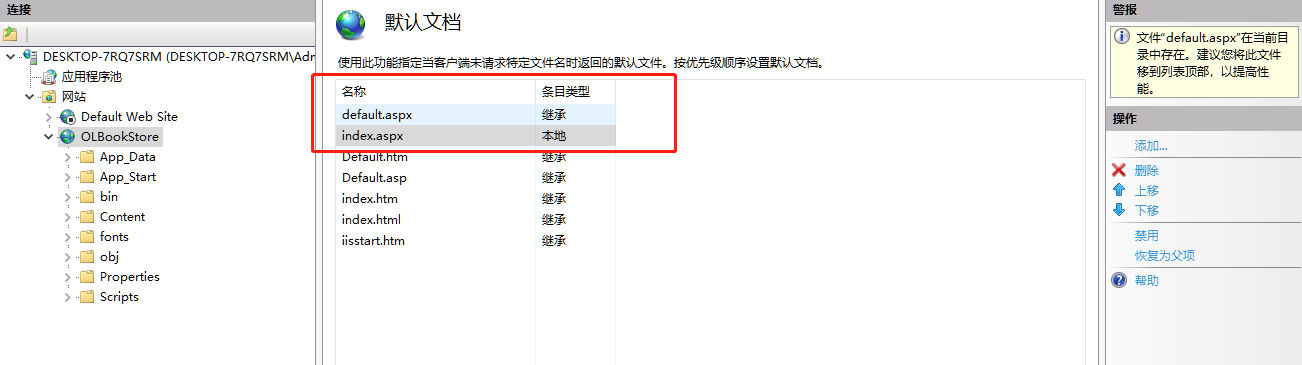
IIS配置设置, 将“default.aspx”上移 ,添加默认文档“index.aspx”
1、ASP.NET CORE 中间件的应用示例
        public void Configure(IApplicationBuilder app, IWebHostEnvironment env,ILogger<Startup> logger)
        {
            if (env.IsDevelopment())
            {
                app.UseDeveloperExceptionPage();
            }

            app.Use(async (context, next) =>
            {
                context.Response.ContentType = "text/plain;charset=utf-8";
                logger.LogInformation("M1:传入请求");
                //await context.Response.WriteAsync("第一个中间件");
                await next();
                logger.LogInformation("M1:传出相应");
            });

            app.Run(async (context) =>
            {
                await context.Response.WriteAsync("第二个中间件");
            });

        }
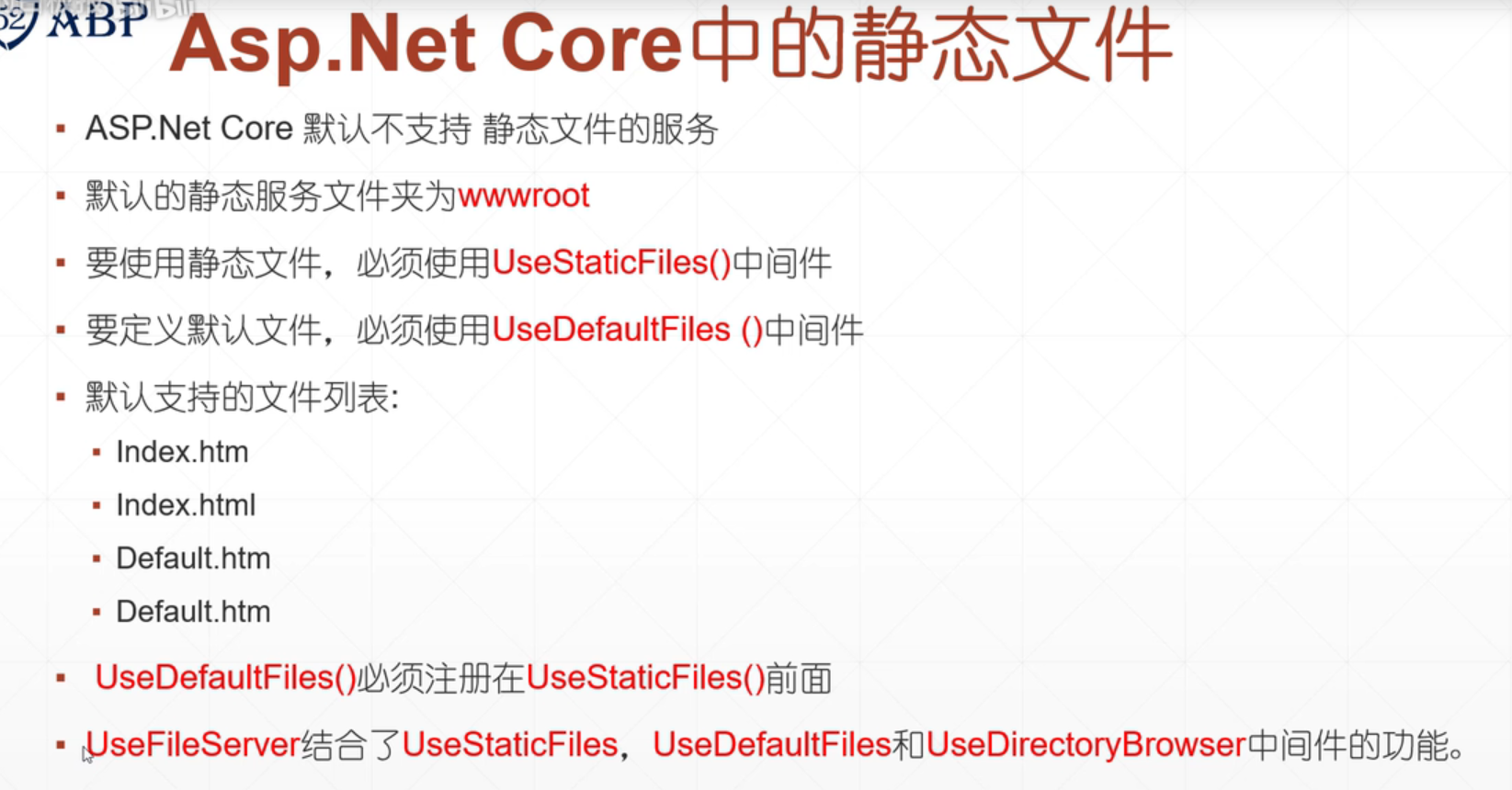
2、静态文件应用示例
3、验证控件、
//WebForms UnobtrusiveValidationMode 需要“jquery”ScriptResourceMapping。请添加一个名为 jquery (区分大小写)的 ScriptRes
<appSettings>
        <add key="ValidationSettings:UnobtrusiveValidationMode" value="None" />
</appSettings>
4、上传文件控件“FileUpLoad”
            if(BtnFileUpLoad.HasFile)
            {
                string fileName = BtnFileUpLoad.FileName;
                //获取文件的后缀名
                string fixName = fileName.Substring(fileName.LastIndexOf(".") + 1).ToLower();
                if(fixName=="jpg" ||fixName=="png" ||fixName=="gif")
                {
                    string filePath = Server.MapPath(".") + "//UpLoadPic//" + fileName;
                    this.BtnFileUpLoad.SaveAs(filePath);
                    this.IMG.ImageUrl = "~/UpLoadPic/" + fileName;
                }
                else
                {
                    this.LblMsg.Text = "上传图片格式不正确";
                }
            }
5、下载文件
        <div>
            1、通过超链接下载、<a href="/DownLoadFiles/logo.zip">点击下载</a>

            2、使用Response对象的TransmitFile方法:
            <asp:Button runat="server" ID="btnDownLoad" Text="点击下载" OnClick="btnDownLoad_Click" />
        </div>


            Response.ContentType = "application/x-zip-compressed";
            Response.AddHeader("Content-Disposition", "attachment;filename=logo.zip");
            string filename = Server.MapPath(".") + "//DownLoadfiles//logo.zip";
            Response.TransmitFile(filename);
6、页面传值
 <div> <a href="ShowDataPage? userId=132465">通过超链接传值</a></div>

            if(!this.IsPostBack)
            {
                if(Request.QueryString["userId"]!=null)
                this.LabMsg.Text= Request.QueryString["userId"];
            }

//通过form表单传值
<body>
<%string userName = Request.Form["userName"]; %>
<%=userName %>
<form id="frmMain" action="" method="post">
<input name="userName" type="text" /><br />
<input type="submit" value="提交" />
</form>
</body>
7、cookie 的使用
            if(!this.IsPostBack)
            {
                this.TextUserName.Text = "wuli";
                HttpCookie cookie = new HttpCookie("userName", this.TextUserName.Text);
                cookie.Expires = DateTime.Now.AddDays(7);
                Response.Cookies.Add(cookie);
            }


           <div>
               <%if (Request.Cookies["userName"]==null) { %>
               <asp:TextBox ID="TextUserName" runat="server"></asp:TextBox><br />
                <asp:Button ID="btnLogin" runat="server" OnClick="btnLogin_Click" Text="登陆" />
               <%} else { %>
               <%=Request.Cookies["userName"].Value %>,你已经登录!
               <%} %>
           </div>

 浙公网安备 33010602011771号