1,if判断
# 需求:大小比对,和1来比较大小。
# shell 中的写法是这样的👇
[tanuki@bogon ~]$ cat 1.sh
#!/bin/bash
# compare a with b
read -p "Please insert the number: " number
if [ $number -eq 1 ] ;then
  echo "$number = 1 "
elif [ $number -lt 1 ] ;then
  echo "$number < 1"
elif [ $number -gt 1 ] ;then
  echo "$number > 1"
fi
# py命令行
In [6]: n = input('please insert the number:')
please insert the number:1

In [7]: n = init(n)

In [10]: if n == 1:
    ...:     print("n=1")
    ...: elif n <= 1:
    ...:     print("n<1")
    ...: elif n >= 1:
    ...:     print("n>1")
    ...:
n=1

In [11]: n = 2

In [12]: if n == 1:
    ...:     print("n=1")
    ...: elif n <= 1:
    ...:     print("n<1")
    ...: elif n >= 1:
    ...:     print("n>1")
    ...:
n>1
# py脚本
In [15]: %run 1.py
Please input the number:2
bin!go!

In [16]: %run 1.py
Please input the number:1
bingo

In [17]: !cat 1.py
# /usr/bin/env python3
# compare python with shell about script
n = input("Please input the number:")
n = int(n)
if n == 1:
    print("bingo")
elif n != 1:
    print("bin!go!")
# shell和python差不多,会按顺序进行执行,当第一条满足时,就不会执行下一个条件;另外由于在linux运行python,命令也很友好基本都差不多。
eq   								==
gt   								>=
lt   								<=
ne   								!=
read -p 							input
echo                                   print
bash                                   %run
cat                                    %cat
...
2、循环
[tanuki@bogon ~]$ cat 1.py
# /usr/bin/env python3
# compare python with shell about script
"""
n = input("Please input the number:")
n = int(n)
if n == 1:
    print("bingo")
elif n != 1:
    print("bin!go!")
"""
print("quan jun chu ji :")
while True:
    n = input("please insert the number")
    if not n:
        continue
    if n == 'q':
        break
    n = int(n)
    if n == 1:
        print("bingo")
        break
    elif n != 1:
        print("bin!go!")
exit("victory")
3、函数
## python命令行
In [5]: def tanuki():
   ...:     print("螃蟹在剥我的壳,笔记本在写我,")
   ...:     print("漫天的我落在枫叶上雪花上,")
   ...:     print("而你在想我...")
   ...:

In [6]: tanuki()
螃蟹在剥我的壳,笔记本在写我,
漫天的我落在枫叶上雪花上,
而你在想我...
## python脚本
[tanuki@localhost ~]$ chmod +x def.py && python3 def.py
[tanuki@localhost ~]$ vim def.py
[tanuki@localhost ~]$ chmod +x def.py && python3 def.py
螃蟹在剥我的壳,笔记本在写我,
漫天的我落在枫叶上雪花上,
而你在想我...
[tanuki@localhost ~]$ cat def.py
#!/usr/bin/env python3
# function about python
def tanuki():
    print("螃蟹在剥我的壳,笔记本在写我,")
    print("漫天的我落在枫叶上雪花上,")
    print("而你在想我...")
tanuki()
## shell命令行
[tanuki@bogon ~]$ function tanuki { echo 螃蟹在剥我的壳,笔记本在写我,  ; sleep 1 ; echo 漫天的我落在枫叶上雪花上,  ; sleep 5 ; echo  而你在想我... ; };
螃蟹在剥我的壳,笔记本在写我,
漫天的我落在枫叶上雪花上,
而你在想我...

## shell脚本
[tanuki@bogon ~]$ cat fnt.sh
#!/bin/bash
# function about shell
tanuki() {
  echo "螃蟹在剥我的壳,笔记本在写我,"
  sleep 1
  echo "漫天的我落在枫叶上雪花上,"
  sleep 3
  echo "而你在想我..."
}
tanuki
[tanuki@bogon ~]$ chmod +x fnt.sh && ./fnt.sh
螃蟹在剥我的壳,笔记本在写我,
漫天的我落在枫叶上雪花上,
而你在想我...
[tanuki@bogon ~]$
4、练习笔记
##########################################
输入端口号进行判断服务名称
比如:
输入80,返回http或者nginx
输入65538,返回未知服务
##########################################
## shell脚本
[tanuki@bogon ~]$ cat judge.sh
#!/bin/bash
cat <<-EOF
=================================
***  端口查寻使用用户脚本     ****

***         使用教程         ****

***  1、端口号请输入1~65535  ****

***  2、输入其他则退出程序    ****

***  水水水水水水水水水水水   ****
=================================
EOF
while true
do
read -p "Please input port,which you want to know :" port
if [ $port -le 65535  ] && [ $port -ge 1 ] ;then
  ss -anputl |grep -w $port |awk '{print $1}'|uniq
  number=`ss -anputl |grep -w $port |awk '{print $1}'|uniq |wc -l`
    if [ $number -eq 0 ];then
      echo "$port is aviliable~ "
    fi
  continue
# 执行效果👇(虽然还有一些问题,不过也算满足了需求...)
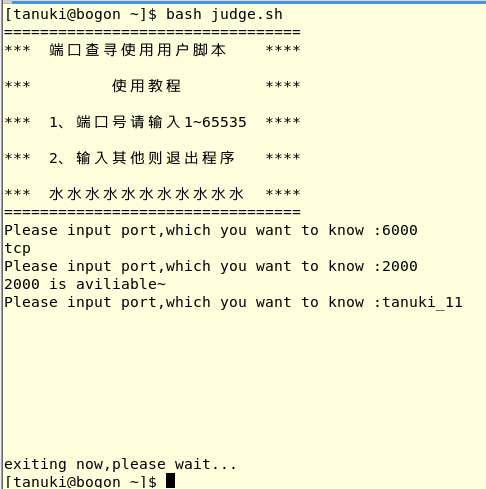
## python
[tanuki@bogon ~]$ cat test.py
[tanuki@bogon ~]$ python3 port.py
Port? 6000
tcp
[tanuki@bogon ~]$ cat port.py
#!/usr/local/env python3
import os
portArg = input('Port? ')

def func1(arg):
    commandLine = "ss -anptlu|grep {arg} |cut -d ' ' -f1 |uniq".format(arg=arg)
    return commandLine

def func2(portArg):
    if portArg == 'n':
        print('continue...')
    elif portArg == 'q':
        print('exit...')
    elif isinstance(int(portArg),int):
        if 0 < int(portArg) < 65536 :
            result = os.popen(func1(portArg))
            print(result.read().strip())
    return None

func2(portArg)
## 受限于自身实力,琢磨了两天还是没解决,多亏了大佬,才让我知道,我是真的不可能写的出来【哭泣】...


 浙公网安备 33010602011771号