记录一次idea上gradle项目的中文乱码问题
处理完成后的效果:
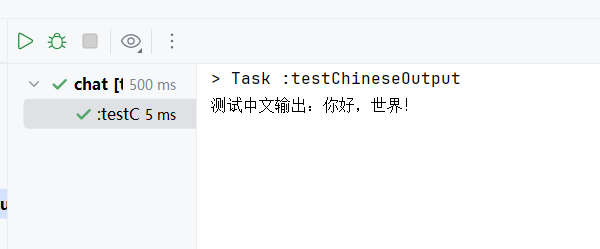
测试代码,build.gradle文件加入以下代码并执行:
task testChineseOutput {
  doLast {
    println new String('测试中文输出:你好,世界!'.getBytes('UTF-8'), 'UTF-8')
  }
}
所有修改步骤:
1、build.gradle中的中文设置:
// ===================== Gradle 编码配置 =====================
// 确保 Gradle 构建过程使用 UTF-8 编码
tasks.withType(GroovyCompile) {
    options.encoding = 'UTF-8'
}

// 确保 Gradle 控制台输出使用 UTF-8 编码
if (System.getProperty('os.name').toLowerCase().contains('windows')) {
    // Windows 环境下强制使用 UTF-8 编码
    System.setProperty('console.encoding', 'UTF-8')
    // 确保系统输出使用 UTF-8
    System.setProperty('file.encoding', 'UTF-8')
    System.setProperty('sun.jnu.encoding', 'UTF-8')
    // 确保 Gradle 守护进程使用 UTF-8
    System.setProperty('org.gradle.jvmargs', '-Dfile.encoding=UTF-8 -Dsun.jnu.encoding=UTF-8')
}

// 确保所有任务都使用 UTF-8 编码
tasks.withType(JavaCompile) {
    options.encoding = 'UTF-8'
}

// 确保测试任务使用 UTF-8 编码
tasks.withType(Test) {
    systemProperty 'file.encoding', 'UTF-8'
    systemProperty 'sun.jnu.encoding', 'UTF-8'
}

// 确保资源处理使用 UTF-8 编码
tasks.withType(ProcessResources) {
    // 资源处理编码设置
    filteringCharset = 'UTF-8'
    outputs.upToDateWhen { false }
}

// 确保文档生成使用 UTF-8 编码
tasks.withType(Javadoc) {
    options.encoding = 'UTF-8'
}

// ===================== 编码全局配置 =====================
tasks.withType(Test) {
  systemProperty 'file.encoding', 'UTF-8'
}

tasks.withType(JavaCompile).configureEach {
  options.encoding = "UTF-8"
  options.compilerArgs.addAll(['-Xlint:unchecked', '-Xlint:deprecation'])
  sourceCompatibility = JavaVersion.VERSION_17
  targetCompatibility = JavaVersion.VERSION_17
}

tasks.withType(JavaExec) {
  systemProperty 'file.encoding', 'UTF-8'
  systemProperty 'sun.jnu.encoding', 'UTF-8'
  defaultCharacterEncoding = 'UTF-8'
}

tasks.withType(Javadoc) {
  options.encoding = 'UTF-8'
}

// ===================== 编译兜底配置 =====================
compileJava {
  options.encoding = 'UTF-8'
  options.compilerArgs.addAll(['-Xlint:unchecked', '-Xlint:deprecation'])
  sourceCompatibility = JavaVersion.VERSION_17
  targetCompatibility = JavaVersion.VERSION_17
}

java {
  buildSearchableOptions.defaultCharacterEncoding = 'UTF-8'
  sourceCompatibility = JavaVersion.VERSION_17
  targetCompatibility = JavaVersion.VERSION_17
}

javadoc {
  options.encoding = 'UTF-8'
}
// ===================== IDE运行配置 =====================
runIde {
  // 解析JavaFX模块路径
  def javafxJars = configurations.runtimeClasspath.files.findAll {
    it.name.startsWith('javafx-') && it.name.endsWith('.jar')
  }
  def javafxModulePath = javafxJars.join(File.pathSeparator)

  // JVM参数(语法严谨,无冗余)
  jvmArgs = [
          '-Xmx2048m',
          '-Dfile.encoding=UTF-8',
          '-Dsun.jnu.encoding=UTF-8',
          "--module-path=${javafxModulePath}",
          '--add-modules=javafx.base,javafx.controls,javafx.fxml,javafx.graphics,javafx.swing,javafx.web',
          '--add-exports=javafx.web/com.sun.webkit.network=ALL-UNNAMED',
          '--add-exports=javafx.web/com.sun.webkit.graphics=ALL-UNNAMED',
          '--add-exports=javafx.web/com.sun.webkit.dom=ALL-UNNAMED',
          '--add-exports=javafx.graphics/com.sun.javafx.scene=ALL-UNNAMED',
          '--add-exports=javafx.web/com.sun.webkit=ALL-UNNAMED',
          '--add-opens=javafx.web/javafx.scene.web=ALL-UNNAMED',
          '--add-opens=javafx.web/com.sun.javafx.scene.web=ALL-UNNAMED',
          '--add-opens=javafx.web/com.sun.webkit=ALL-UNNAMED',
          '-Djavafx.media.threads=8',
          '-Dprism.forceGPU=false',
          '-Djava.net.preferIPv4Stack=true',
          '-Dsun.net.http.allowRestrictedHeaders=true',
          '-Dwebkit.media.player.useNative=true'
  ]

  // 编码环境变量(标准Map写法)
  environment([
          'IDE_PROPERTIES_FILE_ENCODING': 'UTF-8',
          'FILE_ENCODING': 'UTF-8'
  ])
}
2、gradle.properties中的编码设置:
org.gradle.jvmargs=-Dfile.encoding=UTF-8
systemProp.file.encoding=UTF-8
3、gradle-wrapper.properties中的编码设置:
org.gradle.jvmargs=-Dfile.encoding=UTF-8
4、idea中VM的设置,插入
-Dfile.encoding=UTF-8
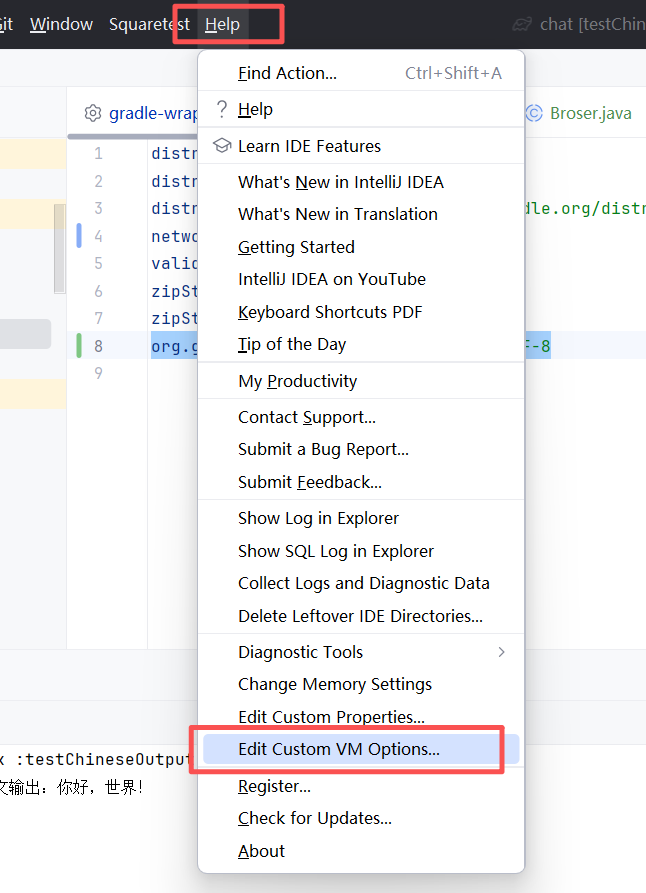
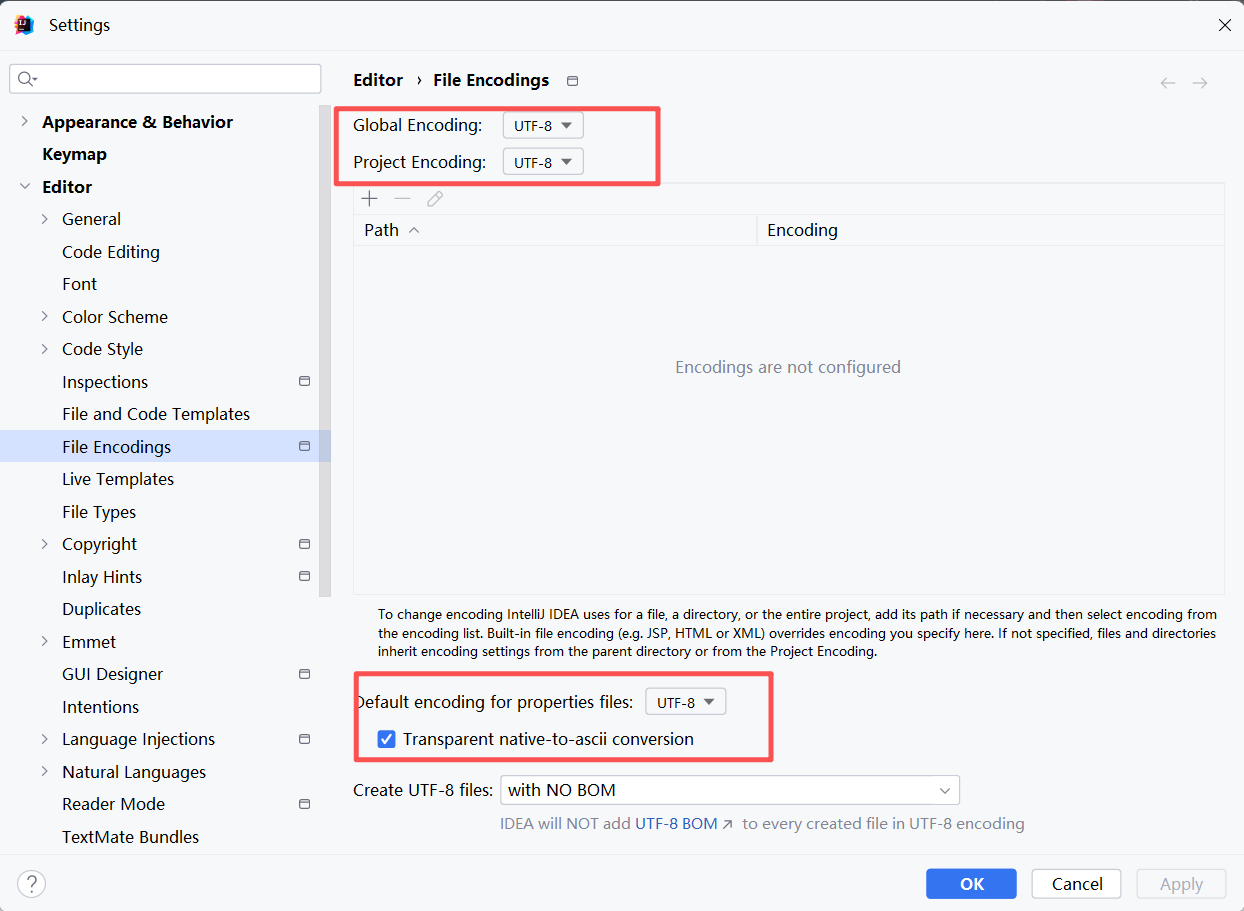
5、idea的setting配置:
6、idea的gradle设置:
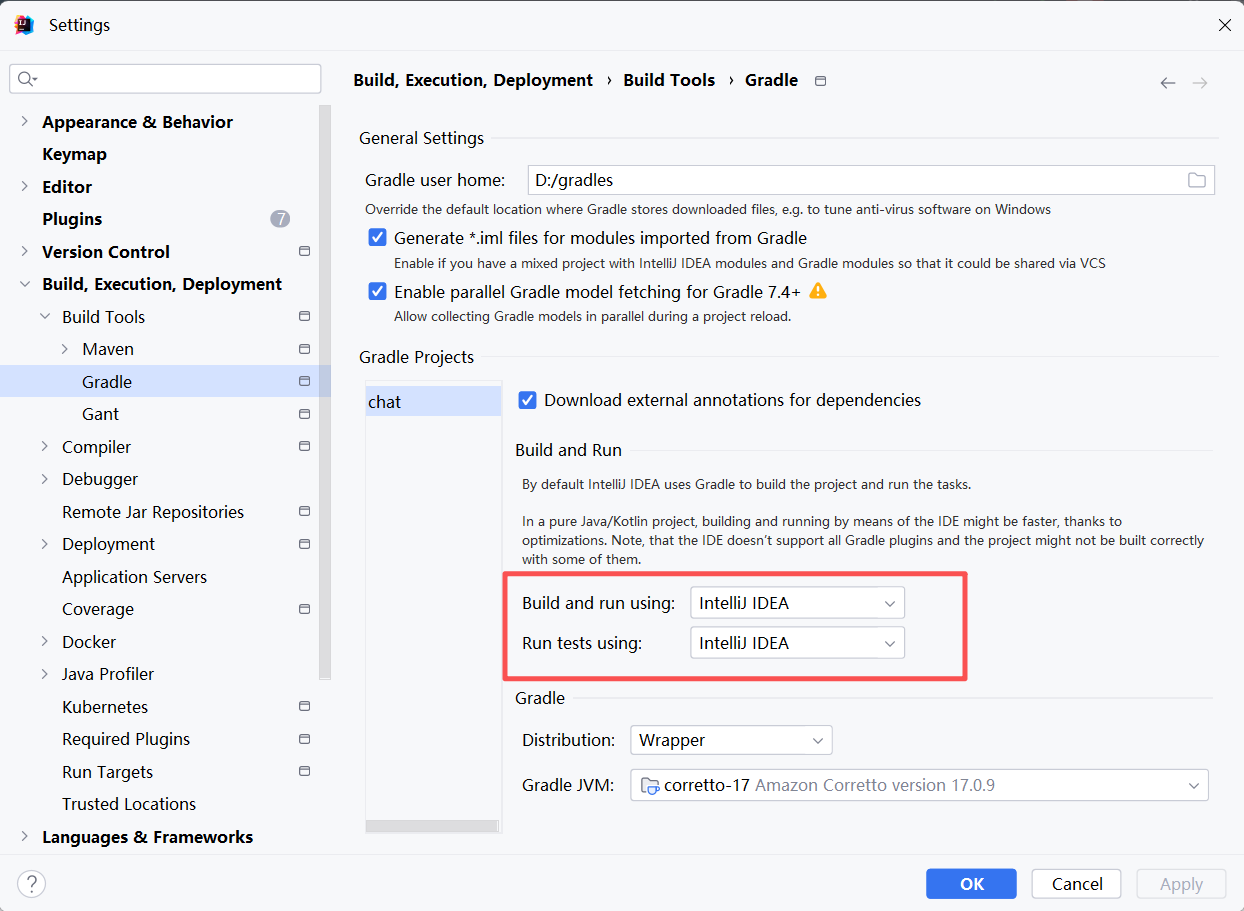
7、run plugin 等启动器的设置,加入VM参数-Dfile.encoding=UTF-8:
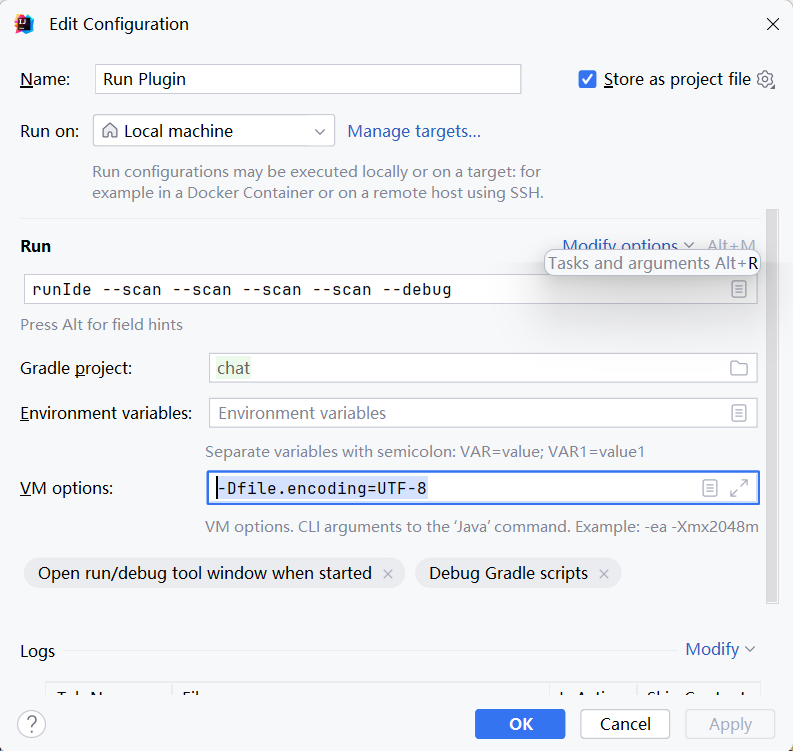
走到这一步,如果中文乱码问题已经处理好,说明你已经很幸运了,但实际上并没有用。哈哈哈哈
终极方案,环境变量+系统重启+重编译:
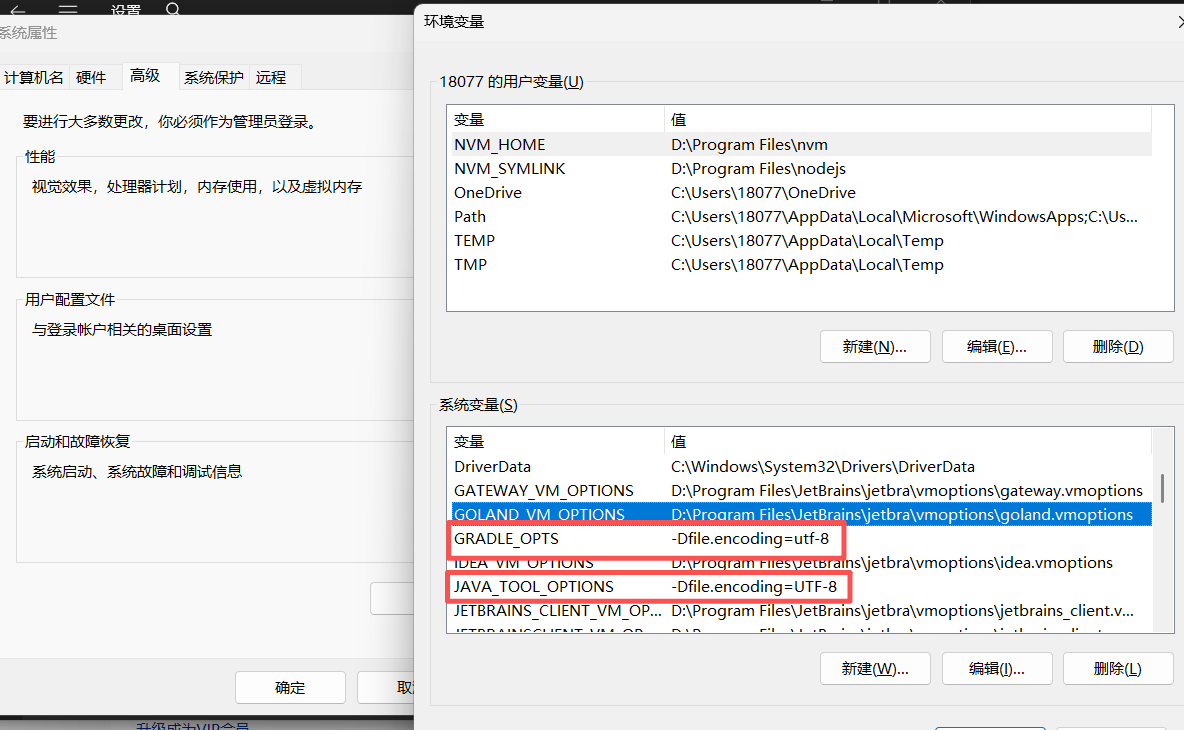
加入环境变量:
GRADLE_OPTS -Dfile.encoding=utf-8
JAVA_TOOL_OPTIONS -Dfile.encoding=UTF-8
-------------------------------------------------完事------------------------------------------------------
以上就是个人历时三周,各种查资料,各种AI的心路历程。
主要原因就是,个人开发习惯UTF-8的编码,但是实际上CMD上执行命令 chcp 会发现,系统默认的是GBK
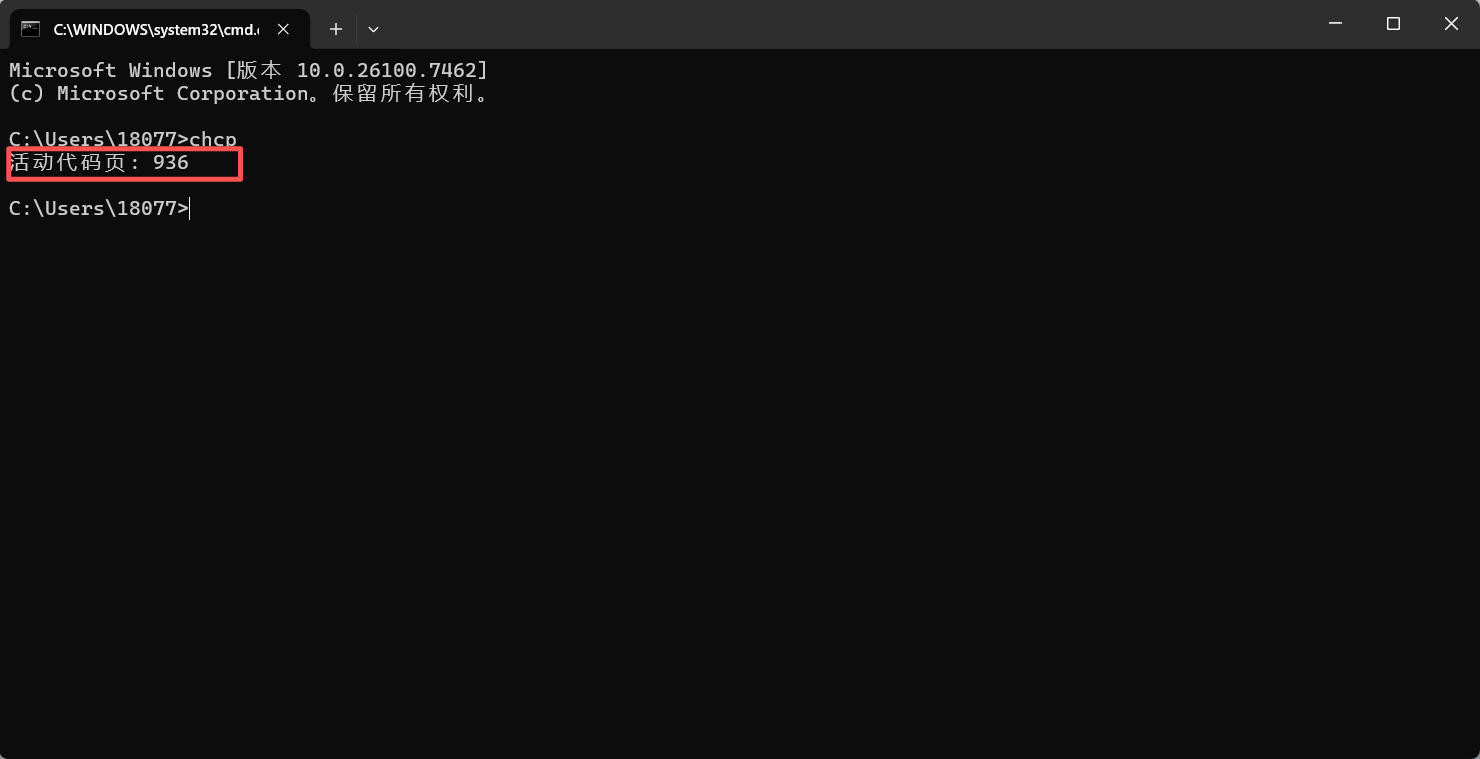
所以需要各种修改,最快捷的办法还是先 chcp 查一下当前系统默认编码,然后直接去修改IDEA的编码配置。

 浙公网安备 33010602011771号