

Android第1-2周作业
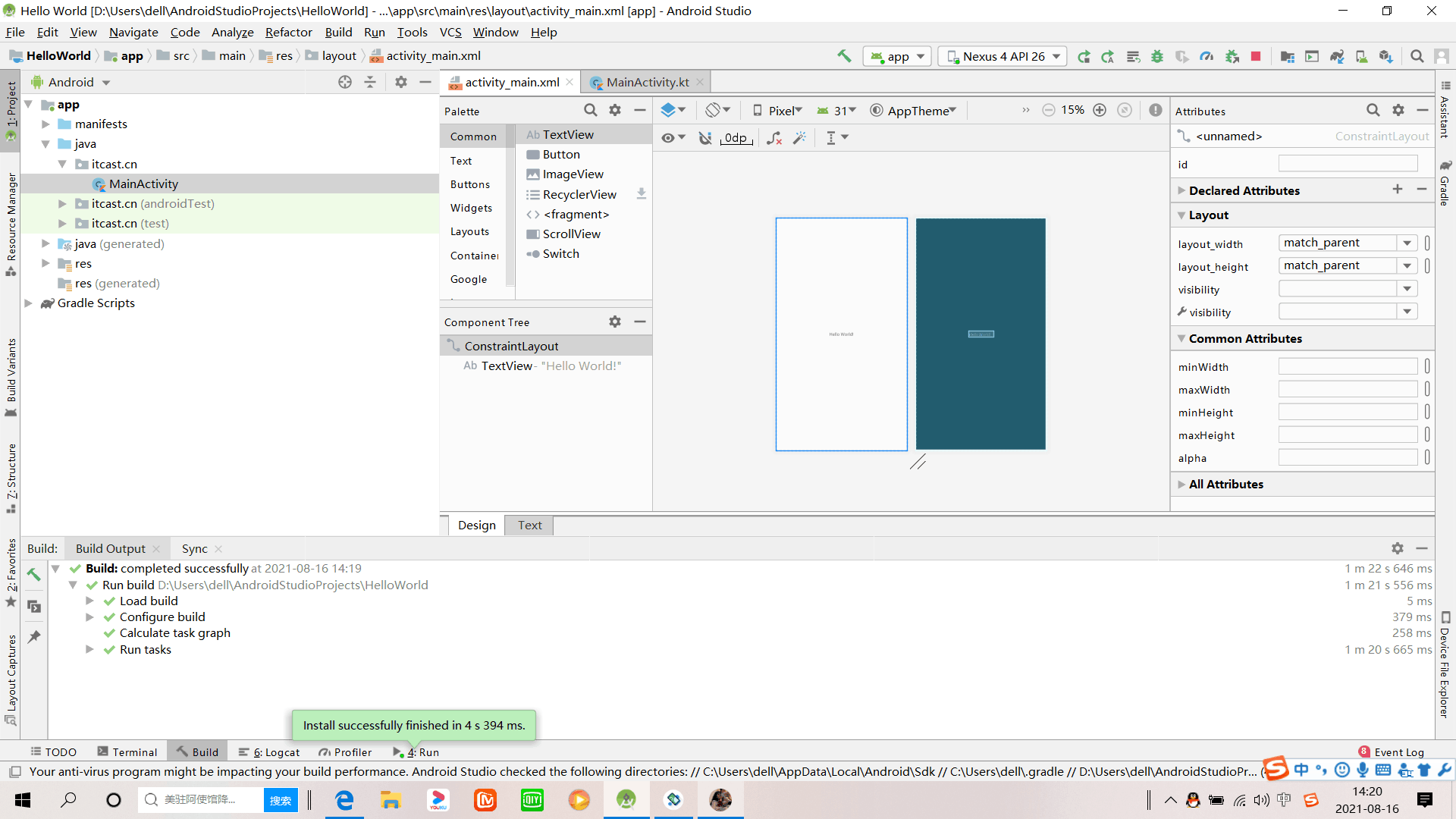
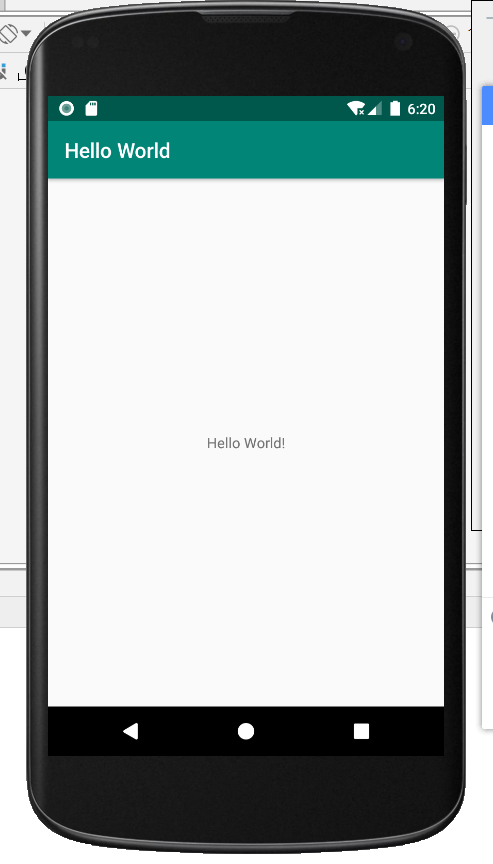
1.安装环境,截图编程界面,截图运行界面
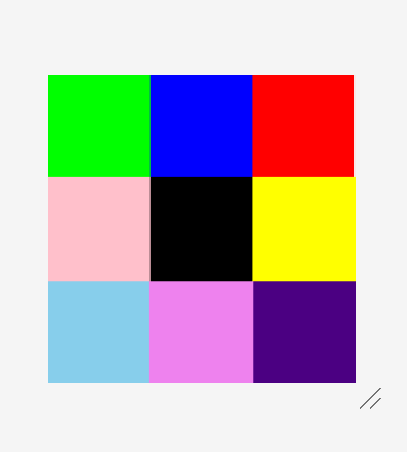
2.九宫格
 1 <?xml version="1.0" encoding="utf-8"?>
 2 <RelativeLayout xmlns:android="http://schemas.android.com/apk/res/android"
 3     android:id="@+id/rl_1"
 4     android:layout_width="match_parent"
 5     android:layout_height="match_parent">
 6     <View
 7         android:id="@+id/v_1"
 8         android:layout_width="100dp"
 9         android:layout_height="100dp"
10         android:background="#FFE1FF"
11         android:layout_centerInParent="true"/>
12     <View
13         android:id="@+id/v_2"
14         android:layout_width="100dp"
15         android:layout_height="100dp"
16         android:background="#0EDB16"
17         android:layout_above="@id/v_1"
18         android:layout_toLeftOf="@id/v_1"
19         />
20     <View
21         android:id="@+id/v_3"
22         android:layout_width="100dp"
23         android:layout_height="100dp"
24         android:background="#F80505"
25         android:layout_above="@id/v_1"
26         android:layout_toRightOf="@id/v_1"/>
27     <View
28         android:id="@+id/v_4"
29         android:layout_width="100dp"
30         android:layout_height="100dp"
31         android:background="#028FFA"
32         android:layout_below="@id/v_1"
33         android:layout_toRightOf="@id/v_1"/>
34
35     <View
36         android:id="@+id/v_5"
37         android:layout_width="100dp"
38         android:layout_height="100dp"
39         android:background="#F08080"
40         android:layout_below="@id/v_1"
41         android:layout_toLeftOf="@id/v_1"/>
42     <View
43         android:id="@+id/v_6"
44         android:layout_width="100dp"
45         android:layout_height="100dp"
46         android:background="#EE00EE"
47         android:layout_below="@id/v_2"
48         android:layout_toLeftOf="@id/v_1"/>
49     <View
50         android:id="@+id/v_7"
51         android:layout_width="100dp"
52         android:layout_height="100dp"
53         android:background="#98F5FF"
54         android:layout_below="@id/v_1"
55         android:layout_toLeftOf="@id/v_4"/>
56     <View
57         android:id="@+id/v_8"
58         android:layout_width="100dp"
59         android:layout_height="100dp"
60         android:background="#CDCDC1"
61         android:layout_below="@id/v_2"
62         android:layout_toRightOf="@id/v_1"/>
63     <View
64         android:id="@+id/v_9"
65         android:layout_width="100dp"
66         android:layout_height="100dp"
67         android:background="#5CACEE"
68         android:layout_above="@id/v_1"
69         android:layout_toRightOf="@id/v_2"/>
70 </RelativeLayout>
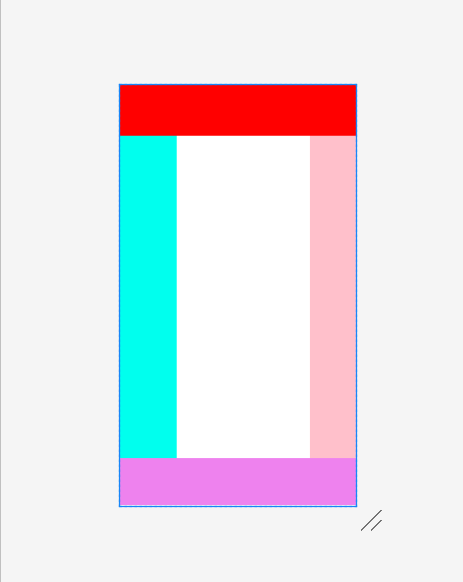
3.制作布局界面

<?xml version="1.0" encoding="utf-8"?>
<RelativeLayout xmlns:android="http://schemas.android.com/apk/res/android"
    android:id="@+id/v_1"
    android:layout_width="match_parent"
    android:layout_height="match_parent">
    <RelativeLayout
        android:id="@+id/v_2"
        android:layout_width="match_parent"
        android:layout_height="90dp"
        android:background="#FF0000"
        ></RelativeLayout>

    <RelativeLayout
        android:id="@+id/v_3"
        android:layout_width="match_parent"
        android:layout_height="560dp"
        android:layout_below="@id/v_2"
        android:background="#FFFFFF"
        ><RelativeLayout
            android:id="@+id/v_5"
            android:layout_width="100dp"
            android:layout_height="match_parent"
            android:background="#00FFEE"
        >
        </RelativeLayout>
        <RelativeLayout
            android:id="@+id/v_6"
            android:layout_width="80dp"
            android:layout_height="match_parent"
            android:background="#FFC0CB"
            android:layout_alignParentRight="true">

    </RelativeLayout>
    </RelativeLayout>

    <RelativeLayout
        android:id="@+id/v_4"
        android:layout_width="match_parent"
        android:layout_height="90dp"
        android:background="#EE82EE"
        android:layout_below="@id/v_3"
        ></RelativeLayout>
</RelativeLayout>
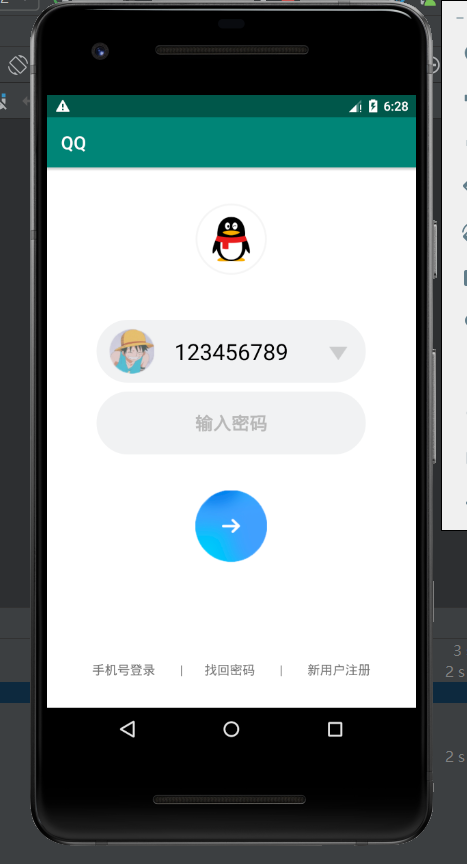
4.制作登录界面(要求至少2个edittext,1个button,最好有一个imageview要求美观)
 1 <?xml version="1.0" encoding="utf-8"?>
 2 <RelativeLayout xmlns:android="http://schemas.android.com/apk/res/android"
 3     xmlns:app="http://schemas.android.com/apk/res-auto"
 4     xmlns:tools="http://schemas.android.com/tools"
 5     android:layout_width="match_parent"
 6     android:layout_height="match_parent"
 7     android:orientation="vertical"
 8     android:background="#FFFFFF">
 9
10     <ImageView
11         android:id="@+id/Tu_1"
12         android:layout_width="80dp"
13         android:layout_height="80dp"
14         android:background="@drawable/tx"
15         android:layout_centerHorizontal="true"
16         android:layout_marginTop="40dp"/>
17
18     <ImageView
19         android:layout_width="50dp"
20         android:layout_height="50dp"
21         android:background="@drawable/tb"
22         android:layout_marginTop="180dp"
23         android:layout_marginLeft="70dp"/>
24
25     <ImageView
26         android:layout_width="20dp"
27         android:layout_height="15dp"
28         android:background="@drawable/xx"
29         android:layout_marginTop="200dp"
30         android:layout_marginLeft="315dp"/>
31
32     <TextView
33         android:layout_width="300dp"
34         android:layout_height="70dp"
35         android:layout_centerHorizontal="true"
36         android:layout_marginTop="170dp"
37         android:background="@drawable/edi_1"
38         android:text="123456789"
39         android:gravity="center"
40         android:textSize="25sp"
41         android:textColor="#000000" />
42
43     <EditText
44         android:layout_width="300dp"
45         android:layout_height="70dp"
46         android:layout_centerHorizontal="true"
47         android:layout_marginTop="250dp"
48         android:background="@drawable/edi_1"
49         android:text="输入密码"
50         android:gravity="center"
51         android:textSize="20sp"
52         android:textColor="#B8B8B8"
53         android:textStyle="bold"/>
54
55     <ImageButton
56         android:layout_width="80dp"
57         android:layout_height="80dp"
58         android:background="@drawable/dl"
59         android:layout_centerHorizontal="true"
60         android:layout_marginTop="360dp"/>
61
62     <TextView
63         android:layout_width="match_parent"
64         android:layout_height="match_parent"
65         android:text="手机号登录        |       找回密码        |        新用户注册"
66         android:gravity="center_horizontal"
67         android:layout_marginTop="550dp"/>
68 </RelativeLayout>

 浙公网安备 33010602011771号