

Android第7周作业
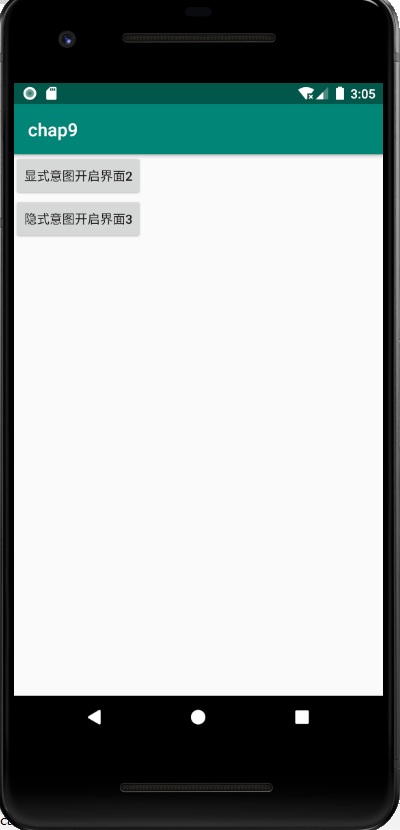
1.三个界面,界面1点击按钮使用显式意图开启界面2.
界面2点击按钮隐式意图开启界面3
要求,按钮点击功能使用setOnclickListener方式
 1 <?xml version="1.0" encoding="utf-8"?>
 2 <LinearLayout xmlns:android="http://schemas.android.com/apk/res/android"
 3     xmlns:tools="http://schemas.android.com/tools"
 4     android:layout_width="match_parent"
 5     android:layout_height="match_parent"
 6     tools:context=".MainActivity"
 7     android:orientation="vertical" >
 8
 9     <Button
10         android:id="@+id/btn1"
11         android:layout_width="wrap_content"
12         android:layout_height="wrap_content"
13         android:text="显式意图开启界面2" />
14
15 </LinearLayout>
package com.example.week7;

import android.os.Bundle;
import android.app.Activity;
import android.content.Intent;
import android.view.View;
import android.widget.Button;

public class MainActivity extends Activity {

    @Override
    protected void onCreate(Bundle savedInstanceState) {
        super.onCreate(savedInstanceState);
        setContentView(R.layout.activity_main);

        Button btn1=(Button)findViewById(R.id.btn1);
        btn1.setOnClickListener(new View.OnClickListener() {
            @Override
            public void onClick(View view) {
                Intent intent=new Intent(MainActivity.this,Main2Activity.class);
                startActivity(intent);
            }
        });
    }

}
<?xml version="1.0" encoding="utf-8"?>
<RelativeLayout xmlns:android="http://schemas.android.com/apk/res/android"
    xmlns:tools="http://schemas.android.com/tools"
    android:layout_width="match_parent"
    android:layout_height="match_parent"
    tools:context=".MainActivity" >

    <Button
        android:id="@+id/btn2"
        android:layout_width="wrap_content"
        android:layout_height="wrap_content"
        android:text="隐式意图开启界面3" />

</RelativeLayout>
package com.example.week7;

import androidx.appcompat.app.AppCompatActivity;
import android.content.Intent;
import android.os.Bundle;
import android.view.View;
import android.widget.Button;

public class Main2Activity extends AppCompatActivity {

    @Override
    protected void onCreate(Bundle savedInstanceState) {
        super.onCreate(savedInstanceState);
        setContentView(R.layout.activity_main2);

        Button btn2=(Button)findViewById(R.id.btn2);
        btn2.setOnClickListener(new View.OnClickListener() {
            @Override
            public void onClick(View view) {
                    Intent intent=new Intent();
                    intent.setAction("cn.itcast.START_ACTIVITY");
                    startActivity(intent);

            }
        });
    }
}
 1 <?xml version="1.0" encoding="utf-8"?>
 2 <RelativeLayout xmlns:android="http://schemas.android.com/apk/res/android"
 3     xmlns:tools="http://schemas.android.com/tools"
 4     android:layout_width="match_parent"
 5     android:layout_height="match_parent"
 6
 7     tools:context=".Main3Activity" >
 8
 9     <TextView
10         android:layout_width="wrap_content"
11         android:layout_height="wrap_content"
12         android:text="界面3"/>
13
14 </RelativeLayout>
2.在界面1做一个按钮开启浏览器访问百度
 1 <?xml version="1.0" encoding="utf-8"?>
 2 <LinearLayout xmlns:android="http://schemas.android.com/apk/res/android"
 3     xmlns:app="http://schemas.android.com/apk/res-auto"
 4     xmlns:tools="http://schemas.android.com/tools"
 5     android:layout_width="match_parent"
 6     android:layout_height="match_parent"
 7     tools:context=".MainActivity">
 8     <Button
 9         android:id="@+id/bt_1"
10         android:layout_width="wrap_content"
11         android:layout_height="wrap_content"
12         android:background="#77DDEB"
13         android:text="显式意图开启界面2"
14         android:textSize="20sp"
15         android:layout_marginTop="20dp"
16         android:layout_marginLeft="20dp"/>
17     <Button
18         android:id="@+id/bt_2"
19         android:layout_width="wrap_content"
20         android:layout_height="wrap_content"
21         android:background="#BE36E4"
22         android:text="开启浏览器访问百度"
23         android:textSize="20sp"
24         android:layout_marginTop="20dp"
25         android:layout_marginLeft="20dp"
26         android:padding="10dp"
27         android:onClick="click1"/>
28
29
30 </LinearLayout>
 1 package com.example.chap10;
 2
 3 import androidx.appcompat.app.AppCompatActivity;
 4
 5 import android.content.Intent;
 6 import android.net.Uri;
 7 import android.os.Bundle;
 8 import android.view.View;
 9 import android.widget.Button;
10
11
12 public class MainActivity extends AppCompatActivity {
13
14     @Override
15     protected void onCreate(Bundle savedInstanceState) {
16         super.onCreate(savedInstanceState);
17         setContentView(R.layout.activity_main);
18         Button btn1=(Button)findViewById(R.id.bt_1);
19         btn1.setOnClickListener(new View.OnClickListener() {
20             @Override
21             public void onClick(View view) {
22                 Intent intent=new Intent(MainActivity.this,Main2Activity.class);
23                 startActivity(intent);
24             }
25         });
26     }
27     public void click1(View view){
28         Intent intent=new Intent();
29         intent.setAction("android.intent.action.VIEW");
30         intent.setData(Uri.parse("http://www.baidu.com"));
31         startActivity(intent);
32     }
33 }

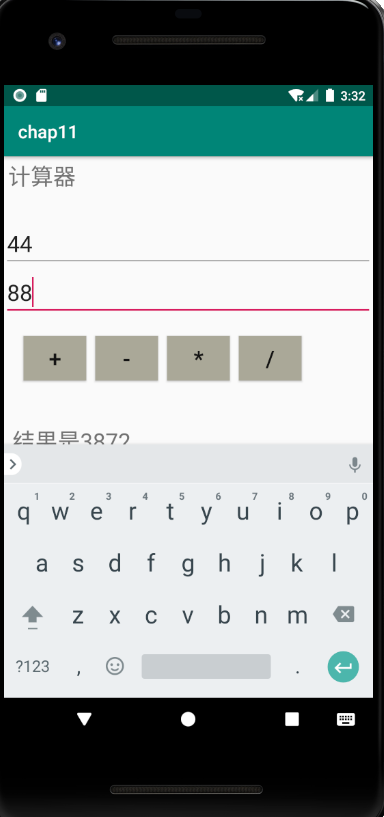
3.2个edittext,4个按钮一个textview,实现简单计算器。
 1 <RelativeLayout
 2     xmlns:android="http://schemas.android.com/apk/res/android"
 3     android:layout_height="match_parent"
 4     android:layout_width="match_parent">
 5     <TextView
 6         android:id="@+id/tv1"
 7         android:layout_width="wrap_content"
 8         android:layout_height="wrap_content"
 9         android:text="计算器"
10         android:gravity="center"
11         android:textSize="25dp"
12         android:layout_margin="5dp"/>
13     <EditText
14         android:id="@+id/et_1"
15         android:layout_width="match_parent"
16         android:layout_height="wrap_content"
17         android:hint="请输入一个数"
18         android:textSize="25dp"
19         android:layout_marginTop="70dp"/>
20     <EditText
21         android:id="@+id/et_2"
22         android:layout_width="match_parent"
23         android:layout_height="wrap_content"
24         android:hint="请输入一个数"
25         android:textSize="25dp"
26         android:layout_below="@id/et_1"/>
27     <Button
28         android:id="@+id/b_1"
29         android:layout_width="70dp"
30         android:layout_height="50dp"
31         android:text="+"
32         android:textSize="25dp"
33         android:background="#AAA898"
34         android:layout_marginTop="200dp"
35         android:layout_marginLeft="22dp"/>
36     <Button
37         android:id="@+id/b_2"
38         android:layout_width="70dp"
39         android:layout_height="50dp"
40         android:text="-"
41         android:textSize="25dp"
42         android:background="#AAA898"
43         android:layout_toRightOf="@id/b_1"
44         android:layout_marginTop="200dp"
45         android:layout_marginLeft="10dp"/>
46     <Button
47         android:id="@+id/b_3"
48         android:layout_width="70dp"
49         android:layout_height="50dp"
50         android:text="*"
51         android:textSize="25dp"
52         android:background="#AAA898"
53         android:layout_toRightOf="@id/b_2"
54         android:layout_marginTop="200dp"
55         android:layout_marginLeft="10dp"/>
56     <Button
57         android:id="@+id/b_4"
58         android:layout_width="70dp"
59         android:layout_height="50dp"
60         android:text="/"
61         android:textSize="25dp"
62         android:background="#AAA898"
63         android:layout_toRightOf="@id/b_3"
64         android:layout_marginTop="200dp"
65         android:layout_marginLeft="10dp"/>
66     <TextView
67         android:id="@+id/tv2"
68         android:layout_width="wrap_content"
69         android:layout_height="wrap_content"
70         android:textSize="25dp"
71         android:text="结果是"
72         android:layout_marginTop="300dp"
73         android:layout_marginLeft="10dp"/>
74
75 </RelativeLayout>
 1 package cn.itcast.chap04;
 2
 3 import androidx.appcompat.app.AppCompatActivity;
 4
 5 import android.content.Intent;
 6 import android.os.Bundle;
 7 import android.view.View;
 8 import android.widget.EditText;
 9 import android.widget.TextView;
10
11 public class CounterActivity extends AppCompatActivity {
12
13     @Override
14     protected void onCreate(Bundle savedInstanceState) {
15         super.onCreate( savedInstanceState );
16         setContentView( R.layout.counter );
17         findViewById( R.id.b_1 ).setOnClickListener( new View.OnClickListener() {
18             @Override
19             public void onClick(View view) {
20                 String num1=((EditText)(findViewById( R.id.et_1 ))).getText().toString();//获取et_1上面的文本,并转成字符串
21                 String num2=((EditText)(findViewById( R.id.et_2 ))).getText().toString();//获取et_2上面的文本,并转成字符串
22                 int n1= Integer.parseInt( num1 );
23                 int n2=Integer.parseInt( num2 );
24                 int sum=n1+n2;
25                 TextView tv1=findViewById( R.id.tv2 );//获取TextView控件
26                 tv1.setText( "结果是"+sum );
27
28             }
29         } );
30         findViewById( R.id.b_2 ).setOnClickListener( new View.OnClickListener() {
31             @Override
32             public void onClick(View view) {
33                 String num1=((EditText)(findViewById( R.id.et_1 ))).getText().toString();
34                 String num2=((EditText)(findViewById( R.id.et_2 ))).getText().toString();
35                 int n1=Integer.parseInt( num1 );
36                 int n2=Integer.parseInt( num2 );
37                 int sum=n1-n2;
38                 TextView tv1=findViewById( R.id.tv2 );
39                 tv1.setText("结果是"+sum);
40             }
41         } );
42         findViewById( R.id.b_3 ).setOnClickListener( new View.OnClickListener() {
43             @Override
44             public void onClick(View view) {
45                 String num1=((EditText)(findViewById( R.id.et_1 ))).getText().toString();
46                 String num2=((EditText)(findViewById( R.id.et_2 ))).getText().toString();
47                 int n1=Integer.parseInt( num1 );
48                 int n2=Integer.parseInt( num2 );
49                 int sum=n1*n2;
50                 TextView tv1=findViewById( R.id.tv2 );
51                 tv1.setText("结果是"+sum);
52             }
53         } );
54         findViewById( R.id.b_4 ).setOnClickListener( new View.OnClickListener() {
55             @Override
56             public void onClick(View view) {
57                 String num1=((EditText)(findViewById( R.id.et_1 ))).getText().toString();
58                 String num2=((EditText)(findViewById( R.id.et_2 ))).getText().toString();
59                 int n1=Integer.parseInt( num1 );
60                 int n2=Integer.parseInt( num2 );
61                 int sum=n1*n2;
62                 TextView tv1=findViewById( R.id.tv2 );
63                 tv1.setText("结果是"+sum);
64             }
65         } );
66         findViewById( R.id.b_4).setOnClickListener( new View.OnClickListener() {
67             @Override
68             public void onClick(View view) {
69                 String num1=((EditText)(findViewById( R.id.et_1 ))).getText().toString();
70                 String num2=((EditText)(findViewById( R.id.et_2 ))).getText().toString();
71                 int n1=Integer.parseInt( num1 );
72                 int n2=Integer.parseInt( num2 );
73                 int sum=n1/n2;
74                 TextView tv1=findViewById( R.id.tv2 );
75                 tv1.setText("结果是"+sum);
76             }
77         } );
78     }
79 }

 浙公网安备 33010602011771号