
ABP演示 - 本地Event Bus
方式一:在Domain层(聚合根)发布事件
事件对象
创建的文件:
- 事件类:
src/Acme.BookStore.Domain/Publishers/Events/PublisherCreatedEvent.cs
- 定义了Publisher创建时的事件数据
using System;

namespace Acme.BookStore.Publishers.Events
{
    /// <summary>
    /// Publisher创建事件
    /// </summary>
    public class PublisherCreatedEvent
    {
        public Guid PublisherId { get; set; }

        public string Name { get; set; }

        public DateTime EstablishmentTime { get; set; }

        public string Country { get; set; }
    }
}
订阅者 ILocalEventHandler
- 事件处理器:
src/Acme.BookStore.Domain/Publishers/EventHandlers/PublisherCreatedEventHandler.cs
-
实现
ILocalEventHandler<PublisherCreatedEvent> -
自动被ABP框架发现并订阅事件
-
在日志中记录新创建的Publisher信息
using System;
using System.Threading.Tasks;
using Volo.Abp.DependencyInjection;
using Volo.Abp.EventBus;
using Microsoft.Extensions.Logging;
using Acme.BookStore.Publishers.Events;

namespace Acme.BookStore.Publishers.EventHandlers
{
    /// <summary>
    /// Publisher创建事件处理器
    /// 实现ILocalEventHandler<TEvent>接口,ABP框架会自动发现并订阅这个事件
    /// </summary>
    public class PublisherCreatedEventHandler : ILocalEventHandler<PublisherCreatedEvent>, ITransientDependency
    {
        private readonly ILogger<PublisherCreatedEventHandler> _logger;

        public PublisherCreatedEventHandler(ILogger<PublisherCreatedEventHandler> logger)
        {
            _logger = logger;
        }

        public Task HandleEventAsync(PublisherCreatedEvent eventData)
        {
            // 在这里处理Publisher创建后的业务逻辑
            // 例如:发送通知邮件、更新缓存、记录日志等

            _logger.LogInformation($"新出版社创建成功: {eventData.Name} (ID: {eventData.PublisherId})");
            _logger.LogInformation($"成立时间: {eventData.EstablishmentTime:yyyy-MM-dd}");
            _logger.LogInformation($"所在国家: {eventData.Country}");

            // 示例:这里可以添加更多业务逻辑
            // 例如:通知管理员、初始化相关数据等

            return Task.CompletedTask;
        }
    }
}
发布者 AddLocalEvent
- 修改了Publisher聚合根:在构造函数中调用
AddLocalEvent()
- 当Publisher被创建并保存到数据库时,事件会自动发布
using System;
using System.Collections.Generic;
using System.ComponentModel.DataAnnotations;
using System.Linq;
using System.Reflection.Emit;
using System.Text;
using System.Threading.Tasks;
using Volo.Abp;
using Volo.Abp.Domain.Entities.Auditing;
using Volo.Abp.Domain.Values;
using Acme.BookStore.Publishers.Events;

namespace Acme.BookStore.Publishers
{
    public class Publisher : FullAuditedAggregateRoot<Guid>
    {
        [Required]
        [StringLength(PublisherConsts.MaxNameLength)]
        public string Name { get; private set; }

        [StringLength(PublisherConsts.MaxDescriptionLength)]
        public string Description { get; private set; }

        public DateTime EstablishmentTime { get; private set; }
        public Address Address { get; private set; } // 改为只读

        [Url]
        [StringLength(PublisherConsts.MaxUrlLength)]
        public string Url { get; private set; }
        //public string FormattedAddress => Address != null
        //? $"{Address.Street}, {Address.City}, {Address.StateOrProvince}, {Address.PostalCode}, {Address.Country}"
        //: string.Empty;

        private Publisher() { } // 为ORM保留构造

        public Publisher(
            Guid id,
            string name,
            DateTime establishmentTime,
            Address address,
            string description = null,
            string url = null)
        {
            Id = id;
            SetName(name);
            EstablishmentTime = establishmentTime;
            UpdateAddress(address);
            Description = description;
            Url = url;

            // 添加本地事件,当这个聚合根保存到数据库时会自动发布
            AddLocalEvent(new PublisherCreatedEvent
            {
                PublisherId = Id,
                Name = Name,
                EstablishmentTime = EstablishmentTime,
                Country = Address?.Country
            });
        }

        public void SetName(string name)
        {
            Name = Check.NotNullOrWhiteSpace(name, nameof(name));
        }

        public void UpdateAddress(Address address)
        {
            Address = Check.NotNull(address, nameof(address));
        }
    }

    public class Address : ValueObject
    {
        /// <summary>
        /// 街道地址,例如:人民路123号。
        /// </summary>
        public string Street { get; set; }

        /// <summary>
        /// 城市名称,例如:北京市。
        /// </summary>
        public string City { get; set; }

        /// <summary>
        /// 州或省份的名称,例如:加利福尼亚州 或 浙江省。
        /// </summary>
        public string StateOrProvince { get; set; }

        /// <summary>
        /// 邮政编码或邮递区号,例如:100000 或 90210。
        /// </summary>
        public string PostalCode { get; set; }

        /// <summary>
        /// 国家名称,例如:中国 或 美国。
        /// </summary>
        public string Country { get; set; }


        private Address() { }

        public Address(string street, string city, string stateOrProvince, string postalCode, string country)
        {
            Street = street;
            City = city;
            StateOrProvince = stateOrProvince;
            PostalCode = postalCode;
            Country = country;
        }

        // 实现ValueObject的抽象方法,以便正确地比较两个Address对象。
        protected override IEnumerable<object> GetAtomicValues()
        {
            yield return Street;
            yield return City;
            yield return StateOrProvince;
            yield return Country;
            yield return PostalCode;
        }

        // 重写ToString方法,以便在调试时更容易地查看Address对象。
        public override string ToString()
        {
            return $"{Street}, {City}, {StateOrProvince}, {PostalCode}, {Country}";
        }
    }
}
重写CreateAsync以确保调用构造函数
重写CreateAsync以确保调用构造函数,从而触发AddLocalEvent
using Acme.BookStore.Authors;
using Acme.BookStore.Options;
using Microsoft.Extensions.Options;
using System;
using System.Collections.Generic;
using System.Linq;
using System.Text;
using System.Threading.Tasks;
using Volo.Abp.Application.Dtos;
using Volo.Abp.Application.Services;
using Volo.Abp.Domain.Repositories;
using Volo.Abp.EventBus.Local;

namespace Acme.BookStore.Publishers
{
    public class PublisherAppService : CrudAppService<
    Publisher, // 1. 实体类型
    PublisherDto, // 2. 实体DTO
    Guid, // 3. 主键类型
    GetPublisherDto, // 4. 获取列表请求DTO
    CreateUpdatePublisherDto, // 5. 创建请求DTO
    CreateUpdatePublisherDto>, IPublisherAppService // 6. 更新请求DTO
    {
    private readonly IPublisherRepository _publisherRepository;
    private readonly PublisherOptions _publisherOptions;
    private readonly ILocalEventBus _localEventBus;


    public PublisherAppService(
        IRepository<Publisher, Guid> repository,
        IPublisherRepository publisherRepository,
        IOptions<PublisherOptions> publisherOptions,
        ILocalEventBus localEventBus)
        : base(repository)
    {
        _publisherRepository = publisherRepository;
        _publisherOptions = publisherOptions.Value;
        _localEventBus = localEventBus;
    }


        // 如果你需要自定义任何CRUD方法,可以在这里重写它们

        /// <summary>
        /// 重写CreateAsync以确保调用构造函数,从而触发AddLocalEvent
        /// </summary>
        public override async Task<PublisherDto> CreateAsync(CreateUpdatePublisherDto input)
        {
            // 手动创建实体,调用构造函数,这样AddLocalEvent会被执行
            var publisher = new Publisher(
                GuidGenerator.Create(),
                input.Name,
                input.EstablishmentTime,
                new Address(
                    input.Address.Street,
                    input.Address.City,
                    input.Address.StateOrProvince,
                    input.Address.PostalCode,
                    input.Address.Country
                ),
                input.Description,
                input.Url
            );

            await Repository.InsertAsync(publisher);

            return ObjectMapper.Map<Publisher, PublisherDto>(publisher);
        }

        /// <summary>
        /// 示例:重写UpdateAsync方法来演示发布事件
        /// </summary>
        public override async Task<PublisherDto> UpdateAsync(Guid id, CreateUpdatePublisherDto input)
        {
            // 先获取旧数据
            var existingPublisher = await Repository.GetAsync(id);
            string oldName = existingPublisher.Name;

            // 执行更新
            var result = await base.UpdateAsync(id, input);

            // 发布更新事件 - 使用ILocalEventBus在Application层发布事件
            await _localEventBus.PublishAsync(new PublisherUpdatedEvent
            {
                PublisherId = id,
                OldName = oldName,
                NewName = input.Name,
                UpdatedTime = DateTime.Now
            });

            return result;
        }
        public override async  Task<PagedResultDto<PublisherDto>> GetListAsync(GetPublisherDto input)
        {
        if (input.Sorting.IsNullOrWhiteSpace())
        {
            input.Sorting = _publisherOptions.DefaultSorting;
        }

            // 应用配置中的默认分页大小
            var maxResultCount = input.MaxResultCount > 0
                ? Math.Min(input.MaxResultCount, _publisherOptions.MaxPageSize)
                : _publisherOptions.DefaultPageSize;

            var publishers = await _publisherRepository.GetListAsync(
                input.SkipCount,
                maxResultCount,
                input.Sorting,
                input.Filter
            );

            var totalCount = input.Filter == null
                ? await _publisherRepository.CountAsync()
                : await _publisherRepository.CountAsync(
                    publisher => publisher.Name.Contains(input.Filter));

            return new PagedResultDto<PublisherDto>(
                totalCount,
                ObjectMapper.Map<List<Publisher>, List<PublisherDto>>(publishers)
            );
        }
    }
}
测试 API - 新增
{
  "name": "北京大学出版社",
  "description": "成立于1979年,植根于北京大学的学术沃土,专注人文社科、经典教材与学术专著的出版",
  "establishmentTime": "1979-02-15T00:00:00.000Z",
  "address": {
    "street": "海淀区颐和园路5号北京大学内",
    "city": "北京市",
    "stateOrProvince": "北京市",
    "postalCode": "100871",
    "country": "中国"
  },
  "url": "http://www.pup.cn"
}

方式二:在Application层发布事件 - ILocalEventBus
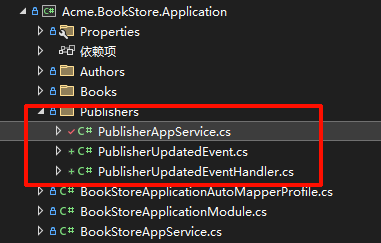
事件对象
创建的文件:
事件类:src/Acme.BookStore.Application/Publishers/PublisherUpdatedEvent.cs
- 定义了Publisher更新时的事件数据
using System;

namespace Acme.BookStore.Publishers
{
    /// <summary>
    /// Publisher更新事件 - 在Application层使用
    /// </summary>
    public class PublisherUpdatedEvent
    {
        public Guid PublisherId { get; set; }

        public string OldName { get; set; }

        public string NewName { get; set; }

        public DateTime UpdatedTime { get; set; }
    }
}
订阅事件 ILocalEventHandler
事件处理器:src/Acme.BookStore.Application/Publishers/PublisherUpdatedEventHandler.cs
-
实现
ILocalEventHandler<PublisherUpdatedEvent> -
记录Publisher的更新历史
    using System;
using System.Threading.Tasks;
using Volo.Abp.DependencyInjection;
using Volo.Abp.EventBus;
using Microsoft.Extensions.Logging;

namespace Acme.BookStore.Publishers
{
    /// <summary>
    /// Publisher更新事件处理器
    /// 处理在Application层发布的PublisherUpdatedEvent
    /// </summary>
    public class PublisherUpdatedEventHandler : ILocalEventHandler<PublisherUpdatedEvent>, ITransientDependency
    {
        private readonly ILogger<PublisherUpdatedEventHandler> _logger;

        public PublisherUpdatedEventHandler(ILogger<PublisherUpdatedEventHandler> logger)
        {
            _logger = logger;
        }

        public Task HandleEventAsync(PublisherUpdatedEvent eventData)
        {
            // 在这里处理Publisher更新后的业务逻辑
            _logger.LogInformation($"出版社信息已更新 (ID: {eventData.PublisherId})");
            _logger.LogInformation($"旧名称: {eventData.OldName}");
            _logger.LogInformation($"新名称: {eventData.NewName}");
            _logger.LogInformation($"更新时间: {eventData.UpdatedTime:yyyy-MM-dd HH:mm:ss}");

            // 示例:可以在这里添加更多逻辑
            // - 发送通知给管理员
            // - 记录审计日志
            // - 更新缓存
            // - 同步到其他系统

            return Task.CompletedTask;
        }
    }
}
发布事件 ILocalEventBus
修改了PublisherAppService:
-
注入
ILocalEventBus -
在
UpdateAsync方法中调用_localEventBus.PublishAsync()发布事件
using Acme.BookStore.Authors;
using Acme.BookStore.Options;
using Microsoft.Extensions.Options;
using System;
using System.Collections.Generic;
using System.Linq;
using System.Text;
using System.Threading.Tasks;
using Volo.Abp.Application.Dtos;
using Volo.Abp.Application.Services;
using Volo.Abp.Domain.Repositories;
using Volo.Abp.EventBus.Local;

namespace Acme.BookStore.Publishers
{
    public class PublisherAppService : CrudAppService<
    Publisher, // 1. 实体类型
    PublisherDto, // 2. 实体DTO
    Guid, // 3. 主键类型
    GetPublisherDto, // 4. 获取列表请求DTO
    CreateUpdatePublisherDto, // 5. 创建请求DTO
    CreateUpdatePublisherDto>, IPublisherAppService // 6. 更新请求DTO
    {
    private readonly IPublisherRepository _publisherRepository;
    private readonly PublisherOptions _publisherOptions;
    private readonly ILocalEventBus _localEventBus;


    public PublisherAppService(
        IRepository<Publisher, Guid> repository,
        IPublisherRepository publisherRepository,
        IOptions<PublisherOptions> publisherOptions,
        ILocalEventBus localEventBus)
        : base(repository)
    {
        _publisherRepository = publisherRepository;
        _publisherOptions = publisherOptions.Value;
        _localEventBus = localEventBus;
    }


        // 如果你需要自定义任何CRUD方法,可以在这里重写它们

        /// <summary>
        /// 示例:重写UpdateAsync方法来演示发布事件
        /// </summary>
        public override async Task<PublisherDto> UpdateAsync(Guid id, CreateUpdatePublisherDto input)
        {
            // 先获取旧数据
            var existingPublisher = await Repository.GetAsync(id);
            string oldName = existingPublisher.Name;

            // 执行更新
            var result = await base.UpdateAsync(id, input);

            // 发布更新事件 - 使用ILocalEventBus在Application层发布事件
            await _localEventBus.PublishAsync(new PublisherUpdatedEvent
            {
                PublisherId = id,
                OldName = oldName,
                NewName = input.Name,
                UpdatedTime = DateTime.Now
            });

            return result;
        }
        public override async  Task<PagedResultDto<PublisherDto>> GetListAsync(GetPublisherDto input)
        {
        if (input.Sorting.IsNullOrWhiteSpace())
        {
            input.Sorting = _publisherOptions.DefaultSorting;
        }

            // 应用配置中的默认分页大小
            var maxResultCount = input.MaxResultCount > 0
                ? Math.Min(input.MaxResultCount, _publisherOptions.MaxPageSize)
                : _publisherOptions.DefaultPageSize;

            var publishers = await _publisherRepository.GetListAsync(
                input.SkipCount,
                maxResultCount,
                input.Sorting,
                input.Filter
            );

            var totalCount = input.Filter == null
                ? await _publisherRepository.CountAsync()
                : await _publisherRepository.CountAsync(
                    publisher => publisher.Name.Contains(input.Filter));

            return new PagedResultDto<PublisherDto>(
                totalCount,
                ObjectMapper.Map<List<Publisher>, List<PublisherDto>>(publishers)
            );
        }
    }
}
测试 API - 修改
{
  "name": "清华大学出版社1.0",
  "description": "成立于1980年,依托清华大学的学术资源,出版高质量的学术著作",
  "establishmentTime": "1980-06-01T00:00:00.000Z",
  "address": {
    "street": "清华大学东门外",
    "city": "北京市",
    "stateOrProvince": "北京市",
    "postalCode": "100084",
    "country": "中国"
  },
  "url": "http://www.tup.tsinghua.edu.cn"
}

🔑 关键概念
-
事件类:普通的POCO类,包含事件需要传递的数据
-
事件处理器:实现
ILocalEventHandler<TEvent>接口,并注册为ITransientDependency -
自动发现:ABP会自动发现所有实现了
ILocalEventHandler的类并订阅相应事件 -
事务性:在聚合根中使用
AddLocalEvent(),事件会在SaveChanges时发布,与事务绑定 -
灵活性:可以在任何地方注入
ILocalEventBus并发布事件
💡 使用场景
-
发送通知:创建用户后发送欢迎邮件
-
更新缓存:数据变更后刷新缓存
-
审计日志:记录重要数据的变更历史
-
数据同步:同步数据到其他模块或系统
-
触发关联操作:创建订单后更新库存、发送通知等
这个示例可以直接编译运行,当你创建或更新Publisher时,会自动触发相应的事件处理器,并在日志中输出相关信息。

 浙公网安备 33010602011771号