
brew相关问题收集
brew下载太慢或者网络问题
最近想在IDEA里装个plantUML插件,Mac可以通过brew install graphviz直接安装。
遇到两个问题:
1.brew update失败
这个问题通过修改brew源为中科大镜像源解决,继续更新遇到下面问题
2.下载github资源失败,提示“url: (7) Failed to connect to raw.githubusercontent.com port 443: Connection refused”
tanghaodeMBP:etc blueberry$ brew install graphviz
Warning: You are using macOS 10.14.
We (and Apple) do not provide support for this old version.
You will encounter build failures with some formulae.
Please create pull requests instead of asking for help on Homebrew's GitHub,
Twitter or any other official channels. You are responsible for resolving
any issues you experience while you are running this
old version.

==> Downloading https://mirrors.ustc.edu.cn/homebrew-bottles/m4-1.4.19.mojave.bo
Already downloaded: /Users/blueberry/Library/Caches/Homebrew/downloads/19370f27820a915c732d42df010ace5082c7f0f1c2e4da5ef069981adfa7a8b4--m4-1.4.19.mojave.bottle.tar.gz
==> Downloading https://mirrors.ustc.edu.cn/homebrew-bottles/autoconf-2.71.mojav
Already downloaded: /Users/blueberry/Library/Caches/Homebrew/downloads/8d78045424ddb55a1156613e207de0ca2dc42b3750cc593ce8a1c578d4291665--autoconf-2.71.mojave.bottle.tar.gz
==> Downloading https://mirrors.ustc.edu.cn/homebrew-bottles/automake-1.16.5.moj
Already downloaded: /Users/blueberry/Library/Caches/Homebrew/downloads/ca34a1b0f2b3a6350e3b833845d3af0e2d836a52356fe01d3380f92f4e52b939--automake-1.16.5.mojave.bottle.tar.gz
==> Downloading https://mirrors.ustc.edu.cn/homebrew-bottles/bison-3.8.2.mojave.
Already downloaded: /Users/blueberry/Library/Caches/Homebrew/downloads/c340bcdaf29658ed34734020d8ce1563849d8304687bfc3dc4ef8aa227854840--bison-3.8.2.mojave.bottle.tar.gz
==> Downloading https://mirrors.ustc.edu.cn/homebrew-bottles/pkg-config-0.29.2_3
Already downloaded: /Users/blueberry/Library/Caches/Homebrew/downloads/b1d1882dcdcccae89b5b76cfbec7ded1aeafa5db2fa442764d153c747d263830--pkg-config-0.29.2_3.mojave.bottle.tar.gz
==> Downloading https://mirrors.ustc.edu.cn/homebrew-bottles/libpng-1.6.37.mojav
Already downloaded: /Users/blueberry/Library/Caches/Homebrew/downloads/f752542bbff6bca2b394cc8bce178add0c88023f82beb77a1e12f7cb5c98a7f5--libpng-1.6.37.mojave.bottle.tar.gz
==> Downloading https://downloads.sourceforge.net/project/freetype/freetype2/2.1
Already downloaded: /Users/blueberry/Library/Caches/Homebrew/downloads/66af195eff97355462607413c617845e4c44f3050223e0f8414d7f72490592a5--freetype-2.11.1.tar.xz
==> Downloading https://mirrors.ustc.edu.cn/homebrew-bottles/fontconfig-2.13.1.m
Already downloaded: /Users/blueberry/Library/Caches/Homebrew/downloads/6594fe8f532989525bba7af82f4f873b8cba117c44f28ceb8d8e0f164db78406--fontconfig-2.13.1.mojave.bottle.tar.gz
==> Downloading https://www.ijg.org/files/jpegsrc.v9e.tar.gz
Already downloaded: /Users/blueberry/Library/Caches/Homebrew/downloads/25de84988519c1b0590b15a8078374419d0992e4c2aafe70b59c2a8fa6546bb0--jpegsrc.v9e.tar.gz
==> Downloading https://github.com/Kitware/CMake/releases/download/v3.22.3/cmake
Already downloaded: /Users/blueberry/Library/Caches/Homebrew/downloads/c6068efa803337e8d6b80e53c4706b218fe2c45f401e72549e80be428e691757--cmake-3.22.3.tar.gz
==> Downloading https://mirrors.ustc.edu.cn/homebrew-bottles/nasm-2.15.05.mojave
Already downloaded: /Users/blueberry/Library/Caches/Homebrew/downloads/f9ec29a074d85c37d39953d51e48b061ae74bbcc217c6fd1ef97f164943c1e13--nasm-2.15.05.mojave.bottle.tar.gz
==> Downloading https://mirrors.ustc.edu.cn/homebrew-bottles/yasm-1.3.0_2.mojave
Already downloaded: /Users/blueberry/Library/Caches/Homebrew/downloads/1274f8ae87a8802cbf194a31fb28577fbe5883df5cc827fc6f7fde00acae02b3--yasm-1.3.0_2.mojave.bottle.1.tar.gz
==> Downloading https://mirrors.ustc.edu.cn/homebrew-bottles/brotli-1.0.9.mojave
Already downloaded: /Users/blueberry/Library/Caches/Homebrew/downloads/e41e03e67e035b7aa340bde66127c569e67e1ae0ebc463a3401fc294f21d415c--brotli-1.0.9.mojave.bottle.tar.gz
==> Downloading https://mirrors.ustc.edu.cn/homebrew-bottles/giflib-5.2.1.mojave
Already downloaded: /Users/blueberry/Library/Caches/Homebrew/downloads/790c50eee32565f6dd763713ddfc8852babf97af6206c954dca92e8fbd1b743d--giflib-5.2.1.mojave.bottle.tar.gz
==> Downloading https://github.com/AcademySoftwareFoundation/Imath/archive/refs/
Already downloaded: /Users/blueberry/Library/Caches/Homebrew/downloads/24f577ca18ff80cac96955a6aeaf861a93276e05f217d45d7eb4fb04f4084219--Imath-3.1.4.tar.gz
==> Downloading https://github.com/openexr/openexr-images/raw/master/TestImages/
######################################################################## 100.0%
curl: (7) Failed to connect to raw.githubusercontent.com port 443: Connection refused
Error: graphviz: Failed to download resource "openexr--exr"
Download failed: https://github.com/openexr/openexr-images/raw/master/TestImages/AllHalfValues.exr
按照网上帖子,将github的IP添加到host文件并未奏效。
最后是通过FQ走代理解决。终端输入:
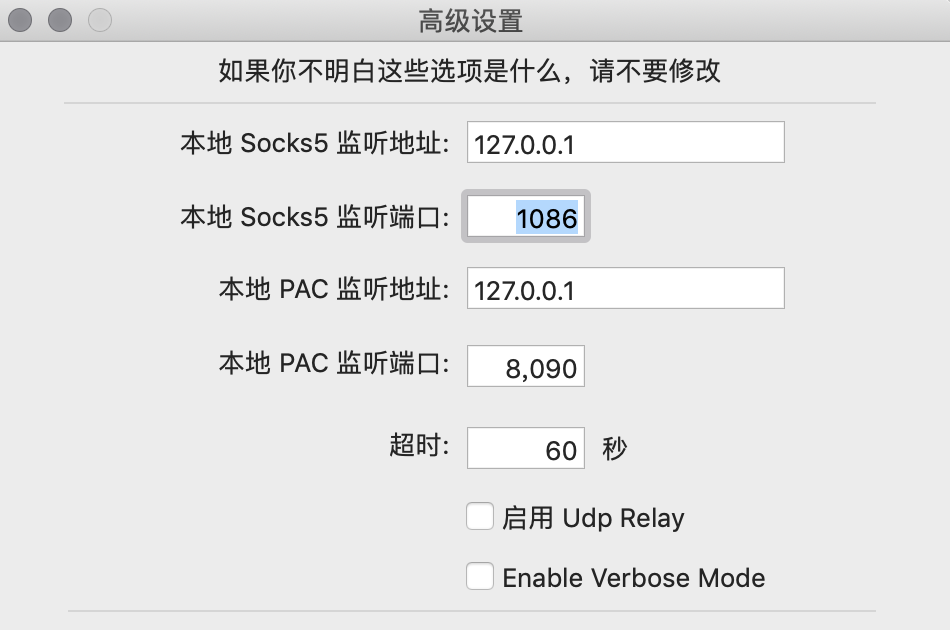
ALL_PROXY=socks5://127.0.0.1:1086 brew install graphviz
IP和端口对应socks5设置
brew下载旧版本软件包
只要替换下面脚本中的packageName和packageVersion为对应软件包和版本信息
# Please define variables
packageName=<packageName>
packageVersion=<packageVersion>

# Create a new tab
brew tap-new local/$packageName

# Extract into local tap
brew extract --version=$packageVersion $packageName local/$packageName

# Verify packages is present
brew search $packageName@

# Run brew install@version as usual
brew install local/$packageName/$packageName@$packageVersion
还看到有人提供下面这种思路,不过还没验证
Homebrew changed recently. Things that used to work do not work anymore. The easiest way I found to work (January 2021), was to:
Find the .rb file for my software (first go to Formulas, find the one I need and then click "History"; for CMake, this is at https://github.com/Homebrew/homebrew-core/commits/master/Formula/cmake.rb)
Pick the desired version among the revisions, e.g. 3.18.4, click three dots in the top right corner of the .rb file diff (...) and then click Raw. Copy the URL.
Unlink the old version brew unlink cmake
Installing directly from the git URL does not work anymore (brew install https://raw.githubusercontent.com/Homebrew/homebrew-core/2bf16397f163187ae5ac8be41ca7af25b5b2e2cc/Formula/cmake.rb will fail)
Instead, download it and install from a local file curl -O https://raw.githubusercontent.com/Homebrew/homebrew-core/2bf16397f163187ae5ac8be41ca7af25b5b2e2cc/Formula/cmake.rb && brew install ./cmake.rb
Voila! You can delete the downloaded .rb file now.
参考:
https://discourse.brew.sh/t/has-brew-install-force-formula-raw-path-been-taken-out/8793
https://stackoverflow.com/questions/3987683/homebrew-install-specific-version-of-formula
brew安装软件包失败,清空过程缓存文件
brew cleanup -s
可以加一个参数-n显示将要删除的文件,但先不删除文件

 浙公网安备 33010602011771号