
Putting the "You" in CPU — Chapter 6: Let's Talk About Forks and Cows
Ch. 6 — Let's Talk About Forks and Cows / 聊聊 Fork 与 COW
原文:Putting the "You" in CPU — Chapter 6: Let's Talk About Forks and Cows
作者:Lexi Mattick & Hack Club(2023 年 7 月)
来源:https://cpu.land/ ,源码以 MIT 许可证开源( https://github.com/hackclub/putting-the-you-in-cpu )
本文件为原文 + 简体中文对照译本,依 MIT 许可证保留署名。
The final question: how did we get here? Where do the first processes come from?
最后一个问题:我们是怎么走到这一步的?最初的那些进程又是从何而来?
This article is almost done. We're on the final stretch. About to hit a home run. Moving on to greener pastures. And various other terrible idioms that mean you are a single Length of Chapter 6 away from touching grass or whatever you do with your time when you aren't reading 15,000 word articles about CPU architecture.
这篇文章快写完了。我们已进入最后冲刺。即将击出全垒打。奔向更青翠的牧场。以及其他各种蹩脚的成语,它们的意思都是:你距离出门晒晒太阳(或者不读一万五千字的 CPU 架构长文时你会做的任何事)只差一个第 6 章的长度了。
If execve starts a new program by replacing the current process, how do you start a new program separately, in a new process? This is a pretty important ability if you want to do multiple things on your computer; when you double-click an app to start it, the app opens separately while the program you were previously on continues running.
如果 execve 是通过替换当前进程来启动一个新程序的,那你要怎样才能单独地、在一个新进程里启动一个新程序呢?如果你想在计算机上同时做多件事,这是一项相当重要的能力;当你双击一个应用来启动它时,这个应用单独打开,而你之前所在的那个程序仍继续运行。
The answer is another system call: fork, the system call fundamental to all multiprocessing. fork is quite simple, actually — it clones the current process and its memory, leaving the saved instruction pointer exactly where it is, and then allows both processes to proceed as usual. Without intervention, the programs continue to run independently from each other and all computation is doubled.
答案是另一个系统调用:fork,它是所有多进程处理的根本性系统调用。fork 其实相当简单——它克隆当前进程及其内存,把已保存的指令指针原封不动地保留在原处,然后允许两个进程都照常继续。在没有干预的情况下,这两个程序会各自独立地继续运行,所有的运算都被加倍了。
The newly running process is referred to as the "child," with the process originally calling fork the "parent." Processes can call fork multiple times, thus having multiple children. Each child is numbered with a process ID (PID), starting with 1.
新运行起来的进程被称为“子进程”(child),而最初调用 fork 的那个进程则是“父进程”(parent)。进程可以多次调用 fork,从而拥有多个子进程。每个子进程都用一个进程 ID(PID)来编号,从 1 开始。
Cluelessly doubling the same code is pretty useless, so fork returns a different value on the parent vs the child. On the parent, it returns the PID of the new child process, while on the child it returns 0. This makes it possible to do different work on the new process so that forking is actually helpful.
毫无区别地把同样的代码翻一倍相当没用,所以 fork 在父进程和子进程中返回不同的值。在父进程中,它返回新子进程的 PID;而在子进程中,它返回 0。这使得在新进程上做不同的工作成为可能,从而让 fork 真正变得有用。
// main.c
pid_t pid = fork();

// Code continues from this point as usual, but now across
// two "identical" processes.
//
// Identical... except for the PID returned from fork!
//
// This is the only indicator to either program that they
// are not one of a kind.

if (pid == 0) {
	// We're in the child.
	// Do some computation and feed results to the parent!
} else {
	// We're in the parent.
	// Probably continue whatever we were doing before.
}
// main.c(译文注释)
pid_t pid = fork();

// 代码从这一点起照常继续,但现在是跨越
// 两个“完全相同”的进程在运行。
//
// 完全相同……除了 fork 返回的 PID!
//
// 这是任一程序唯一的线索,表明自己
// 并非独一无二。

if (pid == 0) {
	// 我们在子进程里。
	// 做点运算,然后把结果喂给父进程!
} else {
	// 我们在父进程里。
	// 大概会继续之前正在做的事情。
}
Process forking can be a bit hard to wrap your head around. From this point on I will assume you've figured it out; if you have not, check out this hideous-looking website for a pretty good explainer.
进程的 fork 可能有点让人费解。从这里往后我会假定你已经想明白了;如果还没有,可以看看这个丑得吓人的网站,它是个相当不错的讲解。
Anyways, Unix programs launch new programs by calling fork and then immediately running execve in the child process. This is called the fork-exec pattern. When you run a program, your computer executes code similar to the following:
总之,Unix 程序启动新程序的方式,是先调用 fork,然后在子进程中立刻运行 execve。这被称为 fork-exec 模式。当你运行一个程序时,你的计算机执行的代码类似下面这样:
// launcher.c
pid_t pid = fork();

if (pid == 0) {
	// Immediately replace the child process with the new program.
	execve(...);
}

// Since we got here, the process didn't get replaced. We're in the parent!
// Helpfully, we also now have the PID of the new child process in the PID
// variable, if we ever need to kill it.

// Parent program continues here...
// launcher.c(译文注释)
pid_t pid = fork();

if (pid == 0) {
	// 立刻用新程序替换掉子进程。
	execve(...);
}

// 既然我们走到了这里,说明进程没有被替换。我们在父进程里!
// 很贴心的是,我们现在也在 PID 变量里拿到了新子进程的 PID,
// 万一我们哪天需要杀掉它的话。

// 父程序在这里继续……
Mooooo! / 哞哞哞!
You might've noticed that duplicating a process's memory only to immediately discard all of it when loading a different program sounds a bit inefficient. Luckily, we have an MMU. Duplicating data in physical memory is the slow part, not duplicating page tables, so we simply don't duplicate any RAM: we create a copy of the old process's page table for the new process and keep the mapping pointing to the same underlying physical memory.
你可能已经注意到,复制一个进程的内存、结果却在加载另一个程序时立刻把它全部丢弃,这听起来有点低效。幸运的是,我们有 MMU。慢的那部分是复制物理内存中的数据,而不是复制页表,所以我们干脆不复制任何 RAM:我们为新进程创建一份旧进程页表的副本,并让映射继续指向同一块底层物理内存。
But the child process is supposed to be independent and isolated from the parent! It's not okay for the child to write to the parent's memory, or vice versa!
但子进程本应是独立的、与父进程相隔离的!子进程写入父进程的内存是不行的,反过来也一样!
Introducing COW (copy on write) pages. With COW pages, both processes read from the same physical addresses as long as they don't attempt to write to the memory. As soon as one of them tries to write to memory, that page is copied in RAM. COW pages allow both processes to have memory isolation without an upfront cost of cloning the entire memory space. This is why the fork-exec pattern is efficient; since none of the old process's memory is written to before loading a new binary, no memory copying is necessary.
隆重介绍 COW(写时复制,copy on write)页。有了 COW 页,只要两个进程都不试图写入内存,它们就从相同的物理地址读取。而一旦其中一个试图写入内存,那个页就会在 RAM 中被复制一份。COW 页让两个进程都拥有内存隔离,却无需预先付出克隆整个内存空间的代价。这正是 fork-exec 模式高效的原因;由于在加载新的二进制程序之前,旧进程的内存没有任何一处被写入,所以根本不需要复制内存。
COW is implemented, like many fun things, with paging hacks and hardware interrupt handling. After fork clones the parent, it flags all of the pages of both processes as read-only. When a program writes to memory, the write fails because the memory is read-only. This triggers a segfault (the hardware interrupt kind) which is handled by the kernel. The kernel which duplicates the memory, updates the page to allow writing, and returns from the interrupt to reattempt the write.
和许多有趣的东西一样,COW 是借助分页技巧和硬件中断处理来实现的。在 fork 克隆了父进程之后,它把两个进程的所有页都标记为只读。当一个程序写入内存时,由于内存是只读的,写入会失败。这会触发一次段错误(硬件中断那一种),由内核来处理。内核复制那块内存,更新该页以允许写入,然后从中断返回,重新尝试写入。
A: Knock, knock!
B: Who's there?
A: Interrupting cow.
B: Interrupting cow wh —
A: MOOOOO!
甲:咚咚咚(敲门)!
乙:谁呀?
甲:爱打断的奶牛。
乙:爱打断的奶牛什——
甲:哞——!译注:这是一个经典的英文“敲门笑话”(knock-knock joke),笑点在于说“奶牛”的一方在对方话没说完时抢着“哞”了出来,正好呼应本节所讲的“中断”。
In the Beginning (Not Genesis 1:1) / 起初(不是《创世记》1:1)
Every process on your computer was fork-execed by a parent program, except for one: the init process. The init process is set up manually, directly by the kernel. It is the first userland program to run and the last to be killed at shutdown.
你计算机上的每一个进程都是由某个父程序 fork-exec 出来的,唯有一个例外:init 进程。init 进程是由内核直接手动设置起来的。它是第一个运行的用户态程序,也是关机时最后一个被杀掉的程序。
Want to see a cool instant blackscreen? If you're on macOS or Linux, save your work, open a terminal, and kill the init process (PID 1):
想看一个很酷的瞬间黑屏吗?如果你用的是 macOS 或 Linux,先保存好你的工作,打开一个终端,然后杀掉 init 进程(PID 1):
$ sudo kill 1
Author's note: knowledge about init processes, unfortunately, only applies to Unix-like systems like macOS and Linux. Most of what you learn from now on will not apply to understanding Windows, which has a very different kernel architecture.
Just like the section on
execve, I am explicitly addressing this — I could write another entire article on the NT kernel, but I am holding myself back from doing so. (For now.)
作者注:关于 init 进程的知识,很遗憾,只适用于像 macOS 和 Linux 这样的类 Unix 系统。从现在起你学到的大部分内容,都不适用于理解 Windows,因为它有着非常不同的内核架构。
就像讲
execve的那一节一样,我在此明确说明这一点——我本可以就 NT 内核再写一整篇文章,但我克制住了自己没这么做。(暂时如此。)
The init process is responsible for spawning all of the programs and services that make up your operating system. Many of those, in turn, spawn their own services and programs.
init 进程负责孵化出构成你操作系统的所有程序和服务。而其中许多程序和服务反过来又孵化出它们自己的服务和程序。
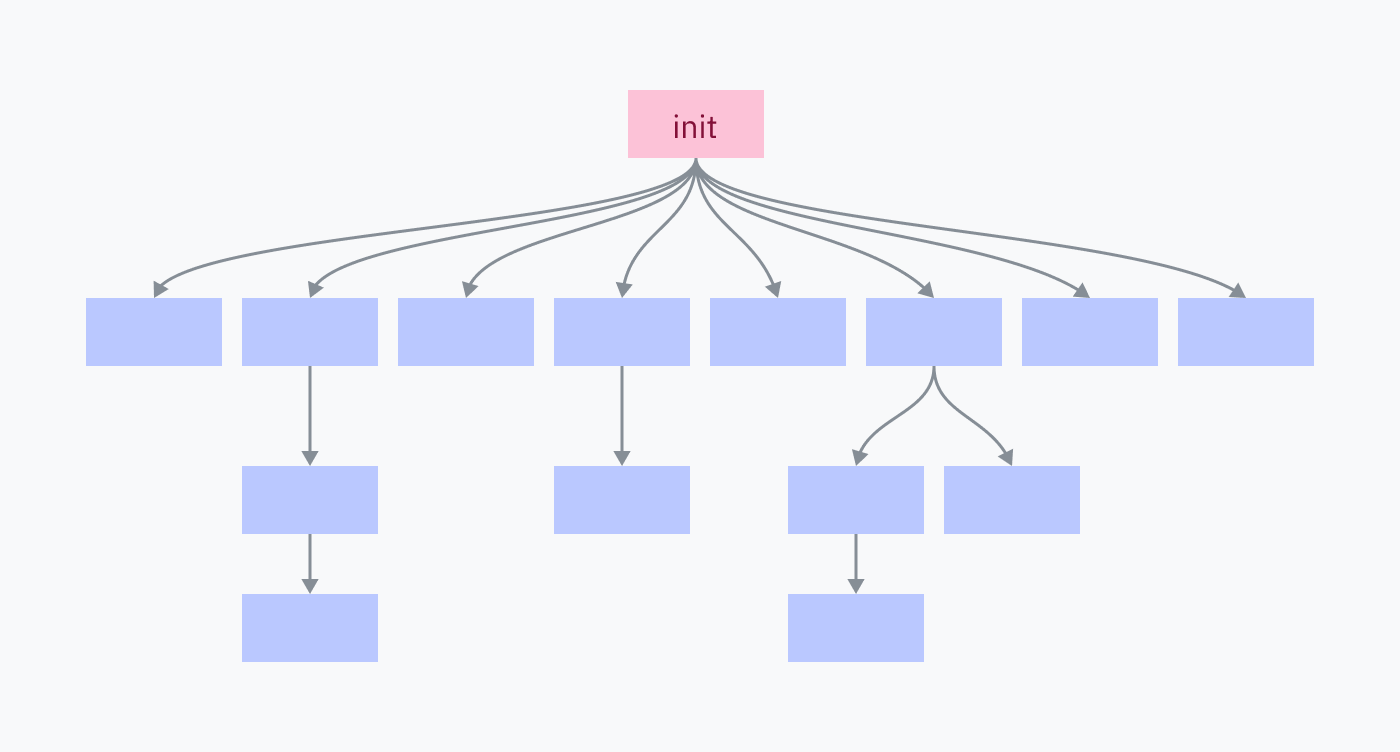
Killing the init process kills all of its children and all of their children, shutting down your OS environment.
杀掉 init 进程会杀掉它所有的子进程以及这些子进程的所有子进程,从而关闭你的操作系统环境。
Back to the Kernel / 回到内核
We had a lot of fun looking at Linux kernel code back in chapter 3, so we're gonna do some more of that! This time we'll start with a look at how the kernel starts the init process.
我们在第 3 章看 Linux 内核代码时玩得很开心,所以我们要再来点这个!这次我们先来看看内核是如何启动 init 进程的。
Your computer boots up in a sequence like the following:
你的计算机以类似下面的顺序启动:
-
The motherboard is bundled with a tiny piece of software that searches your connected disks for a program called a bootloader. It picks a bootloader, loads its machine code into RAM, and executes it.
Keep in mind that we are not yet in the world of a running OS. Until the OS kernel starts an init process, multiprocessing and syscalls don't really exist. In the pre-init context, "executing" a program means directly jumping to its machine code in RAM without expectation of return.
-
主板上捆绑着一小段软件,它在你连接的磁盘中搜索一个称为引导加载程序(bootloader)的程序。它挑选一个引导加载程序,把它的机器码加载进 RAM,然后执行它。
要记住,我们此刻还不在一个运行中的操作系统的世界里。在操作系统内核启动一个 init 进程之前,多进程和系统调用其实并不存在。在 init 之前的语境中,“执行”一个程序意味着直接跳到它在 RAM 中的机器码,且并不期待返回。
-
The bootloader is responsible for finding a kernel, loading it into RAM, and executing it. Some bootloaders, like GRUB, are configurable and/or let you select between multiple operating systems. BootX and Windows Boot Manager are the built-in bootloaders of macOS and Windows, respectively.
-
引导加载程序负责找到一个内核,把它加载进 RAM,然后执行它。有些引导加载程序,比如 GRUB,是可配置的,以及/或者让你在多个操作系统之间进行选择。BootX 和 Windows Boot Manager 分别是 macOS 和 Windows 内置的引导加载程序。
-
The kernel is now running and begins a large routine of initialization tasks including setting up interrupt handlers, loading drivers, and creating the initial memory mapping. Finally, the kernel switches the privilege level to user mode and starts the init program.
-
内核现在运行起来了,开始一大套初始化任务,包括设置中断处理程序、加载驱动程序,以及创建初始的内存映射。最后,内核把特权级切换到用户模式,并启动 init 程序。
-
We're finally in userland in an operating system! The init program begins running init scripts, starting services, and executing programs like the shell/UI.
-
我们终于身处一个操作系统的用户态之中了!init 程序开始运行各种 init 脚本、启动服务,以及执行诸如 shell/界面之类的程序。
Initializing Linux / 初始化 Linux
On Linux, the bulk of step 3 (kernel initialization) occurs in the start_kernel function in init/main.c. This function is over 200 lines of calls to various other init functions, so I won't include the whole thing in this article, but I do recommend scanning through it! At the end of start_kernel a function named arch_call_rest_init is called:
在 Linux 上,第 3 步(内核初始化)的大部分发生在 init/main.c 中的 start_kernel 函数里。这个函数是 200 多行对各种其他 init 函数的调用,所以我不会把它的全文都放进本文,但我确实推荐你把它扫一遍!在 start_kernel 的末尾,一个名为 arch_call_rest_init 的函数被调用:
// start_kernel @ init/main.c
	/* Do the rest non-__init'ed, we're now alive */
	arch_call_rest_init();
What does non-__init'ed mean?
The
start_kernelfunction is defined asasmlinkage __visible void __init __no_sanitize_address start_kernel(void). The weird keywords like__visible,__init, and__no_sanitize_addressare all C preprocessor macros used in the Linux kernel to add various code or behaviors to a function.In this case,
__initis a macro that instructs the kernel to free the function and its data from memory as soon as the boot process is completed, simply to save space.How does it work? Without getting too deep into the weeds, the Linux kernel is itself packaged as an ELF file. The
__initmacro expands to__section(".init.text"), which is a compiler directive to place the code in a section called.init.textinstead of the usual.textsection. Other macros allow data and constants to be placed in special init sections as well, such as__initdatathat expands to__section(".init.data").
non-__init'ed 是什么意思?
start_kernel函数被定义为asmlinkage __visible void __init __no_sanitize_address start_kernel(void)。诸如__visible、__init和__no_sanitize_address这些奇怪的关键字,全都是 Linux 内核中使用的 C 预处理器宏,用来给函数添加各种代码或行为。在这里,
__init是一个宏,它指示内核在启动过程一完成就把该函数及其数据从内存中释放掉,纯粹是为了节省空间。它是怎么工作的?不深入太多细节的话,Linux 内核本身就被打包成一个 ELF 文件。
__init宏展开为__section(".init.text"),这是一个编译器指令,用于把代码放进一个称为.init.text的节,而不是通常的.text节。其他宏也允许把数据和常量放进特殊的 init 节,比如__initdata就展开为__section(".init.data")。
arch_call_rest_init is nothing but a wrapper function:
arch_call_rest_init 不过是一个包装函数:
// init/main.c
void __init __weak arch_call_rest_init(void)
{
	rest_init();
}
The comment said "do the rest non-__init'ed" because rest_init is not defined with the __init macro. This means it is not freed when cleaning up init memory:
那条注释说“把剩下的以 non-__init'ed 的方式做完”,是因为 rest_init 并没有用 __init 宏来定义。这意味着在清理 init 内存时它不会被释放:
// init/main.c
noinline void __ref rest_init(void)
{
rest_init now creates a thread for the init process:
rest_init 现在为 init 进程创建一个线程:
// rest_init @ init/main.c
	/*
	 * We need to spawn init first so that it obtains pid 1, however
	 * the init task will end up wanting to create kthreads, which, if
	 * we schedule it before we create kthreadd, will OOPS.
	 */
	pid = user_mode_thread(kernel_init, NULL, CLONE_FS);
The kernel_init parameter passed to user_mode_thread is a function that finishes some initialization tasks and then searches for a valid init program to execute it. This procedure starts with some basic setup tasks; I will skip through these for the most part, except for where free_initmem is called. This is where the kernel frees our .init sections!
传给 user_mode_thread 的 kernel_init 参数是一个函数,它完成一些初始化任务,然后搜索一个有效的 init 程序并执行它。这个过程从一些基本的设置任务开始;这些我大部分都会略过,除了调用 free_initmem 的那一处。就是在这里,内核释放掉了我们的 .init 节!
// kernel_init @ init/main.c
	free_initmem();
Now the kernel can find a suitable init program to run:
现在内核可以找一个合适的 init 程序来运行了:
// kernel_init @ init/main.c
	/*
	 * We try each of these until one succeeds.
	 *
	 * The Bourne shell can be used instead of init if we are
	 * trying to recover a really broken machine.
	 */
	if (execute_command) {
		ret = run_init_process(execute_command);
		if (!ret)
			return 0;
		panic("Requested init %s failed (error %d).",
		      execute_command, ret);
	}

	if (CONFIG_DEFAULT_INIT[0] != '\0') {
		ret = run_init_process(CONFIG_DEFAULT_INIT);
		if (ret)
			pr_err("Default init %s failed (error %d)\n",
			       CONFIG_DEFAULT_INIT, ret);
		else
			return 0;
	}

	if (!try_to_run_init_process("/sbin/init") ||
	    !try_to_run_init_process("/etc/init") ||
	    !try_to_run_init_process("/bin/init") ||
	    !try_to_run_init_process("/bin/sh"))
		return 0;

	panic("No working init found.  Try passing init= option to kernel. "
	      "See Linux Documentation/admin-guide/init.rst for guidance.");
On Linux, the init program is almost always located at or symbolic-linked to /sbin/init. Common inits include systemd (which has an abnormally good website), OpenRC, and runit. kernel_init will default to /bin/sh if it can't find anything else — and if it can't find /bin/sh, something is TERRIBLY wrong.
在 Linux 上,init 程序几乎总是位于 /sbin/init 或以符号链接指向它。常见的 init 包括 systemd(它有一个好得反常的网站)、OpenRC 和 runit。如果 kernel_init 找不到任何别的东西,就会默认使用 /bin/sh——而如果它连 /bin/sh 都找不到,那说明出了极其严重的问题。
MacOS has an init program, too! It's called launchd and is located at /sbin/launchd. Try running that in a terminal to get yelled for not being a kernel.
macOS 也有一个 init 程序!它叫 launchd,位于 /sbin/launchd。试着在终端里运行它,你会因为“你不是内核”而挨一顿呵斥。
From this point on, we're at step 4 in the boot process: the init process is running in userland and begins launching various programs using the fork-exec pattern.
从这里往后,我们就到了启动过程中的第 4 步:init 进程运行在用户态,并开始使用 fork-exec 模式启动各种程序。
Fork Memory Mapping / Fork 时的内存映射
I was curious how the Linux kernel remaps the bottom half of memory when forking processes, so I poked around a bit. kernel/fork.c seems to contain most of the code for forking processes. The start of that file helpfully pointed me to the right place to look:
我很好奇 Linux 内核在 fork 进程时是如何重新映射内存下半区的,于是四处翻了翻。kernel/fork.c 似乎包含了 fork 进程的大部分代码。那个文件的开头很贴心地把我指向了该看的地方:
// kernel/fork.c
/*
 *  'fork.c' contains the help-routines for the 'fork' system call
 * (see also entry.S and others).
 * Fork is rather simple, once you get the hang of it, but the memory
 * management can be a bitch. See 'mm/memory.c': 'copy_page_range()'
 */
It looks like this copy_page_range function takes some information about a memory mapping and copies the page tables. Quickly skimming through the functions it calls, this is also where pages are set to be read-only to make them COW pages. It checks whether it should do this by calling a function called is_cow_mapping.
看起来这个 copy_page_range 函数接受一些关于内存映射的信息并复制页表。快速扫一眼它所调用的函数,这里也正是把页设为只读以使其成为 COW 页的地方。它通过调用一个名为 is_cow_mapping 的函数来检查自己是否应该这么做。
is_cow_mapping is defined back in include/linux/mm.h, and returns true if the memory mapping has flags that indicate the memory is writeable and isn't shared between processes. Shared memory doesn't need to be COWed because it is designed to be shared. Admire the slightly incomprehensible bitmasking:
is_cow_mapping 定义在 include/linux/mm.h 中,如果内存映射带有表明该内存可写、且不在各进程间共享的标志,它就返回 true。共享内存不需要被 COW,因为它本就被设计为共享的。来欣赏一下这段略微令人费解的位掩码运算:
// include/linux/mm.h
static inline bool is_cow_mapping(vm_flags_t flags)
{
	return (flags & (VM_SHARED | VM_MAYWRITE)) == VM_MAYWRITE;
}
Back in kernel/fork.c, doing a simple Command-F for copy_page_range yields one call from the dup_mmap function… which is in turn called by dup_mm… which is called by copy_mm… which is finally called by the massive copy_process function! copy_process is the core of the fork function, and, in a way, the centerpoint of how Unix systems execute programs — always copying and editing a template created for the first process at startup.
回到 kernel/fork.c,简单地用 Command-F 搜一下 copy_page_range,会得到一处来自 dup_mmap 函数的调用……而 dup_mmap 又被 dup_mm 调用……dup_mm 又被 copy_mm 调用……copy_mm 最终被那个庞大的 copy_process 函数调用!copy_process 是 fork 函数的核心,某种意义上也是 Unix 系统执行程序方式的中心枢纽——永远都在复制并编辑一个在启动时为第一个进程创建的模板。
In Summary… / 总结……
So… how do programs run?
那么……程序是如何运行的?
On the lowest level: processors are dumb. They have a pointer into memory and execute instructions in a row, unless they reach an instruction that tells them to jump somewhere else.
在最底层:处理器是“笨”的。它们有一个指向内存的指针,并一条接一条地执行指令,除非遇到一条告诉它们跳到别处的指令。
Besides jump instructions, hardware and software interrupts can also break the sequence of execution by jumping to a preset location that can then choose where to jump to. Processor cores can't run multiple programs at once, but this can be simulated by using a timer to repeatedly trigger interrupts and allowing kernel code to switch between different code pointers.
除了跳转指令之外,硬件中断和软件中断也能打断执行的顺序,办法是跳到一个预设的位置,那里再进而选择要跳到哪儿。处理器核心无法一次运行多个程序,但这可以通过用一个定时器反复触发中断、并让内核代码在不同的代码指针之间切换来模拟出来。
Programs are tricked into believing they're running as a coherent, isolated unit. Direct access to system resources is prevented in user mode, memory space is isolated using paging, and system calls are designed to allow generic I/O access without too much knowledge about the true execution context. System calls are instructions that ask the CPU to run some kernel code, the location of which is configured by the kernel at startup.
程序被骗得以为自己是作为一个连贯、隔离的单元在运行。在用户模式下,对系统资源的直接访问被阻止,内存空间借助分页被隔离,而系统调用被设计为在无需过多了解真实执行上下文的情况下就能进行通用的 I/O 访问。系统调用是一些请求 CPU 去运行某段内核代码的指令,这段代码的位置由内核在启动时配置好。
But… how do programs run?
但是……程序究竟是如何运行的?
After the computer starts up, the kernel launches the init process. This is the first program running at the higher level of abstraction where its machine code doesn't have to worry about many specific system details. The init program launches the programs that render your computer's graphical environment and are responsible for launching other software.
在计算机启动之后,内核启动 init 进程。这是第一个运行在更高抽象层级上的程序,在这个层级上,它的机器码不必操心许多具体的系统细节。init 程序启动那些渲染你计算机图形环境的、并负责启动其他软件的程序。
To launch a program, it clones itself with the fork syscall. This cloning is efficient because all of the memory pages are COW and the memory doesn't need to be copied within physical RAM. On Linux, this is the copy_process function in action.
要启动一个程序,它用 fork 系统调用克隆自己。这种克隆是高效的,因为所有内存页都是 COW 的,内存无需在物理 RAM 内被复制。在 Linux 上,这正是 copy_process 函数在发挥作用。
Both processes check if they're the forked process. If they are, they use an exec syscall to ask the kernel to replace the current process with a new program.
两个进程都会检查自己是不是那个 fork 出来的进程。如果是,它们就用一个 exec 系统调用请求内核用一个新程序替换掉当前进程。
The new program is probably an ELF file, which the kernel parses to find information on how to load the program and where to place its code and data within the new virtual memory mapping. The kernel might also prepare an ELF interpreter if the program is dynamically linked.
那个新程序很可能是一个 ELF 文件,内核会解析它,以找到关于如何加载该程序、以及把它的代码和数据放在新虚拟内存映射中何处的信息。如果程序是动态链接的,内核可能还会准备一个 ELF 解释器。
The kernel can then load the program's virtual memory mapping and return to userland with the program running, which really means setting the CPU's instruction pointer to the start of the new program's code in virtual memory.
内核随后就能加载该程序的虚拟内存映射,并在程序运行的状态下返回用户态——这实际上意味着把 CPU 的指令指针设为新程序代码在虚拟内存中的起始处。

 浙公网安备 33010602011771号