
IIS ASP.NET Core
安装ASP.NET Core Module (ANCM) for IIS
下载地址
https://learn.microsoft.com/en-us/aspnet/core/host-and-deploy/aspnet-core-module?view=aspnetcore-9.0
项目添加web.config
<?xml version="1.0" encoding="utf-8"?>
<configuration>
    <location path="." inheritInChildApplications="false">
        <system.webServer>
            <handlers>
                <add name="aspNetCore" path="*" verb="*" modules="AspNetCoreModuleV2" resourceType="Unspecified" />
            </handlers>
            <aspNetCore processPath="dotnet"
                        arguments=".\XXX.dll"
                        stdoutLogEnabled="true"
                        stdoutLogFile=".\logs\stdout"
                        hostingModel="inprocess">
            <environmentVariables>
                <environmentVariable name="ASPNETCORE_ENVIRONMENT" value="Sit" />
            </environmentVariables>
            </aspNetCore>
        </system.webServer>
    </location>
</configuration>
参考
https://learn.microsoft.com/en-us/aspnet/core/host-and-deploy/iis/web-config?view=aspnetcore-9.0
项目启动问题
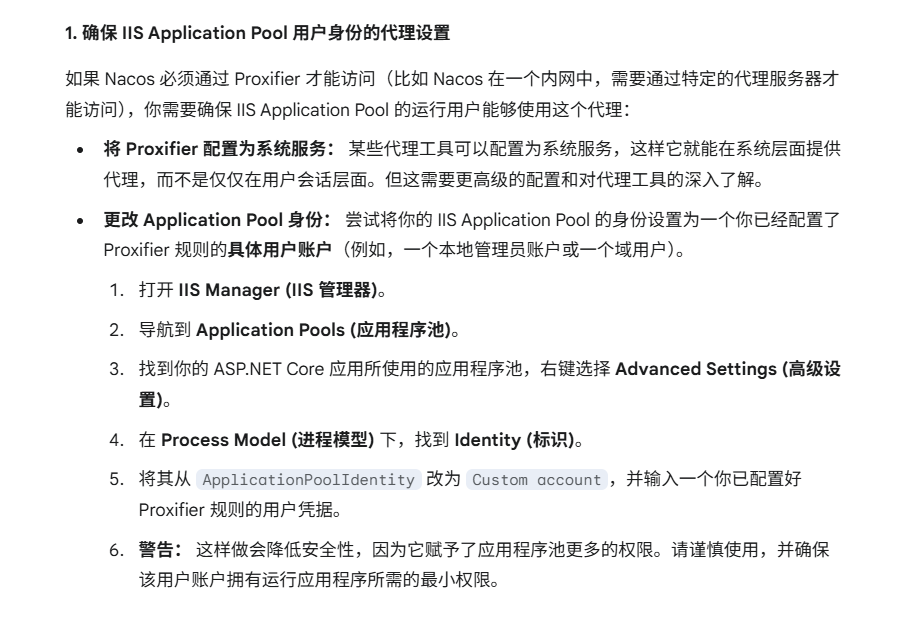
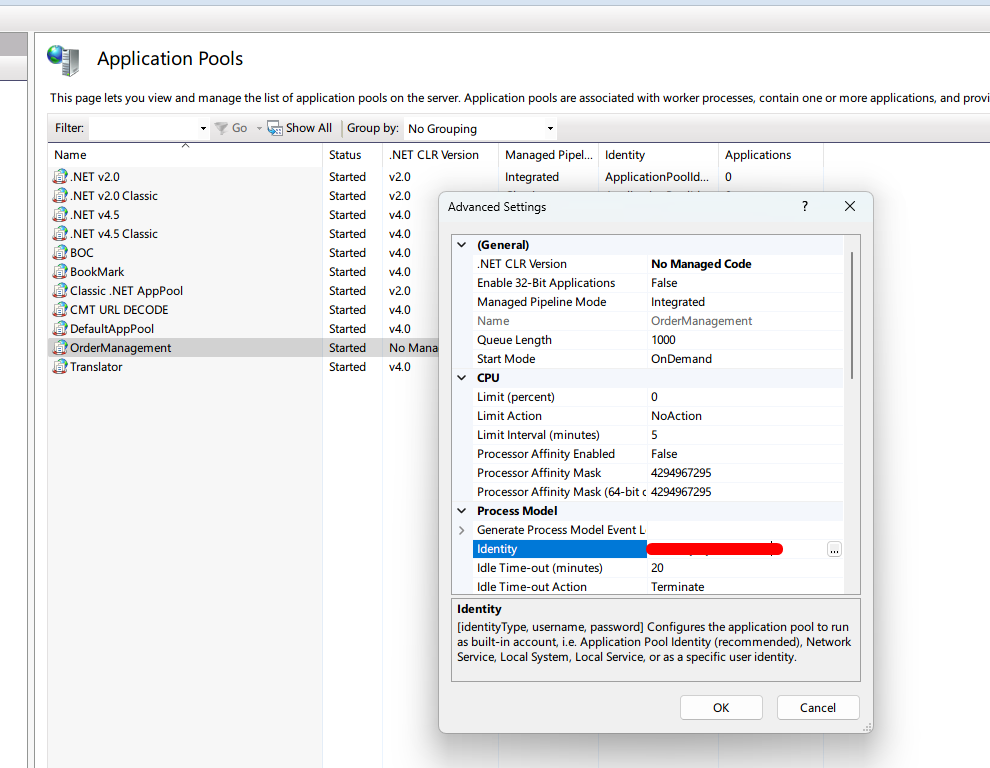
项目启动的时候,请求Nacos,但Nacos本地是通过VPN访问的,导致启动失败。
原因:

解决:
直接编译问题
过去,我们一边开发项目一边部署在IIS,直接编译,IIS就会应用最新的dll,然后我们就可以通过附加进程的方式进行调试。
为什么asp.net core直接编译的时候,IIS却显示文件占用呢?
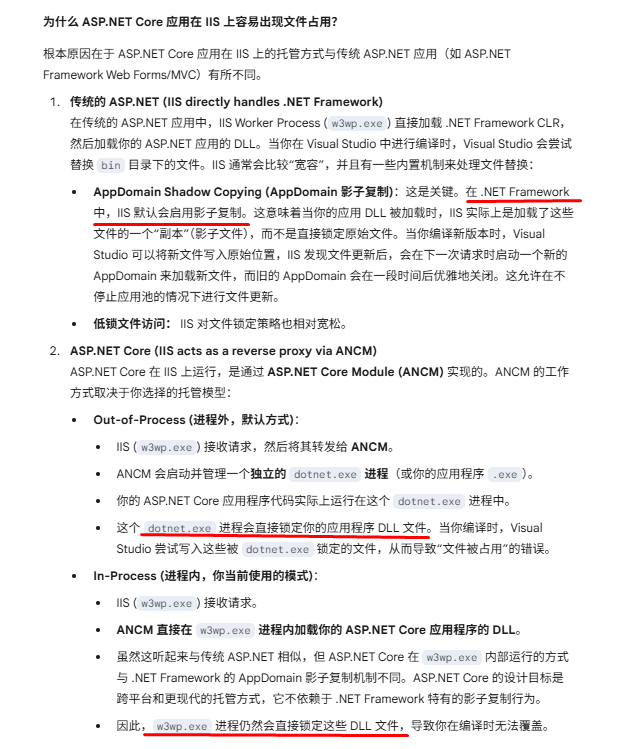
关于影子复制,见
解决办法:
编译前,手动停止IIS应用程序池,编译后,再启动
这个过程可以自动化,给IDE添加编译事件
以下示例是copy编译后的文件到另一个文件夹
<PropertyGroup>
<IISAppPoolName>OrderManagement</IISAppPoolName>
<AppUrl>http://localhost:8088/swagger</AppUrl>
</PropertyGroup>
<Target Name="PostBuild" AfterTargets="PostBuildEvent">
<Exec Command=""%systemroot%\system32\inetsrv\appcmd.exe" stop apppool /apppool.name:"$(IISAppPoolName)"" />
<Exec Command="xcopy "$(TargetDir)*.*" "C:\Workspace\IIS\ordermanagement" /Y /I /E /R" />
<Exec Command=""%systemroot%\system32\inetsrv\appcmd.exe" start apppool /apppool.name:"$(IISAppPoolName)"" />
<Exec Command="powershell.exe -NoProfile -ExecutionPolicy Bypass -Command "Invoke-WebRequest -Uri '$(AppUrl)' -UseBasicParsing -TimeoutSec 10 -ErrorAction SilentlyContinue | Out-Null"" />
</Target>
如果不想copy,则需要在编译前停止app pool
<PropertyGroup>
<IISAppPoolName>OrderManagement</IISAppPoolName>
<AppUrl>http://localhost:8088/swagger</AppUrl>
</PropertyGroup>
<Target Name="PreBuild" BeforeTargets="PreBuildEvent">
<Exec Command=""%systemroot%\system32\inetsrv\appcmd.exe" stop apppool /apppool.name:"$(IISAppPoolName)""/>
</Target>
<Target Name="PostBuild" AfterTargets="PostBuildEvent">
<Exec Command=""%systemroot%\system32\inetsrv\appcmd.exe" start apppool /apppool.name:"$(IISAppPoolName)""/>
<Exec Command="powershell.exe -NoProfile -ExecutionPolicy Bypass -Command "Invoke-WebRequest -Uri '$(AppUrl)' -UseBasicParsing -TimeoutSec 10 -ErrorAction SilentlyContinue | Out-Null""/>
</Target>
但是,
有这个功夫,我还不如直接启动项目
柳暗花明
既然知道了ASP.NET的启动与“影复制”有关系,就顺带查一下
然后找到了
这不就是我们想要的吗?
加入配置
<?xml version="1.0" encoding="utf-8"?>

<configuration>
    <location path="." inheritInChildApplications="false">
        <system.webServer>
            <handlers>
                <add name="aspNetCore" path="*" verb="*" modules="AspNetCoreModuleV2" resourceType="Unspecified" />
            </handlers>
            <aspNetCore processPath="dotnet"
                        arguments=".\xxx.dll"
                        stdoutLogEnabled="true"
                        stdoutLogFile=".\logs\stdout"
                        hostingModel="inprocess">

                <handlerSettings>
                    <handlerSetting name="enableShadowCopy" value="true" />
                    <!-- Ensure that the IIS ApplicationPool identity has permission to this directory -->
                    <handlerSetting name="shadowCopyDirectory" value="../ShadowCopyDirectory/" />
                </handlerSettings>

                <environmentVariables>
                    <environmentVariable name="ASPNETCORE_ENVIRONMENT" value="Sit" />
                </environmentVariables>
            </aspNetCore>
        </system.webServer>
    </location>
</configuration>
编译,确实没有再提示文件占用了
附件进程调试
这下可以修改代码,编译,附加进程调试了吧?
附加进程的时候,有时候为w3wp进程并未启动,需要稍微等一下。附件进程后,你会发现,你只有请求了,app才会启动,而且,断点不会命中。
等第一次请求完了,再次附件进程,断点才会进。
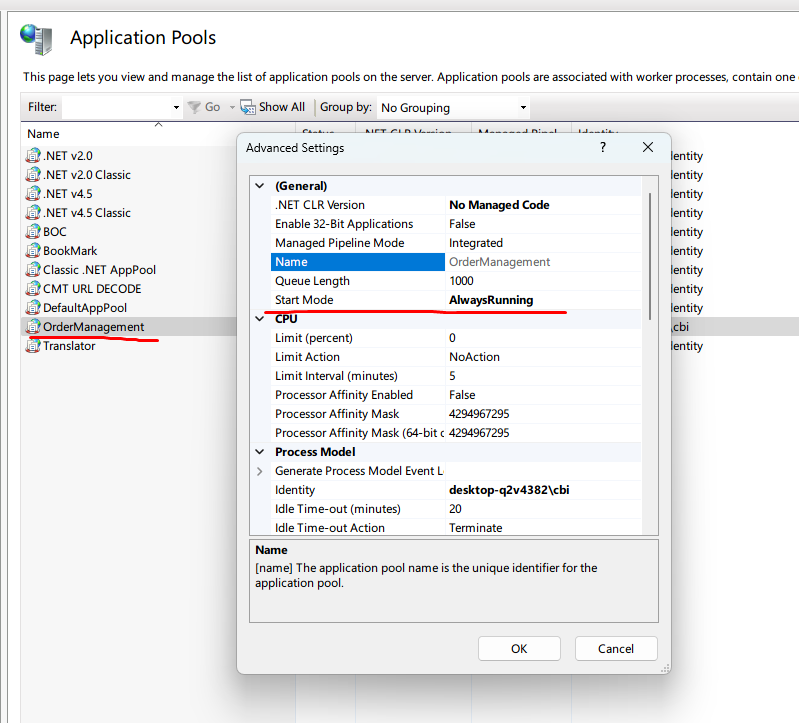
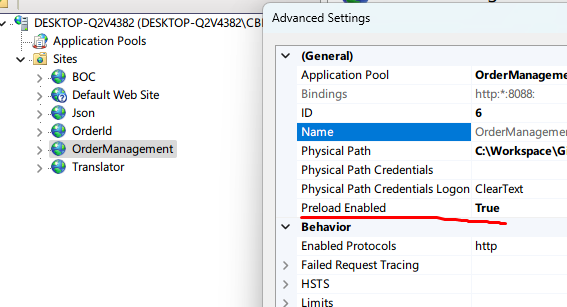
我们需要配置让热热身
官方说通过修改IIS配置或者写入webconfig都可以
<?xml version="1.0" encoding="utf-8"?>
<configuration>
  <location path="." inheritInChildApplications="false">
    <system.webServer>
      <applicationInitialization doAppInitAfterRestart="true" />
    </system.webServer>
  </location>
</configuration>
经过我测试,发现好像并没有生效。
通过IIS配置,确实有效果。

 浙公网安备 33010602011771号