

Mybatis入门
什么是框架
生活中的框架

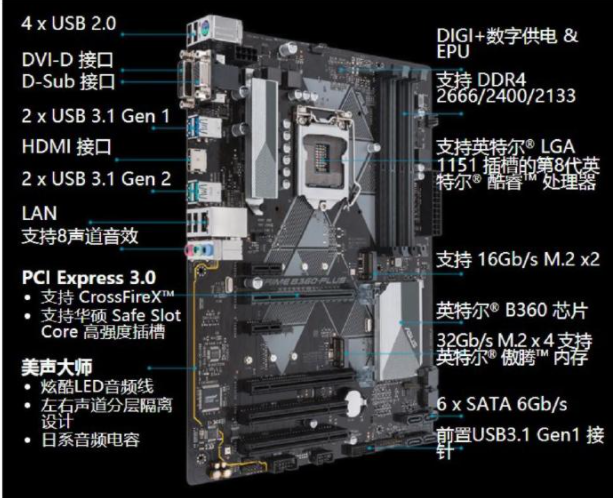
软件开发中的框架
- 框架是可被应用开发者定制的应用骨架
- 框架是一种规则,保证开发者遵循相同的方式开发程序
- 框架提倡“不重复造轮子”,对基础功能进行封装
框架的优点
- 极大提高了开发效率
- 统一的编码规则,利于团队管理
- 灵活配置应用,拥有更好的维护性
什么是MyBatis
MyBatis是优秀的持久化框架、它使用XML将SQL与程序解耦、学习简单,执行高效是JDBC的延伸。
MyBatis的开发流程
- 引入MyBatis
- 创建依赖配置文件
- 创建实体(Entity)类
- 创建Mapping映射文件
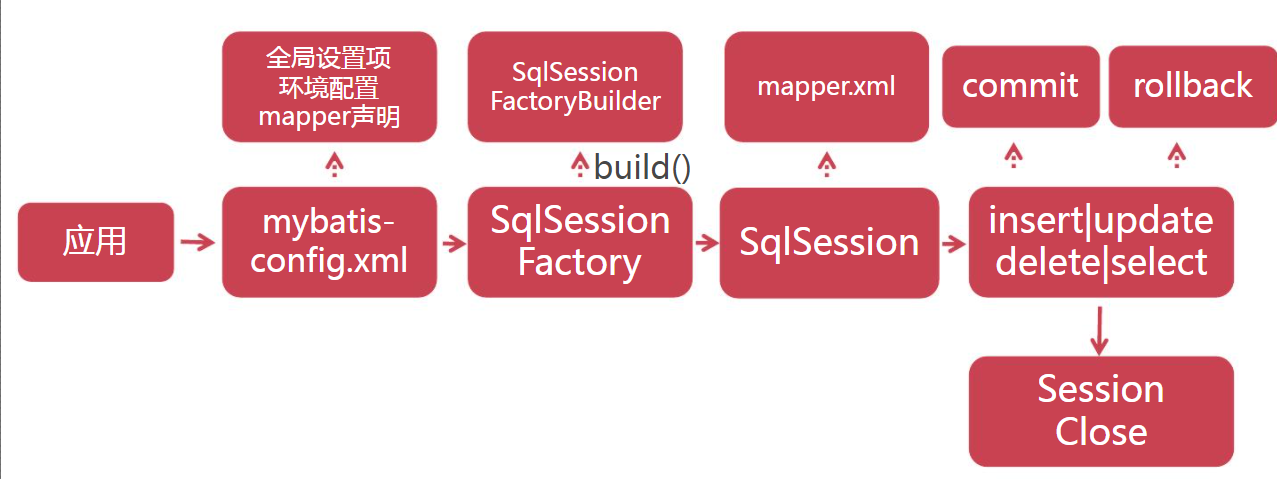
- 初始化SessionFactory
- 利用SqlSession对象操作数据
MyBatis的环境配置
mybatis-config.xml
MyBatis采用XML格式配置数据库环境信息,MyBatis环境配置标签<environment>、environment包含数据库驱动、URL、用户名与密码;
<!--设置默认指向的数据库-->
    <environments default="dev">
        <!--配置环境,不同的环境不同的id名字-->
        <environment id="dev">
            <!-- 采用JDBC方式对数据库事务进行commit/rollback -->
            <transactionManager type="JDBC"></transactionManager>
            <!--采用连接池方式管理数据库连接-->
            <dataSource type="POOLED">
                <property name="driver" value="com.mysql.jdbc.Driver"/>
                <property name="url" value="jdbc:mysql://localhost:3306/babytun?useUnicode=true&characterEncoding=UTF-8"/>
                <property name="username" value="****"/>
                <property name="password" value="****"/>
            </dataSource>
        </environment>
SqlSessionFactory
- SqlSessionFactory是Mybatis的核心对象
- 用于初始化MyBatis,创建SqlSession对象
- 保证SqlSessionFactory在应用全局唯一
SqlSession
- SqlSessionFactory是Mybatis操作数据库的核心对象
- SqlSession使用JDBC方式与数据库交互
- SqlSession对象提供了数据库表CRUD对应方法
MyBatis数据查询
查询步骤
- 创建实体类(Entity)
- 创建Mapper XML
- 编写<select>SQL标签
- 开启驼峰命名
- 新增<mapper>
- SqlSession执行select语句
举例select:
Goods.java
package com.imooc.mybatis.entity;

public class Goods {
    private Integer goodsId;//商品编号
    private String title;//标题
    private String subTitle;//子标题
    private Float originalCost;//原始价格
    private Float currentPrice;//当前价格
    private Float discount;//折扣率
    private Integer isFreeDelivery;//是否包邮 ,1-包邮 0-不包邮
    private Integer categoryId;//分类编号


    public Integer getGoodsId() {
        return goodsId;
    }

    public void setGoodsId(Integer goodsId) {
        this.goodsId = goodsId;
    }

    public String getTitle() {
        return title;
    }

    public void setTitle(String title) {
        this.title = title;
    }

    public String getSubTitle() {
        return subTitle;
    }

    public void setSubTitle(String subTitle) {
        this.subTitle = subTitle;
    }

    public Float getOriginalCost() {
        return originalCost;
    }

    public void setOriginalCost(Float originalCost) {
        this.originalCost = originalCost;
    }

    public Float getCurrentPrice() {
        return currentPrice;
    }

    public void setCurrentPrice(Float currentPrice) {
        this.currentPrice = currentPrice;
    }

    public Float getDiscount() {
        return discount;
    }

    public void setDiscount(Float discount) {
        this.discount = discount;
    }

    public Integer getIsFreeDelivery() {
        return isFreeDelivery;
    }

    public void setIsFreeDelivery(Integer isFreeDelivery) {
        this.isFreeDelivery = isFreeDelivery;
    }

    public Integer getCategoryId() {
        return categoryId;
    }
}
goods.xml
<?xml version="1.0" encoding="UTF-8"?>
<!DOCTYPE mapper
        PUBLIC "-//mybatis.org//DTD Mapper 3.0//EN"
        "http://mybatis.org/dtd/mybatis-3-mapper.dtd">
<mapper namespace="goods">

    <select id = "selectAll" resultType="com.imooc.mybatis.entity.Goods">
        select * from t_goods order by goods_id desc limit 10
    </select>

</mapper>
mybatis-config.xml中增加
<mappers>
        <mapper resource="mappers/goods.xml"/>
    </mappers>
执行查询:
/**
     * select查询语句执行
     * @throws Exception
     */
    @Test
    public void testSelectAll() throws Exception {
        SqlSession session = null;
        try{
            session = MyBatisUtils.openSession();
            List<Goods> list = session.selectList("goods.selectAll");
            for(Goods g : list){
                System.out.println(g.getTitle());
            }
        }catch (Exception e){
            throw e;
        }finally {
            MyBatisUtils.closeSession(session);
        }
    }
SQL传参
单参数传递
使用parameterType指定参数的数据类型即可,SQL中#{value}提取参数。
goods.xml中增加
<select id="selectById" parameterType="Integer" resultType="com.imooc.mybatis.entity.Goods">
        select * from t_goods where  goods_id = #{value}
    </select>
然后测试方法:
/**
     * 传递单个SQL参数
     * @throws Exception
     */
    @Test
    public void testSelectById() throws Exception {
        SqlSession session = null;
        try{
            session = MyBatisUtils.openSession();
            Goods goods = session.selectOne("goods.selectById" , 1603);
            System.out.println(goods.getTitle());
        }catch (Exception e){
            throw e;
        }finally {
            MyBatisUtils.closeSession(session);
        }
    }
传递多个参数
多参数传递时,使用parameterType指定Map接口,SQL中#{key}提取参数
goods.xml中添加
<select id="selectByPriceRange" parameterType="java.util.Map" resultType="com.imooc.mybatis.entity.Goods">
        select * from t_goods
        where
            current_price between  #{min} and #{max}
        order by current_price
            limit 0,#{limt}
    </select>
测试方法:
/**
     * 传递多个SQL参数
     * @throws Exception
     */
    @Test
    public void testSelectByPriceRange() throws Exception {
        SqlSession session = null;
        try{
            session = MyBatisUtils.openSession();
            Map param = new HashMap();
            param.put("min",100);
            param.put("max" , 500);
            param.put("limt" , 10);
            List<Goods> list = session.selectList("goods.selectByPriceRange", param);
            for(Goods g:list){
                System.out.println(g.getTitle() + ":" + g.getCurrentPrice());

            }
        }catch (Exception e){
            throw e;
        }finally {
            MyBatisUtils.closeSession(session);
        }
    }
获取多表关联查询结果
goods.xml
<!-- 利用LinkedHashMap保存多表关联结果
            MyBatis会将每一条记录包装为LinkedHashMap对象
            key是字段名  value是字段对应的值 , 字段类型根据表结构进行自动判断
            优点: 易于扩展,易于使用
            缺点: 太过灵活,无法进行编译时检查
         -->
    <select id="selectGoodsMap" resultType="java.util.LinkedHashMap" flushCache="true">
        select g.* , c.category_name,'1' as test from t_goods g , t_category c
        where g.category_id = c.category_id
    </select>
测试方法:
/**
     * 利用Map接收关联查询结果
     * @throws Exception
     */
    @Test
    public void testSelectGoodsMap() throws Exception {
        SqlSession session = null;
        try{
            session = MyBatisUtils.openSession();
            List<Map> list = session.selectList("goods.selectGoodsMap");
            for(Map map : list){
                System.out.println(map);
            }
        }catch (Exception e){
            throw e;
        }finally {
            MyBatisUtils.closeSession(session);
        }
    }
ResultMap结果映射
- ResultMap可以将查询结果映射为复杂类型的Java对象、
- ResultMap适用于Java对象保存多表关联结果、
- ResultMap支持对象关联查询等高级特性
举例:
新增GoodsDTO.java
package com.imooc.mybatis.dto;

import com.imooc.mybatis.entity.Goods;

//Data Transfer Object--数据传输对象
public class GoodsDTO {
    private Goods goods = new Goods();
    private String categoryName;
    private String test;

    public Goods getGoods() {
        return goods;
    }

    public void setGoods(Goods goods) {
        this.goods = goods;
    }

    public String getTest() {
        return test;
    }

    public void setTest(String test) {
        this.test = test;
    }
}
goods.xml增加
<!--结果映射-->
    <resultMap id="rmGoods" type="com.imooc.mybatis.dto.GoodsDTO">
        <!--设置主键字段与属性映射-->
        <id property="goods.goodsId" column="goods_id"></id>
        <!--设置非主键字段与属性映射-->
        <result property="goods.title" column="title"></result>
        <result property="goods.originalCost" column="original_cost"></result>
        <result property="goods.currentPrice" column="current_price"></result>
        <result property="goods.discount" column="discount"></result>
        <result property="goods.isFreeDelivery" column="is_free_delivery"></result>
        <result property="goods.categoryId" column="category_id"></result>
        <result property="categoryName" column="category_name"></result>

        <result property="test" column="test"/>
    </resultMap>
    <select id="selectGoodsDTO" resultMap="rmGoods">
        select g.*, c.*, '1' as test
        from t_goods g,
             t_category c
        where g.category_id = c.category_id
    </select>
测试方法:
/**
     * 利用ResultMap进行结果映射
     *
     * @throws Exception
     */
    @Test
    public void testSelectGoodsDTO() throws Exception {
        SqlSession session = null;
        try {
            session = MyBatisUtils.openSession();
            List<GoodsDTO> list = session.selectList("goods.selectGoodsDTO");
            for (GoodsDTO g : list) {
                System.out.println(g.getGoods().getTitle());
            }
        } catch (Exception e) {
            throw e;
        } finally {
            MyBatisUtils.closeSession(session);
        }
    }
数据库事务
数据库事务是保证数据库数据操作完整性的基础
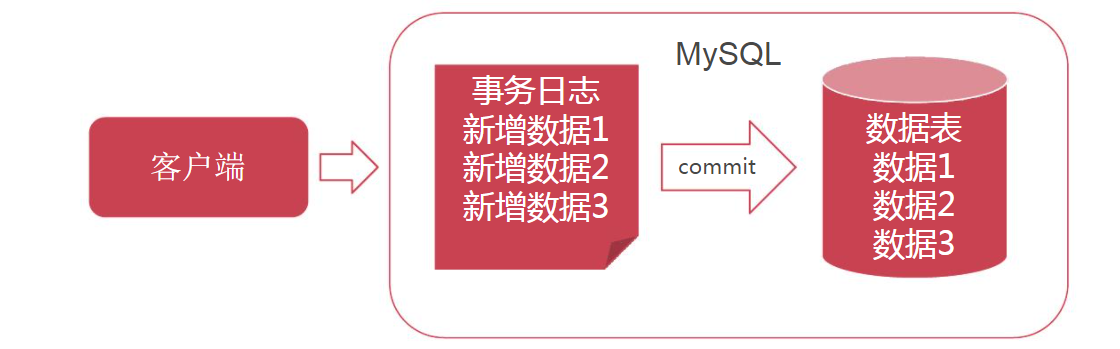
数据库的写操作包含三种:
- insert
- update
- delete
insert
flushCache="true"在sql执行后强制清空缓存
<insert id="insert" parameterType="com.imooc.mybatis.entity.Goods" flushCache="true">
        INSERT INTO t_goods(title, sub_title, original_cost, current_price, discount, is_free_delivery, category_id)
        VALUES (#{title} , #{subTitle} , #{originalCost}, #{currentPrice}, #{discount}, #{isFreeDelivery}, #{categoryId})
      <!--<selectKey resultType="Integer" keyProperty="goodsId" order="AFTER">-->
          <!--select last_insert_id()-->
      <!--</selectKey>-->
    </insert>
update
<update id="update" parameterType="com.imooc.mybatis.entity.Goods">
        UPDATE t_goods
        SET
          title = #{title} ,
          sub_title = #{subTitle} ,
          original_cost = #{originalCost} ,
          current_price = #{currentPrice} ,
          discount = #{discount} ,
          is_free_delivery = #{isFreeDelivery} ,
          category_id = #{categoryId}
        WHERE
          goods_id = #{goodsId}
    </update>
delete
<delete id="delete" parameterType="Integer">
        delete from t_goods where goods_id = #{value}
    </delete>
Mybatis预防SQL注入攻击
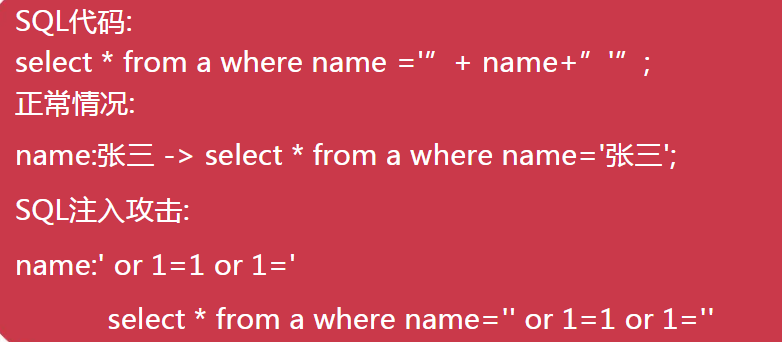
SQL注入攻击是指攻击者利用SQL漏洞,绕过系统约束,越权获取数据的攻击方式。
MyBatis的两种传值方式
${} 文本替换,未经任何处理对SQL文本替换
#{} 预编译传值,使用预编译传值可以预防SQL注入
SQL注入攻击举例:
<select id="selectByTitle" parameterType="java.util.Map" resultType="com.imooc.mybatis.entity.Goods">
        select * from t_goods where title = ${title} 或者 #{title}
    </select>
测试代码:
/**
     * 预防SQL注入
     * @throws Exception
     */
    @Test
    public void testSelectByTitle() throws Exception {
        SqlSession session = null;
        try{
            session = MyBatisUtils.openSession();
            Map param = new HashMap();
            /*
                ${}原文传值
                select * from t_goods
                where title = '' or 1 =1 or title = '【德国】爱他美婴幼儿配方奶粉1段800g*2罐 铂金版'
            */
            /*
               #{}预编译
               select * from t_goods
                where title = "'' or 1 =1 or title = '【德国】爱他美婴幼儿配方奶粉1段800g*2罐 铂金版'"
            */

            param.put("title","'' or 1=1 or title='【德国】爱他美婴幼儿配方奶粉1段800g*2罐 铂金版'");
            List<Goods> list = session.selectList("goods.selectByTitle", param);
            for(Goods g:list){
                System.out.println(g.getTitle() + ":" + g.getCurrentPrice());
            }
        }catch (Exception e){
            throw e;
        }finally {
            MyBatisUtils.closeSession(session);
        }
    }
当时用${ } 原文传值 时,执行命令为:
select * from t_goods where title = '' or 1 =1 or title = '【德国】爱他美婴幼儿配方奶粉1段800g*2罐 铂金版'
当时用#{ } 预编译 时,执行命令为:
select * from t_goods where title = "'' or 1 =1 or title = '【德国】爱他美婴幼儿配方奶粉1段800g*2罐 铂金版'"
使用原文传值会将所有数据输出,会造成数据泄露。
什么时候回用到原文传值呢?
比如,想要根据前端数据的条件来动态变化SQL查询方式。
举例:
param.put("order" , " order by title desc");
这时候必须配合 ${} 一起使用。(但是不建议使用)
MyBatis的工作流程

 浙公网安备 33010602011771号