
异常处理
一、异常概述与异常体系结构
1、异常概念
在使用计算机语言进行项目开发的过程中,即使程序员把代码写得尽善尽美,在系统的运行过程中仍然会遇到一些问题,因为很多问题不是靠代码能够避免的,比如:客户输入数据的格式,读取文件是否存在,网络是否始终保持通畅等等
异常:在Java语言中,将程序执行中发生的不正常情况称为“异常” 。(开发过程中的语法错误和逻辑错误不是异常)
2、异常的分类
Java程序在执行过程中所发生的异常事件可分为两类:
- Error:Java虚拟机无法解决的严重问题。如:JVM系统内部错误、资源耗尽等严重情况。比如:StackOverflowError和OOM。一般不编写针对性的代码进行处理。
/**
 *
 * Error
 * Java虚拟机无法解决的严重问题,如,JVM系统内部错误、资源耗尽等严重错误。比如:StackOverFlowError和OOM。一般不编写针对性的代码进行处理。
 */
public class ErrorTest {
    public static void main(String[] args) {
        //1、栈溢出
//       main(args); //Exception in thread "main" java.lang.StackOverflowError

        //2、堆溢出
//        int[] arr = new int[1024 * 1024 * 1024]; //Exception in thread "main" java.lang.OutOfMemoryError: Java heap space

    }
}
- Exception: 其它因编程错误或偶然的外在因素导致的一般性问题,可以使用针对性的代码进行处理。例如
-
- 空指针访问
-
- 试图读取不存在的文件
-
- 网络连接中断
-
- 数组角标越界
import org.junit.Test;
import java.io.FileInputStream;
import java.util.Date;
import java.util.Scanner;

/**
 * 一、异常体系结构
 * java.lang.Throwable
 *              --> java.lang.Error: 一般不编写针对性的代码进行处理
 *              --> java.lang.Exception: 可以进行异常的处理
 *                             --> 编译时异常(checked)
 *                                      |--> IOException
 *                                          |--> FileNotFountException
 *                                      |--> ClassNotFoundException
 *                             --> 运行时异常(unChecked)
 *                                      |--> NullPointException
 *                                      |--> ArrayIndexOutOfBoundsException
 *                                      |--> ClassCastException
 *                                      |--> NumberFormatException
 *                                      |--> InputMismatchException
 *                                      |--> ArithmeticException
 *
 *  面试题:常见的异常都有哪些? 举例说明
 */
public class ExceptionTest {
    //运行时异常
    /**
     * 空指针异常: NullPointException
     */
    @Test
    public void nullPointExceptionTest(){
        int[] arr = null;
//        arr[0] = 1; //java.lang.NullPointerException

        Object object = null;
//        object.getClass(); //java.lang.NullPointerException

        String str = null;
//        str.substring(0); //java.lang.NullPointerException
    }

    /**
     * 数据下标越界异常: ArrayIndexOutOfBoundsException
     */
    @Test
    public void arrayIndexOutOfBoundsExceptionTest(){
        int[] arr = new int[2];
//        arr[2] = 1; //java.lang.ArrayIndexOutOfBoundsException
    }

    /**
     * 字符串下标越界异常: StringIndexOutOfBoundsException
     */
    @Test
    public void stringIndexOutOfBoundsExceptionTest(){
        String str = "hello";
//        str.charAt(str.length()); //java.lang.StringIndexOutOfBoundsException
    }

    /**
     * 类型转换异常: ClassCastException
     */
    @Test
    public void classCastExceptionTest(){
        Object object= new Date();
        String str = (String)object; //java.lang.ClassCastException
    }

    /**
     * 数值格式化异常: NumberFormatException
     */
    @Test
    public void numberFormatException(){
        String str = "hello";
//        Integer.parseInt(str); //java.lang.NumberFormatException
    }

    /**
     * 输入异常: InputMismatchException
     */
    @Test
    public void inputMismatchException(){
        Scanner scanner = new Scanner(System.in);
        scanner.nextInt(); //输入非数值的字符 java.util.InputMismatchException
    }

    /**
     * 算数异常: ArithmeticException
     */
    @Test
    public void arithmeticException(){
        int a = 1 / 0; //java.lang.ArithmeticException
    }

    //编译时异常
    @Test
    public void demo(){
//        FileInputStream fis = new FileInputStream("E:\\附件\\file\\txt\\hello.txt");
//        int index = ' ';
//        while ((index = fis.read()) != -1){
//            System.out.print((char)index);
//        }
//        fis.close();
    }
}
对于这些错误,一般有两种解决方法:
一是遇到错误就终止程序的运行。
另一种方法是由程序员在编写程序时,就考虑到错误的检测、错误消息的提示,以及错误的处理。
捕获错误最理想的是在编译期间,但有的错误只有在运行时才会发生。
比如:除数为0,数组下标越界等
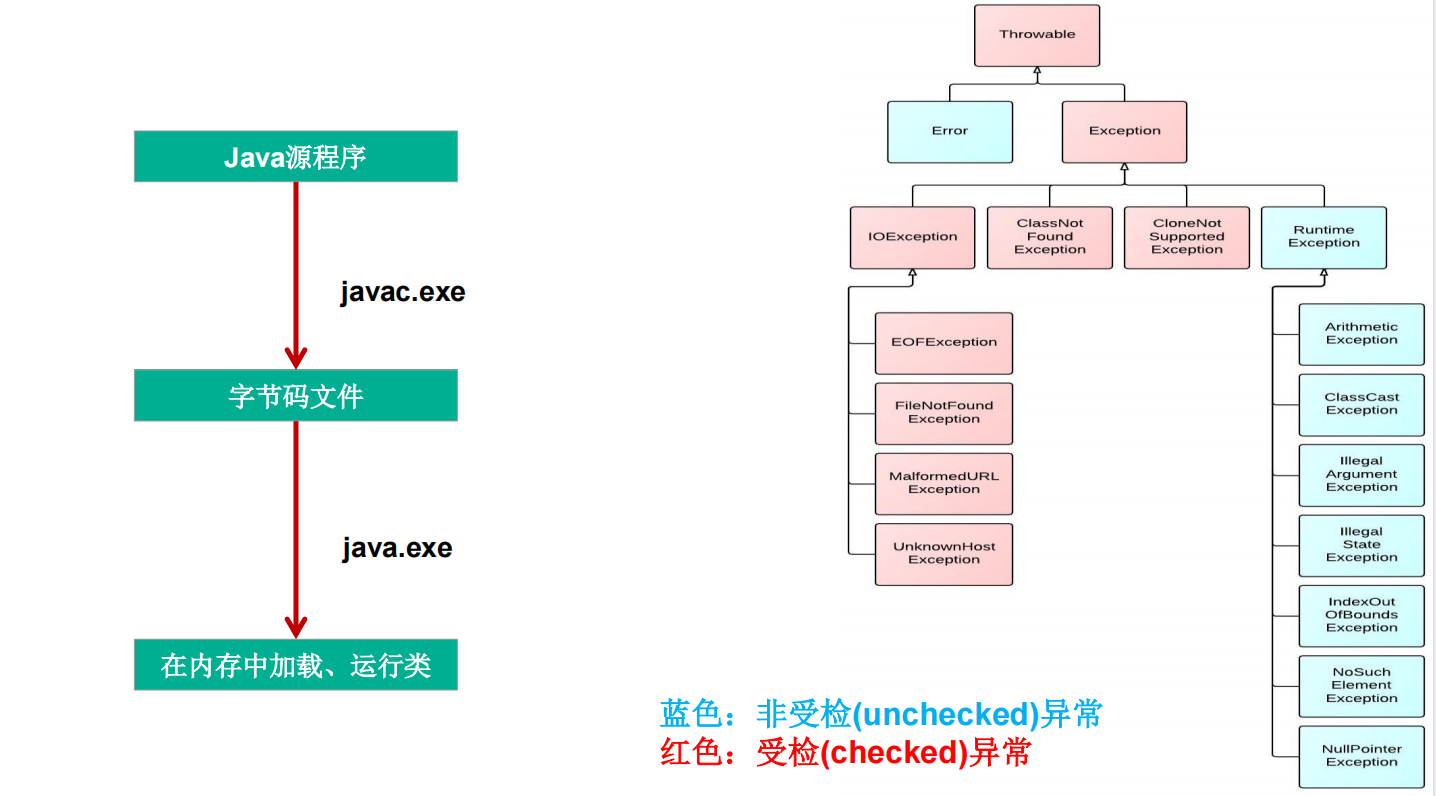
分类:编译时异常和运行时异常
1.运行时异常
是指编译器不要求强制处置的异常。一般是指编程时的逻辑错误,是程序员应该积极避免其出现的异常。java.lang.RuntimeException类及它的子类都是运行时异常。
对于这类异常,可以不作处理,因为这类异常很普遍,若全处理可能会对程序的可读性和运行效率产生影响。
2.编译时异常
是指编译器要求必须处置的异常。即程序在运行时由于外界因素造成的一般性异常。编译器要求Java程序必须捕获或声明所有编译时异常。
对于这类异常,如果程序不处理,可能会带来意想不到的结果。
二、常见异常
 java.lang.RuntimeException
        ClassCastException
        ArrayIndexOutOfBoundsException
        NullPointerException
        ArithmeticException
        NumberFormatException
        InputMismatchException
        。。。

java.io.IOExeption
	 	FileNotFoundException
		EOFException

java.lang.ClassNotFoundException
java.lang.InterruptedException
java.io.FileNotFoundException
java.sql.SQLException
三、异常处理机制一:try-catch-finally
在编写程序时,经常要在可能出现错误的地方加上检测的代码,如进行x/y运算时,要检测分母为0,数据为空,输入的不是数据而是字符等。过多的if-else分支会导致程序的代码加长、臃肿,可读性差。因此采用异常处理机制。
import org.junit.Test;

import java.io.FileInputStream;
import java.io.FileNotFoundException;
import java.io.IOException;

/**
 * 一、异常的处理: 抓抛模型
 * 过程一: “抛”, 程序在正常执行过程中,一旦出现异常,就会在异常代码处生成一个对应异常类的对象。并将此对象抛出。
 *              一旦抛出对象以后,其后的代码就不再执行。
 *
 *         关于异常对象的产生(1)系统自动生成的异常对象
 *                          (2)手动的生成一个异常对象,并抛出 throw
 *
 * 过程二: “抓”, 可以理解为异常的处理方式 (1)try-catch-finally (2)throws
 *
 *二、try-catch-finally
 *    try{
 *        // 可能出现异常的代码
 *    }catch(异常类型1 变量名1){
 *       // 处理异常的方式1
 *    }catch(异常类型2 变量名2){
 *       // 处理异常的方式2
 *    }
 *    ...
 *    finally{
 *       // 一定会执行的代码
 *    }
 *
 *    说明:
 *       (1)finally是可选的
 *       (2)使用try将可能出现异常代码包装起来,在执行过程中,一旦出现异常,就会生成一个对应异常类的对象,根据此对象的类型
 *            去catch中进行匹配
 *       (3)一旦try中的异常匹配到某一个catch时,就进入catch中进行异常的处理,一旦处理完成,
 *            就跳出当前的try-catch结构(没有写finally的情况),继续执行其后的代码
 *       (4)catch中的异常类型如果没有子父类关系,则谁声明在上,谁声明在下无所谓。
 *            catch中的异常类型满足子父类的关系,则要求子类一定声明在父类上面。否则报错。
 *        (5) 常用的异常对象处理的方式: one:String getMessage();  two:printStackTrace()
 *        (6) 在try结构中声明的变量,再出了try结构以后,就不能再被调用
 *        (7) try-catch-finally结构可以嵌套。
 *
 *     体会1:使用try-catch-finally处理编译时异常,使得程序在编译时就不再报错,但是运行时仍可能报错。
 *           相当于我们使用try-catch-finally将一个编译时可能出现的异常,延迟到运行时出现。
 *     体会2:开发中,由于运行时异常比较常见,所以我们通常就不针对运行时异常进行编写try-catch-finally了
 *           针对于编译时异常,我们说一定要考虑异常的处理。
 */
public class TryCatchTest {
    @Test
    public void demo1(){
        String str = "hello";
        try {
            Integer.parseInt(str);
            System.out.println("转换结束...");
        }catch (NumberFormatException e){
//            System.err.println("出现数值转换异常: NumberFormatException");

            //String getMessage();
            String message = e.getMessage();
            System.out.println(message); //For input string: "hello"

            e.printStackTrace();
            /*
            java.lang.NumberFormatException: For input string: "hello"
            at java.lang.NumberFormatException.forInputString(NumberFormatException.java:65)
            at java.lang.Integer.parseInt(Integer.java:580)
            at java.lang.Integer.parseInt(Integer.java:615)
            at com.notes._1Java基础编程._7异常处理._3异常的处理方式._3异常的处理方式.demo1(_3异常的处理方式.java:42)
            at sun.reflect.NativeMethodAccessorImpl.invoke0(Native Method)
            at sun.reflect.NativeMethodAccessorImpl.invoke(NativeMethodAccessorImpl.java:62)
            at sun.reflect.DelegatingMethodAccessorImpl.invoke(DelegatingMethodAccessorImpl.java:43)
            at java.lang.reflect.Method.invoke(Method.java:498)
            at org.junit.runners.model.FrameworkMethod$1.runReflectiveCall(FrameworkMethod.java:50)
            at org.junit.internal.runners.model.ReflectiveCallable.run(ReflectiveCallable.java:12)
            at org.junit.runners.model.FrameworkMethod.invokeExplosively(FrameworkMethod.java:47)
            at org.junit.internal.runners.statements.InvokeMethod.evaluate(InvokeMethod.java:17)
            at org.junit.runners.ParentRunner.runLeaf(ParentRunner.java:325)
            at org.junit.runners.BlockJUnit4ClassRunner.runChild(BlockJUnit4ClassRunner.java:78)
            at org.junit.runners.BlockJUnit4ClassRunner.runChild(BlockJUnit4ClassRunner.java:57)
            at org.junit.runners.ParentRunner$3.run(ParentRunner.java:290)
            at org.junit.runners.ParentRunner$1.schedule(ParentRunner.java:71)
            at org.junit.runners.ParentRunner.runChildren(ParentRunner.java:288)
            at org.junit.runners.ParentRunner.access$000(ParentRunner.java:58)
            at org.junit.runners.ParentRunner$2.evaluate(ParentRunner.java:268)
            at org.junit.runners.ParentRunner.run(ParentRunner.java:363)
            at org.junit.runner.JUnitCore.run(JUnitCore.java:137)
            at com.intellij.junit4.JUnit4IdeaTestRunner.startRunnerWithArgs(JUnit4IdeaTestRunner.java:68)
            at com.intellij.rt.junit.IdeaTestRunner$Repeater.startRunnerWithArgs(IdeaTestRunner.java:33)
            at com.intellij.rt.junit.JUnitStarter.prepareStreamsAndStart(JUnitStarter.java:230)
            at com.intellij.rt.junit.JUnitStarter.main(JUnitStarter.java:58)
             */
        }

//        System.out.println("执行结束...");
    }

    @Test
    public void demo2(){
        try {
            FileInputStream fis = new FileInputStream("E:\\附件\\file\\txt\\hello.txt");
            int index = ' ';
            while ((index = fis.read()) != -1){
                System.out.print((char)index);
            }
            fis.close();
        }catch (FileNotFoundException e){
            e.printStackTrace();
        }catch (IOException e){
            e.printStackTrace();
        }
    }
}
import org.junit.Test;

import java.io.FileInputStream;
import java.io.FileNotFoundException;
import java.io.IOException;

/**
 * try-catch-finally的使用
 * 1、finally是可选的
 * 2、finally中声明的是一定会执行的代码。即使catch中又出现异常了、try中有return语句、catch中有return语句等情况。
 * 3、像数据库连接、输入输出流、网络编程socket连接等资源,JVM是不能自动回收的,我们需要手动的进行资源的释放。此时资源的释放,就需要声明在finally中。
 *
 */
public class FinallyTest {
    @Test
    public void demo1(){
        try {
            int a = 10 / 0;
            System.out.println(a);
        }catch (ArithmeticException e){
            e.printStackTrace();
        }catch (Exception e){
            e.printStackTrace();
        }finally {
            System.out.println("执行结束");
        }
    }

    //finally中声明的是一定会执行的代码。即使catch中又出现异常了、try中有return语句、catch中有return语句等情况。
    @Test
    public void demo2(){
        int a = method();
        System.out.println(a);
    }

    public int method(){
        try {
            int a = 10 / 0;
            System.out.println(a);
            return 1;
        }catch (ArithmeticException e){
            e.printStackTrace();
            return 2;
        }catch (Exception e){
            e.printStackTrace();
            return 3;
        }finally {
            System.out.println("执行结束");
//            return 4;
        }
    }

    //像数据库连接、输入输出流、网络编程socket连接等资源,JVM是不能自动回收的,我们需要手动的进行资源的释放。此时资源的释放,就需要声明在finally中。
    @Test
    public void demo3(){
        FileInputStream fis = null;
        try {
            fis = new FileInputStream("hello.txt");
            int index = ' ';
            while ((index = fis.read()) != -1){
                System.out.print((char)index);
            }
        }catch (FileNotFoundException e){
            e.printStackTrace();
        }catch (IOException e){
            e.printStackTrace();
        }finally {
            try {
                if (fis != null){ //可能会报空指针异常
                    fis.close();
                }
            }catch (IOException e){
                e.printStackTrace();
            }
        }
    }
}
1、Java异常处理
Java采用的异常处理机制,是将异常处理的程序代码集中在一起,与正常的程序代码分开,使得程序简洁、优雅,并易于维护。
2、Java异常处理的方式:
方式一:try-catch-finally
方式二:throws + 异常类型
Java提供的是异常处理的抓抛模型
Java程序的执行过程中如出现异常,会生成一个异常类对象,该异常对象将被提交给Java运行时系统,这个过程称为抛出(throw)异常
3、异常对象的生成
由虚拟机自动生成:程序运行过程中,虚拟机检测到程序发生了问题,如果在当前代码中没有找到相应的处理程序,就会在后台自动创建一个对应异常类的实例对象并抛出 --> 自动抛出
由开发人员手动创建:Exception exception = new ClassCastException(); --> 创建好的异常对象不抛出对程序没有任何影响,和创建一个普通对象一样
4、异常的抛出机制
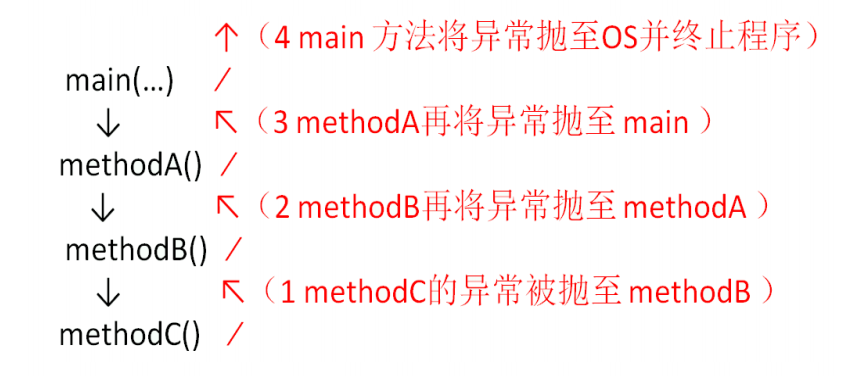
为保证程序正常执行,代码必须对可能出现的异常进行处理。
如果一个方法内抛出异常,该异常对象会被抛给调用者方法中处理。如果异常没有在调用者方法中处理,它继续被抛给这个调用方法的上层方法。这个过程将一直继续下去,直到异常被处理。这一过程称为捕获(catch)异常。
如果一个异常回到main()方法,并且main()也不处理,则程序运行终止。
程序员通常只能处理Exception,而对Error无能为力。
异常处理是通过try-catch-finally语句实现的。
try{
...... //可能产生异常的代码
}
catch( ExceptionName1 e ){
...... //当产生ExceptionName1型异常时的处置措施
}
catch( ExceptionName2 e ){
...... //当产生ExceptionName2型异常时的处置措施
}
[ finally{
...... //无论是否发生异常,都无条件执行的语句
} ]
(1)try
捕获异常的第一步是用try{…}语句块选定捕获异常的范围,将可能出现异常的代码放在try语句块中
(2)catch (Exceptiontype e):
在catch语句块中是对异常对象进行处理的代码。每个try语句块可以伴随一个或多个catch语句,用于处理可能产生的不同类型的异常对象。
如果明确知道产生的是何种异常,可以用该异常类作为catch的参数;也可以用其父类作为catch的参数。
比如:可以用ArithmeticException类作为参数的地方,就可以用RuntimeException类作为参数,或者用所有异常的父类Exception类作为参数。
但不能是与ArithmeticException类无关的异常,如NullPointerException(catch中的语句将不会执行)。
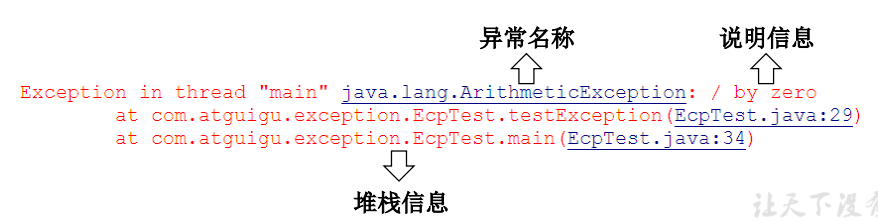
捕获异常的有关信息:
getMessage() 获取异常信息,返回字符串
printStackTrace() 获取异常类名和异常信息,以及异常出现在程序中的位置。返回值void。
(3)finally
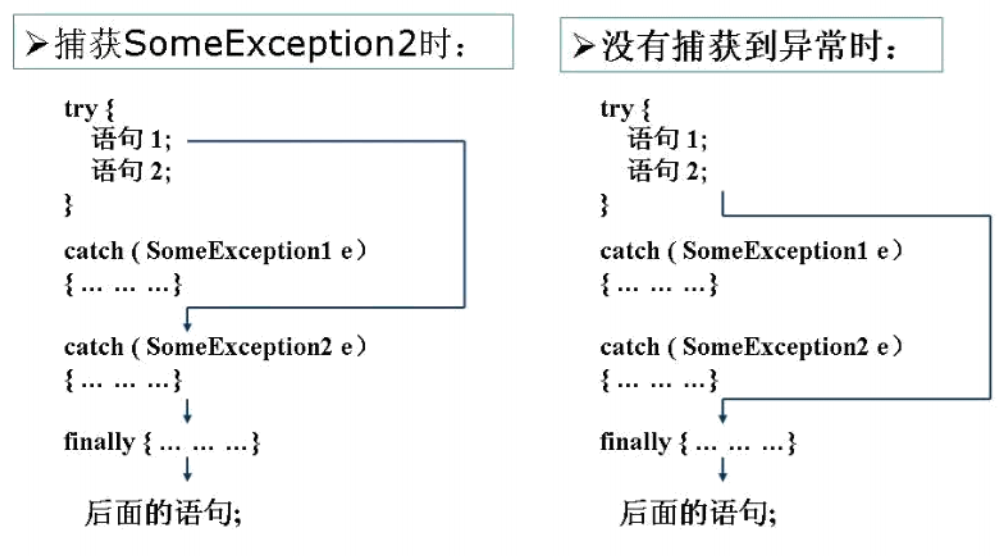
捕获异常的最后一步是通过finally语句为异常处理提供一个统一的出口,使得在控制流转到程序的其它部分以前,能够对程序的状态作统一的管理。
不论在try代码块中是否发生了异常事件,catch语句是否执行,catch语句是否有异常,catch语句中是否有return,finally块中的语句都会被执行。
finally语句和catch语句是任选的
5、举例
(1)
public class IndexOutExp {
    public static void main(String[] args) {
        String friends[] = {"lisa","bily","kessy"};
        try{
            for (int i = 0 ; i < 5 ; i++){
                System.out.println(friends[i]);
            }
        }catch(ArrayIndexOutOfBoundsException e){
            System.out.println("index err");
        }
        System.out.println("\nthis is the end");
    }
}
(2)
public class DivideZero1 {
    int x;
    public static void main(String[] args) {
        int y;
        DivideZero1 c = new DivideZero1();
        try {
            y = 3 / c.x;
        } catch (ArithmeticException e) {
            System.out.println("divide by zero error!");
        }
        System.out.println("program ends ok!");
    }
}
6、练习
编写一个类ExceptionTest,在main方法中使用try、catch、finally,要求:
在try块中,编写被零除的代码。
在catch块中,捕获被零除所产生的异常,并且打印异常信息
在finally块中,打印一条语句。
7、体会
捕获和不捕获异常,程序的运行有什么不同。
体会try语句块中可能发生多个不同异常时的处理。
体会finally语句块的使用。
(1)不捕获异常时的情况
前面使用的异常都是RuntimeException类或是它的子类,这些类的异常的特点是:即使没有使用try和catch捕获,Java自己也能捕获,并且编译通过( 但运行时会发生异常使得程序运行终止 )。
如果抛出的异常是IOException等类型的非运行时异常,则必须捕获,否则编译错误。也就是说,我们必须处理编译时异常,将异常进行捕捉,转化为运行时异常。
(2)IOException异常处理举例
import java.io.*;
public class IOExp {
    public static void main(String[] args) {
        FileInputStream in = new FileInputStream("atguigushk.txt");
        int b;
        b = in.read();
        while (b != -1) {
            System.out.print((char) b);
            b = in.read();
        }
        in.close();
    }
}
import java.io.*;
public class IOExp {
    public static void main(String[] args) {
        FileInputStream in = new FileInputStream("atguigushk.txt");
        int b;
        b = in.read();
        while (b != -1) {
            System.out.print((char) b);
            b = in.read();
        }
        in.close();
    }
}
8、练习
捕获和处理IOException异常
编译、运行应用程序IOExp.java,体会Java语言中异常的捕获和处理机制。相关知识:FileInputStream类的成员方法read()的功能是每次从相应的(本地为ASCII码编码格式)文件中读取一个字节,并转换成0~255之间的int型整数返回,到达文件末尾时则返回-1。
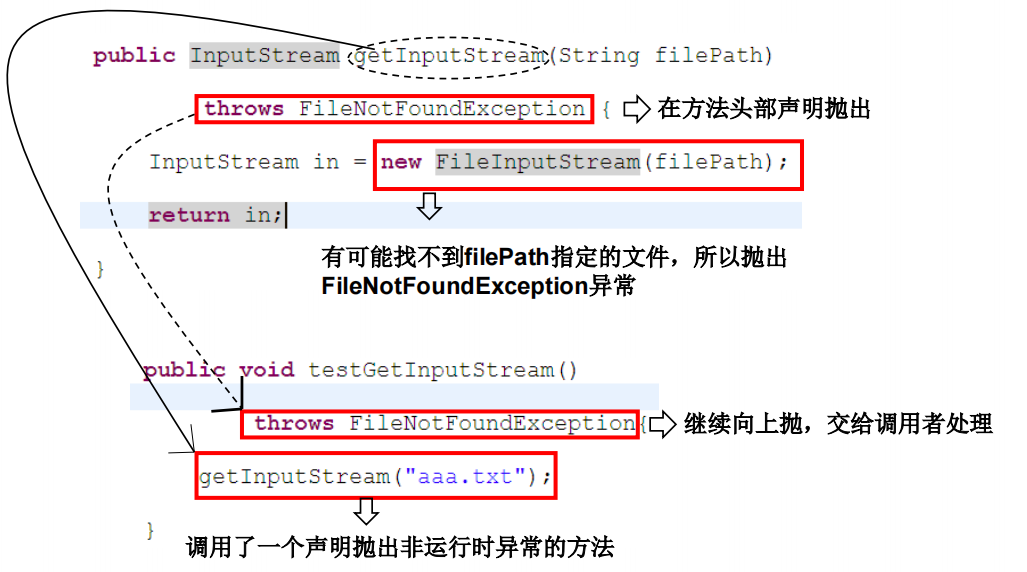
四、异常处理机制二:throws
/**
 * 异常的处理方式二: throws + 异常类型
 *
 * 1、"throws + 异常类型" 声明在方法的声明处。指明此方法执行时,可能会抛出的异常类型。
 *    一旦当方法体执行时,出现异常,仍会在异常代码处生成一个异常类的对象,此对象满足throws后异常类型时,就会被抛出。
 *    异常代码后续的代码,就不再执行。
 *
 * 2、体会:try-catch-finally 真正的将异常给处理掉了
 *         throws的方式只是将异常抛给了方法的调用者,并没有真正将异常处理掉。
 *
 * 3、开发中如何选择使用try-catch-finally 还是使用throws
 *    (1)如果父类被重写的方法没有用throws方式处理异常,则子类重写的方法也不能使用throws,意味着如果子类重写的方法中有异常,必须使用try-catch-finally方式处理。
 *    (2)执行的方法a中,先后又调用了另外的几个方法,这几个方法是递进关系执行的,我们建议这几个方法使用throws的方式进行处理,而执行的方法a可以考虑使用try-catch-finally方式进行处理。
 */
1、声明抛出异常是Java中处理异常的第二种方式
如果一个方法(中的语句执行时)可能生成某种异常,但是并不能确定如何处理这种异常,则此方法应显示地声明抛出异常,表明该方法将不对这些异常进行处理,而由该方法的调用者负责处理。
在方法声明中用throws语句可以声明抛出异常的列表,throws后面的异常类型可以是方法中产生的异常类型,也可以是它的父类。
2、声明抛出异常举例
public void readFile(String file) throws FileNotFoundException {
    ……
        // 读文件的操作可能产生FileNotFoundException类型的异常
        FileInputStream fis = new FileInputStream(file);
    ……
}
import java.io.*;
public class ThrowsTest {
    public static void main(String[] args) {
        ThrowsTest t = new ThrowsTest();
        try {
            t.readFile();
        } catch (IOException e) {
            e.printStackTrace();
        }
    }
    public void readFile() throws IOException {
        FileInputStream in = new FileInputStream("atguigushk.txt");
        int b;
        b = in.read();
        while (b != -1) {
            System.out.print((char) b);
            b = in.read();
        }
        in.close();
    }
}
import java.io.FileNotFoundException;
import java.io.IOException;

/**
 * 子类重写方法抛出异常的类型,不大于父类被重写方法抛出异常的类型
 *
 * 如果子类重写方法抛出异常的类型,大于父类被重写方法抛出异常的类型,进行try-catch后,可能捕捉不到子类抛出的异常,程序会报错终止
 */
public class Demo1 {

    public static void main(String[] args) {
        Animal1 animal1 = new Pig();
        try{
            animal1.method();
        }catch(IOException e){
            e.printStackTrace();
        }

    }
}

class Animal1 {
    public void method() throws IOException{

    }
}
class Pig extends Animal1 {
    @Override
    public void method() throws FileNotFoundException{

    }

}
重写方法不能抛出比被重写方法范围更大的异常类型。在多态的情况下,对methodA()方法的调用-异常的捕获按父类声明的异常处理
public class A {
    public void methodA() throws IOException {
        ……
    }
}
public class B1 extends A {
    public void methodA() throws FileNotFoundException {
        ……
    }
}
public class B2 extends A {
    public void methodA() throws Exception { //报错
        ……
    }
}
五、手动抛出异常:throw
public class ManualThrowsEx {
    public static void main(String[] args) {
        Student1 student1 = new Student1();
    }
}

class Student1{
    private int id;

    public void register(int id) throws Exception{
        if(id > 0){
            this.id = id;
        }else{
 //           System.out.println("输入的非法数据:" + id);
            // 手动抛出异常对象
 //           throw new RuntimeExceptiom("输入的数据非法 id:" + id);//运行时异常
            throw new Exception("输入的数据非法 id:" + id);
        }
    }
    @Override
    public String toString() {
        return "Student{" +
                "id=" + id +
                '}';
    }
}
/*
toString()方法
toString()方法在Object类里定义的,其返回值类型为String类型,返回类名和它的引用地址
在进行String类与其他类型的连接操作时,自动调用toString()方法,demo如下:
Date now = new Date();
System.out.println("now = " + now);//相当于下一行代码
System.out.println("now = " + now.toString());
*/
Java异常类对象除在程序执行过程中出现异常时由系统自动生成并抛出,也可根据需要使用人工创建并抛出。
首先要生成异常类对象,然后通过throw语句实现抛出操作(提交给Java运行环境)。
IOException e = new IOException();
throw e;
可以抛出的异常必须是Throwable或其子类的实例。下面的语句在编译时将会产生语法错误:
throw new String("want to throw");
六、用户自定义异常类
/**
 * 如何自定义异常类
 * 1、继承于现有的异常结构:RuntimeException、Exception
 * 2、提共全局常量:serialVersionUID
 * 3、提供重载的构造器
 */
public class MyException extends Exception{
    static final long serialVersionUID = -3387516993124229948L;

    public MyException() {
    }

    public MyException(String message) {
        super(message);
    }
}
public class StudentTest{
    public static void main(String[] args) {
        Student student = new Student();
        try {
            student.register(-10001);
        } catch (Exception e) {
            System.err.println(e.getMessage());
        }
    }
}

class Student {
    private int id;

    public void register(int id) throws Exception {
        if (id > 0){
            this.id = id;
        }else {
//            System.out.println("输入的数据非法: " + id);
            //手动抛出异常对象
//            throw new RuntimeException("输入的数据非法 id: " + id); //运行时异常
            throw new MyException("输入的数据非法 id: " + id);
        }
    }

    @Override
    public String toString() {
        return "Student{" +
                "id=" + id +
                '}';
    }
}
1、自定义异常类的注意点
- 一般地,用户自定义异常类都是RuntimeException的子类。
- 自定义异常类通常需要编写几个重载的构造器。
- 自定义异常需要提供serialVersionUID
- 自定义的异常通过throw抛出。
- 自定义异常最重要的是异常类的名字,当异常出现时,可以根据名字判断异常类型。
用户自定义异常类MyException,用于描述数据取值范围错误信息。用户自己的异常类必须继承现有的异常类。
class MyException extends Exception {
    static final long serialVersionUID = 13465653435L;
    private int idnumber;
    public MyException(String message, int id) {
        super(message);
        this.idnumber = id;
    }
    public int getId() {
        return idnumber;
    }
}
class MyException extends Exception {
    static final long serialVersionUID = 13465653435L;
    private int idnumber;
    public MyException(String message, int id) {
        super(message);
        this.idnumber = id;
    }
    public int getId() {
        return idnumber;
    }
}
练习
(1)
(2)
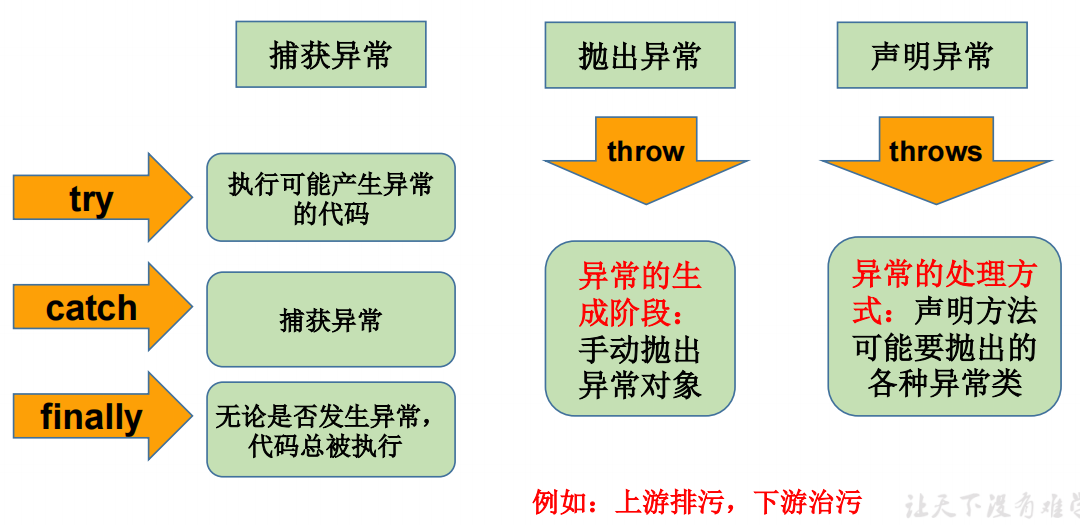
七、总结:异常处理5个关键字

 浙公网安备 33010602011771号