暑假生活每周总结4
本周进行了大数据的yarn配置部署,并部署了hive。进行了web的练习操作。
首先是进入虚拟机配置MapReduce配置文件写入环境变量
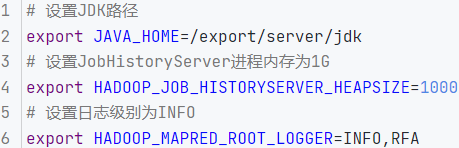
mapred-site.xml文件,添加如下配置信息
<?xml version="1.0"?>
<?xml-stylesheet type="text/xsl" href="configuration.xsl"?>
<!--
  Licensed under the Apache License, Version 2.0 (the "License");
  you may not use this file except in compliance with the License.
  You may obtain a copy of the License at

    http://www.apache.org/licenses/LICENSE-2.0

  Unless required by applicable law or agreed to in writing, software
  distributed under the License is distributed on an "AS IS" BASIS,
  WITHOUT WARRANTIES OR CONDITIONS OF ANY KIND, either express or implied.
  See the License for the specific language governing permissions and
  limitations under the License. See accompanying LICENSE file.
-->

<!-- Put site-specific property overrides in this file. -->

<configuration>
  <property>
    <name>mapreduce.framework.name</name>
    <value>yarn</value>
    <description></description>
  </property>

  <property>
    <name>mapreduce.jobhistory.address</name>
    <value>node1:10020</value>
    <description></description>
  </property>


  <property>
    <name>mapreduce.jobhistory.webapp.address</name>
    <value>node1:19888</value>
    <description></description>
  </property>


  <property>
    <name>mapreduce.jobhistory.intermediate-done-dir</name>
    <value>/data/mr-history/tmp</value>
    <description></description>
  </property>


  <property>
    <name>mapreduce.jobhistory.done-dir</name>
    <value>/data/mr-history/done</value>
    <description></description>
  </property>
<property>
  <name>yarn.app.mapreduce.am.env</name>
  <value>HADOOP_MAPRED_HOME=$HADOOP_HOME</value>
</property>
<property>
  <name>mapreduce.map.env</name>
  <value>HADOOP_MAPRED_HOME=$HADOOP_HOME</value>
</property>
<property>
  <name>mapreduce.reduce.env</name>
  <value>HADOOP_MAPRED_HOME=$HADOOP_HOME</value>
</property>
</configuration>
之后进行YARN配置文件
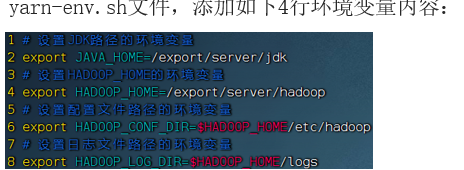
yarn-site.xml文件配置
<?xml version="1.0"?>
<!--
  Licensed under the Apache License, Version 2.0 (the "License");
  you may not use this file except in compliance with the License.
  You may obtain a copy of the License at

    http://www.apache.org/licenses/LICENSE-2.0

  Unless required by applicable law or agreed to in writing, software
  distributed under the License is distributed on an "AS IS" BASIS,
  WITHOUT WARRANTIES OR CONDITIONS OF ANY KIND, either express or implied.
  See the License for the specific language governing permissions and
  limitations under the License. See accompanying LICENSE file.
-->

<configuration>

<!-- Site specific YARN configuration properties -->
<property>
    <name>yarn.log.server.url</name>
    <value>http://node1:19888/jobhistory/logs</value>
    <description></description>
</property>

  <property>
    <name>yarn.web-proxy.address</name>
    <value>node1:8089</value>
    <description>proxy server hostname and port</description>
  </property>


  <property>
    <name>yarn.log-aggregation-enable</name>
    <value>true</value>
    <description>Configuration to enable or disable log aggregation</description>
  </property>

  <property>
    <name>yarn.nodemanager.remote-app-log-dir</name>
    <value>/tmp/logs</value>
    <description>Configuration to enable or disable log aggregation</description>
  </property>


<!-- Site specific YARN configuration properties -->
  <property>
    <name>yarn.resourcemanager.hostname</name>
    <value>node1</value>
    <description></description>
  </property>

  <property>
    <name>yarn.resourcemanager.scheduler.class</name>
    <value>org.apache.hadoop.yarn.server.resourcemanager.scheduler.fair.FairScheduler</value>
    <description></description>
  </property>

  <property>
    <name>yarn.nodemanager.local-dirs</name>
    <value>/data/nm-local</value>
    <description>Comma-separated list of paths on the local filesystem where intermediate data is written.</description>
  </property>


  <property>
    <name>yarn.nodemanager.log-dirs</name>
    <value>/data/nm-log</value>
    <description>Comma-separated list of paths on the local filesystem where logs are written.</description>
  </property>


  <property>
    <name>yarn.nodemanager.log.retain-seconds</name>
    <value>10800</value>
    <description>Default time (in seconds) to retain log files on the NodeManager Only applicable if log-aggregation is disabled.</description>
  </property>


  <property>
    <name>yarn.nodemanager.aux-services</name>
    <value>mapreduce_shuffle</value>
    <description>Shuffle service that needs to be set for Map Reduce applications.</description>
  </property>
</configuration>
将配置分发到其他主机

一键启动集群:
$HADOOP_HOME/sbin/start-yarn.sh
其次执行:$HADOOP_HOME/bin/mapred --daemon start historyserver 启动:
HistoryServer(历史服务器)
关闭
$HADOOP_HOME/sbin/stop-yarn.sh
hive:1安装数据库mysql
# 更新密钥
rpm --import https://repo.mysql.com/RPM-GPG-KEY-mysql-2022

# 安装Mysql yum库
rpm -Uvh http://repo.mysql.com//mysql57-community-release-el7-7.noarch.rpm

# yum安装Mysql
yum -y install mysql-community-server

# 启动Mysql设置开机启动
systemctl start mysqld
systemctl enable mysqld

# 检查Mysql服务状态
systemctl status mysqld

# 第一次启动mysql,会在日志文件中生成root用户的一个随机密码,使用下面命令查看该密码
grep 'temporary password' /var/log/mysqld.log

# 修改root用户密码
mysql -u root -p -h localhost
Enter password:

mysql> ALTER USER 'root'@'localhost' IDENTIFIED BY 'Root!@#$';

# 如果你想设置简单密码,需要降低Mysql的密码安全级别
set global validate_password_policy=LOW; # 密码安全级别低
set global validate_password_length=4;     # 密码长度最低4位即可

# 然后就可以用简单密码了(课程中使用简单密码,为了方便,生产中不要这样)
ALTER USER 'root'@'localhost' IDENTIFIED BY 'root';

/usr/bin/mysqladmin -u root password 'root'

grant all privileges on *.* to root@"%" identified by 'root' with grant option;
flush privileges;
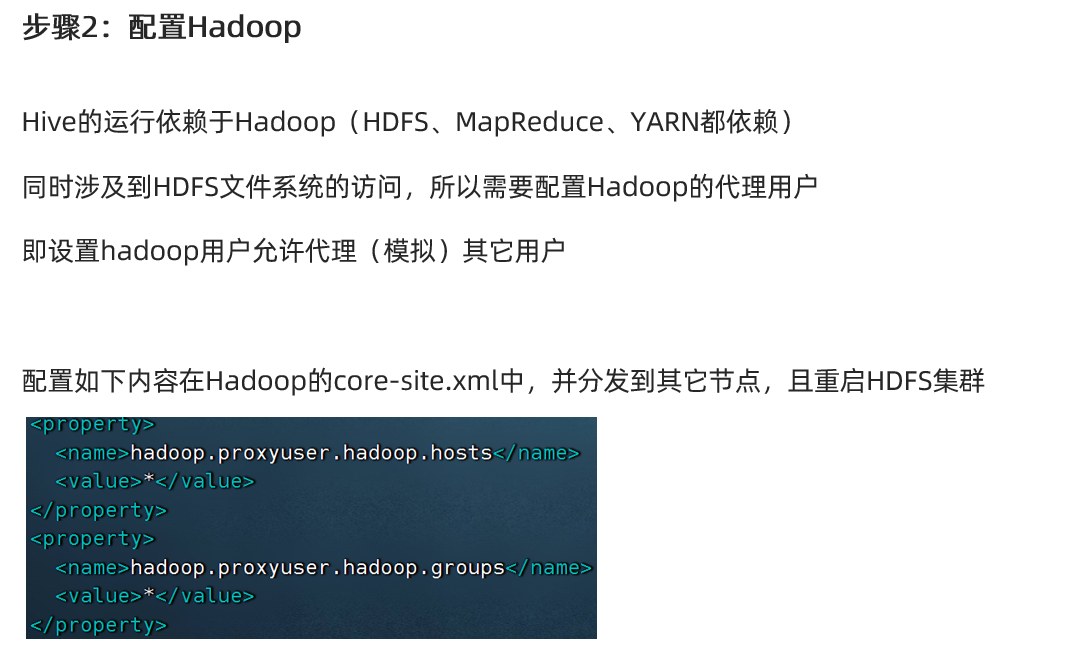
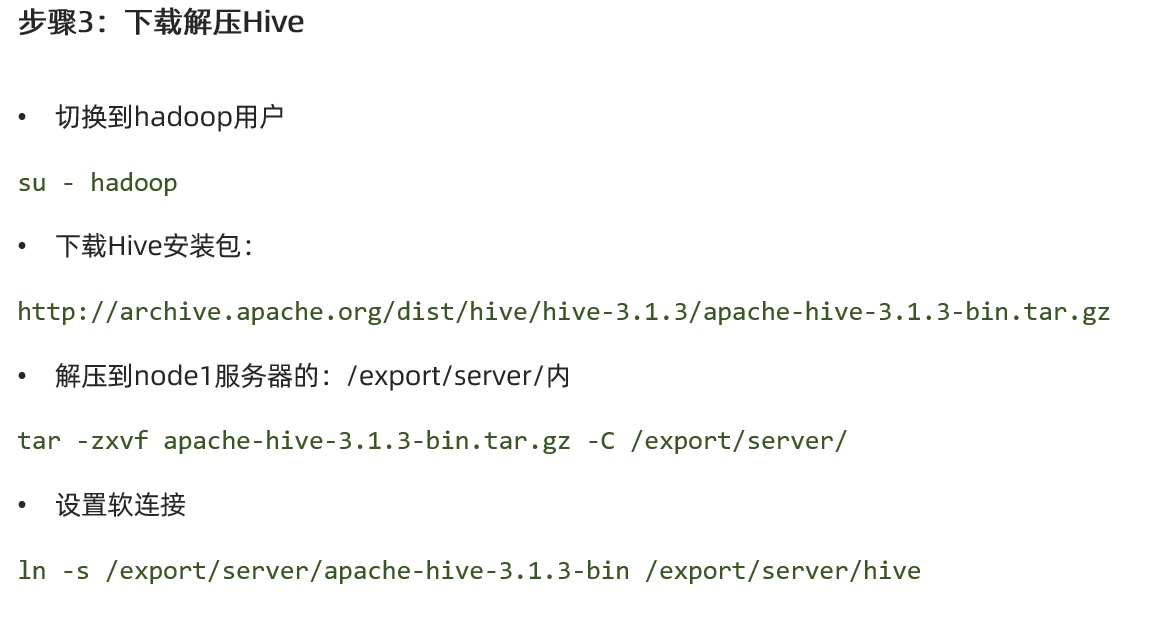

<configuration>
<property>
<name>javax.jdo.option.ConnectionURL</name>
<value>jdbc:mysql://node1:3306/hive?createDatabaseIfNotExist=true&useSSL=false&useUnicode=true&characterEncoding=UTF-8</value>
</property>
<property>
<name>javax.jdo.option.ConnectionDriverName</name>
<value>com.mysql.jdbc.Driver</value>
</property>
<property>
<name>javax.jdo.option.ConnectionUserName</name>
<value>root</value>
</property>
<property>
<name>javax.jdo.option.ConnectionPassword</name>
<value>123456</value>
</property>
<property>
<name>hive.server2.thrift.bind.host</name>
<value>node1</value>
</property>
<property>
<name>hive.metastore.uris</name>
<value>thrift://node1:9083</value>
</property>
<property>
<name>hive.metastore.event.db.notification.api.auth</name>
<value>false</value>
</property>
</configuration>

 浙公网安备 33010602011771号