
如何使用SpringAI来实现一个RAG应用系统
如何使用SpringAI来实现一个RAG应用系统
作者工作内容涉及到技术问题答疑,所以搭建一个RAG系统来减轻作者答疑的工作量
RAG原理
大模型没有本地私有知识,所以用户在向大模型提问的时候,大模型只能在它学习过的知识范围内进行回答,而RAG就是在用户在提问的时候 将本地与问题相关的私有知识连同问题一块发送给大模型,进而大模型从用户提供的私有知识范围内进行更精确的回答。
核心技术栈
- SpringAI
- MybatisPlus
- Chroma
- Elasticsearch
- MySQL
核心步骤
文本分块向量化
将文本切分成多个文本块,作者使用markdown来存储文本内容,markdown格式的文本相对来说是比较容易且分的,将文本切分之后 请求向量化接口进行文本向量化,最后将向量的结果写入到原本的数据块中 存储到向量数据库
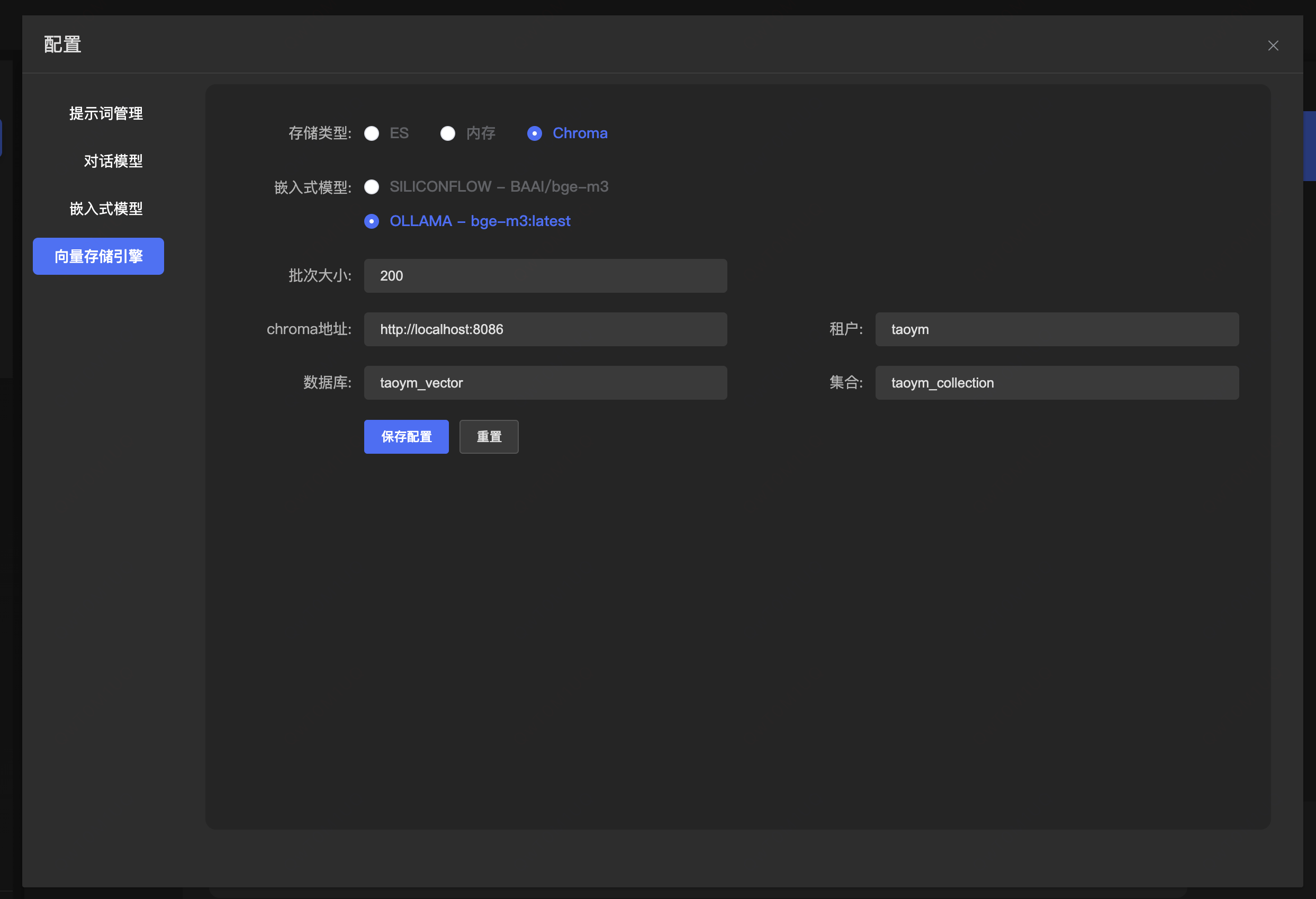
向量数据库
- Elasticsearch 混合检索使用,知识召回准确度比较高
- Chroma 本地测试 或者小数据集使用 也能混合检索 但是无法像es那样可以模糊混合检索
向量检索
将用户的问题进行向量化,然后调用向量数据库的检索
实现
文本分块存储到向量数据库
@Service("docMarkdownFileParseService")
public class DocMarkdownFileParseServiceImpl implements DocFileParseService {
    @Override
    public List<Document> parse(MultipartFile file,Integer kdId) {
        // 初始化markdown配置
        MarkdownDocumentReaderConfig config = MarkdownDocumentReaderConfig.builder()
                .withHorizontalRuleCreateDocument(true)
                .withIncludeCodeBlock(true)
                .withIncludeBlockquote(true)
                .withAdditionalMetadata("knowledgeDocId", kdId)
                .build();

        MarkdownDocumentReader reader = new MarkdownDocumentReader(file.getResource(), config);

        // 文档切分读取
        return reader.get();
    }
}
分块的时候会涉及一些metadata,metadata用来存储数据块的元数据,也可以存储一些自定义字段,可以更好的为混合检索提供支持! 这里我存储了知识文本的ID
MarkdownDocumentReader
我在SpringAI的基础上扩展了MarkdownDocumentReader,主要是将markdown各级标题提取出来组合成titleExpander,最终形成 一级标题-二级标题-三级标题-当前标题 这样的格式,进而为后续的混合检索提供支持
SpringAI默认提供的类没有对表格解析做支持,所以我也支持了表格的解析,所有源码都粘贴到下面
package cn.dataling.rag.application.reader;
import org.commonmark.ext.gfm.tables.*;
import org.commonmark.ext.gfm.tables.TableBlock;
import org.commonmark.ext.gfm.tables.TablesExtension;
import org.commonmark.node.*;
import org.commonmark.parser.Parser;
import org.springframework.ai.document.Document;
import org.springframework.ai.document.DocumentReader;
import org.springframework.ai.reader.markdown.config.MarkdownDocumentReaderConfig;
import org.springframework.core.io.DefaultResourceLoader;
import org.springframework.core.io.Resource;
import java.io.IOException;
import java.io.InputStreamReader;
import java.util.*;
/**
* Reads the given Markdown resource and groups headers, paragraphs, or text divided by
* horizontal lines (depending on the
* {@link MarkdownDocumentReaderConfig#horizontalRuleCreateDocument} configuration) into
* {@link Document}s.
*
* @author Piotr Olaszewski
*/
public class MarkdownDocumentReader implements DocumentReader {
/**
* The resource points to the Markdown document.
*/
private final Resource markdownResource;
/**
* Configuration to a parsing process.
*/
private final MarkdownDocumentReaderConfig config;
/**
* Markdown parser.
*/
private final Parser parser;
/**
* Create a new {@link MarkdownDocumentReader} instance.
*
* @param markdownResource the resource to read
*/
public MarkdownDocumentReader(String markdownResource) {
this(new DefaultResourceLoader().getResource(markdownResource), MarkdownDocumentReaderConfig.defaultConfig());
}
/**
* Create a new {@link MarkdownDocumentReader} instance.
*
* @param markdownResource the resource to read
* @param config the configuration to use
*/
public MarkdownDocumentReader(String markdownResource, MarkdownDocumentReaderConfig config) {
this(new DefaultResourceLoader().getResource(markdownResource), config);
}
/**
* Create a new {@link MarkdownDocumentReader} instance.
*
* @param markdownResource the resource to read
*/
public MarkdownDocumentReader(Resource markdownResource, MarkdownDocumentReaderConfig config) {
this.markdownResource = markdownResource;
this.config = config;
this.parser = Parser.builder()
.extensions(Collections.singletonList(TablesExtension.create()))
.build();
}
/**
* Extracts and returns a list of documents from the resource.
*
* @return List of extracted {@link Document}
*/
@Override
public List<Document> get() {
try (var input = this.markdownResource.getInputStream()) {
Node node = this.parser.parseReader(new InputStreamReader(input));
DocumentVisitor documentVisitor = new DocumentVisitor(this.config);
node.accept(documentVisitor);
return documentVisitor.getDocuments();
} catch (IOException e) {
throw new RuntimeException(e);
}
}
/**
* A convenient class for visiting handled nodes in the Markdown document.
*/
static class DocumentVisitor extends AbstractVisitor {
private final List<Document> documents = new ArrayList<>();
private final List<String> currentParagraphs = new ArrayList<>();
private final MarkdownDocumentReaderConfig config;
private Document.Builder currentDocumentBuilder;
/**
* 存储各级标题的文本内容,用于构建层级title
* 数组索引对应标题级别(1-6)
*/
private final String[] headingLevels = new String[7];
/**
* 用于构建表格内容的构建器
*/
private final StringBuilder tableBuilder = new StringBuilder();
/**
* 是否正在处理表格
*/
private boolean inTable = false;
/**
* 当前表格的列数,用于生成分隔行
*/
private int tableColumns = 0;
/**
* 是否正在处理表头
*/
private boolean inTableHeader = false;
DocumentVisitor(MarkdownDocumentReaderConfig config) {
this.config = config;
}
/**
* Visits the document node and initializes the current document builder.
*/
@Override
public void visit(org.commonmark.node.Document document) {
this.currentDocumentBuilder = Document.builder();
super.visit(document);
}
@Override
public void visit(Heading heading) {
buildAndFlush();
// 更新当前级别的标题文本(在visit(Text)中设置)
// 这里先设置当前级别及更高级别保持不变,清除更低级别的标题
int level = heading.getLevel();
for (int i = level; i < headingLevels.length; i++) {
headingLevels[i] = null;
}
super.visit(heading);
}
@Override
public void visit(ThematicBreak thematicBreak) {
if (this.config.horizontalRuleCreateDocument) {
buildAndFlush();
}
super.visit(thematicBreak);
}
@Override
public void visit(SoftLineBreak softLineBreak) {
translateLineBreakToSpace();
super.visit(softLineBreak);
}
@Override
public void visit(HardLineBreak hardLineBreak) {
translateLineBreakToSpace();
super.visit(hardLineBreak);
}
@Override
public void visit(ListItem listItem) {
translateLineBreakToSpace();
super.visit(listItem);
}
@Override
public void visit(Image image) {
String alt = image.getDestination(); // 注意:这里应为getTitle()或getFirstChild()获取alt文本
String url = image.getDestination();
String title = image.getTitle();
// 将图片信息格式化后添加到当前段落中
String imageInfo = String.format("", alt, url, title);
this.currentParagraphs.add(imageInfo);
super.visit(image);
}
@Override
public void visit(BlockQuote blockQuote) {
if (!this.config.includeBlockquote) {
return;
}
translateLineBreakToSpace();
this.currentDocumentBuilder.metadata("category", "blockquote");
super.visit(blockQuote);
}
@Override
public void visit(Code code) {
this.currentParagraphs.add(code.getLiteral());
this.currentDocumentBuilder.metadata("category", "code_inline");
super.visit(code);
}
@Override
public void visit(FencedCodeBlock fencedCodeBlock) {
if (!this.config.includeCodeBlock) {
return;
}
translateLineBreakToSpace();
String literal = fencedCodeBlock.getLiteral();
Integer openingFenceLength = fencedCodeBlock.getOpeningFenceLength();
Integer closingFenceLength = fencedCodeBlock.getClosingFenceLength();
StringJoiner literalJoiner = new StringJoiner("");
literalJoiner.add("\n");
// 构建开头的代码块标记,包含语言标识
for (int i = 0; i < openingFenceLength; i++) {
literalJoiner.add(fencedCodeBlock.getFenceCharacter());
}
// 添加语言标识(如果有)
String language = fencedCodeBlock.getInfo();
if (language != null && !language.trim().isEmpty()) {
literalJoiner.add(language);
}
literalJoiner.add("\n");
literalJoiner.add(literal);
// 构建结尾的代码块标记
for (int i = 0; i < closingFenceLength; i++) {
literalJoiner.add(fencedCodeBlock.getFenceCharacter());
}
literalJoiner.add("\n");
this.currentParagraphs.add(literalJoiner.toString());
this.currentDocumentBuilder.metadata("category", "code_block");
this.currentDocumentBuilder.metadata("lang", language); // 同时保存在元数据中
super.visit(fencedCodeBlock);
}
@Override
public void visit(CustomBlock customBlock) {
if (customBlock instanceof TableBlock tableBlock){
inTable = true;
inTableHeader = false;
tableBuilder.setLength(0); // 清空表格构建器
tableColumns = 0;
// 设置元数据
this.currentDocumentBuilder.metadata("category", "table");
super.visit(tableBlock); // 继续访问表格子节点
// 表格处理完成
if (tableBuilder.length() > 0) {
this.currentParagraphs.add(tableBuilder.toString());
}
inTable = false;
inTableHeader = false;
} else {
super.visit(customBlock);
}
}
@Override
public void visit(CustomNode customNode) {
if (customNode instanceof TableBody tableBody){
inTableHeader = false;
super.visit(tableBody);
} else if (customNode instanceof TableRow tableRow){
if (inTable) {
// 处理表格行
int columnCount = 0;
StringBuilder rowBuilder = new StringBuilder("|");
// 遍历行中的所有单元格
Node child = tableRow.getFirstChild();
while (child != null) {
if (child instanceof TableCell) {
columnCount++;
String cellContent = extractCellContent((TableCell) child);
rowBuilder.append(cellContent).append("|");
}
child = child.getNext();
}
// 如果是表头行,记录列数并添加分隔行
if (inTableHeader && tableColumns == 0) {
tableColumns = columnCount;
tableBuilder.append(rowBuilder).append("\n");
// 添加分隔行
tableBuilder.append("|");
tableBuilder.append("---|".repeat(Math.max(0, tableColumns)));
tableBuilder.append("\n");
} else {
tableBuilder.append(rowBuilder).append("\n");
}
}
super.visit(tableRow);
} else if (customNode instanceof TableCell tableCell){
// 单元格内容在visit(Text)中处理,这里直接继续访问
super.visit(tableCell);
} else if (customNode instanceof TableHead tableHead){
inTableHeader = true;
super.visit(tableHead);
} else {
super.visit(customNode);
}
}
@Override
public void visit(Text text) {
if (text.getParent() instanceof Heading heading) {
int level = heading.getLevel();
String currentTitle = text.getLiteral();
// 存储当前级别的标题
headingLevels[level] = currentTitle;
// 构建层级title
String hierarchicalTitle = buildHierarchicalTitle(level);
this.currentDocumentBuilder.metadata("category", "header_%d".formatted(level))
.metadata("title", currentTitle)
.metadata("titleExpander", hierarchicalTitle);
} else if (!inTable) {
// 如果不是在表格中,才添加到当前段落
this.currentParagraphs.add(text.getLiteral());
}
// 表格中的文本在extractCellContent方法中处理
super.visit(text);
}
/**
* 构建层级标题
* @param currentLevel 当前标题级别
* @return 层级标题字符串,如 "一级标题 - 二级标题 - 三级标题"
*/
private String buildHierarchicalTitle(int currentLevel) {
List<String> titleParts = new ArrayList<>();
// 从1级标题开始,收集到当前级别为止的所有标题
for (int i = 1; i <= currentLevel; i++) {
if (headingLevels[i] != null && !headingLevels[i].trim().isEmpty()) {
titleParts.add(headingLevels[i].trim());
}
}
// 用 " - " 连接所有标题部分
return String.join(" - ", titleParts);
}
/**
* 提取表格单元格内容
*/
private String extractCellContent(TableCell tableCell) {
StringBuilder cellBuilder = new StringBuilder();
Node child = tableCell.getFirstChild();
while (child != null) {
cellBuilder.append(extractNodeText(child));
child = child.getNext();
}
// 清理内容:移除首尾空格,将内部多个空格/换行替换为单个空格
String content = cellBuilder.toString().trim();
content = content.replaceAll("\\s+", " ");
// 如果单元格内容为空,添加一个空格
if (content.isEmpty()) {
content = " ";
}
return content;
}
/**
* 递归提取节点文本
*/
private String extractNodeText(Node node) {
if (node instanceof Text) {
return ((Text) node).getLiteral();
} else if (node instanceof Code) {
return ((Code) node).getLiteral();
} else if (node instanceof StrongEmphasis) {
// 加粗文本
return extractChildrenText(node);
} else if (node instanceof Emphasis) {
// 斜体文本
return extractChildrenText(node);
} else if (node instanceof Link) {
// 链接 - 提取链接文本
return extractChildrenText(node);
} else {
// 其他节点类型,递归提取子节点文本
return extractChildrenText(node);
}
}
/**
* 提取所有子节点的文本
*/
private String extractChildrenText(Node node) {
StringBuilder result = new StringBuilder();
Node child = node.getFirstChild();
while (child != null) {
result.append(extractNodeText(child));
child = child.getNext();
}
return result.toString();
}
public List<Document> getDocuments() {
buildAndFlush();
return this.documents;
}
private void buildAndFlush() {
if (!this.currentParagraphs.isEmpty() || (inTable && tableBuilder.length() > 0)) {
String content;
if (inTable && tableBuilder.length() > 0) {
// 如果正在处理表格,使用表格内容
content = tableBuilder.toString();
} else {
// 否则使用段落内容
content = String.join("\n", this.currentParagraphs);
}
Document.Builder builder = this.currentDocumentBuilder.text(content);
this.config.additionalMetadata.forEach(builder::metadata);
Document document = builder.build();
this.documents.add(document);
this.currentParagraphs.clear();
tableBuilder.setLength(0);
}
this.currentDocumentBuilder = Document.builder();
}
private void translateLineBreakToSpace() {
if (!this.currentParagraphs.isEmpty() && !inTable) {
this.currentParagraphs.add(" ");
}
}
}
}
表格支持还需要添加一下依赖
        <dependency>
            <groupId>org.commonmark</groupId>
            <artifactId>commonmark-ext-gfm-tables</artifactId>
            <version>0.22.0</version>
        </dependency>
下面是接受前端上传的markdown文件,以及所选择的知识库ID,然后做文本切块 向量化存储
    public List<Document> embeddingDocumentsForMarkdown(Integer kdId, MultipartFile file) {

        String fileExtension = getFileExtension(file);

        // 文档切分读取
        List<Document> documents = switch (fileExtension) {
            case "md" -> docFileParseServiceMap.get("docMarkdownFileParseService").parse(file, kdId);
            case "pdf" -> docFileParseServiceMap.get("docPdfFileParseService").parse(file, kdId);
            case "docx", "doc" -> docFileParseServiceMap.get("docWordFileParseService").parse(file, kdId);
            default -> throw new ExceptionCore("不支持的文件类型");
        };

        if (CollectionUtils.isEmpty(documents)) {
            return Collections.emptyList();
        }

        vectorStoreComponent.getVectorStore().add(documents);

        return Collections.emptyList();
    }
向量数据库
存储文本向量 为向量检索提供支持
package cn.dataling.rag.application.provider;

import cn.dataling.rag.application.properties.ChromaProperties;
import cn.dataling.rag.application.properties.ElasticsearchProperties;
import cn.dataling.rag.application.util.JsonUtils;
import cn.dataling.rag.application.vectorstore.ChromaVectorStore;
import cn.dataling.rag.application.vectorstore.ElasticsearchAiSearchFilterExpressionConverter;
import cn.dataling.rag.application.vectorstore.ElasticsearchVectorStore;
import cn.dataling.rag.application.vectorstore.SimpleVectorStore;
import com.google.common.collect.Lists;
import org.springframework.ai.chroma.vectorstore.ChromaApi;
import org.springframework.ai.embedding.EmbeddingModel;
import org.springframework.ai.vectorstore.VectorStore;


/**
 * 向量存储提供者
 */
public final class VectorStoreProvider {

    /**
     * 获取向量存储
     *
     * @param vectorStoreType 向量存储类型
     * @param embeddingModel  嵌入模型
     * @param jsonConfig      配置
     */
    public static VectorStore getVectorStore(String vectorStoreType, EmbeddingModel embeddingModel, String jsonConfig) {
        VectorStoreProviderEnum vectorStoreProviderEnum = VectorStoreProviderEnum.valueOf(vectorStoreType);
        switch (vectorStoreProviderEnum) {
            case ELASTICSEARCH:
                ElasticsearchProperties elasticsearchProperties = JsonUtils.toObject(jsonConfig, ElasticsearchProperties.class);
                elasticsearchProperties.setSimilarity(ElasticsearchVectorStore.SimilarityFunction.cosine);
                return elasticsearchVectorStore(embeddingModel, elasticsearchProperties);
            case SIMPLE:
                return simpleVectorStore(embeddingModel);
            case CHROMA:
                ChromaProperties chromaProperties = JsonUtils.toObject(jsonConfig, ChromaProperties.class);
                return chromaVectorStore(embeddingModel, chromaProperties);
            default:
                throw new RuntimeException("vectorStoreType not support");
        }
    }

    /**
     * 获取ES向量存储
     *
     * @param embeddingModel          嵌入模型
     * @param elasticsearchProperties es配置
     */
    public static VectorStore elasticsearchVectorStore(EmbeddingModel embeddingModel, ElasticsearchProperties elasticsearchProperties) {

        return ElasticsearchVectorStore.builder(elasticsearchProperties, embeddingModel)
                .withFilterExpressionConverter(new ElasticsearchAiSearchFilterExpressionConverter())
                .batchingStrategy(docs -> Lists.partition(docs, elasticsearchProperties.getBatchSize()))
                .build();
    }

    /**
     * 获取内存向量存储
     *
     * @param embeddingModel 嵌入模型
     */
    public static VectorStore simpleVectorStore(EmbeddingModel embeddingModel) {
        return SimpleVectorStore.builder(embeddingModel)
                .batchingStrategy(docs -> Lists.partition(docs, 100))
                .build();
    }

    /**
     * 获取Chroma向量存储
     *
     * @param embeddingModel   嵌入模型
     * @param chromaProperties chroma配置
     */
    public static VectorStore chromaVectorStore(EmbeddingModel embeddingModel, ChromaProperties chromaProperties) {
        ChromaApi chromaApi = ChromaApi.builder()
                .baseUrl(chromaProperties.getBaseUrl())
                .build();

        return ChromaVectorStore.builder(chromaApi, embeddingModel)
                .collectionName(chromaProperties.getCollectionName())
                .tenantName(chromaProperties.getTenantName())
                .batchingStrategy(docs -> Lists.partition(docs, chromaProperties.getBatchSize()))
                .databaseName(chromaProperties.getDatabaseName())
                .initializeSchema(true)
                .initializeImmediately(true)
                .build();
    }

    /**
     * 向量存储提供者枚举
     */
    public enum VectorStoreProviderEnum {
        ELASTICSEARCH("ES"),
        SIMPLE("内存"),
        CHROMA("Chroma"),

        ;

        private final String value;

        VectorStoreProviderEnum(String value) {
            this.value = value;
        }

        public String getValue() {
            return value;
        }
    }
}
RAG检索增强
    public Flux<AssistantMessage> chatWithRag(ChatWithRagDTO data) {

        // 查询知识文档
        KnowledgeDoc knowledgeDoc = knowledgeDocService.getKnowledgeDocById(data.getKnowledgeDocId());

        if (ObjectUtils.isEmpty(knowledgeDoc)) {
            return Flux.just(new AssistantMessage("知识库不存在"));
        }

        // 获取知识文档的提示词
        Integer promptId = knowledgeDoc.getPromptId();
        PromptInfo promptInfo = promptInfoMapper.selectById(promptId);
        // 查询模型信息
        Model model = modelMapper.selectById(data.getChatModelId());
        // 获取对话客户端
        ChatClient chatClient = chatClientProvider.getChatClient(model.getProvider(), model.getName(), model.getApiUrl(), model.getApiKey());

        String delimiterToken = ObjectUtils.isEmpty(promptInfo) ? "{}" : promptInfo.getDelimiterToken();

        StTemplateRenderer stTemplateRenderer = ObjectUtils.isEmpty(delimiterToken) ?
                StTemplateRenderer.builder().startDelimiterToken('{').endDelimiterToken('}').build() :
                StTemplateRenderer.builder().startDelimiterToken(delimiterToken.charAt(0)).endDelimiterToken(delimiterToken.charAt(1)).build();

        // 构建提示词 同时将工具信息添加到提示词模板中
        PromptTemplate promptTemplate = ObjectUtils.isEmpty(promptId) ? defaultPromptTemplate : PromptTemplate.builder()
                .template(promptInfoService.getPromptInfoById(promptId).getContent())
                // 自定义模板分隔符(避免与 JSON 冲突 ) 默认分隔符 {} 可能与 JSON 语法冲突,可修改为 <>
                .renderer(stTemplateRenderer)
                .variables(Map.of("tools", getMcpToolsDefinition()))
                .build();

        VectorStore vectorStore = vectorStoreComponent.getVectorStore();

        RetrievalAugmentationAdvisor augmentationAdvisor = RetrievalAugmentationAdvisor.builder()
                // 阶段一:优化用户问题 将单个查询扩展为多个相关查询
                .queryExpander(query -> data.getQueryExpander() ? queryExpander(chatClient, query.text()) : List.of(query))
                // 阶段二: 根据查询检索相关文档 根据扩展后的查询进行检索 默认会使用线程池并行查询
                .documentRetriever(query -> similaritySearch(data.getTopK(), data.getSimilarityThreshold(), query.text(), data.getKnowledgeDocId(), vectorStore))
                // 阶段三:合并来自多个查询结果 合并多查询/多数据源的检索结果,去重
                .documentJoiner(new ConcatenationDocumentJoiner())
                // 阶段四:对检索到的文档进行后置处理 对检索到的文档进行后处理,如重排序
                .documentPostProcessors((query, documents) -> data.getRerank() ? documentRerank(documents, query.text()) : documents)
                // 阶段五:查询增强阶段 将检索到的文档上下文融入原始查询 生成最终的prompt prompt中要包含 context 和 query 分别代表上下文和查询
                .queryAugmenter(ContextualQueryAugmenter.builder()
                        .documentFormatter(documents -> documents.stream()
                                .map(e -> {
                                    String temp = """
                                            标题: %s
                                            内容: %s
                                            """;
                                    Map<String, Object> metadata = e.getMetadata();
                                    String titleExpander = CollectionUtils.isEmpty(metadata) ? "无标题" : (metadata.containsKey("titleExpander") ? metadata.get("titleExpander").toString() : "无标题");
                                    return String.format(temp, titleExpander, e.getText());
                                })
                                .reduce((a, b) -> a + "\n\n" + b)
                                .orElse("未检测到相关知识"))
                        // 允许空上下文 如果为true的话 当上下文为空 模型会跳过上下文 使用自己的知识进行回答
                        .allowEmptyContext(false)
                        .emptyContextPromptTemplate(emptyContextPrompt)
                        .promptTemplate(promptTemplate)
                        .build())
                .build();

        return chatClient.prompt()
                .user(data.getText())
                .toolCallbacks(toolCallbackProvider)
                .advisors(MessageChatMemoryAdvisor.builder(jdbcChatMemory).build(), augmentationAdvisor)
                .advisors(a -> a.param(ChatMemory.CONVERSATION_ID, data.getConversationId()))
                .stream()
                .chatResponse()
                .map(e -> e.getResult().getOutput())
                .takeWhile(assistantMessage -> IS_STREAM.getOrDefault(data.getConversationId(), true))
                .onErrorResume(throwable -> Flux.just(AssistantMessage.builder().content(String.format("模型调用异常 %s", throwable.getCause().getMessage())).build()))
                .doFinally(d -> IS_STREAM.remove(data.getConversationId()));

    }
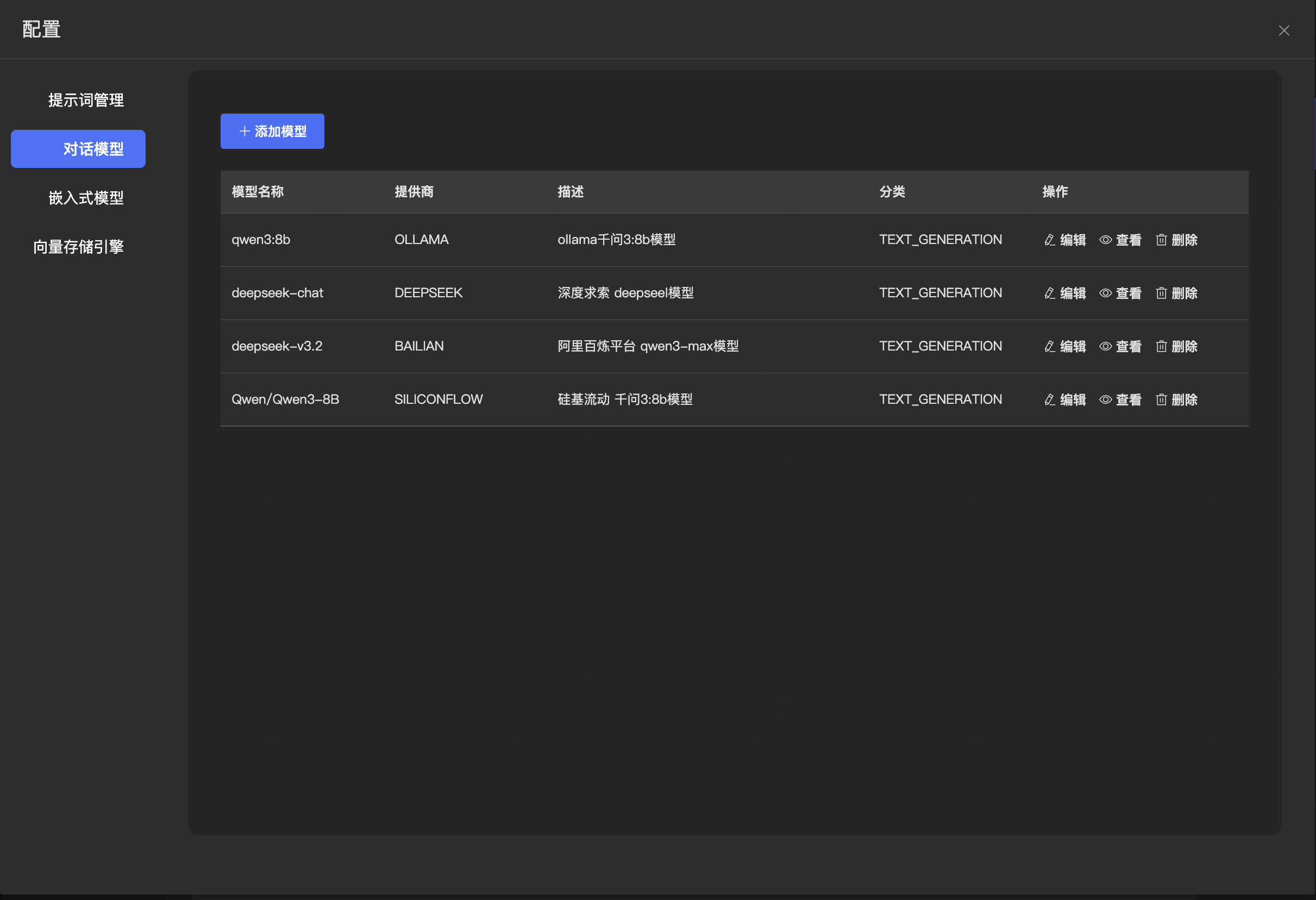
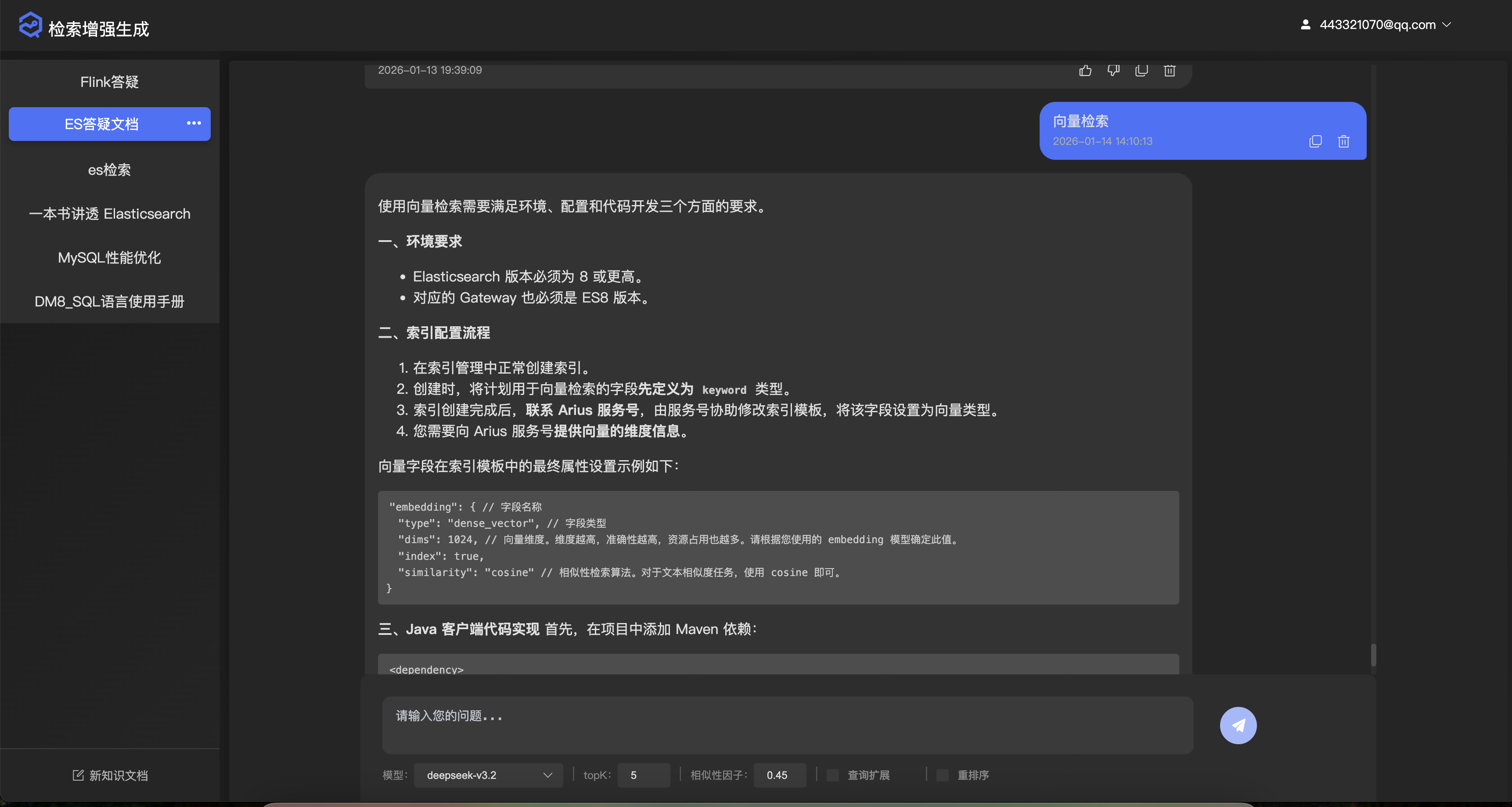
最后成品
文章来自于 https://www.cnblogs.com/sxxs 请勿随意转载!!!

 浙公网安备 33010602011771号