
K8S基于NFS创建动态PV
一、环境
组件
|
名称 |
版本 |
|
CentOS |
CentOS Linux release 7.9.2009 (Core) |
|
Kubernetes |
v1.30.1 |
|
NFS |
v1.3.0 |
节点
|
名称 |
节点地址 |
|
master-01 |
192.168.71.161 |
|
worker-01 |
192.168.71.150 |
|
worker-02 |
192.168.71.151 |
二、部署NFS
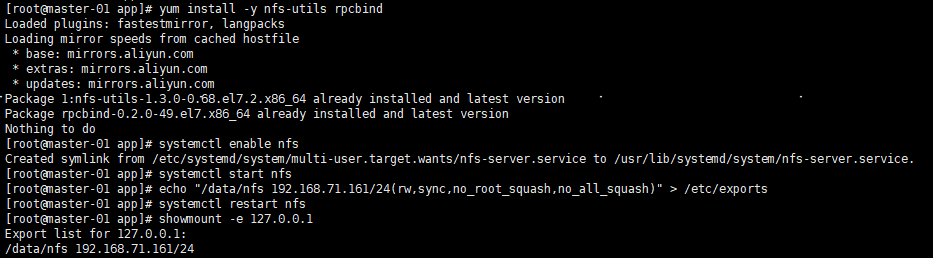
在主节点安装配置NFS服务
# 安装 nfs-utils, rpcbind
yum install -y nfs-utils rpcbind
# 启动服务
systemctl enable nfs
systemctl start nfs
# 创建挂载目录
mkdir -pv /data/nfs
## 配置目录参数
echo "/data/nfs 192.168.71.161/24(rw,sync,no_root_squash,no_all_squash)" > /etc/exports
# 重启NFS服务
systemctl restart nfs
# 验证
showmount -e 127.0.0.1
在从节点安装NFS服务
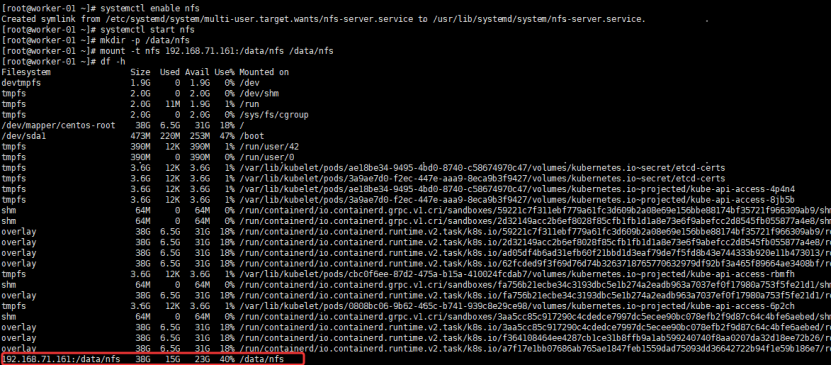
# 安装 nfs-utils
yum install -y nfs-utils
# 验证
showmount -e 192.168.71.161
# 启动服务
systemctl enable nfs
systemctl start nfs
# 创建挂载目录
mkdir -pv /data/nfs
# 挂载
mount -t nfs 192.168.71.161:/data/nfs /data/nfs
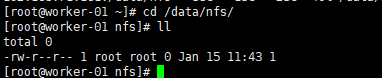
# 测试:master-01 创建文件

worker-01
worker-02

# 卸载
umount /data/nfs
三、K8S存储设置
创建命名空间:kubectl create ns loongstudio
3.1、创建StorageClass
kind: StorageClass
apiVersion: storage.k8s.io/v1
metadata:
  name: nfs-storage
  namespace: loongstudio
  annotations:
    storageclass.beta.kubernetes.io/is-default-class: 'true'
    storageclass.kubernetes.io/is-default-class: 'true'
  labels:
    environment: test
provisioner: fuseim.pri/ifs # 外部制备器提供者,编写为提供者的名称
reclaimPolicy: Retain  # 回收策略,默认为Delete可以配置为Retain
volumeBindingMode: Immediate # 默认Immediate,创建PVC立即进行绑定
创建:kubectl apply -f storageClass.yaml

删除:kubectl delete -f storageClass.yaml
3.2、创建RBAC权限
apiVersion: v1
kind: ServiceAccount
metadata:
  name: nfs-client-provisioner
  namespace: loongstudio
---
kind: ClusterRole
apiVersion: rbac.authorization.k8s.io/v1
metadata:
  name: nfs-client-provisioner-runner
rules:
  - apiGroups: [""]
    resources: ["persistentvolumes"]
    verbs: ["get", "list", "watch", "create", "delete"]
  - apiGroups: [""]
    resources: ["persistentvolumeclaims"]
    verbs: ["get", "list", "watch", "update"]
  - apiGroups: ["storage.k8s.io"]
    resources: ["storageclasses"]
    verbs: ["get", "list", "watch"]
  - apiGroups: [""]
    resources: ["events"]
    verbs: ["create", "update", "patch"]
---
kind: ClusterRoleBinding
apiVersion: rbac.authorization.k8s.io/v1
metadata:
  name: run-nfs-client-provisioner
subjects:
  - kind: ServiceAccount
    name: nfs-client-provisioner
    namespace: loongstudio
roleRef:
  kind: ClusterRole
  name: nfs-client-provisioner-runner
  apiGroup: rbac.authorization.k8s.io
---
kind: Role
apiVersion: rbac.authorization.k8s.io/v1
metadata:
  name: leader-locking-nfs-client-provisioner
  namespace: loongstudio
rules:
  - apiGroups: [""]
    resources: ["endpoints"]
    verbs: ["get", "list", "watch", "create", "update", "patch"]
---
kind: RoleBinding
apiVersion: rbac.authorization.k8s.io/v1
metadata:
  name: leader-locking-nfs-client-provisioner
  namespace: loongstudio
subjects:
  - kind: ServiceAccount
    name: nfs-client-provisioner
    namespace: loongstudio
roleRef:
  kind: Role
  name: leader-locking-nfs-client-provisioner
  apiGroup: rbac.authorization.k8s.io
创建:kubectl apply -f rbac.yaml
删除:kubectl delete -f rbac.yaml
3.3、创建Provisioner
kind: Deployment
apiVersion: apps/v1
metadata:
  name: nfs-client-provisioner
  labels:
    app: nfs-client-provisioner
  namespace: loongstudio
spec:
  replicas: 1
  strategy:
    type: Recreate
  selector:
    matchLabels:
      app: nfs-client-provisioner
  template:
    metadata:
      labels:
        app: nfs-client-provisioner
    spec:
      serviceAccountName: nfs-client-provisioner
      containers:
        - name: nfs-client-provisioner
          image: docker.1ms.run/eipwork/nfs-subdir-external-provisioner:v4.0.2
          imagePullPolicy: IfNotPresent
          volumeMounts:
            - name: nfs-client-root
              mountPath: /persistentvolumes
          env:
            - name: PROVISIONER_NAME
              value: fuseim.pri/ifs       # 这里必须要填写storageclass中的PROVISIONER
            - name: NFS_SERVER
              value: 192.168.71.161     # 指定NFS服务器的IP地址
            - name: NFS_PATH
              value: /data/nfs          # 指定NFS服务器中的共享挂载目录
      volumes:
        - name: nfs-client-root           # 定义持久化卷的名称,必须要上面volumeMounts挂载的名称一致
          nfs:
            server: 192.168.71.161        # 指定NFS所在的IP地址
            path: /data/nfs               # 指定NFS服务器中的共享挂载目录
创建:kubectl apply -f provisioner.yaml
删除:kubectl delete -f provisioner.yaml
3.4、创建pvc
kind: PersistentVolumeClaim
apiVersion: v1
metadata:
  name: nginx-pvc
  namespace: loongstudio
  labels:
    environment: test
    app: nginx
spec:
  storageClassName: nfs-storage
  accessModes:
    - ReadWriteMany
  resources:
    requests:
      storage: 256Mi
创建:kubectl apply -f pvc.yaml
查询:kubectl get pvc -n loongstudio
master-01

worker-01

worker-02

删除:kubectl delete -f pvc.yaml
【参考:
https://developer.aliyun.com/article/1449462?scm=20140722.ID_community@@article@@1449462._.ID_community@@article@@1449462-OR_rec-PAR1_0b87b7a417684443861373388efed0-V_1-RL_community@@article@@904147
】

 浙公网安备 33010602011771号