
平铺视图部件(lv_tileview)
平铺视图部件可以实现不同方向的页面切换,用户可以页面中添加内容。
平铺视图部件组成部分:
- 主体(LV_PART_MAIN)
- 滚动条(LV_PART_SCROLLBAR)
API函数
- 创建平铺视图部件
lv_obj_t *tileview = lv_tileview_create( parent );
- 添加页面
![img]()
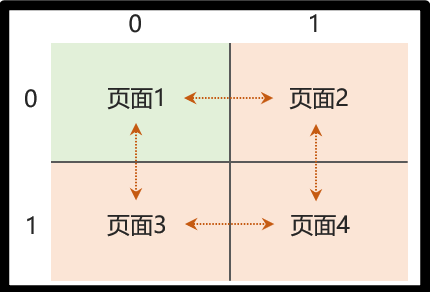
//  lv_tileview_add_tile(lv_obj_t * tv, uint8_t col_id, uint8_t row_id, lv_dir_t dir)
//  col_id :    列ID索引
//  row_id :    行ID索引
//  dir :       允许平铺视图部件切换的方向
lv_obj_t *tile1 = lv_tileview_add_tile( tileview, 0, 0, LV_DIR_RIGHT );
lv_obj_t *tile2 = lv_tileview_add_tile( tileview, 1, 0, LV_DIR_LEFT );
- 设置当前显示页面
lv_obj_update_layout( tileview );							/* 更新参数 */
lv_obj_set_tile( tileview, tile2, LV_ANIM_OFF );			/* 根据页面对象设置 */
lv_obj_set_tile_id( tileview, 1, 0, LV_ANIM_OFF );			/* 根据页面行列设置 */
窗口部件(lv_win)
窗口部件可以作为一个容器,展现不同功能的页面。
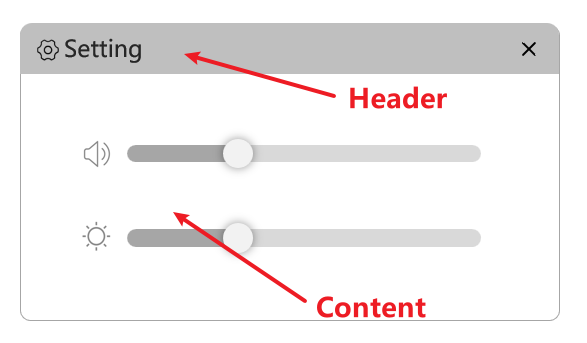
窗口部件组成部分:
- 头部(Header)
- 主体(Content)
API函数
- 创建窗口部件
lv_obj_t *win = lv_win_create(parent, header_height);
- 添加标题、按钮
//如果lv_win_add_title()在lv_win_add_btn()前面出现的话那么“关闭按钮”就在    右边(windows)
//........................................后面出现的话那么“关闭按钮”就在    左边(MAC)
//添加窗口部件的主体标题
lv_obj_t *title = lv_win_add_title(win, "Setting");
//添加关闭按钮
lv_obj_t *btn = lv_win_add_btn(win, LV_SYMBOL_CLOSE, 20);
- 添加主体内容
//获取主体的主要作用是通过获取的主体创建子对象,用来在窗口内部显示内容(滑块、标签等等)
lv_obj_t *content = lv_win_get_content(win); 				/* 获取主体 */
lv_obj_t *label = lv_label_create(content);					/* 添加内容 */
消息框部件(lv_msgbox)
消息框部件可以实现弹窗提示,常用于消息通知、确定操作等。
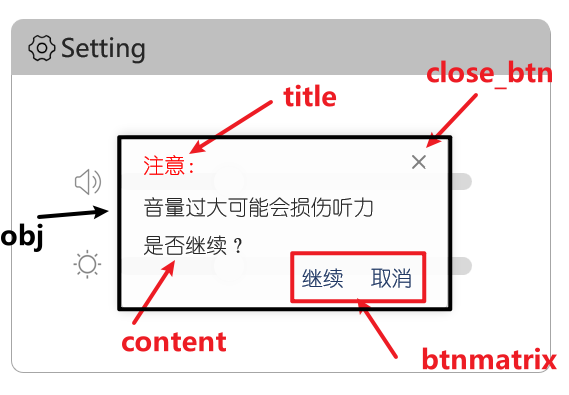
消息框部件组成部分:
- 主体(obj)
- 标题(title)
- 关闭按钮(close_btn)
- 内容(content)
- 按钮矩阵(btnmatrix)
API函数
- 创建消息框部件
![img]()
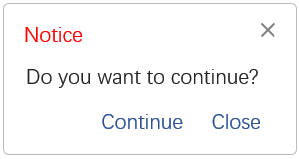
/*
    Notice:                     标题
    Do you want to continue?:   主体文本
    btns:                       按钮矩阵
    true:                       是否开启"关闭按钮"
static const char *btns[] = { "Continue", "Close", "" };
lv_obj_t *msgbox = lv_msgbox_create( lv_scr_act(), "Notice", "Do you want to continue?", btns, true );
- 关闭消息框
lv_msgbox_close(msgbox);
- 获取按钮索引、文本
lv_obj_t *target = lv_event_get_current_target(e);					/* 获取当前触发源 */
lv_msgbox_get_active_btn(target);							/* 获取按钮索引 */
lv_msgbox_get_active_btn_text(target);						/* 获取按钮文本 */
