
20241101 实验四 《Python程序设计》实验报告
20241101 2024-2025-2 《Python程序设计》实验四报告
课程:《Python程序设计》
班级:2411
姓名:苏萱
学号:20241101
实验教师:王志强
实验日期:2025.5.14
必修/选修: 公选课
1.实验内容
(一)实验灵感
鉴于每次赶着上课前想打开云校查看下节课的教室时云校总是出现卡顿的问题,十分令人着急,所以设计了这个程序每日自动从课表中读取上课时间和教室,并提前十分钟发送微信信息提醒,方便我在上一节课下课后打开微信就直接知道下一节课要前往的教室,节省了不必要的时间开销,同时也能避免忘记有课的情况。
(二)实验设计
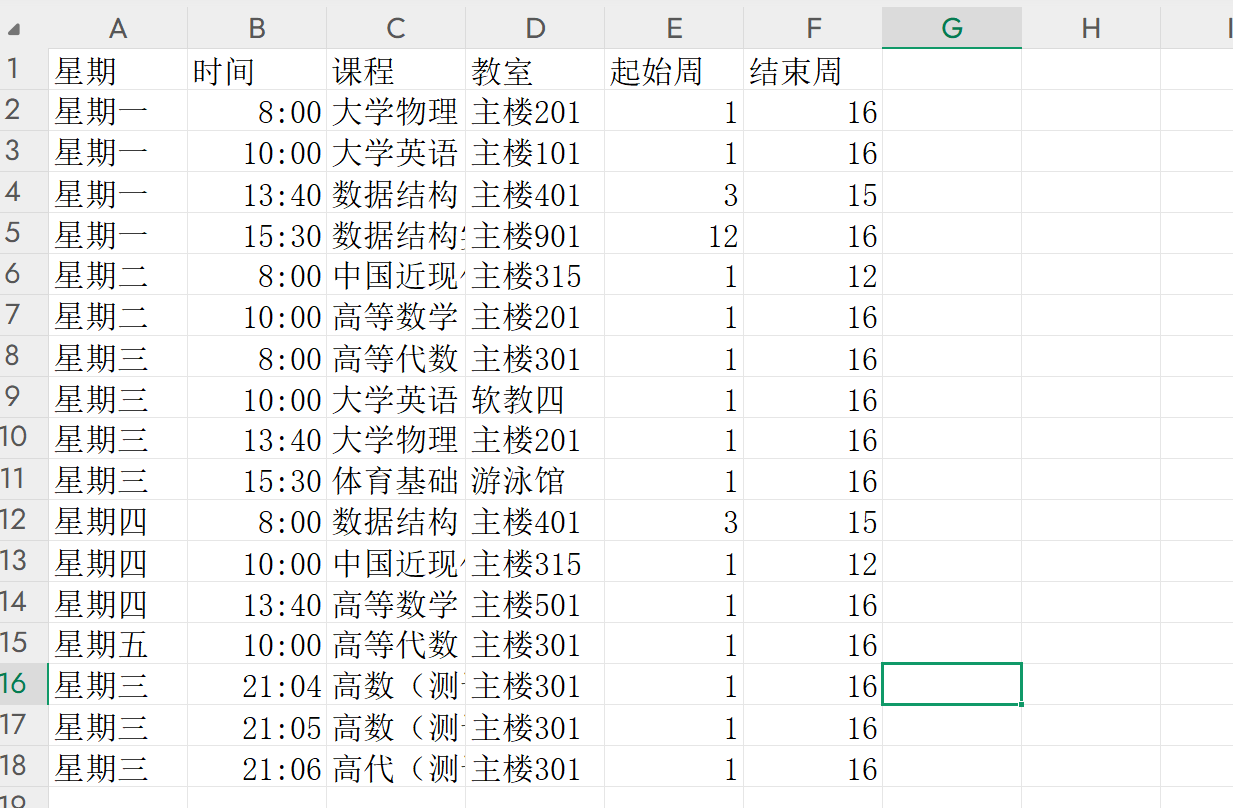
1.将课表详细汇总至excel表格中,包括星期、课程、教室、起始周、结束周信息
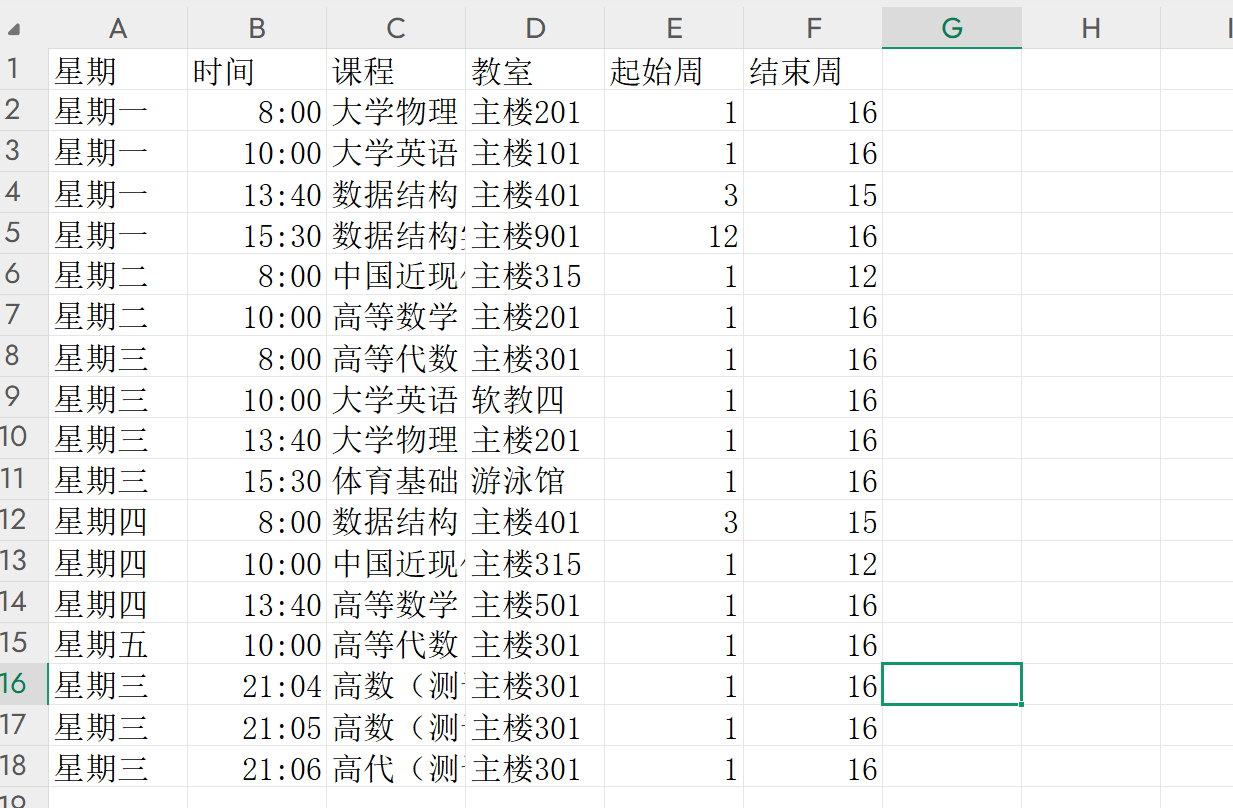
(后三组为实验演示测试数据)
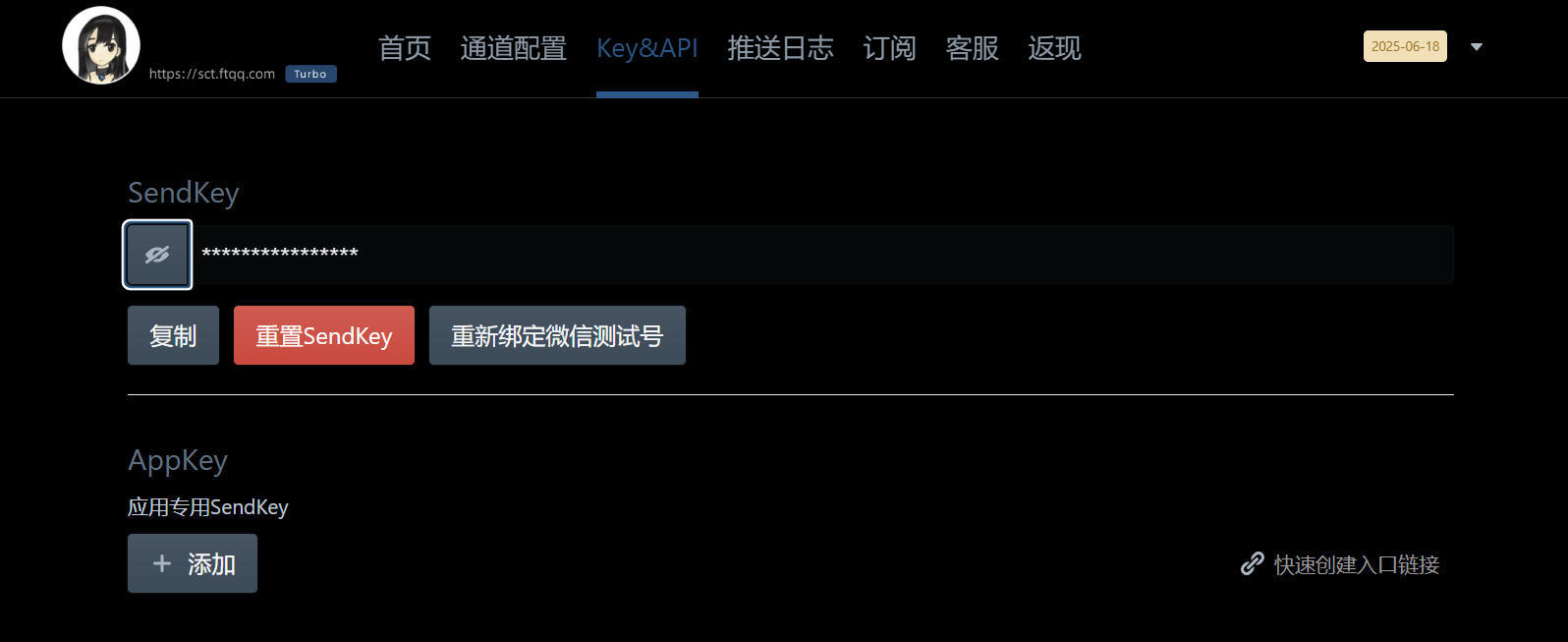
2.使用Server酱将服务器上的通知信息推送到手机上
3.代码设计
①函数read_class_schedule(file_path)用于读取excel文件中的课表相关数据
def read_class_schedule(file_path):
    try:
        df = pd.read_excel(file_path, engine='openpyxl')
        return df
    except Exception as e:
        print(f"读取课表文件失败:{e}")
        return None
调用pandas库中读取excel表格的函数read_excel,将函数的返回值(即读取的excel表格中的内容)赋值给变量df,之后则可以通过df对数据进行访问和操作。
②函数get_current_date_and_day()用于获取当前日期和星期
def get_current_date_and_day():
    now = datetime.datetime.now()
    week_days = ["星期一", "星期二", "星期三", "星期四", "星期五", "星期六", "星期日"]
    return now.strftime("%Y-%m-%d"), week_days[now.weekday()]
③函数get_current_week获取当前周数
考虑到每周的课表大致相同,仅不用科目开始和结束的周数不一致,根据目前的周数知道本周是否有这门课程
def get_current_week(start_date, total_weeks):
    semester_start = datetime.datetime.strptime(start_date, "%Y-%m-%d")
    today = datetime.datetime.now()
    week_number = min((today - semester_start).days // 7 + 1, total_weeks)
    return week_number
⑤函数 get_today_schedule从表格数据中筛选出当天的课程信息
def get_today_schedule(schedule_df, start_date, total_weeks):
    current_week = get_current_week(start_date, total_weeks)
    today, current_day = get_current_date_and_day()
    today_schedule = schedule_df[
        (schedule_df['星期'] == current_day) &
        (schedule_df['起始周'] <= current_week) &
        (schedule_df['结束周'] >= current_week)
    ]
    return today_schedule
⑥函数send_wechat_notification用于发送微信通知
# 发送微信通知
def send_wechat_notification(message):
    try:
        #构建请求URL和数据,准备发送POST请求
        url = f"https://sctapi.ftqq.com/{SERVER_CHAN_KEY}.send"
        data = {
            "title": "课表提醒",
            "desp": message.strip()
        }
        #发送POST请求,检查响应码状态
        response = requests.post(url, json=data)
        response.raise_for_status()
        ##解析响应JSON,根据返回的code判断是否发送成功
        result = response.json()
        if result.get("code") == 0:
            print("微信通知发送成功  ✅")
        else:
            print(f"微信通知发送失败 ❌:{result.get('message', '未知错误')}")
    except requests.exceptions.RequestException as e:
        print(f"发送微信通知请求失败:{e}")
    except ValueError as e:
        print(f"解析JSON响应失败:{e}")
⑦函数job执行定时任务,上课前十分钟发送课程信息
def job():
    print(f"[{time.strftime('%Y-%m-%d %H:%M:%S')}] 开始执行定时任务...")
    file_path = "D:\\我的大一下课表.xlsx"
    start_date = "2025-02-24"
    total_weeks = 16
    schedule_df = read_class_schedule(file_path)
    if schedule_df is None:
        return
    today_schedule = get_today_schedule(schedule_df, start_date, total_weeks)

    if today_schedule.empty:
        print("今天没有课程安排。")
        return

    for _, row in today_schedule.iterrows():
        class_time = row['时间']
        course = row['课程']
        classroom = row['教室']
        class_datetime = datetime.datetime.strptime(f"{get_current_date_and_day()[0]} {class_time}", "%Y-%m-%d %H:%M:%S")

        # 在上课前10分钟发送提醒
        reminder_time = class_datetime - datetime.timedelta(minutes=10)
        schedule.every().day.at(reminder_time.strftime("%H:%M:%S")).do(send_notification, course, classroom, class_time.strftime("%H:%M:%S"))
⑧启动定时器并无限循环
job()
while True:
    schedule.run_pending()
    time.sleep(1)
完整源代码
https://gitee.com/suxuan111/pythonhomework/commit/c32a13b3a68cca09a9e4d6515ef98fbc103eea85
import pandas as pd
import datetime
import requests
import schedule
import time

# Server酱的SendKey
SERVER_CHAN_KEY = "SCT282501Tp1Hhdn5B3k67ITYynaqrTZef"

# 读取XLS文件中的课表数据
def read_class_schedule(file_path):
    try:
        df = pd.read_excel(file_path, engine='openpyxl')
        return df
    except Exception as e:
        print(f"读取课表文件失败:{e}")
        return None

# 获取当前日期和星期(中文)
def get_current_date_and_day():
    now = datetime.datetime.now()
    week_days = ["星期一", "星期二", "星期三", "星期四", "星期五", "星期六", "星期日"]
    return now.strftime("%Y-%m-%d"), week_days[now.weekday()]

# 获取当前周数(从学期开始的第一天算起)
def get_current_week(start_date, total_weeks):
    semester_start = datetime.datetime.strptime(start_date, "%Y-%m-%d")
    today = datetime.datetime.now()
    week_number = min((today - semester_start).days // 7 + 1, total_weeks)
    return week_number

# 获取当天课表信息
def get_today_schedule(schedule_df, start_date, total_weeks):
    current_week = get_current_week(start_date, total_weeks)
    today, current_day = get_current_date_and_day()
    today_schedule = schedule_df[
        (schedule_df['星期'] == current_day) &
        (schedule_df['起始周'] <= current_week) &
        (schedule_df['结束周'] >= current_week)
    ]
    print("当天课表信息:")
    print(today_schedule)
    return today_schedule

# 发送微信通知
def send_wechat_notification(message):
    try:
        url = f"https://sctapi.ftqq.com/{SERVER_CHAN_KEY}.send"
        data = {
            "title": "课表提醒",
            "desp": message.strip()
        }
        response = requests.post(url, json=data)
        response.raise_for_status()
        result = response.json()
        if result.get("code") == 0:
            print("微信通知发送成功  ✅")
        else:
            print(f"微信通知发送失败 ❌:{result.get('message', '未知错误')}")
    except requests.exceptions.RequestException as e:
        print(f"发送微信通知请求失败:{e}")
    except ValueError as e:
        print(f"解析JSON响应失败:{e}")
# 定时任务:发送课表提醒
def job():
    print(f"[{time.strftime('%Y-%m-%d %H:%M:%S')}] 开始执行定时任务...")
    file_path = "D:\\我的大一下课表.xlsx"
    start_date = "2025-02-24"
    total_weeks = 16
    schedule_df = read_class_schedule(file_path)
    if schedule_df is None:
        return
    today_schedule = get_today_schedule(schedule_df, start_date, total_weeks)

    if today_schedule.empty:
        print("今天没有课程安排。")
        return

    for _, row in today_schedule.iterrows():
        class_time = row['时间']
        course = row['课程']
        classroom = row['教室']
        class_datetime = datetime.datetime.strptime(f"{get_current_date_and_day()[0]} {class_time}", "%Y-%m-%d %H:%M:%S")

        # 在上课前10分钟发送提醒
        reminder_time = class_datetime - datetime.timedelta(minutes=10)
        schedule.every().day.at(reminder_time.strftime("%H:%M:%S")).do(send_notification, course, classroom, class_time.strftime("%H:%M:%S"))
#格式化通知消息并发送微信通知
def send_notification(course, classroom, class_time):
    message = f"课程:{course},教室:{classroom},时间:{class_time}"
    send_wechat_notification(message)

# 启动定时器
print("程序启动,等待每日自动执行...")
job()
while True:
    schedule.run_pending()
    time.sleep(1)
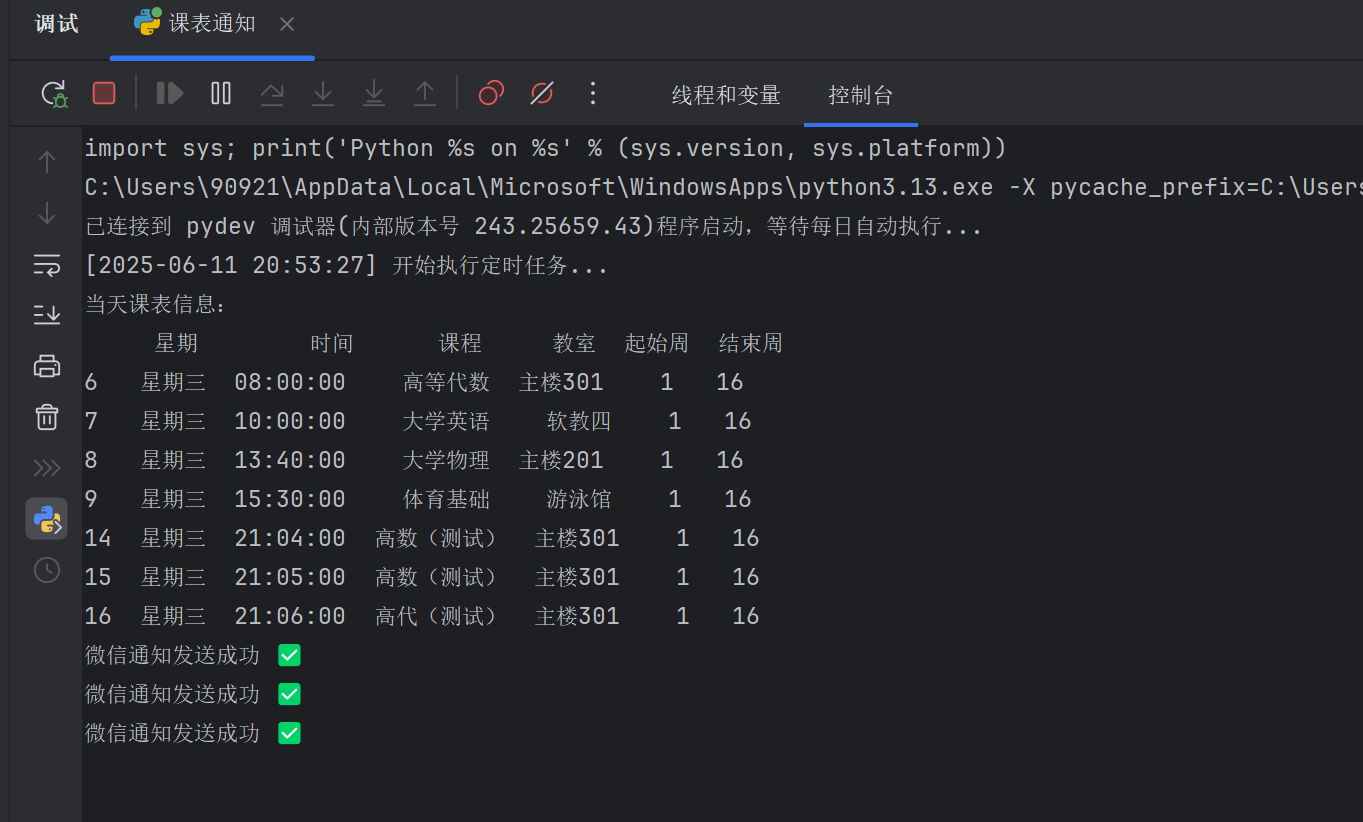
2. 实验过程及结果
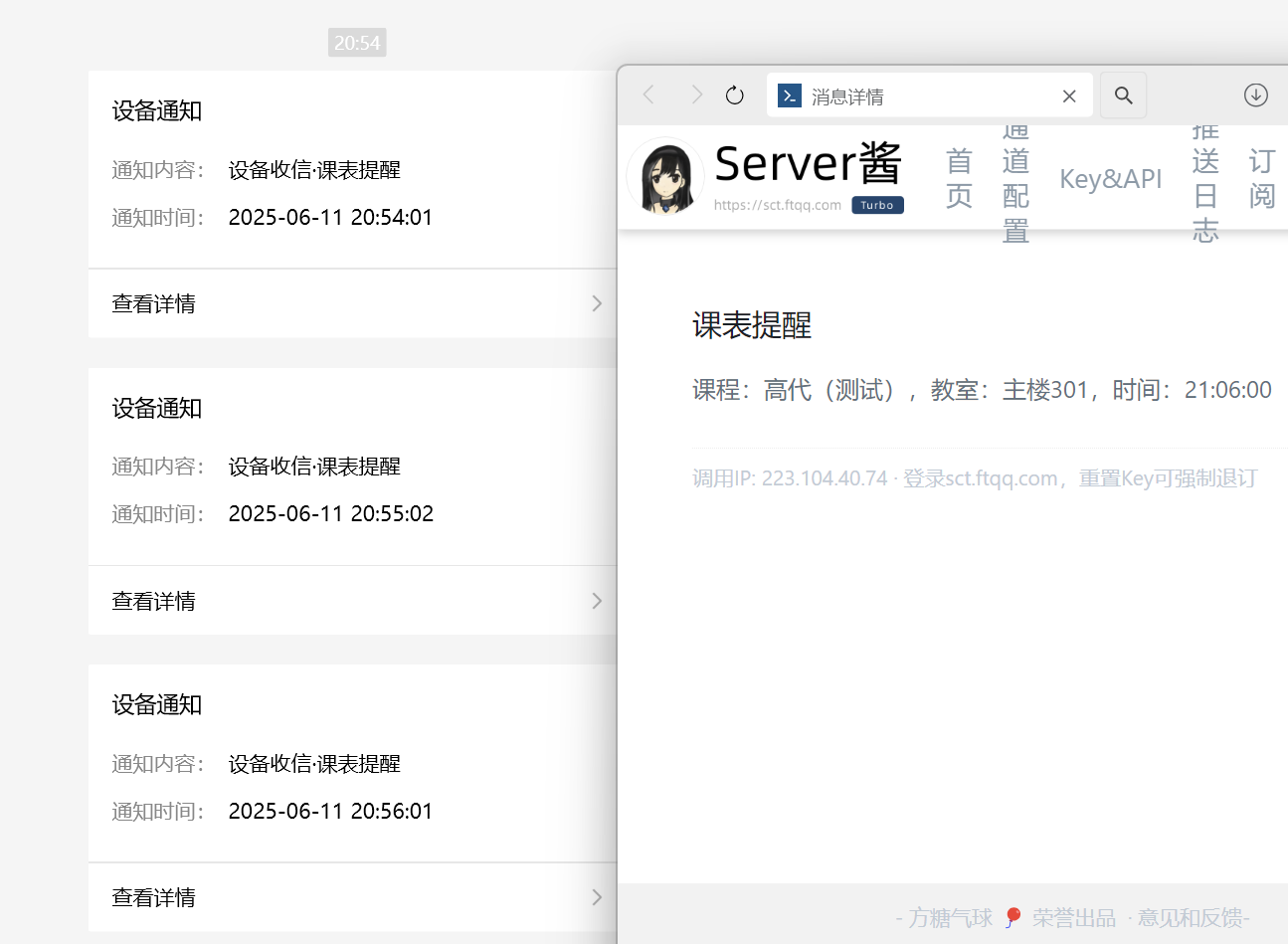
3. 课程感悟
时间过的真快啊,感觉还没开始学就结束了...从刚开始还能写明白的猜拳,到后来突然变难了的客户端服务端数据库,让我认识到这个知识库有多么的庞大,而我接触到的只是冰山一角,要想真的用好python还有非常多的知识要去学习。本身选python这门选修课就是抱着多学会一门技能而来,虽然课程结束了,但或许我的学习之路才刚刚开始。没有什么意见,建议倒是有一个,就是老师讲课的时候能不能稍微慢一点啊啊,对于没有基础的人来讲后面几节课跟的真的有点费劲啊(苦)。希望大二还能有机会跟老师一起学习!!

 浙公网安备 33010602011771号